Tectonicus
Tectonicus turns a Minecraft Java world into a detailed, zoomable map by generating a 3D model and rendering map images intended to resemble the in-game view.
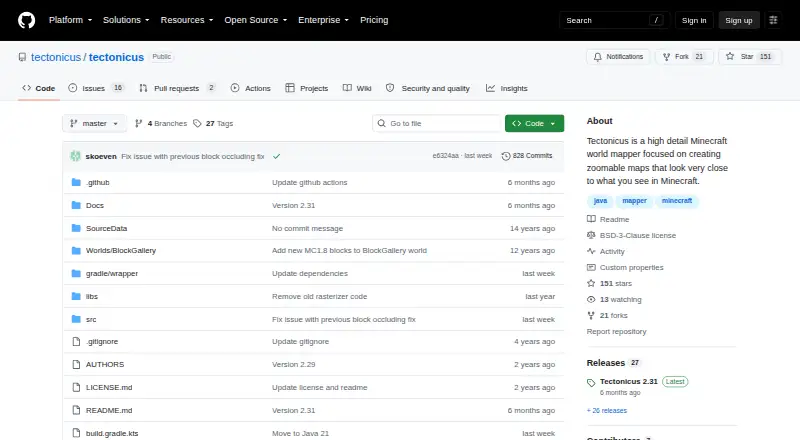
What Tectonicus is
Tectonicus turns a Minecraft Java world into a detailed, zoomable map by generating a 3D model and rendering map images intended to resemble the in-game view. It supports Linux, macOS, and Windows, and can create maps for different dimensions with markers and waypoints. The program runs from the command line with Java: users download a release, create an XML configuration file, and run it. After the first render, later runs with the same options are faster because only changed tiles are rendered. Player-placed signs appear by default, but a special filter can limit which signs show. Signs tagged with #view can add first-person map views with configurable height, angle, field of view, and nighttime rendering. Release 2.31 supports Minecraft 1.21 through 1.21.11, but not Minecraft 26.1. Map output can use gigabytes of disk space depending on world size; WebP or JPG and closestZoomSize can reduce storage use. Copper golem statues do not currently work, and shelves render only partially.
Good
- Maps aim to resemble Minecraft’s in-game appearance.
- Later runs render only changed tiles.
- Can add first-person views from marked signs.
- Supports offline viewing and web-server maps.
- Free under the BSD 3-Clause license.
Watch out
- Map images may use gigabytes of disk space.
- Minecraft 26.1 is not yet supported.
- Copper golem statues are not working.
- Shelves render only partially.
Who it suits
Tectonicus suits Minecraft Java players who want detailed map images of their worlds and are comfortable running a Java command-line program. It can also serve users who want configurable sign-based first-person views.
Verdict
Tectonicus offers configurable world maps, but setup involves a Java command line and XML configuration. Check Minecraft compatibility and allow for potentially large image output before generating a map.
Plans and prices
From Tectonicus's own pricing page, checked 7 Oct 2026.
| Plan | Price | What it gives you |
|---|---|---|
| Tectonicus | Free | No price stated · generates large amounts of image data that may use gigabytes of disk space |
The facts
Each one read from Tectonicus's own pages, with the date it was checked.
What it does
- Architecture support
- Release 2.31 adds arm64 LWJGL natives for M-series Macs and possibly other ARM platforms.checked 7 Oct 2026
- First-person views
- Signs marked with #view can create first-person views in the map, with configurable height, angle, field of view, and nighttime rendering.checked 7 Oct 2026
- How to run
- The README instructs users to download a release, create an XML configuration file, and run Tectonicus from the command line with Java.checked 7 Oct 2026
- Incremental rendering
- After the first run, subsequent runs with the same options are significantly quicker because only changed tiles are rendered.checked 7 Oct 2026
- License
- The repository provides Tectonicus under the BSD 3-Clause license.checked 7 Oct 2026
- Map subsets
- Release 2.31 adds rectangular world subsets alongside circular subsets.checked 7 Oct 2026
- Map views
- It can generate first-person views from sign locations and insert them into the map, with configurable height, angle, field of view, and nighttime rendering.checked 7 Oct 2026
- Minecraft compatibility
- The 2.31 release states compatibility with Minecraft 1.21 through 1.21.11 and says Minecraft 26.1 is not yet supported.checked 7 Oct 2026
- Minecraft support
- The latest release notes list compatibility with Minecraft 1.21 through 1.21.11 and say Minecraft 26.1 is not supported yet.checked 7 Oct 2026
- Purpose
- Tectonicus generates a 3D model of a Minecraft Java world and uses it to create detailed, zoomable maps.checked 7 Oct 2026
- Rendering limits
- Release notes say copper golem statues are currently not working and shelves only partially render.checked 7 Oct 2026
- Sign filtering
- By default, Tectonicus displays every sign players place, and a special filter can restrict which signs appear.checked 7 Oct 2026
- Storage requirements
- Generated images can use gigabytes of disk space depending on world size; the README says WebP or JPG and closestZoomSize can reduce this.checked 7 Oct 2026
- Storage use
- Map image output can use gigabytes of disk space depending on world size; the README suggests WebP or JPG and closestZoomSize to reduce it.checked 7 Oct 2026
- Web map behavior
- Release 2.30 says chest inventory tooltips work when the map is served from a web server or when browser CORS is disabled.checked 7 Oct 2026
Where it runs
- Mac support
- Release 2.31 added arm64 LWJGL native libraries for M-series Macs and possibly other ARM platforms.checked 7 Oct 2026
- Map appearance
- The project describes its focus as maps that look very close to what players see in Minecraft.checked 7 Oct 2026
The company
- Maker
- The repository copyright notice names John Campbell and Tectonicus contributors.checked 7 Oct 2026
The full review of Tectonicus
Tectonicus turns Minecraft Java worlds into detailed, zoomable 2D maps that closely follow the game’s familiar visual style. It is aimed at server owners, map archivists and technically confident players who want files they can host or view offline, rather than a hosted live-map service. The free BSD-licensed program offers unusually fine rendering control, provided you can manage a Java command-line workflow and the storage its images require.
Overview
Tectonicus builds a 3D model of a Minecraft Java world and renders map images from it. The process is deliberately local: download a release, create an XML configuration file, then launch the program with Java from the command line. That setup suits administrators who want repeatable, scriptable generation and control over output, but it is a poor match for anyone expecting a browser wizard or automatic cloud rendering.
Maps support offline viewing, server maps and multiple dimensions. They are 2D presentations of the generated world model, with markers and waypoints for documenting important locations. There is no live-update mode, so changes on an active server appear only after another render.
Key features
The rendering focus is visual familiarity: maps are designed to look close to what players see in Minecraft, making them useful for orientation rather than merely technical terrain inspection. Incremental rendering is especially valuable for recurring updates. After the initial run, keeping the same options allows Tectonicus to redraw only changed tiles, making later generations significantly faster while leaving the first render and its storage cost intact.
Signs provide practical server-community detail. By default, every player-placed sign is shown, while a dedicated filter can limit which signs appear. A sign tagged #view can add a first-person view to the map; height, viewing angle, field of view and nighttime rendering are configurable. These controls can turn in-world directions or landmarks into useful map viewpoints, though they add configuration work.
Output size is the main operational constraint. Depending on world size, generated images can consume gigabytes of disk space. The project recommends WebP or JPG output and the closestZoomSize setting to reduce that footprint. Release 2.31 adds rectangular world subsets alongside circular subsets, useful when a full-world render is unnecessary. Release 2.30 also supports chest-inventory tooltips when the map is served from a web server or when browser CORS is disabled.
Compatibility is current but not universal. Release 2.31 supports Minecraft 1.21 through 1.21.11; Minecraft 26.1 is not supported yet. The same release adds arm64 LWJGL natives for M-series Macs and potentially other ARM systems. Copper golem statues currently do not work, and shelves render only partially, so newer block content may not appear perfectly.
Pricing
Tectonicus costs free on its free plan, with no trial required and no paid tier described. The software itself has no seat or usage fee, making it suitable for personal archives, community servers and repeated local rendering. The trade-off is infrastructure rather than subscription cost: you provide the Java environment, processing time and potentially gigabytes of storage for map images.
Platforms
Releases are available for Linux, macOS and Windows. M-series Mac users benefit from the added arm64 LWJGL native libraries in version 2.31. Offline viewing and server-map output broaden deployment options, but the command-line Java requirement remains central on every platform.
Who it's for
Choose Tectonicus if you run a Minecraft Java server, maintain a world archive, or need configurable maps that can be hosted privately and viewed without an internet connection. It is also a strong fit for users who value incremental re-rendering and sign-driven viewpoints. Look elsewhere if you need automatic live updates, a no-configuration web interface, or a hosted service that absorbs rendering and storage costs.
Pros and cons
Pros
- Authentic visual output: maps aim to resemble the in-game Minecraft view, helping players recognize terrain and structures.
- Powerful sign tools: filtering and configurable #view locations add useful server documentation.
- Efficient repeat renders: unchanged tiles are skipped after the first generation when options remain consistent.
- Flexible deployment: dimensions, markers, waypoints, offline viewing and server maps are supported under a permissive BSD 3-Clause license.
Cons
- Technical setup: XML editing and Java command-line execution exclude users seeking a guided graphical workflow.
- Heavy storage demand: large worlds can consume gigabytes of image data even with output optimizations.
- No live maps: server changes require a new render before they appear.
- Compatibility gaps: Minecraft 26.1 is unsupported, while copper golems and shelves render incompletely.
Alternatives
BedrockMap is the better choice for Bedrock and mobile users who want a hosted freemium workflow, with a free tier limited to one world, a 1500x1500-block render area, two renders per day and three zoom levels.
The Explorer's Friend suits users seeking a free, MIT-licensed server-side Minecraft map mod or plugin across web and self-hosted environments.
Bedrock Viz is preferable when the source world is Minecraft Bedrock Edition.
Mapcrafter is an alternative free renderer for Anvil worlds that requires Minecraft 1.6 resource packs.
uNmINeD, mcmap, BlueMap and MCA Saenk are other free Minecraft mapping options with different deployment and edition requirements.
Verdict
Tectonicus is a strong recommendation for technically capable Minecraft Java server administrators who want highly configurable, offline-capable maps with authentic-looking rendering and efficient incremental updates. Its zero price and permissive license remove subscription barriers. Choose another tool if live updates, simpler setup, Bedrock support or managed hosting matters more than local control.
Alternatives to Tectonicus
- 1

BedrockMap
Free planAndroidiOSWebAPI8.0From $4 a month - 2
The Explorer's Friend
Free planWebAPILinuxmacOS7.0Free plan - 3
Bedrock Viz
Free planWebLinuxmacOSWindows6.8Free plan - 4
Mapcrafter
Free planWebLinuxmacOSSelf-hosted6.4Free plan - 5
MCA Saenk
Free planWindows6.3Free plan - 6
mcview
Free planiOSmacOSWindows6.2Free plan