Teachit
Teachit Studio helps primary and secondary teachers prepare classroom materials from a topic and year group or by transforming a PDF, recording, or YouTube l…
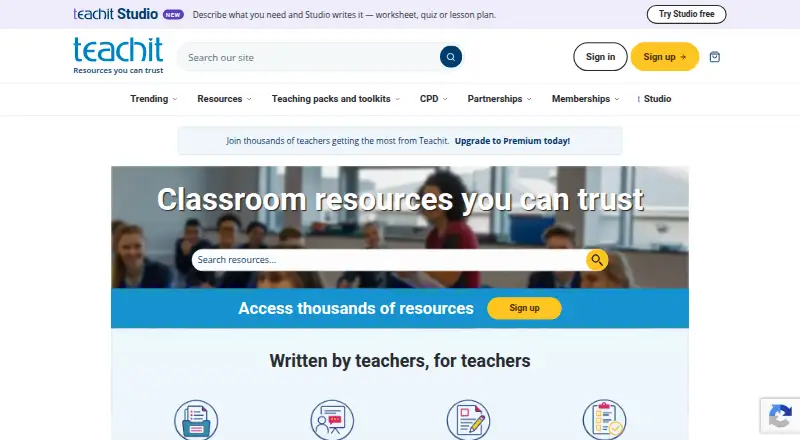
What Teachit is
Teachit Studio helps primary and secondary teachers prepare classroom materials from a topic and year group or by transforming a PDF, recording, or YouTube lesson into study notes and resources. It can generate worksheets, quizzes, lesson plans, flashcards, exit tickets, task cards, vocabulary sets, differentiated worksheets, and other formats such as PowerPoints, templates, teaching packs, and activities. The service covers 16 year groups and 16 subjects, including English, maths, science, history, geography, languages, and EAL. Accounts receive two free generations without a credit card; the Free plan also lists 10 AI tutor messages total. A Teachit subscription includes up to 30 resources and 500 AI tutor chat messages each month, with its price not listed. Output is provided as branded, print-ready PDFs; Word export is in beta. Teachers can assign live quizzes by QR code, link, or short code, and pupils can join without accounts. Uploaded content is sent to AI providers for generation, though Teachit says it is not used to train AI models. Generated material may contain errors, so teachers should review it before classroom use.
Good
- Two free generations without a credit card
- Works with PDFs, recordings, and YouTube lessons
- Offers differentiated materials and separate EAL and SEND support
- Live quizzes do not require pupil accounts
- Print-ready PDFs include pupil and teacher mark-scheme copies
Watch out
- Requires a Teachit account
- Generated content may contain errors and needs review
- Word export is in beta
- PDFs are limited to 50 MB
Who it suits
It suits adult primary and secondary educators looking to turn existing media or a topic into classroom resources. Pupils can join live quizzes without an account or installation.
Verdict
Teachit Studio combines resource generation from teaching materials with tools for creating live quizzes. The free generations make it possible to try the workflow, but teachers should check generated content before using it in class.
Plans and prices
From Teachit's own pricing page, checked 3 Oct 2026.
| Plan | Price | What it gives you |
|---|---|---|
| Free | Free | 2 free generations · 10 AI tutor messages total |
| Teachit subscription | Priced on request | Up to 30 resources a month · 500 AI tutor messages a month |
The facts
Each one read from Teachit's own pages, with the date it was checked.
What it does
- Account requirements
- Studio requires a Teachit account and is intended for adult educators aged 18 or over.checked 3 Oct 2026
- AI and student data
- Studio says providers may not train models on submitted material, and student quiz answers are not sent to AI providers.checked 3 Oct 2026
- AI limitation
- Teachit says generated content can be wrong and should be checked before use with a class.checked 3 Oct 2026
- AI review
- Teachit says generated content can contain errors and should be reviewed by a teacher before classroom use.checked 3 Oct 2026
- Differentiation
- Resources can be differentiated by level, with EAL, SEND and read-aloud support available separately.checked 3 Oct 2026
- Downloads
- Resources are provided as branded, print-ready PDFs; resources with mark schemes have pupil and teacher copies.checked 3 Oct 2026
- Exports
- Resources are available as print-ready PDF files, with Word export described as being in beta.checked 3 Oct 2026
- Inputs and file limits
- Studio accepts PDFs up to 50 MB, audio recordings up to 90 minutes and YouTube videos up to 45 minutes, or 30 minutes when the video has no captions.checked 3 Oct 2026
- Live quizzes
- Teachers can assign quizzes using a QR code, link or short code; pupils do not need accounts, and session data is deleted within 24 hours.checked 3 Oct 2026
- Privacy
- The Studio privacy policy says uploaded content is sent to AI providers to generate resources and that Teachit does not train AI models on that content.checked 3 Oct 2026
- Purpose
- Teachit Studio helps teachers create classroom resources and turn PDFs, YouTube lessons, and recordings into study notes.checked 3 Oct 2026
- Resource types
- Studio generates worksheets, quizzes, lesson plans, flashcards, exit tickets, task cards, vocabulary sets and differentiated worksheets.checked 3 Oct 2026
- Session limits
- A live quiz link remains open for four hours, and session data including names and answers is deleted within 24 hours.checked 3 Oct 2026
- Student access
- Pupils can join a live quiz without an account, sign-in, or installation.checked 3 Oct 2026
- Subscription allowance
- A Teachit subscription includes up to 30 resources a month and 500 AI tutor chat messages a month.checked 3 Oct 2026
- Support
- Teachit lists [email protected] for Studio, subscription and billing questions.checked 3 Oct 2026
- What it does
- Teachit Studio turns PDFs, recordings and YouTube lessons into teaching materials or generates resources from a topic and year group.checked 3 Oct 2026
- Who it is for
- Teachit Studio is aimed at primary and secondary teachers and creates materials for 16 year groups across 16 subjects.checked 3 Oct 2026
The company
- Company
- Teachit Studio is operated by Sandbox Learning Limited, trading as Teachit and registered in England and Wales under company number 12635255.checked 3 Oct 2026
- Headquarters
- Bath, England, UKchecked 28 Sep 2026
- Maker
- Teachit Studio is operated by Sandbox Learning Limited, trading as Teachit.checked 3 Oct 2026
Money
- Free use
- Every account gets 2 free generations, with no credit card required.checked 3 Oct 2026
The full review of Teachit
Teachit Studio is a web-based tool for primary and secondary teachers who want to turn teaching materials into classroom resources or build them from a topic and year group. Its free generations offer a low-commitment way to explore the workflow, while the monthly resource allowance makes a subscription more suited to regular use.
Overview
Studio can work from PDFs, audio recordings and YouTube lessons, or generate resources around a topic and year group. Outputs span worksheets, quizzes, lesson plans, flashcards, exit tickets, task cards, vocabulary sets and differentiated worksheets, alongside formats such as PowerPoints, templates, writing frames, teaching packs and games. This breadth is useful when a teacher needs more than a single worksheet format, though generated content needs review before it reaches a class.
Resources are delivered as branded, print-ready PDFs, with separate pupil and teacher copies when a resource includes a mark scheme. Word export is in beta, so teachers who need reliably editable files should treat that as a limitation rather than a finished export option.
Key features
Material-to-resource generation
Studio accepts PDFs up to 50 MB, recordings up to 90 minutes and YouTube videos up to 45 minutes—or 30 minutes when a video has no captions. That accommodates substantial source material, but teachers working with longer recordings or videos will need to use a shorter input. Generated resources can be differentiated by level; EAL, SEND and read-aloud support are available separately.
Live quizzes
Teachers can assign a quiz by QR code, link or short code, and pupils can join without an account, sign-in or installation. That removes a setup hurdle for classroom sessions. A link remains open for four hours, and session data, including names and answers, is deleted within 24 hours.
AI and classroom review
Teachit says uploaded material is sent to AI providers to generate resources, that providers may not train models on submitted material, and that Teachit does not train AI models on it. Student quiz answers are not sent to AI providers. These are relevant protections, but teachers should still consider what they upload. Teachit also cautions that generated content can contain errors; review before classroom use is essential, not optional.
Pricing
| Plan | Price | What it includes |
|---|---|---|
| Free | free | 2 free generations and 10 AI tutor messages total; no credit card required |
| Teachit subscription | Custom pricing | Up to 30 resources a month and 500 AI tutor messages a month |
The free plan is a practical fit for trying a couple of generations, but its two-generation cap and ten total AI tutor messages make it unsuitable for sustained classroom preparation. The subscription raises the monthly allowance substantially and suits teachers creating resources regularly. It has a stated quota of up to 30 resources and 500 tutor messages per month; the price is custom pricing.
Platforms
Teachit Studio runs on the web and requires a Teachit account. It is intended for adult educators aged 18 or over. School licensing is supported, and support for Studio, subscription and billing questions is available at [email protected].
Who it's for
Studio targets primary and secondary teachers, with resources spanning 16 year groups and 16 subjects. Its listed levels range from EYFS through KS1–KS5 and IGCSE; subjects include English, maths, science, history, geography and languages, as well as EAL and ELT. It is a stronger fit for educators who want to generate or adapt materials than for those primarily seeking a library of ready-made resources.
Pros and cons
- Pro: Multiple source types and a broad set of outputs let teachers turn existing lessons into varied classroom materials.
- Pro: Quiz access needs no pupil account or installation, reducing friction during a live session.
- Pro: Two free generations with no credit card required give teachers a way to assess the workflow before subscribing.
- Con: The free generation and tutor-message caps are too small for ongoing use.
- Con: Branded PDFs are print-ready, but Word export remains in beta, limiting dependable editing after export.
- Con: AI output may be wrong, so teachers must check it before classroom use.
Alternatives
For a broader choice of teacher resource libraries, browse Teacher Resource Libraries. Choose Myatt & Co instead if you want films and accompanying resources, with a small film selection on its free plan and all films and resources on its £22 a month Monthly plan.
CommonLit is a better fit for teachers seeking a text library and CommonLit 360 curriculum at no cost through CommonLit Digital; its Spark plan is $4,200 a year. Classroom Secrets offers a web-based alternative with a free plan and a $6.56 a month Flexible Monthly plan for one user.
Choose Teach Starter if a free collection of non-editable resources is enough, or consider its $6.08 a month Plus plan for editable resources. OER Commons is a free option with a digital library, Open Author and group creation. Tes Resources suits teachers looking for a marketplace where authors decide whether to charge for resources and set the price. PBS LearningMedia offers free PreK–12 educator and student access with a free account required for all features. Teach This is another resource option, with a Primary + Unit Plans teacher membership at $12.42 a year.
Verdict
Teachit Studio is best for primary and secondary teachers who want to turn their own PDFs, recordings or videos into a range of classroom resources, or build materials from a topic. Its strongest reason to choose it is the combination of broad resource generation and account-free live quizzes for pupils. Look elsewhere if you need dependable editable exports, more than two free generations, or a clearly priced subscription before committing.
Alternatives to Teachit
- 1
Myatt & Co
Free planAndroidiOSWebmacOS8.0From £220 a year - 2
BusyTeacher
Free planAndroidiOSWeb7.9$10 one-time - 3

CommonLit
Free planAndroidiOSWeb7.5From $4,200 a year - 4
ReadWriteThink
Free planAndroidiOSWeb7.3Free plan - 5
Topmarks
Free planAndroidiOSWebmacOS7.3$3.99 one-time - 6
Twinkl
AndroidiOSWeb6.8From $7.49 a month