TalkTastic
TalkTastic is a free macOS voice keyboard for writing in applications where text can be typed or pasted.
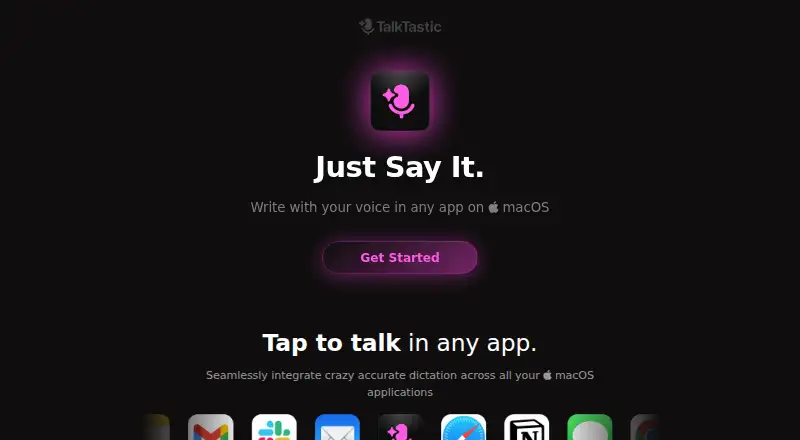
What TalkTastic is
TalkTastic is a free macOS voice keyboard for writing in applications where text can be typed or pasted. It transcribes speech and can use context from the app on screen to format or rewrite the text. Recording starts through a keyboard shortcut, cursor shortcut, or menu bar control. Results can be pasted into the active field automatically or selected for manual insertion. The site says snapshots are taken on command, can be disabled, and can be set to delete after processing. User data is not used to train other companies’ AI models, while end-to-end encryption is still in development. The app requires microphone, speech recognition, screen recording, and accessibility permissions. A help article says it is currently available only in English. Installation requires macOS 13.1 or later, and the guide says it performs best on an Apple chip. The maker highlights remote workers, freelancers, non-native English speakers, older people, and neurodivergent users.
Good
- Works across macOS text fields
- Uses on-screen context for rewriting
- Automatic or manual text insertion
- Snapshots can be disabled or auto-deleted
- Free Beta plan
Watch out
- Currently English only
- Requires several system permissions
- End-to-end encryption is in development
- Requires macOS 13.1 or later
Who it suits
TalkTastic suits macOS users who prefer dictation for writing across apps. It may appeal to remote workers, freelancers, non-native English speakers, older people, and neurodivergent users.
Verdict
TalkTastic offers system-wide voice entry with optional context-aware formatting and rewriting. Review its permissions and English-only availability before installing.
Plans and prices
From TalkTastic's own pricing page, checked 9 Oct 2026.
| Plan | Price | What it gives you |
|---|---|---|
| Beta | Free | macOS 13.1 or later |
The facts
Each one read from TalkTastic's own pages, with the date it was checked.
What it does
- AI training
- The site says user data is not used to train other companies’ AI models.checked 9 Oct 2026
- Custom vocabulary
- Yeschecked 20 Sep 2026
- Encryption
- The site says end-to-end data encryption is in development.checked 9 Oct 2026
- Input methods
- You can start recording with a keyboard shortcut, a cursor shortcut, or the menu bar.checked 9 Oct 2026
- Intended users
- The maker highlights remote workers, freelancers, non-native English speakers, older people, and neurodivergent users as groups who may benefit.checked 9 Oct 2026
- Language support
- A help article says TalkTastic is currently available only in English.checked 9 Oct 2026
- Permissions
- TalkTastic requires microphone, speech recognition, screen recording, and accessibility permissions for its described features.checked 9 Oct 2026
- Privacy controls
- The site says snapshots are taken on command, can be turned off, and can be set to auto-delete after processing.checked 9 Oct 2026
- Privacy model
- hybridchecked 20 Sep 2026
- Product
- TalkTastic is a voice keyboard for writing in macOS apps.checked 9 Oct 2026
- Support
- Users can contact the team through Help messages or send feedback from the app.checked 9 Oct 2026
- System requirement
- The installation guide specifies macOS 13.1 or later and says the app performs best on an Apple chip.checked 9 Oct 2026
- Text insertion
- TalkTastic can automatically paste text into the active text field, or let you choose a result to insert manually.checked 9 Oct 2026
- Transcription
- It transcribes speech and can use context from the app on screen to format or rewrite text.checked 9 Oct 2026
Where it runs
- App compatibility
- TalkTastic works in macOS apps where you can type or paste text.checked 9 Oct 2026
- Supported platforms
- macOSchecked 20 Sep 2026
Money
- Free plan
- Yeschecked 20 Sep 2026
Alternatives to TalkTastic
- 1

Superwhisper
Free planAndroidiOSAPILinux9.0From $84.99 a year - 2

Wispr Flow
Free planAndroidiOSmacOSWindows8.5From $12 a month - 3

Dictanote
Free planAndroidiOSWebLinux8.5From $60 a year - 4

Aqua Voice
Free planAndroidiOSmacOSWindows8.4From $8 a month - 5

WakaScribe
Free planAndroidiOSLinuxmacOS8.2From €1 a month - 6
Voice In
Free planExtensionLinuxmacOSWindows7.9From $59.99 a year