SysManager
SysManager is a local-first Windows desktop toolkit for system upkeep, privacy controls, network diagnostics, and app management.
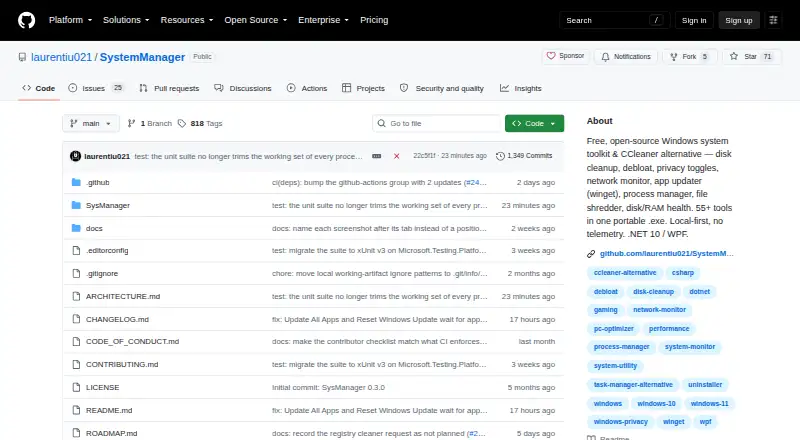
What SysManager is
SysManager is a local-first Windows desktop toolkit for system upkeep, privacy controls, network diagnostics, and app management. Its README groups 60 feature tabs into 12 areas, including cleanup, system tools, network diagnostics, app management, and privacy and security. Maintenance options include junk cleanup, startup management, driver updates, scheduled maintenance, and restore-point tools. Gaming features include live ping overlays for CS2, FACEIT, PUBG, and streaming endpoints, along with launcher-cache cleanup and latency tools. For apps, SysManager uses winget for updates, bulk installation, and uninstallation. The maker says the app requires no account and sends no usage data or telemetry; two automatic startup checks retrieve version information and app updates. Other network actions run when requested, and optional bulk-installer icons are fetched only if enabled. SysManager is free for Windows 10 and 11, distributed as a portable .exe. Its releases include checksums, a build attestation, and an SBOM, but the builds are unsigned, so Windows may warn on first launch.
Good
- Covers cleanup, startup, drivers, maintenance, and restore points
- Groups 60 feature tabs into 12 areas
- Uses winget for app updates and bulk installs
- No account, usage data, or telemetry, says maker
- Releases include checksum, attestation, and SBOM
Watch out
- Only available as a portable Windows .exe
- Builds are unsigned and may trigger a launch warning
- Some changes cannot be restored after deletion or uninstall
- No Microsoft Store build
Who it suits
It suits Windows 10 and 11 users who want system maintenance, network tools, privacy controls, and app management in one portable toolkit. It may also fit gamers who want the listed ping overlays and latency tools.
Verdict
SysManager brings a broad set of Windows utilities into one free portable app, including cleanup, app management, and gaming tools. Consider its unsigned build and the limits of Undo Changes before using it for system changes.
Plans and prices
From SysManager's own pricing page, checked 11 Oct 2026.
| Plan | Price | What it gives you |
|---|---|---|
| Free | Free | Windows 10/11 · portable .exe |
The facts
Each one read from SysManager's own pages, with the date it was checked.
Where it runs
- App integration
- SysManager uses winget for app updates, bulk installation, and uninstalling, and is available through the Windows Package Manager community repository.checked 11 Oct 2026
- Windows support
- windows 10 and 11checked 21 Sep 2026
What it does
- Driver updates
- Yeschecked 21 Sep 2026
- Feature breadth
- The README lists 60 feature tabs organized into 12 groups, including system tools, network diagnostics, cleanup, app management, and privacy and security.checked 11 Oct 2026
- Gaming tools
- It includes live ping overlays for CS2, FACEIT, PUBG, and streaming endpoints, along with launcher-cache cleanup and latency tools.checked 11 Oct 2026
- Junk cleanup
- Yeschecked 21 Sep 2026
- License
- SysManager is released under the MIT license.checked 11 Oct 2026
- Limitations
- The only build is a portable Windows .exe; the README says there is no Microsoft Store build because its sandbox prevents many of the app's functions.checked 11 Oct 2026
- Network behavior
- Other network actions, including diagnostics and app operations, run when the user requests them; optional bulk-installer app icons are fetched only if enabled.checked 11 Oct 2026
- Privacy
- The maker says the app sends no usage data, collects no telemetry, and requires no account; it describes two automatic startup checks for version information and app updates.checked 11 Oct 2026
- Purpose
- SysManager is a local-first Windows desktop toolkit for system health, cleanup, privacy controls, network diagnostics, app management, and more.checked 11 Oct 2026
- Restore-point tools
- Yeschecked 21 Sep 2026
- Reversibility
- Undo Changes can restore certain settings changed through SysManager, but permanently deleted files, removed preinstalled apps, and uninstalled programs cannot be put back.checked 11 Oct 2026
- Scheduled maintenance
- Yeschecked 21 Sep 2026
- Security verification
- Releases include a SHA-256 checksum, a GitHub build attestation, and a CycloneDX SBOM; the README explains how to verify the download and its build provenance.checked 11 Oct 2026
- Startup manager
- Yeschecked 21 Sep 2026
- Support
- The project directs questions to GitHub Discussions and bug reports to issues, and says bug reports get a first look within a few days.checked 11 Oct 2026
- Unsigned downloads
- The maker says builds are currently unsigned, so Windows may show a warning on first launch.checked 11 Oct 2026
Money
- Free plan
- Yeschecked 21 Sep 2026
The company
- Maker
- The project README describes SysManager as built by one person in their spare time.checked 11 Oct 2026
Alternatives to SysManager
- 1

CCleaner
Free planAndroidiOSmacOSWindows8.9From $44.95 a year - 2

Kudu
Free planWebAPILinuxmacOS8.2From $5 a month - 3
Process Lasso
Free planWindows8.1From $14.97 a year - 4
Advanced SystemCare
Free planWindows8.0Free plan - 5
Glary Utilities
Free planWindows8.0From $39.95 a year - 6

Avast Cleanup Premium
AndroidiOSmacOSWindows8.0From $29.88 a year