Subtitle Composer
Subtitle Composer is a free, open-source subtitle editor for Linux, with text-based tools for basic and advanced editing.
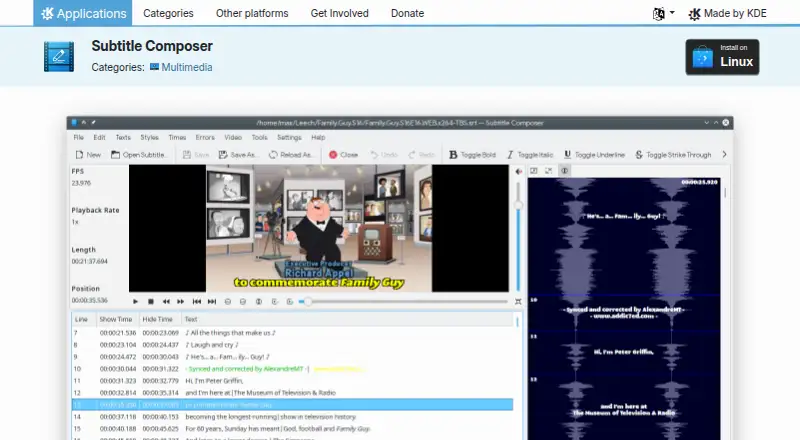
What Subtitle Composer is
Subtitle Composer is a free, open-source subtitle editor for Linux, with text-based tools for basic and advanced editing. It opens and saves formats including SRT, MicroDVD, SSA/ASS, MPlayer, TMPlayer, and YouTube captions, and can open or apply OCR to several graphics subtitle formats. Users can preview subtitles in an integrated video player or on an audio waveform, select an audio stream, and demux subtitle streams from video files. Editing functions include synchronization, time shifting and scaling, frame-rate conversion, joining and splitting files, side-by-side translations, text styling, spell checking, and timing-error detection. The application also supports speech recognition from audio or video files using PocketSphinx. Translation is supported, and version 0.8.0 release notes name DeepL and Google Cloud engines. Linux installation options include Discover or another AppStream store, distribution package managers, and Flathub, as well as an x86_64 AppImage and source downloads. Version 0.8.2 requires FFmpeg 5.1.5 or later. KDE lists the license as GPL-2.0+.
Good
- Free and open-source under GPL-2.0+.
- Supports numerous text subtitle formats.
- Includes waveform and video-player previews.
- Offers speech recognition using PocketSphinx.
- Includes timing, translation, and spell-checking tools.
Watch out
- Available platform listed is Linux.
- Version 0.8.2 requires FFmpeg 5.1.5 or later.
- Python and Ruby scripting support were removed in version 0.8.0.
Who it suits
It suits Linux users who need subtitle editing, synchronization, translation, or speech recognition in one application. It can also serve users working with several text subtitle formats or some graphics subtitle formats.
Verdict
Subtitle Composer covers subtitle editing, preview, timing, and translation, with multiple Linux installation routes. Check the FFmpeg requirement and scripting changes if those affect your workflow.
Plans and prices
From Subtitle Composer's own pricing page, checked 3 Oct 2026.
| Plan | Price | What it gives you |
|---|---|---|
| Subtitle Composer | Free | No paid plans or usage limits stated · Free |
The facts
Each one read from Subtitle Composer's own pages, with the date it was checked.
What it does
- Auto-captioning
- Yeschecked 20 Sep 2026
- Download
- The product page lists Linux installation through Discover or another AppStream store, distribution package managers, and Flathub, plus an x86_64 AppImage and source downloads.checked 3 Oct 2026
- Editing tools
- Features include synchronization, time shifting and scaling, frame-rate conversion, joining and splitting files, side-by-side translations, text styling, spell checking, and timing-error detection.checked 3 Oct 2026
- Legal entity
- KDE says its legal and financial matters are represented by KDE e.V., a registered non-profit in Germany.checked 3 Oct 2026
- License
- The product page lists the license as GPL-2.0+.checked 3 Oct 2026
- Runtime requirement
- The 0.8.2 release announcement says Subtitle Composer requires FFmpeg version 5.1.5 or later.checked 3 Oct 2026
- Scripting
- The feature list describes scripting through languages supported by Kross; the 0.8.0 release notes say Kross was replaced with QJSEngine and Python and Ruby support were removed.checked 3 Oct 2026
- Security and privacy
- KDE's software privacy policy says KDE software generally does not transmit information from end-user devices except after an explicit user action, and says any telemetry is opt-in and disabled by default where present.checked 3 Oct 2026
- Speaker labels
- Yeschecked 20 Sep 2026
- Speech recognition
- The application supports speech recognition from audio or video files using PocketSphinx.checked 3 Oct 2026
- SRT export
- Yeschecked 20 Sep 2026
- Subtitle formats
- It opens and saves text formats including SRT, MicroDVD, SSA/ASS, MPlayer, TMPlayer, and YouTube captions, and can open or OCR several graphics subtitle formats.checked 3 Oct 2026
- Subtitle translation
- Yeschecked 20 Sep 2026
- Support
- The product page links to KDE's Discuss help forum and provides a bug-report link.checked 3 Oct 2026
- Translation engines
- The 0.8.0 release notes say DeepL and Google Cloud translation engines were added.checked 3 Oct 2026
- Video and audio
- It can demux subtitle streams from video files and preview subtitles in an integrated video player or on an audio waveform, with audio stream selection.checked 3 Oct 2026
- VTT export
- Yeschecked 20 Sep 2026
- What it does
- Subtitle Composer is an open-source, text-based subtitle editor for basic and advanced editing.checked 3 Oct 2026
Money
- Free plan
- Yeschecked 20 Sep 2026
The company
- Maker
- KDE describes itself as an international community developing free, open-source software and says it has done so since 1996.checked 3 Oct 2026