Subsample
Subsample is a standalone sampler for turning live input or recordings into collections of distinct sounds that can be played from MIDI.
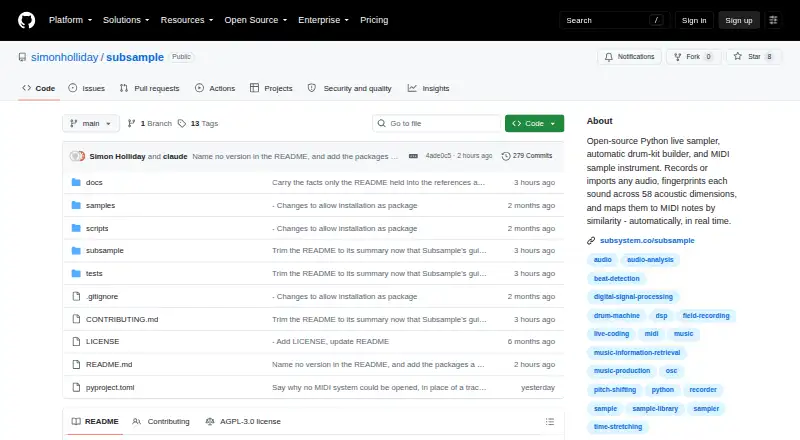
What Subsample is
Subsample is a standalone sampler for turning live input or recordings into collections of distinct sounds that can be played from MIDI. It separates and sorts sound events, then assigns them to MIDI notes by acoustic similarity without labels, training data, or manual tagging. In live sampling, it captures, trims, analyzes, and adds events to an instrument library in real time. Onset detection can find hits in longer samples and place them on a beat grid at a target BPM. Its processors include filters, dynamics, distortion, radio, vocoder, pitch shifting, time stretching, and quantisation. It accepts WAV, BWF, FLAC, AIFF, OGG, and MP3/MPEG audio, and supports MIDI input, OSC sending and receiving, and MIDI control bindings. Audio support runs from mono through 7.1, with per-instrument routing and first-order ambisonic capture and playback. Subsample has no graphical interface: users configure it with YAML files and a MIDI map and run it from a terminal. It runs on Linux and macOS; on Windows, it runs inside WSL2 and is not tested natively. It is free under AGPLv3; proprietary or closed-source use requires a commercial licence.
Good
- Maps sounds to MIDI notes by acoustic similarity.
- Captures and analyzes live sound events.
- Supports audio from mono through 7.1.
- Accepts WAV, FLAC, AIFF, OGG, and other formats.
Watch out
- It has no graphical interface.
- Windows use requires WSL2 and is not tested natively.
- Configuration and MIDI map formats can change between releases.
- Proprietary or closed-source use requires a commercial licence.
Who it suits
Subsample suits musicians and audio users comfortable configuring a terminal-based sampler. It may be useful for workflows that need automatic sample mapping and multichannel routing.
Verdict
Subsample offers automatic mapping and extensive audio routing, but its terminal-only setup and early-release status are important considerations. Check the AGPLv3 terms or discuss a commercial licence if planning proprietary use.
Plans and prices
From Subsample's own pricing page, checked 8 Oct 2026.
| Plan | Price | What it gives you |
|---|---|---|
| Subsample (AGPLv3) | Free | Open-source sampler; proprietary or closed-source use requires a commercial licence |
The facts
Each one read from Subsample's own pages, with the date it was checked.
What it does
- Audio formats
- It accepts WAV, BWF, FLAC, AIFF, OGG, and MP3/MPEG audio.checked 8 Oct 2026
- Audio routing
- It supports mono through 7.1 audio and per-instrument output routing.checked 8 Oct 2026
- Automatic matching
- It matches samples by similarity without labels, training data, or manual tagging.checked 8 Oct 2026
- Commercial licensing
- The maker invites contact to discuss a commercial licence for proprietary or closed-source use.checked 8 Oct 2026
- Configuration
- It is headless, has no graphical interface, and is configured with YAML files and a MIDI map.checked 8 Oct 2026
- Integrations
- It supports standard and virtual MIDI input, OSC sender and receiver, and MIDI control including Program Change and CC bindings.checked 8 Oct 2026
- Interface
- It has no graphical interface and is configured with YAML files and run from a terminal.checked 8 Oct 2026
- Licence
- Subsample is released under AGPLv3, which requires modified versions run as a network service to make their source available to users.checked 8 Oct 2026
- License
- Subsample is released under AGPLv3, which requires modified versions used as network services to make source code available to users.checked 8 Oct 2026
- Live sampling
- It captures, trims, analyses, and adds distinct sound events to an instrument library in real time.checked 8 Oct 2026
- Loop tools
- It detects onsets in long samples and can place each hit on a beat grid at a target BPM.checked 8 Oct 2026
- Multichannel audio
- It supports mono through 7.1 audio, per-instrument output routing, and first-order ambisonic capture and playback.checked 8 Oct 2026
- Purpose
- Subsample cuts separate sounds from live input or recordings, sorts them by sound, and plays them from MIDI.checked 8 Oct 2026
- Release status
- The project describes itself as an early release, and its configuration and MIDI map formats can change between releases.checked 8 Oct 2026
- Sound processing
- Its DSP processors include filters, dynamics, distortion, radio, vocoder, pitch shifting, time stretching, and quantisation.checked 8 Oct 2026
Where it runs
- Automatic mapping
- It matches sounds to MIDI notes by acoustic similarity without labels, training data, or manual tagging.checked 8 Oct 2026
- Platforms
- It runs on Linux and macOS; Windows support is through WSL2 and native Windows is not tested.checked 8 Oct 2026
- Platform support
- It runs on Linux and macOS; on Windows it runs inside WSL2 and is not tested on native Windows.checked 8 Oct 2026
The company
- Maker
- The project was created by Simon Holliday, described on the project page as a senior technologist and junior musician.checked 8 Oct 2026
The full review of Subsample
Subsample turns live input and recordings into a MIDI-playable library, sorting captured sounds by acoustic similarity. It is aimed at technically confident musicians and sound designers who value automatic mapping, live sampling, and precise routing more than a graphical workflow. The broad feature set is compelling for a free standalone sampler, but terminal configuration, changing early-release formats, and licensing constraints make it a specialist choice.
Overview
Subsample separates distinct sound events from incoming audio or recordings, analyses them, and organises them into an instrument. Its automatic mapping assigns MIDI notes by acoustic similarity without labels, training data, or manual tagging, reducing the preparation normally required for varied source material. Round-robin playback is supported for alternating sample variation.
The application is headless: YAML files and a MIDI map define its configuration, and operation happens from a terminal rather than a graphical interface. That suits users comfortable maintaining text configuration and MIDI mappings, but it is a poor match for performers who expect visual editing. The project calls itself an early release, and configuration and MIDI-map formats can change between releases, so setups may require maintenance over time.
Key features
Capture and automatic mapping
Live sampling captures, trims, analyses, and adds distinct sound events to an instrument library in real time. This is useful for turning an evolving recording session into playable material without stopping to tag every hit. Similarity-based mapping handles the note assignment automatically, although users who need a conventional hand-authored key map may find the system less predictable.
Loop construction and processing
For long samples, onset detection can find individual hits and place them on a beat grid at a target BPM. It is a practical shortcut for extracting rhythmic material. Built-in DSP covers filters, dynamics, distortion, radio effects, vocoding, pitch shifting, time stretching, and quantisation, giving the standalone sampler substantial sound-shaping range before external processing.
MIDI, OSC, and routing
Subsample accepts standard and virtual MIDI input and supports Program Change and CC bindings. OSC sender and receiver support extends control to compatible networked setups. Audio handling spans mono through 7.1, with per-instrument output routing and first-order ambisonic capture and playback. That combination is valuable in multichannel or spatial projects, while likely exceeding the needs of a simple stereo sampler.
Formats and deployment
Supported audio includes WAV, BWF, FLAC, AIFF, OGG, and MP3/MPEG. Subsample is standalone-only rather than a plug-in, so it must sit alongside a host or DAW when used in a larger production workflow.
Pricing
Subsample (AGPLv3): free — an open-source sampler with no free trial because the software itself is free. The licence is AGPLv3; modified versions run as network services must make their source available to users. Proprietary or closed-source use requires discussing a commercial licence with the maker. There are no seats, usage quotas, renewal charges, or paid feature tiers stated, but the licence distinction matters to businesses embedding or distributing modified software.
Platforms
Subsample runs on Linux and macOS. On Windows it runs inside WSL2 and is not tested on native Windows, so Windows users should expect a compatibility layer rather than a conventional native application. It supports standalone operation only.
Who it's for
Choose Subsample if you are a musician, sound designer, or technically minded live-audio user building instruments from recordings and want automatic acoustic matching, real-time capture, multichannel routing, and extensive MIDI or OSC control. It is particularly interesting for experimental sampling and spatial setups where terminal automation is acceptable.
Look elsewhere if you need a graphical editor, a plug-in format, a fixed configuration format, or native Windows support. Teams shipping proprietary products should resolve the AGPLv3 obligations or obtain a commercial licence before adopting it.
Pros and cons
- Pros: automatic mapping works without labels, training data, or manual tagging; live capture builds an instrument in real time; onset-to-grid tools accelerate loop creation; broad DSP, MIDI, OSC, and multichannel routing support; accepts common lossless, broadcast, and compressed formats; free and open source.
- Cons: no graphical interface means YAML and terminal work; early-release status can require changes to configuration and MIDI maps; Windows support depends on untested WSL2 rather than native operation; standalone-only deployment excludes plug-in workflows; AGPLv3 can conflict with proprietary or closed-source distribution.
Alternatives
For a broad starting point, browse Sampler Software.
sfizz is a free option across Linux, macOS, web, and Windows, with optional donations and API support; pick it when broad platform access matters more than Subsample's automatic capture and mapping.
Decent Sampler is free on iOS, Linux, macOS, and Windows and plays libraries in its .dspreset and .dslibrary formats, making it preferable when you already use that library ecosystem.
Vaporizer 2 is free GPL-3.0 software with standalone and plug-in formats for Linux, macOS, and Windows; choose it when plug-in hosting is essential.
LinuxSampler is a free GNU GPL sampler with API and self-hosted options; it is a better fit for established sampler-server workflows, subject to its commercial-use permission requirement.
TX16Wx Software Sampler offers a free sampler plug-in and a paid unrestricted licence, suiting users who want a conventional plug-in path with an upgrade option.
Just a Sample is a free, open-source MIT-licensed sampler for Windows, macOS, and Linux; choose it for a simpler permissive-licence alternative.
Momentum provides a free app and plug-in for macOS, web, and Windows with slicing and WAV/AIFF support; it suits loop-focused editing rather than terminal-driven automatic mapping.
Source-to-Image is a free open-source toolkit for Linux, macOS, and Windows.
Verdict
Subsample is a strong specialist pick for technically confident creators who want automatic sample mapping, real-time capture, and serious multichannel control without paying for the software. Its terminal-only interface, evolving release formats, non-native Windows path, standalone-only design, and AGPLv3 obligations are substantial trade-offs. Choose it for experimental or automated sampling; choose another sampler for a polished graphical workflow or uncomplicated proprietary deployment.
Alternatives to Subsample
- 1
Momentum
Free planWebmacOSWindows7.6From $99.95 a year - 2
Source-to-Image
Free planOpen sourceLinuxmacOSSelf-hostedWindows7.2Free plan - 3

Decent Sampler
Free planiOSLinuxmacOSWindows7.1Free plan - 4
sfizz
Free planWebAPILinuxmacOS6.9Free plan - 5
Quanta 2
iOSLinuxmacOSWindows6.6$99 one-time - 6
Vaporizer 2
Free planLinuxmacOSWindows6.5Free plan