
Decent Sampler
Decent Sampler is a free sample player for libraries in DecentSampler format.
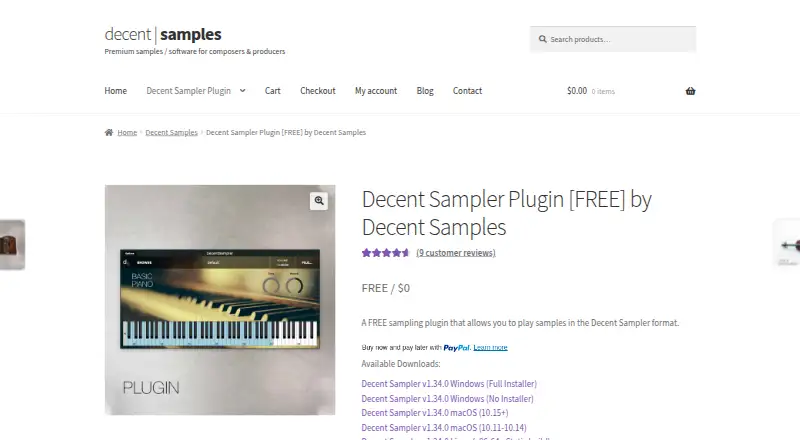
What Decent Sampler is
Decent Sampler is a free sample player for libraries in DecentSampler format. It plays .dspreset and .dslibrary files and is available as a standalone app or plugin. Support spans Windows 10 and later, Mac systems with Intel or Apple Silicon, Linux x64 and ARM64, and iOS. Supported plugin formats vary by platform: Windows offers VST, VST3, and AAX; Mac adds AU; Linux offers VST and VST3; and iOS has AUv3. The product page lists version 1.34.0, with updates including shelf EQ, darker delay repeats, and the option to switch modulators on or off. It supports WAV, AIFF, and FLAC samples, sample mapping, and round-robin playback. Guides are available for Ableton Live, FL Studio, Logic, and GarageBand. Downloading requires entering an email address. Library creators need WAV or AIFF files and a text editor, with format documentation and community help available. The listed price is free.
Good
- Free, with standalone and plugin options
- Runs on Windows, Mac, Linux, and iOS
- Supports WAV, AIFF, and FLAC samples
- Includes sample mapping and round-robin playback
Watch out
- Download requires an email address
- Library creation requires WAV or AIFF files and a text editor
Who it suits
It suits musicians who need to play DecentSampler-format libraries across desktop or iOS, including users of the listed DAWs. Library creators can use its documentation and support resources to get started.
Verdict
Decent Sampler offers free playback for its own library format across several platforms and plugin types. Check that your files use its supported library format, and note the email requirement for downloading.
Plans and prices
From Decent Sampler's own pricing page, checked 29 Sep 2026.
| Plan | Price | What it gives you |
|---|---|---|
| Decent Sampler | Free | Plays sample libraries in DecentSampler format (.dspreset and .dslibrary) |
| Decent Sampler Plugin | Free | Sample player for .dspreset and .dslibrary libraries · plugin and standalone formats · email required for download |
The facts
Each one read from Decent Sampler's own pages, with the date it was checked.
What it does
- Audio routing
- Sample libraries can define buses and route effects through those buses.checked 15 Oct 2026
- Bug reporting
- Users can report bugs through the contact form or bug tracker; the bug tracker requires a separate account.checked 29 Sep 2026
- Creator requirements
- The maker says creating sample libraries requires WAV or AIFF files and a text editor, and links to format documentation.checked 29 Sep 2026
- Creator support
- The maker directs creators to its Decent Sampler Q&A page and the Pianobook Discord help channel.checked 29 Sep 2026
- Custom interfaces
- The format supports creator-defined interfaces with tabs, buttons, images, labels, menus, XY pads, keyboards, drawbars and oscilloscopes.checked 15 Oct 2026
- DAW guidance
- The maker provides usage guides for Ableton Live, FL Studio, Logic, and GarageBand.checked 29 Sep 2026
- DAW integrations
- The iOS AUv3 plug-in is explicitly usable inside GarageBand and AUM.checked 15 Oct 2026
- Developer format
- The developer guide explains how to build DecentSampler sample libraries and describes the format as actively developing.checked 15 Oct 2026
- Download requirement
- The product page asks users to enter their email address to download the plugin.checked 29 Sep 2026
- Effects
- Documented effects include filters, EQ, gain, reverb, delay, chorus, phaser, convolution, pitch shifting, wave folding, wave shaping, stereo simulation, bit crushing, compression and stutter.checked 15 Oct 2026
- Extensibility
- Extensibility is file-format and preset based; the public guide documents XML elements and bindings rather than a conventional web API or SDK.checked 15 Oct 2026
- File types
- It plays files with the extensions .dspreset and .dslibrary.checked 29 Sep 2026
- Latest release
- Version 1.38.0 was released October 15, 2026 and added default window sizing controls, resize fixes and a Linux crash fix.checked 15 Oct 2026
- Legal name
- The privacy notice identifies the operating legal entity as Decidedly LLC, doing business as Decent Samples.checked 15 Oct 2026
- Library license limits
- The end-user license allows use in music or video compositions but forbids redistributing samples or libraries by themselves and forbids bypassing copy protection.checked 15 Oct 2026
- License status
- Decent Sampler is proprietary and closed source, built with JUCE under a commercial license; the maker says there is no source tree to build.checked 15 Oct 2026
- Limit: content dependence
- The same review said Decent Sampler ships without a large factory library, so usefulness depends on finding or creating compatible libraries.checked 15 Oct 2026
- Limit: display sizing
- 3DCANDY said the interface can look small and lost on a 4K display.checked 15 Oct 2026
The company
- Company founded
- LinkedIn lists Decidedly as founded in 2014.checked 15 Oct 2026
- Company size
- LinkedIn lists Decidedly as a privately held software-development company with 2–10 employees.checked 15 Oct 2026
- Headquarters
- Decent Samples says it is based in Philadelphia.checked 15 Oct 2026
Where it runs
- iOS formats
- The iOS version is supplied as an AUv3 plug-in and standalone app.checked 15 Oct 2026
- iOS support
- An iOS AUv3 and standalone version is linked from the product page.checked 29 Sep 2026
- Limit: iOS bugs
- App Store reviewers reported earlier bugs and crashes, an instrument glitch, and a preference for keeping Pianobook folders zipped on iPad.checked 15 Oct 2026
The full review of Decent Sampler
Decent Sampler is a sample player for libraries built in DecentSampler format. It is best suited to musicians who already use compatible libraries and creators who want to make them. Its broad platform and plugin support is useful, but the format restriction narrows its role.
Overview
The player loads .dspreset and .dslibrary files, with WAV, AIFF, and FLAC sample support. Sample mapping and round-robin playback give library creators tools for assembling instruments, while standalone and plugin versions let players choose how to use them. This is a focused library player, not a general-purpose sampler for files in other library formats.
The download page requires an email address. Version 1.34.0 adds shelf EQ, darker delay repeats, and the ability to switch modulators on and off. Bug reports can be sent through a contact form or bug tracker; the tracker requires a separate account.
Key features
Decent Sampler supports plugin and standalone use, although available plugin formats depend on the operating system. Guides for Ableton Live, FL Studio, Logic, and GarageBand provide practical setup help for users of those DAWs.
Creators can build libraries using WAV or AIFF files and a text editor. Format documentation, a Q&A page, and the Pianobook Discord help channel offer ways to learn the format and get assistance. For libraries submitted to the Decent Samples store, the publisher handles hosting, copy protection, and platform maintenance in return for a 30% commission, with monthly PayPal payouts. That can ease distribution work, but creators give up a share of sales.
Pricing
Decent Sampler costs nothing. The free plan plays libraries in DecentSampler format, including .dspreset and .dslibrary files; there is no paid tier or trial to weigh against it. The main trade-off is compatibility, not a free-plan cap: libraries in other formats are outside its stated scope.
Platforms
Decent Sampler supports iOS, Linux, macOS, and Windows. Windows 10 and later support 32-bit and 64-bit VST, VST3, AAX, and standalone versions. On Mac, Intel and Apple Silicon systems support VST, VST3, AU, AAX, and standalone. Linux x64 and ARM64 support VST, VST3, and standalone formats. The iOS versions are AUv3 and standalone. This range makes it viable across desktop and mobile workflows, though plugin choices vary by platform.
Who it's for
Musicians who want a free player for compatible DecentSampler libraries are the clearest fit. It also suits creators willing to work with WAV or AIFF sources and a text editor to build libraries. Choose another sampler if you need to load libraries in formats beyond .dspreset and .dslibrary.
Pros and cons
- Pro: Free playback with both plugin and standalone options means users can try compatible libraries without a software purchase.
- Pro: Support across iOS, Linux, macOS, and Windows gives users multiple ways to fit it into their setup.
- Pro: Sample mapping and round-robin playback support instrument-building workflows, with documentation and community help for creators.
- Con: Playback is restricted to DecentSampler-format libraries, so it is not a universal library player.
- Con: Downloading requires an email address, and bug-tracker reports require a separate account.
- Con: Store distribution costs creators a 30% commission, even though hosting and platform maintenance are handled for them.
Alternatives
Sampler Software is the category directory for comparing samplers. Consider sfizz for another free sampler with Linux, macOS, Windows, web, and API platforms; its plan also allows use without financial return and accepts optional donations. Vaporizer 2 is another free option, with standalone and plugin formats on Linux, macOS, and Windows under GPL-3.0. LinuxSampler is free and spans Linux, macOS, Windows, API, and self-hosted platforms, but commercial hardware or software use requires prior written permission under its GNU GPL terms.
TX16Wx Software Sampler offers a free sampler plug-in and a free trial; its unrestricted licence has custom pricing. Source-to-Image is a free open-source toolkit for Linux, macOS, and Windows, with no paid plans stated. Sample Dicer has a free indie-use plan for macOS and Windows, limited to companies below USD 1,000,000 in combined annual revenue and projects below USD 250,000 in production and development budget.
MASCHINE is a paid option for macOS and Windows, with plans at $39 a month for an update-only version for Maschine 2 users and $109 a month for Maschine 3 including Maschine Central. Quanta 2 costs $99, paid once for a perpetual licence with no subscription or DRM, and also supports iOS, Linux, macOS, and Windows.
Verdict
Choose Decent Sampler if you want free playback and creation support for libraries in its own format across desktop and iOS. Its plugin range, standalone versions, and creator resources make that focused role useful. Look elsewhere if your library collection uses other formats or you need a general-purpose sampler.
Getting started
- Open the Decent Sampler product page.
- Enter an email address to download the plugin.
- Choose the version for Windows, Mac, Linux, or iOS.
- Load .dspreset or .dslibrary files in the standalone app or a supported plugin host.
- Use the maker’s guides for Ableton Live, FL Studio, Logic, or GarageBand if relevant.
Questions
Does Decent Sampler cost anything?
The player is free, with a listed price of no cost.
Which sample libraries can it play?
It plays libraries in DecentSampler format using .dspreset and .dslibrary files.
Which platforms are supported?
Windows 10 and later, Mac with Intel or Apple Silicon, Linux x64 and ARM64, and iOS are supported.
Which formats does it support?
The listed sample formats are WAV, AIFF, and FLAC. Plugin formats vary by platform, and standalone versions are also available.
Do I need an account or email to download it?
The product page asks users to enter an email address to download the plugin.
What does a creator need to make a sample library?
The maker says creators need WAV or AIFF files and a text editor, and provides format documentation. It also points creators to its Q&A page and Pianobook Discord help channel.
Alternatives to Decent Sampler
- 1
Momentum
Free planWebmacOSWindows7.6From $99.95 a year - 2
Source-to-Image
Free planOpen sourceLinuxmacOSSelf-hostedWindows7.2Free plan - 3
sfizz
Free planWebAPILinuxmacOS6.9Free plan - 4
Quanta 2
iOSLinuxmacOSWindows6.6$99 one-time - 5
Vaporizer 2
Free planLinuxmacOSWindows6.5Free plan - 6

Atlas 2
LinuxmacOSWindows6.3$99 one-time