
Studio Lofi
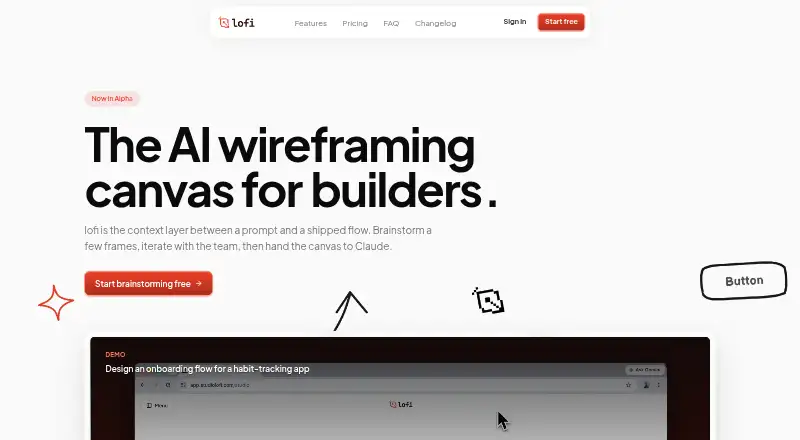
Studio Lofi is a web-based low-fidelity design canvas for sketching interfaces, generating AI wireframes, iterating on flows, and preparing handoffs.
What Studio Lofi is
Studio Lofi is a web-based low-fidelity design canvas for sketching interfaces, generating AI wireframes, iterating on flows, and preparing handoffs. Users can describe a flow in plain language and receive tappable wireframe frames, or begin with a sketch or image. The canvas provides a pen, sticky notes, UI elements, arrows, and freeform text. Chat-based editing changes an individual frame’s copy, layout, or edge cases. Clickable prototypes and real-time collaboration are supported. For handoff, users can copy structured context to Claude or share a live canvas URL that updates with edits. Frames export as PNG or SVG, and the site says SVGs paste into Figma as editable vector layers. Other formats include frame JSON, HTML with Tailwind, a Claude-ready prompt, and Markdown. The Free plan provides 30 AI credits monthly and five projects. Lofi Studio Pro costs $12 a month with 500 credits and unlimited projects.
Good
- Generates tappable wireframes from plain-language flows
- Supports sketches, images, and canvas drawing tools
- Provides clickable prototypes and real-time collaboration
- Exports PNG, SVG, JSON, HTML, and Markdown
- Offers Claude and Figma handoff options
Watch out
- Free plan allows up to five projects
- Free plan includes 30 AI credits monthly
- Thinking generations and edits use ten credits
- AI prompts and workspace context go to providers
Who it suits
Studio Lofi suits designers sketching product flows, testing ideas, or preparing structured handoffs to engineering tools. The Free plan is aimed at side projects and trying the product; Pro is described for designers shipping weekly.
Verdict
Studio Lofi connects early wireframing, collaborative editing, and engineering handoff in one web canvas. Its credit system and provider data handling are the main practical considerations before choosing a plan.
Plans and prices
From Studio Lofi's own pricing page, checked 8 Oct 2026.
| Plan | Price | What it gives you |
|---|---|---|
| Free | Free | 30 AI credits / month · Thinking mode included · Up to 5 projects · Sketch & draw on canvas · Export to PNG, Figma & Claude |
| Lofi Studio Pro | $12 a month | 500 AI credits / month · Thinking mode at full capacity — room for ~35 sessions a month · Unlimited projects · Sketch & draw on canvas · Export to PNG, Figma & Claude · Cancel anytime |
The facts
Each one read from Studio Lofi's own pages, with the date it was checked.
What it does
- AI credits
- Generations, chat messages, canvas edits, and code exports cost 1 credit each; Thinking generations and Thinking canvas edits cost 10 credits, while frame suggestions are free.checked 8 Oct 2026
- AI models
- The site says default mode uses Google's Gemini 3 Flash and Thinking mode uses Gemini 3.1 Pro.checked 8 Oct 2026
- Audience
- The Free plan is described as suited to sketching a side project or trying the product, while Pro is described for designers shipping every week.checked 8 Oct 2026
- Canvas tools
- The canvas includes a pen, sticky notes, UI elements, arrows, and freeform text.checked 8 Oct 2026
- Claude handoff
- Users can copy a structured context package to Claude or share a live canvas URL that reflects edits as they happen.checked 8 Oct 2026
- Data use
- The privacy policy says prompts and relevant workspace context are sent to AI providers for generation, and customer prompts or content are not used to train the company's own models.checked 8 Oct 2026
- Figma export
- Frames can be copied as SVG or PNG; the site says SVGs paste into Figma as editable vector layers.checked 8 Oct 2026
- Frame editing
- Users can iterate on individual frames in chat to change copy, layouts, or edge cases.checked 8 Oct 2026
- Privacy
- The company says it does not sell personal information and uses cookieless analytics that collect aggregated usage data.checked 8 Oct 2026
- Prompt to wireframes
- Users can describe a flow in plain language and lofi drafts wireframe frames they can tap through.checked 8 Oct 2026
- Security
- The privacy policy says safeguards include encryption in transit, hashed password storage, and access controls.checked 8 Oct 2026
- Support
- The homepage says a human replies to questions sent to [email protected] within a day.checked 8 Oct 2026
- What it does
- lofi is a low-fidelity design canvas for sketching frames, generating AI wireframes, iterating on flows, and handing results to engineering tools.checked 8 Oct 2026
The company
- Maker
- The about page says lofi is built by a two-person team, is independently owned, and identifies Wei and Lichin as co-founders.checked 8 Oct 2026
Alternatives to Studio Lofi
- 1

Miro
Free planAndroidiOSWebAPI8.3From $8 a month - 2

Figma Make
Free planAndroidiOSWebAPI8.2Free plan - 3

OpenDesign
Free planOpen sourceWebAPILinuxmacOS8.1From $8 a month - 4
YouWare
Free planAndroidiOSWebAPI8.1From $20 a month - 5
Jenova UI/UX Prototype Generator
Free planAndroidiOSWebAPI8.0From $20 a month - 6
pen.dev
Free planWebAPIExtensionLinux7.8From $16 a month