Jenova UI/UX Prototype Generator
Jenova UI/UX Prototype Generator turns natural-language descriptions into visual screen prototypes for iOS, Android, and web apps.
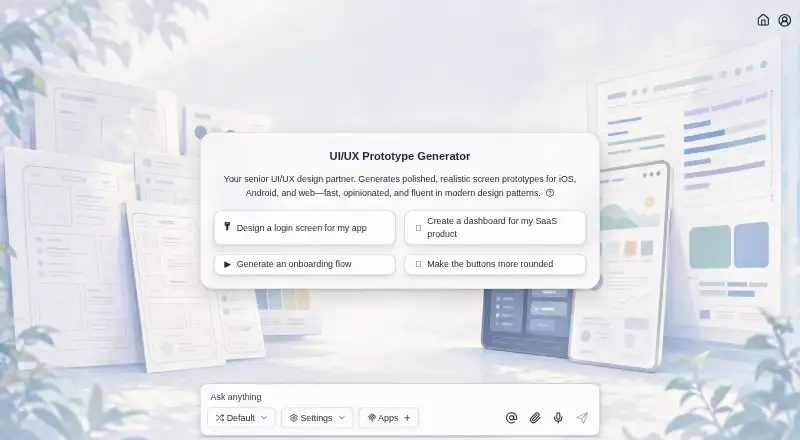
What Jenova UI/UX Prototype Generator is
Jenova UI/UX Prototype Generator turns natural-language descriptions into visual screen prototypes for iOS, Android, and web apps. It can create connected multi-screen flows, including onboarding, navigation, dashboards, settings, and edge states. Generated designs draw on iOS Human Interface Guidelines, Material Design, and modern web conventions.
Users can provide brand assets or describe a visual identity, then refine layouts, colors, and typography through follow-up messages. Persistent memory carries design language across sessions, while conversation history and memory sync across web, iOS, and Android. Sketch or image input and clickable prototypes are supported. The generator is also available through the Jenova API. Its output is visual prototypes, not code repositories or production design files. The free plan has limited usage; Plus costs $20 per month, billed monthly, and includes higher usage limits and specific AI model selection. Jenova's privacy policy says it does not use chat history or uploaded files to train its own AI models.
Good
- Generates multi-screen flows from descriptions.
- Supports brand assets and visual identity guidance.
- Follow-up messages can refine design elements.
- Clickable prototypes and sketch or image input are supported.
- History and memory sync across web and mobile.
Watch out
- Free plan usage is limited.
- Output is not a code repository or production design file.
- Plus costs $20 per month, billed monthly.
Who it suits
It may suit founders, product managers, developers, marketers, and design teams who want to explore app screens from descriptions, including people without design-tool expertise. It is for visual prototyping rather than producing code repositories or production design files.
Verdict
Jenova turns written directions and visual references into interactive screen prototypes across web and mobile. Its stated output boundary matters: it provides prototypes, not production design files or code repositories.
Plans and prices
From Jenova UI/UX Prototype Generator's own pricing page, checked 15 Oct 2026.
| Plan | Price | What it gives you |
|---|---|---|
| Free | Free | core features · limited monthly usage · no credit card |
| Plus | $20 a month | 30× free usage · monthly |
| Premium | $50 a month | 75× free usage · monthly |
| Pro | $100 a month | 150× free usage · monthly |
| Max | $200 a month | 300× free usage · monthly |
| Ultra | $500 a month | 750× free usage · monthly |
| Enterprise | $1,000 a month | 1,500× free usage · monthly |
The facts
Each one read from Jenova UI/UX Prototype Generator's own pages, with the date it was checked.
Where it runs
- Android distribution
- The Android app is free to download, lists 10,000-plus downloads, and AppBrain reports about 2.74 out of 5 from roughly 140 ratings.checked 15 Oct 2026
What it does
- API
- The maker says the generator is available programmatically through the Jenova API.checked 4 Oct 2026
- API authentication
- Developers create keys in the platform dashboard and send them as Bearer tokens to the API.checked 15 Oct 2026
- API availability
- The UI/UX generator is available programmatically through the Jenova Agent API.checked 15 Oct 2026
- API capabilities
- The API supports orchestration, model routing, sessions, memory, file upload, retrieval-augmented generation, tools, and MCP integrations.checked 15 Oct 2026
- Audience
- The maker describes it for founders, product managers, developers, marketers, and design teams, including people without design-tool expertise.checked 4 Oct 2026
- Brand consistency
- Users can upload brand assets or describe their visual identity, and persistent memory carries design language across sessions.checked 4 Oct 2026
- Conversational iteration
- Users refine layout, color, typography, interactions, and hierarchy through follow-up instructions.checked 15 Oct 2026
- Conversation-based editing
- Users can refine layouts, colors, typography, and other elements through follow-up messages.checked 4 Oct 2026
- Data handling
- Jenova's privacy policy says it does not use chat history or uploaded files to train its own AI models.checked 4 Oct 2026
- Design conventions
- It generates designs informed by iOS Human Interface Guidelines, Material Design, and modern web conventions.checked 4 Oct 2026
- Design-system matching
- It can infer and preserve a visual language from uploaded assets or described brand requirements.checked 15 Oct 2026
- Documentation depth
- The API documentation includes quickstart instructions, endpoint reference material, authentication, billing, usage, and error information.checked 15 Oct 2026
- Funding
- Crunchbase shows one angel funding round but obscures the amount and investor details.checked 15 Oct 2026
- Integrations
- Jenova connects through MCP to services including Gmail, Google Drive, Notion, Reddit, and YouTube.checked 15 Oct 2026
- Licence
- Jenova states that its platform and services are proprietary and grants only a limited, revocable use licence.checked 15 Oct 2026
Money
- API billing
- API use is prepaid through credits consumed according to model, tool, storage, and request usage.checked 15 Oct 2026
The company
- Company
- The privacy policy identifies Azeroth Inc. as the company operating Jenova.checked 4 Oct 2026
- Company founder
- Crunchbase lists Boris Wang as founder.checked 15 Oct 2026
- Company founding
- LinkedIn lists the company as founded in 2024.checked 15 Oct 2026
- Company headquarters
- LinkedIn lists New York, New York as headquarters.checked 15 Oct 2026
- Company legal name
- Crunchbase identifies the operating company as Azeroth Inc.checked 15 Oct 2026
- Company size
- LinkedIn lists Jenova as having one employee.checked 15 Oct 2026
- Headquarters
- New York, United Stateschecked 28 Sep 2026
The full review of Jenova UI/UX Prototype Generator
Overview
Jenova is a natural-language generator for visual app prototypes, aimed at people who want to explore product screens without relying on design-tool expertise. It is strongest for shaping connected screen flows through conversation; it is not the right choice when you need implementation-ready design files or code.
Key features
Jenova generates multi-screen flows for tasks such as onboarding, navigation, dashboards, settings, and edge cases. That makes it more useful for considering how an app experience fits together than for producing a lone screen. Its designs draw on iOS Human Interface Guidelines, Material Design, and modern web conventions, providing familiar starting points across platforms rather than a blank canvas.
You can upload brand assets or describe a visual identity, and persistent memory carries that design language across sessions. Follow-up messages can refine layouts, colors, typography, and other elements. This conversational approach suits people who want to direct iterations in plain language, though it is less suited to detailed manual editing in a design tool. Sketch or image input can guide generation, and clickable prototypes make it possible to review interactions.
The central limitation is what Jenova produces: visual prototypes, not production design files or code repositories. It can help communicate and refine an idea, but teams that need those artifacts for implementation should choose another tool.
Pricing
Jenova uses a freemium model. The Free plan costs nothing and includes core features with limited usage, making it a way to try the workflow or handle occasional prototyping. The Plus plan costs $20 a month, billed monthly, and adds higher usage limits and specific AI model selection. It fits people who prototype more often or want model choice; the free tier gives up both higher limits and that selection. No seat count is stated for either plan.
Platforms
Jenova is listed for Android, iOS, Linux, macOS, web, and Windows, and it also offers API access. The maker says the experience has feature parity across web, iOS, and Android, with conversation history and memory synced between them. That is useful for people moving between those three clients, while the API makes programmatic access an option. The privacy policy says chat history and uploaded files are not used to train Jenova's own AI models.
Who it's for
Founders, product managers, developers, marketers, and design teams can use Jenova to turn product descriptions and visual references into prototypes without requiring design-tool expertise. It is a sensible fit for early exploration, communicating screen ideas, or iterating on branded flows. It is less suitable for a team whose primary need is a production design handoff or code output.
Pros and cons
- Connected flows, not just isolated screens: onboarding, navigation, dashboards, settings, and edge states help teams consider a broader experience.
- Brand continuity across sessions: uploaded assets or a described identity, paired with persistent memory, support a more consistent direction over multiple conversations.
- Flexible input and review: sketch or image input and clickable prototypes help users guide and inspect concepts.
- Output stops at prototypes: production design files and code repositories are outside its stated deliverable, so implementation still needs another path.
- Free usage is limited: frequent users may need the Plus plan's higher limits, at $20 a month billed monthly.
Alternatives
For a broader set of options, browse AI Wireframe Generators.
- Genspark Design is another freemium option with a free plan providing 100 credits per day and a Plus plan with 10,000 credits per month and 50 GB AI Drive storage. Consider it when those credit and storage allowances suit your workflow.
- Miro has a free plan with 3 editable boards, 7,000+ templates, and 250+ integrations. Choose it when boards, templates, and integrations are a better fit than Jenova's prototype-generation focus.
- Figma Make offers a Starter plan with 150 AI credits/day and 500 AI credits/month, and a Professional Full seat at $16 a month billed monthly with 3,000 AI credits/month. It may suit readers who prefer its credit-based plan options.
- Whimsical has a free plan capped at 50 board objects/month and 50 doc blocks/month, with watermarked exports and 7-day version history. Consider it when those board and document limits match the work you need to do.
- OpenDesign offers a free local CLI with bring-your-own-key use and no recurring OpenDesign model-credit grant. It is an alternative for readers specifically seeking that local CLI and BYOK arrangement.
- WireMagic
- Prototyper
- UX Pilot
Verdict
Choose Jenova if you want to turn written directions, sketches, or images into branded, clickable screen flows and refine them through conversation. Its breadth across mobile and web, plus synced history and memory on web, iOS, and Android, supports iterative work across devices. Look elsewhere if the deliverable must be production design files or code, or if limited free usage does not fit your pace.
Getting started
- Open the Jenova UI/UX Prototype Generator website
- Start with the free plan or choose Plus at $20 a month
- Describe the iOS, Android, or web app screens you want
- Upload a sketch, image, or brand assets, or describe your visual identity
- Refine layouts, colors, and typography through follow-up messages
- Use the web, iOS, or Android experience, or connect through the Jenova API
Limits worth knowing
The Free plan includes core features with limited usage. Plus raises usage limits and allows specific AI model selection for $20 a month, billed monthly.
Questions
Does Jenova have a free plan?
Yes. The Free plan costs nothing and includes core features with limited usage.
How much does Plus cost?
Plus costs $20 a month, billed monthly. It provides higher usage limits and specific AI model selection.
Which platforms are supported?
Jenova is available on web, iOS, Android, Linux, macOS, Windows, and through an API.
Does it create production code or design files?
The output is visual prototypes rather than code repositories or production design files.
Can I use existing brand material?
Yes. You can upload brand assets or describe your visual identity, and persistent memory carries the design language across sessions.
How is uploaded data handled?
Jenova's privacy policy says chat history and uploaded files are not used to train its own AI models.
Alternatives to Jenova UI/UX Prototype Generator
- 1

Miro
Free planAndroidiOSWebAPI8.3From $8 a month - 2

Figma Make
Free planAndroidiOSWebAPI8.2Free plan - 3

OpenDesign
Free planOpen sourceWebAPILinuxmacOS8.1From $8 a month - 4
YouWare
Free planAndroidiOSWebAPI8.1From $20 a month - 5
pen.dev
Free planWebAPIExtensionLinux7.8From $16 a month - 6
Genspark Design
Free planAndroidiOSWebLinux7.5From $19.99 a month