StreamChum Studio
StreamChum Studio is a desktop streaming app for composing broadcasts, encoding video, going live, or recording locally.
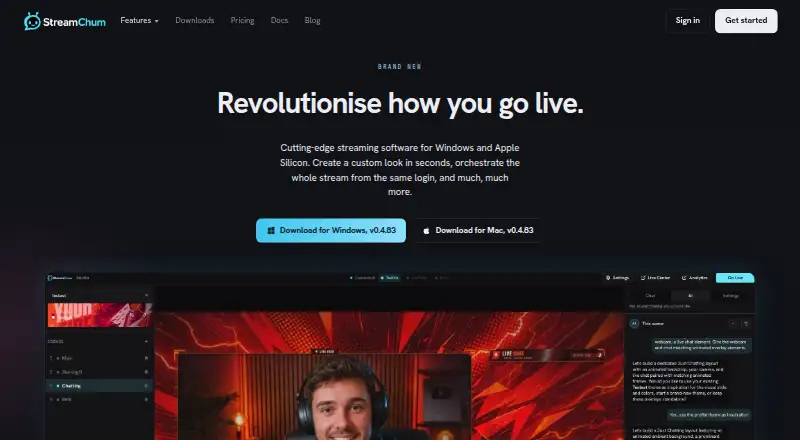
What StreamChum Studio is
StreamChum Studio is a desktop streaming app for composing broadcasts, encoding video, going live, or recording locally. It can stream to Twitch, YouTube, and Kick together, and can send Twitch a separate phone-oriented layout while YouTube and Kick receive a horizontal encode. Local recording saves one layout as an FLV file on the computer, but cannot run during streaming. Studio AI can propose scenes using the computer’s displays, cameras, and existing overlays, with a checklist before changes are applied. A Producer can switch scenes and change overlays from a browser, while Live Center combines chats from Twitch, YouTube, and Kick and scopes moderation actions to the platform of the message. The Free plan allows one live platform, seven days of history, and only the owner seat; live captions and creative AI features require a paid plan. Windows and Apple Silicon Macs are supported; macOS requires version 13.3 or later, and Intel Macs are not supported.
Good
- Can stream to Twitch, YouTube, and Kick together.
- Twitch can receive a separate phone layout.
- Browser Producer can switch scenes and overlays.
- Live Center combines chat across three platforms.
- OBS plugin does not require port forwarding.
Watch out
- Free plan supports one live platform.
- Free plan history is limited to seven days.
- Cannot record locally while streaming.
- Intel Macs are not supported.
Who it suits
StreamChum Studio suits streamers who want to broadcast across Twitch, YouTube, and Kick, with scene, overlay, and chat tools. The free option may suit an owner streaming to one platform, while teams needing more seats or history have paid plans.
Verdict
StreamChum Studio combines multistreaming, scene control, overlays, and cross-platform chat moderation. Check the platform, recording, and plan limits against your setup before choosing it.
Plans and prices
From StreamChum Studio's own pricing page, checked 9 Oct 2026.
| Plan | Price | What it gives you |
|---|---|---|
| Free | Free | 1 live platform · Studio, chat, overlays, and Actions · 7 days history · owner only · Free; no card |
| Plus | $8.26 a month | 2,000 AI credits / month · 5 staff seats · 90-day history · $8.25/ mo · $99/yr |
| Pro | $14.08 a month | 4,000 AI credits / month · 15 staff seats · 365-day history · $14.08/ mo · $169/yr |
The facts
Each one read from StreamChum Studio's own pages, with the date it was checked.
What it does
- Chat moderation
- Live Center combines Twitch, YouTube, and Kick chat and scopes delete, timeout, and ban actions to the platform where the message originated.checked 9 Oct 2026
- Destinations
- Studio can go live to Twitch, YouTube, and Kick together.checked 9 Oct 2026
- Discord behavior
- The Discord bot posts configured go-live pings, shout-outs, and timers, and the docs state that it does not read Discord chat.checked 9 Oct 2026
- Dual format
- Studio can send Twitch a separate phone layout while keeping the desktop layout wide; YouTube and Kick stay on the horizontal encode.checked 9 Oct 2026
- Integrations
- The maker documents connections for Twitch, YouTube, Kick, Discord, Ko-fi, OBS, and Stream Deck.checked 9 Oct 2026
- Notable limits
- The Free plan allows one live platform, seven days of history, and only the owner seat; live captions and creative AI features require a paid plan.checked 9 Oct 2026
- OBS security detail
- The OBS plugin uses an outbound WebSocket tunnel and does not require OBS to listen on port 4455 or the user to forward a port.checked 9 Oct 2026
- Recording
- Studio records one layout to an FLV file on the computer, and it cannot record while streaming.checked 9 Oct 2026
- Remote production
- A Producer can switch scenes and change Studio overlays from a browser without installing an app.checked 9 Oct 2026
- Scene creation
- Studio AI can propose scene layouts using the computer's displays, cameras, and existing overlays, with a checklist before applying them.checked 9 Oct 2026
- Support
- The docs say users can contact StreamChum or join its Discord, and that support replies by email.checked 9 Oct 2026
- What it does
- StreamChum Studio is a desktop streaming app for capturing, composing, encoding, going live, or recording locally.checked 9 Oct 2026
The company
- Headquarters
- Corfe Mullen, Dorset, United Kingdomchecked 28 Sep 2026
Where it runs
- Platform support
- Studio supports Windows and Apple Silicon Macs; macOS requires version 13.3 or later, and Intel Macs are not supported.checked 9 Oct 2026
Money
- Trial
- The pricing page describes a 14-day trial that includes Studio, Live Center, Producer, overlays, Actions, Play, Viewer Briefs, and Theme Collections AI, with zero AI credits and caption hours until subscription.checked 9 Oct 2026
Alternatives to StreamChum Studio
- 1

Restream
Free planAndroidiOSWebAPI8.4From $19 a month - 2

StreamYard On-Air
Free planiOSWebExtension8.0From $35.99 a month - 3
mimoLive
Free planiOSWebAPImacOS7.9From $70 a month - 4
OneStream Live
Free planAndroidiOSWebExtension7.8From $15 a month - 5

Streamster
Free planAndroidiOSWebWindows7.7From $15 a month - 6

PRISM Live Studio
Free planAndroidiOSmacOSWindows7.6From $79.99 a year