Storyboard That
Storyboard That is a browser-based platform for making storyboards, graphic organizers, comics, and other visual assets.
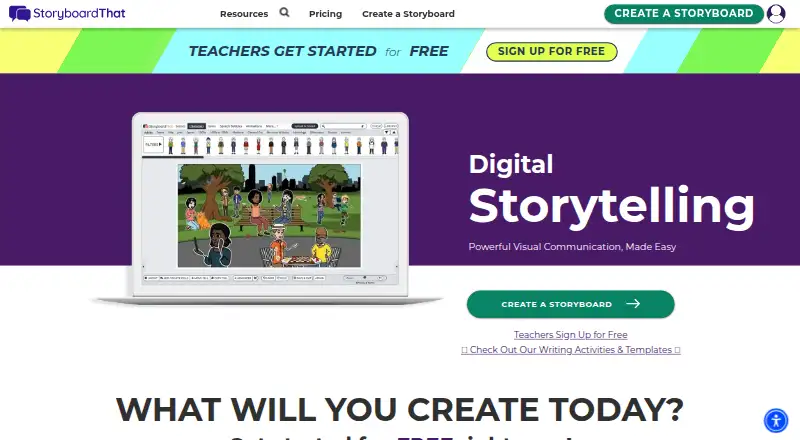
What Storyboard That is
Storyboard That is a browser-based platform for making storyboards, graphic organizers, comics, and other visual assets. Its drag-and-drop creator combines layouts with a searchable library of characters, scenes, and other items. Finished projects can be shared by email, social media, or blog embed, and presented through PowerPoint, Google Slides, or Apple Keynote. The education offering includes over 3,000 Common Core-aligned lesson plans and activities, alongside integrations such as Google Classroom, Canvas, Schoology, and other classroom systems. The Free plan allows two storyboards each week, uses a classic layout with a three-cell option, and places a watermark on downloads. Other plans include options for teachers, teams, and schools or districts. A privacy detail is important for free users: Free Edition storyboards are public, can be viewed and copied by anyone, and may appear in Google search results.
Good
- Creates storyboards, graphic organizers, and comics
- Includes over 3,000 education lesson plans and activities
- Supports PowerPoint, Google Slides, and Keynote presentations
- Integrates with Google Classroom, Canvas, and Schoology
- Offers plans for individuals, teachers, and teams
Watch out
- Free plan allows two storyboards per week
- Free downloads are watermarked
- Free Edition storyboards are public and copyable
- Free Edition storyboards may appear in Google search
Who it suits
Storyboard That suits teachers, students, teams, and people creating visual materials for education, business, or personal use. Its lesson plans and classroom integrations may be useful for education settings.
Verdict
Storyboard That offers visual creation tools and a broad education offering, with plans for individual, classroom, and team use. Free Edition work is public and may be copied or indexed, so avoid using it for material that needs privacy.
Plans and prices
From Storyboard That's own pricing page, checked 4 Oct 2026.
| Plan | Price | What it gives you |
|---|---|---|
| Free | Free | 2 storyboards per week · 3-cell option · classic layout · watermarked downloads |
| Free Teacher | Free | Limited art library · limited creator and export features · privacy and safety features · basic classroom management |
| Individual | $9.99 a month | Single user · unlimited storyboards · up to 100 cells per storyboard · full layouts and exports · Billed Monthly; page says plans start at $9.99 after the first month |
| Premium Teacher | $13.99 a month | Unlimited storyboard storage · 5,000+ art assets · all layouts and export options · advanced classroom and assignment management · Page says plans start at $13.99 after the first month; displayed as / month |
| Teams | $24.99 a month | Multiple linked users · administrative dashboards · project folders · private commenting · Per user per month; page says plans start at $24.99 after the first month |
| School & District | Priced on request | Admin-level classroom, department, and school management · premium LMS rostering · personalized training and support · Packages; contact sales |
The facts
Each one read from Storyboard That's own pages, with the date it was checked.
The company
- Company history
- The maker says it relaunched Storyboard That as a web application in August 2012 after an earlier desktop application project.checked 4 Oct 2026
- Headquarters
- Boston, Massachusetts area, United Stateschecked 28 Sep 2026
What it does
- Creation tools
- Its creator includes layouts and a library of characters, scenes, and other search items.checked 4 Oct 2026
- Data protection
- For education accounts, the maker says storyboard images are stored encrypted and access requires a short-lived token.checked 4 Oct 2026
- Education resources
- The education offering includes over 3,000 Common Core-aligned lesson plans and activities.checked 4 Oct 2026
- Education security
- The maker says it complies with FERPA, CCPA, COPPA, Ed-2D, and GDPR and is SOC 2 Type 2 with all five Trust Services Criteria.checked 4 Oct 2026
- Export and sharing
- Users can present storyboards with PowerPoint, Google Slides, or Apple Keynote, email them, post them on social media, or embed them on a blog.checked 4 Oct 2026
- Integrations
- The pricing page lists Google Classroom, Google rostering, Clever, ClassLink, Canvas LTI 1.3, Schoology LTI 1.3, Blackbaud LTI 1.3, Buzz LTI 1.3, and D2L LTI 1.3 integrations.checked 4 Oct 2026
- Privacy limitation
- Free Edition storyboards are public, can be viewed and copied by anyone, and may appear in Google search results.checked 4 Oct 2026
- Purpose
- Storyboard That is a browser-based drag-and-drop platform for creating storyboards, graphic organizers, comics, and visual assets.checked 4 Oct 2026
- Support
- The pricing page directs users with questions to [email protected].checked 4 Oct 2026
- Who it serves
- The maker describes the product for education, business, and personal use, including teachers, students, and teams.checked 4 Oct 2026
Money
- Trial
- The maker says the corporate edition has a 14-day trial.checked 4 Oct 2026
Alternatives to Storyboard That
- 1

Krock.io
Free planWebAPIExtensionmacOS7.8From $10 a month - 2
Studiovity
AndroidiOSWebAPI7.8 - 3

Previs Pro
Free planiOSWebAPImacOS7.7From $119.99 a year - 4

Boords
Free planWebAPI7.5Free plan - 5

AIM Previz
Free planWebAPIExtensionSelf-hosted7.3From $29 a month - 6
Shot Designer
Free planAndroidiOSmacOSWindows7.2Free plan