
Boords
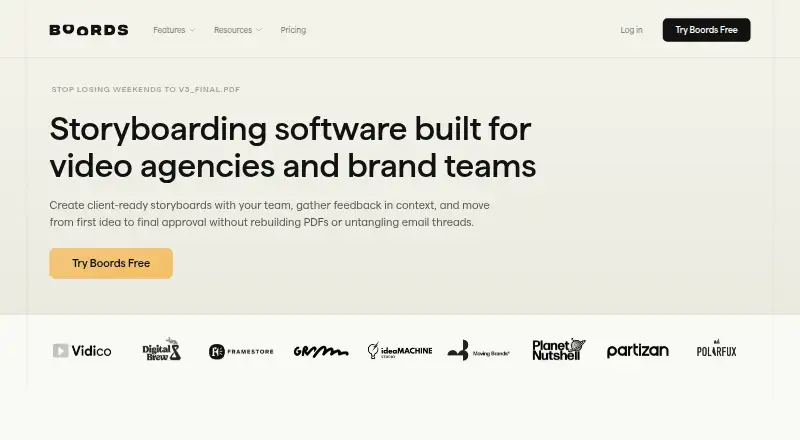
Boords is a web-based video preproduction tool that brings scripts, storyboards, animatics, and client approvals into one workflow.
What Boords is
Boords is a web-based video preproduction tool that brings scripts, storyboards, animatics, and client approvals into one workflow. Users can make storyboard frames from their own artwork, uploaded images, or AI-generated images with consistent characters. Its script editor supports free-form, audio/visual, and screenplay formats, and scripts can be converted into frames. Clients can review a shared link, comment on individual frames, and approve or request changes without an account. Storyboards can be timed with voiceover or music; boards export as PDF or image, while animatics export as MP4. Boords also offers a public API and signed webhooks, with Slack notifications, Dropbox, and Google Drive listed as integrations. The free plan is described as limited to five active storyboards and up to five team members. Boords says customer content is not used to train its AI models, and account administrators can disable AI features. It is designed for video and advertising agencies, creative directors, production managers, in-house brand teams, and animation studios.
Good
- Scripts can be converted into storyboard frames.
- Clients can comment and approve through a shared link.
- Animatics export as MP4.
- Offers a public API and signed webhooks.
- Administrators can disable AI features.
Watch out
- Free plan is limited to five active storyboards.
- Free plan supports up to five team members.
- Boords is not currently SOC 2 or ISO 27001 certified.
Who it suits
Boords suits video and advertising agencies, creative directors, production managers, in-house brand teams, and animation studios. It may fit teams that need clients to review and approve storyboard frames without an account.
Verdict
Boords connects scriptwriting, storyboard creation, animatics, and client review in a web-based workflow. Its free plan has active-board and team-size limits; paid pricing starts at $26/user/mo annually.
Plans and prices
From Boords's own pricing page, checked 30 Sep 2026.
| Plan | Price | What it gives you |
|---|---|---|
| Solo (free) | Free | Single user · 250 AI images per month · Unlimited storyboards & scripts |
| Free | Free | 5 active storyboards · 3 active scripts · 8 one-off AI image credits · No credit card required |
| Solo (yearly) | $26 a year | 1 user · 250 AI images/month · Unlimited storyboards · billed yearly |
| Solo | $39 a month | 1 user · 250 AI images/month · unlimited storyboards and scripts · $39/month; $26/mo billed yearly |
| Pro (yearly) | $50 a year | Up to 5 users · 1,000 AI images/month · billed yearly |
| Pro | $75 a month | Up to 5 users · 1,000 AI images/month · everything in Solo · $75/month; $50/mo billed yearly |
| Team (yearly) | $85 a year | Up to 10 users · 2,000 AI images/month · Advanced team controls · billed yearly |
| Team | $125 a month | Up to 10 users · 2,000 AI images/month · advanced team controls · $125/month; $85/mo billed yearly |
| Agency (yearly) | $165 a year | Up to 30 users · 3,000 AI images/month · Priority support · billed yearly |
| Agency | $250 a month | Up to 30 users · 3,000 AI images/month · priority support · $250/month; $165/mo billed yearly |
| Enterprise | Priced on request | Custom seats and billing · SAML SSO · custom AI credit pools · dedicated support · MSA/DPA support · audit-grade activity trail · Custom |
The facts
Each one read from Boords's own pages, with the date it was checked.
What it does
- AI image generation
- The product generates or edits storyboard images and supports reusable custom characters for visual consistency.checked 15 Oct 2026
- AI privacy
- Boords says customer content is not used to train its AI models and account administrators can disable AI features for the account.checked 30 Sep 2026
- AI script import
- Script import accepts PDF, plain text, Markdown, CSV and HTML files up to 2 MB, 250 pages or 60,000 words.checked 15 Oct 2026
- Animatics
- Animatics provide timed previews with transitions, audio and subtitles and can be exported as MP4.checked 15 Oct 2026
- Animatics and exports
- Storyboards can be timed with voiceover or music; boards export as PDF or image and animatics as MP4.checked 30 Sep 2026
- API access requirement
- API tokens require a paid plan and are authenticated with the X-API-KEY header against https://app.boords.com/v1.checked 15 Oct 2026
- API rate limit
- Each API token is limited to 120 requests per minute.checked 15 Oct 2026
- Client review
- Review links let guests comment in a browser without creating a Boords account, with optional passwords and open tracking.checked 15 Oct 2026
- Compliance limitation
- Boords says it follows UK GDPR and aligns with EU GDPR and CCPA/CPRA but is not currently SOC 2 or ISO 27001 certified.checked 15 Oct 2026
- Data location
- Boords says its managed AWS and Heroku infrastructure is primarily in the EU (Ireland).checked 30 Sep 2026
- Documentation
- The documentation hub covers getting started, images, storyboards, scripts, comments, sharing, exports, teams, accounts and developer topics.checked 15 Oct 2026
- Exports
- Storyboard exports include PDF, Word, spreadsheet, image ZIP, MP4 animatic and PowerPoint formats; scripts export to PDF, Word, Markdown and plain text.checked 15 Oct 2026
- Frame editor
- Frames support drawing, annotations, shapes, text, imported images and camera overlays for pans, zooms and moves.checked 15 Oct 2026
- Independent review score
- GraiLogic gives Boords a provisional 58/100 score and describes it as a client-approval-focused planning tool.checked 15 Oct 2026
- Integrations
- Boords offers a public API and signed webhooks, and its pricing page lists Slack notifications, Dropbox, and Google Drive.checked 30 Sep 2026
- Intended users
- Boords says it is designed for video and advertising agencies, creative directors, production managers, in-house brand teams, and animation studios.checked 30 Sep 2026
- Legal entity
- Boords trades as Presentable Software Limited, company number 09985153, with a registered office in Thame, England.checked 15 Oct 2026
The company
- Company size
- LinkedIn lists Boords as a privately held London company with 2–10 employees, founded in 2015.checked 15 Oct 2026
- Data ownership
- Customers retain intellectual-property rights in their uploaded content and grant Boords a limited licence to host, process and display it for service operation and support.checked 15 Oct 2026
- Founded
- 2015checked 23 Sep 2026
- Founder and headquarters
- Boords says James Chambers founded it in London in 2015 after co-founding Animade, and identifies London as headquarters.checked 15 Oct 2026
- Headquarters
- Thame, England, United Kingdomchecked 23 Sep 2026
Money
- Free plan limit
- Boords' About page describes the free plan as limited to five active storyboards and up to five team members.checked 30 Sep 2026
Where it runs
- GetApp platform listing
- GetApp lists web, Android and iPhone/iPad support for Boords but shows no user ratings or review data.checked 15 Oct 2026
The full review of Boords
Boords is a web-based video preproduction workspace for scripts, storyboards, animatics and client sign-off. It suits agencies and production teams that need clients to review frames without joining the service. Its connected workflow is the draw; growing teams should weigh seat caps and monthly AI-image allowances before choosing a plan.
Overview
Boords brings several steps of preproduction into one place, from script drafting through timed animatics and approvals. That continuity is useful when a project needs both visual planning and client feedback, rather than a storyboard tool alone. Its free plan is constrained to five active storyboards and five team members, so it is better for trying the workflow or small projects than for maintaining a larger ongoing board library.
Key features
The script editor supports free-form, audio/visual and screenplay formats, and scripts can be turned into storyboard frames. Teams can base frames on their own artwork, uploaded images or AI-generated images with consistent characters. This mix suits productions with established visual assets as well as those developing imagery in the tool, but the AI allowance ranges from 250 to 3,000 images a month across paid tiers.
Boards can be timed to voiceover or music and exported as MP4 animatics. Storyboards can be exported as PDF or image files, with additional formats including DOCX, XLSX, Google Slides, Markdown and plain text. Shared review links let clients comment on individual frames and approve or request changes without an account, keeping sign-off accessible to external stakeholders. Shot annotations, scene layouts and team collaboration add useful structure for production work.
A public API and signed webhooks give teams integration options; Boords also lists Slack notifications, Dropbox and Google Drive. Its traffic uses HTTPS with 256-bit SSL, and files and backups are encrypted at rest. The infrastructure is primarily in Ireland, and Boords says customer content is not used to train its AI models; administrators can disable AI features. It is not SOC 2 or ISO 27001 certified, which may rule it out for organizations requiring either certification.
Pricing
The free Solo plan costs nothing and includes one user, 250 AI images per month, and unlimited storyboards and scripts. Despite the five-active-board and five-member cap described for the free plan, the Solo plan summary says unlimited storyboards; the active-board cap is the practical constraint to check before relying on it for continuing work.
Solo costs $26 a year when billed yearly, or $39 a month when billed monthly. Both are for one user and include 250 AI images per month and unlimited storyboards. The annual price is the lower-cost route for an individual; monthly billing costs more but avoids committing to a yearly term.
Pro costs $50 a year when billed yearly, or $75 a month. It supports up to five users and 1,000 AI images per month; the monthly option also explicitly includes unlimited storyboards. This is the first tier suited to a small shared team, though its five-seat ceiling may be tight for agency groups.
Team costs $85 a year when billed yearly, or $125 a month. It allows up to ten users, 2,000 AI images per month and advanced team controls; the monthly plan also includes unlimited storyboards. Agency costs $165 a year when billed yearly, or $250 a month, for up to 30 users and 3,000 AI images per month, with priority support and unlimited storyboards on the monthly plan. Those higher tiers suit larger production groups that need more seats and, for Agency, faster support.
Enterprise has custom pricing, custom seat counts and AI credit pools, dedicated support and onboarding, and SAML single sign-on. A free trial is available. The listed annual plan amounts are given as yearly billing, while monthly options cost more; confirm the billing term when comparing tiers.
Platforms
Boords runs on the web and also supports API access. It is a fit for teams working across devices through a browser-based workflow, rather than those seeking a dedicated desktop app.
Who it's for
Boords is aimed at video and advertising agencies, creative directors, production managers, in-house brand teams and animation studios. It is strongest for teams that need scripts, frames, animatics and client approvals to stay connected. A solo user can start on Solo, while larger teams should match seat capacity and image volume to their production needs. Organizations that require SOC 2 or ISO 27001 certification should look elsewhere.
Pros and cons
- Pros: Script formats convert into storyboard frames, reducing friction between writing and visual planning.
- Pros: Account-free client review links support frame-level comments and approval without asking clients to create accounts.
- Pros: Timed MP4 animatics and a broad set of board export formats support both presentation and handoff needs.
- Pros: Administrators can disable AI features, and Boords says customer content is not used to train its AI models.
- Cons: The free plan's five-active-board and five-member limits constrain sustained use, even though the Solo summary describes unlimited storyboards.
- Cons: AI-image quotas and user caps vary by tier, so teams may need to upgrade as collaborators or image production increase.
- Cons: It is not SOC 2 or ISO 27001 certified, a barrier for some security procurement requirements.
Alternatives
For a broader shortlist, compare AI Storyboard Generators and Storyboard Software. Drawstory is another freemium web option with a free plan and trial. GOGUL has a free tier with a one-time 100-credit balance, eight frames per storyboard, one character and no PDF export, so it is a more constrained starting point. LTX Studio offers a free web/API tier with 800 credits once, rather than Boords' monthly AI-image allowance. StoryBirdie starts free with 20 credits, one project, two screenplays and PDF, XLSX and CSV exports. Story2Board gives a free 300-credit balance that never expires. Cygnus is available on macOS and web, with its free tier limited to 200 monthly credits, two projects and watermarked 720p exports. CinemaScape AI offers a free starter tier with two projects, ten one-time storyboard generations and PDF export. StoryboardCanvas AI is another freemium web option.
Verdict
Choose Boords if your team wants scripts, storyboard frames, animatics and client approvals in a single web workflow, especially when external reviewers should not need accounts. Its chief trade-offs are plan-dependent seats and AI-image quotas, plus the absence of SOC 2 and ISO 27001 certification. For agencies and production teams that can work within those limits, it is a focused preproduction choice; for solo experimentation, a free alternative with a larger or differently structured credit allowance may fit better.
Getting started
- Open the Boords storyboard software website.
- Start with the free plan or review paid plans and the available free trial.
- Create a script in free-form, audio/visual, or screenplay format, or begin with storyboard frames.
- Add artwork, uploaded images, or AI-generated images to frames.
- Share a review link with clients for comments and approval.
Limits worth knowing
The free plan is described as limited to five active storyboards and up to five team members. Its plan details list a single user and 250 AI images per month.
Questions
Does Boords have a free plan?
Yes. Solo (free) costs $0.00 and lists a single user, 250 AI images per month, and unlimited storyboards and scripts. The free plan is also described as limited to five active storyboards and up to five team members.
How much do paid plans cost?
Solo is $26/user/mo billed yearly or $39 per month billed monthly. Pro is $50 per year billed yearly or $75 per month; Team is $85 per year billed yearly or $125 per month; Agency is $165 per year billed yearly or $250 per month. Enterprise uses custom billing terms, with no price listed.
What platforms does Boords support?
Boords lists web and API.
Can clients review a storyboard without an account?
Yes. Clients can use a shared link to comment on individual frames and approve or request changes without an account.
What integrations are listed?
Boords lists Slack notifications, Dropbox, and Google Drive. It also offers a public API and signed webhooks.
How does Boords handle customer content and AI?
Boords says customer content is not used to train its AI models. Account administrators can disable AI features for the account.
Alternatives to Boords
- 1
Krock.io
Free planWebAPIExtensionmacOS7.8From $10 a month - 2
LTX Studio
Free planWebAPISelf-hosted7.5From $12 a month - 3

Armox AI
Free planWebAPI7.4From $20 a month - 4

GOGUL
Free planWebAPI7.3From $9 a month - 5
Cygnus
Free planWebmacOS6.8From $372 a year - 6
StoryToShot
Free planWeb6.8From $19.90 a month