Cygnus
Cygnus turns screenplays into video sequences with consistent characters across frames.
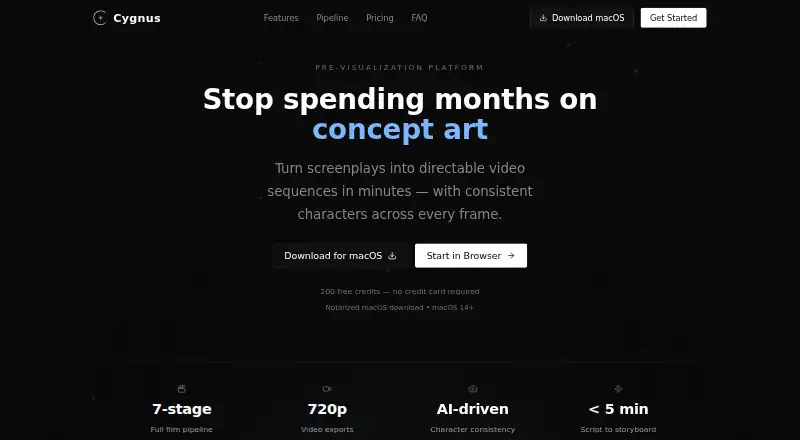
What Cygnus is
Cygnus turns screenplays into video sequences with consistent characters across frames. Its workflow spans concept, script, character and location references, storyboard, video, timeline, review, and export. It accepts Final Draft, PDF, Fountain, plain text, treatments, and outlines. Reference images are used to lock character appearances across storyboard frames and video clips. Collaborators can review work through shareable links with comments, annotations, and approvals. Listed exports include Premiere Pro, After Effects, Frame.io, and PDF, as well as Premiere XML and EDL. Generated clips run from 1 to 15 seconds at 720p; extensions add 2 to 10 seconds to an existing source video. Cygnus recommends projects of 1–5 minutes, 3–10 scenes, and 8–35 shots, suggesting longer work be divided into acts or sequences. It offers browser access and a notarized macOS app requiring macOS 14 or later. The free plan includes 200 credits per month, two projects, and watermarked 720p exports. Paid plans remove watermarks and provide higher project or team allowances.
Good
- Accepts screenplay files, treatments, and outlines.
- Reference images help maintain character appearances.
- Shareable links support comments and approvals.
- Exports include Premiere XML and EDL.
- Free plan includes all seven pipeline stages.
Watch out
- Free plan limits users to two projects.
- Free exports are watermarked.
- Generated video is limited to 720p.
- Mac app requires macOS 14 or later.
Who it suits
It suits indie filmmakers, agencies and brands, and studios or production teams developing short, storyboard-led video projects. Teams that need review links and the listed export options may find its workflow useful.
Verdict
Cygnus connects screenplay development, visual planning, review, and video export in one workflow. Its stated project-size guidance and 720p generation limit are important considerations for longer or higher-resolution work.
Plans and prices
From Cygnus's own pricing page, checked 4 Oct 2026.
| Plan | Price | What it gives you |
|---|---|---|
| Free | Free | 200 credits/mo · 2 projects · all 7 pipeline stages · 720p exports · watermarked output |
| Creator (monthly) | $39 a month | 2,000 credits/mo · 10 projects · all 7 pipeline stages · 720p exports · no watermarks · $39/month |
| Pro (monthly) | $89 a month | 6,000 credits/mo · unlimited projects · all 7 pipeline stages · 720p exports · no watermarks · 5 team seats · priority support · $89/month |
| Studio (monthly) | $279 a month | 20,000 credits/mo · everything in Pro · 720p exports · 25 team seats · priority render queue · dedicated account manager · $279/month |
| Creator (annual) | $372 a year | 2,000 credits/mo · 10 projects · all 7 pipeline stages · 720p exports · no watermarks · $372/year |
| Pro (annual) | $852 a year | 6,000 credits/mo · unlimited projects · all 7 pipeline stages · 720p exports · no watermarks · 5 team seats · priority support · $852/year |
| Studio (annual) | $2,676 a year | 20,000 credits/mo · everything in Pro · 720p exports · 25 team seats · priority render queue · dedicated account manager · $2,676/year |
The facts
Each one read from Cygnus's own pages, with the date it was checked.
What it does
- AI services
- Cygnus says its plans include AI services in the plan credits and do not require users to provide their own API keys.checked 4 Oct 2026
- Character consistency
- Cygnus locks character appearances from reference images and aims to maintain them across storyboard frames and video clips.checked 4 Oct 2026
- Commercial use
- Cygnus says content generated on paid plans is licensed for commercial use in film, television, advertising, and corporate video production.checked 4 Oct 2026
- Exports and integrations
- The site lists exports for Premiere Pro, After Effects, Frame.io, and PDF, and mentions Premiere XML and EDL exports.checked 4 Oct 2026
- Intended users
- The site presents Cygnus for indie filmmakers, agencies and brands, and studios and production teams.checked 4 Oct 2026
- Pipeline
- Its seven-stage workflow covers concept, script, character and location bible, storyboard, video, timeline, review, and export.checked 4 Oct 2026
- Purpose
- Cygnus turns screenplays into directable video sequences with consistent characters across frames.checked 4 Oct 2026
- Recommended project size
- Cygnus says it is optimized for scripts targeting 1–5 minutes, 3–10 scenes, and 8–35 shots, and recommends splitting longer projects into acts or sequences.checked 4 Oct 2026
- Review
- Collaborators can use shareable review links to comment, annotate, and approve frames.checked 4 Oct 2026
- Script formats
- Cygnus accepts Final Draft, PDF, Fountain, plain text, treatments, and outlines.checked 4 Oct 2026
- Security and data
- Cygnus says scripts are encrypted at rest and in transit, content is not used for AI training, and users retain ownership of uploaded and generated content.checked 4 Oct 2026
- Support
- The site lists [email protected] for support and says Pro includes priority support.checked 4 Oct 2026
- Video limits
- Video generation supports 1–15 second clips at 720p, with extensions adding 2–10 seconds to an existing source video.checked 4 Oct 2026
Where it runs
- Desktop platform
- The site offers a notarized macOS download and specifies macOS 14 or later; it also offers browser access.checked 4 Oct 2026
The full review of Cygnus
Cygnus is a screenplay-to-video workspace for filmmakers who want to develop and review short visual sequences with a production team. Its strongest case is keeping script, character references, storyboards, and generated clips connected; its project guidance makes it a less natural fit for long-form work in a single project.
Overview
Cygnus moves work through seven stages, from concept and script to character and location planning, storyboard, video, timeline, review, and export. It accepts Final Draft, PDF, Fountain, plain text, treatments, and outlines, making it useful both for screenplay-based projects and earlier-stage material. The benefit is a connected path from written idea to reviewable sequence rather than a script-only tool; the cost is working within a workflow optimized for compact projects.
Key features
Script to visual sequence
Script import, shot sequencing, and frame generation support turning a screenplay into directable video sequences. Character appearances can be anchored to reference images across storyboard frames and clips, a practical advantage when visual continuity matters. Generated clips are 1–15 seconds at 720p, while extensions add 2–10 seconds to an existing source video. That is suited to short beats and previews, but not a substitute for longer, higher-resolution footage.
Review and handoff
Shareable review links let collaborators comment, annotate, and approve frames, which can keep feedback tied to the visual material. Exports include Premiere Pro, After Effects, Frame.io, and PDF, with Premiere XML and EDL also mentioned. These handoff options make Cygnus more relevant to teams already moving work into production software than a tool that stops at storyboard creation.
Project scope, data, and support
Cygnus recommends projects of 1–5 minutes, 3–10 scenes, and 8–35 shots, and suggests splitting larger work into acts or sequences. That gives users a sensible scale boundary, but means longer projects bring additional organization work. Cygnus says scripts are encrypted at rest and in transit, content is not used for AI training, and users retain ownership of uploaded and generated content. Paid-plan content is licensed for commercial use in film, television, advertising, and corporate video. AI services are included in plan credits, so users do not need to supply API keys.
Pricing
The free plan costs nothing and includes 200 credits per month, two projects, all seven stages, 720p exports, and watermarked output. It is a useful way to explore the workflow, but the project cap and watermark limit its usefulness for ongoing client delivery.
Creator costs $31 a year (billed $372/year) annually or $39 a month (billed $39/month). Both include 2,000 credits per month, 10 projects, all stages, 720p exports, and no watermarks. This is the clearest fit for an individual creator who needs clean exports without team seats. Pro costs $71 a year (billed $852/year) annually or $89 a month (billed $89/month); it raises the allowance to 6,000 monthly credits and unlimited projects, and adds five team seats and priority support. It suits small production teams, though the resolution remains 720p.
Studio costs $223 a year (billed $2,676/year) annually or $279 a month (billed $279/month). It includes 20,000 monthly credits, everything in Pro, 25 team seats, a priority render queue, and a dedicated account manager. That extra capacity and service are aimed at larger teams; it does not raise the stated export resolution. Annual billing is shown as an annual amount, while monthly billing is charged monthly.
Platforms
Cygnus is available in a browser and as a notarized macOS download for macOS 14 or later. It will not suit users who need a Windows desktop app.
Who it's for
Indie filmmakers can use Cygnus to shape short projects from script through visual review, while agencies, brands, studios, and production teams may value collaboration and production-oriented exports. It is less compelling for work that depends on higher than 720p output or a single project substantially beyond the recommended scope.
Pros and cons
- Pros: One workflow spans script, visual planning, video, review, and export, reducing the need to separate those stages across tools.
- Pros: Reference-image character continuity and shareable annotated reviews address practical collaboration needs.
- Pros: AI services are included in plan credits, and paid plans permit commercial use.
- Cons: 720p exports and clips no longer than 15 seconds constrain projects needing higher-resolution or longer footage.
- Cons: The recommended project size is compact, so longer work is better divided into acts or sequences.
- Cons: Free output is watermarked, while team seats and priority support require Pro or Studio.
Alternatives
For a wider set of storyboard options, browse AI Storyboard Generators. Krock.io is worth considering for its free 1-user plan with 2 GB storage, one workspace, two projects, 50 AI Tokens, and unlimited reviewers. Choose Boords if a web-based storyboard and script workspace with 250 monthly AI images on its free single-user plan better matches the job.
CinemaScape AI offers a free plan with two projects, 10 one-time storyboard generations, screenplay editing, a story canvas, blocking, and PDF export, so it may suit a storyboard-first workflow. Drawstory is another web-based freemium option to compare. GOGUL may fit a one-off storyboard: its free balance is 100 credits and does not replenish, with limits of eight frames per storyboard and one character. Shai offers access to the first nine storyboard scenes and 200 credits for image creation and editing, while AI video is premium-only.
Story2Board suits users who prefer credits that never expire: its free plan provides 300 credits for the Nano Banana model only. StoryBirdie may be a better fit for script analysis and document export, with its free plan offering 20 credits, one project, two screenplays, PDF, XLSX, and CSV export.
Verdict
Choose Cygnus if you need to carry a compact screenplay project through visual planning, collaborative review, and production handoff, especially when consistent characters and commercial-use rights matter. Look elsewhere if your work needs output above 720p, longer generated footage, or a project scope that does not break naturally into smaller sequences.
Getting started
- Open https://www.cygnus.video/ in a browser or download the notarized macOS app for macOS 14 or later.
- Create a project and import a Final Draft, PDF, Fountain, or plain-text script, treatment, or outline.
- Use the workflow stages to develop the concept, script, character and location bible, storyboard, and video.
- Share review links with collaborators for comments, annotations, and approvals.
- Choose a plan based on its monthly credits, project allowance, and team seats.
Limits worth knowing
The free plan includes 200 credits per month and two projects, with watermarked 720p exports. Creator provides 2,000 credits per month and 10 projects; Pro provides 6,000 credits per month, unlimited projects, and five team seats. Studio provides 20,000 credits per month and 25 team seats.
Questions
Is Cygnus free?
Yes. The Free plan costs nothing and includes 200 credits per month, two projects, all seven pipeline stages, and watermarked 720p exports.
What do the paid plans cost?
Creator costs $31 a year or $39 a month. Pro costs $71 a year or $89 a month, and Studio costs $223 a year or $279 a month.
Which platforms does Cygnus support?
Cygnus offers browser access and a notarized macOS download. The macOS app requires macOS 14 or later.
Can teams review work in Cygnus?
Yes. Collaborators can use shareable links to comment, annotate, and approve frames. Pro includes five team seats, and Studio includes 25.
Can content made with Cygnus be used commercially?
Cygnus says content generated on paid plans is licensed for commercial use in film, television, advertising, and corporate video production.
Does Cygnus require users to provide AI API keys?
No. Cygnus says AI services are included in plan credits and do not require users to provide their own API keys.
Alternatives to Cygnus
- 1
Krock.io
Free planWebAPIExtensionmacOS7.8From $10 a month - 2

Boords
Free planWebAPI7.5Free plan - 3
LTX Studio
Free planWebAPISelf-hosted7.5From $12 a month - 4

Armox AI
Free planWebAPI7.4From $20 a month - 5

GOGUL
Free planWebAPI7.3From $9 a month - 6
StoryToShot
Free planWeb6.8From $19.90 a month