
Previs Pro
Previs Pro is a 3D previsualisation tool for filmmakers planning virtual sets, character positions, camera angles, and editorial timelines.
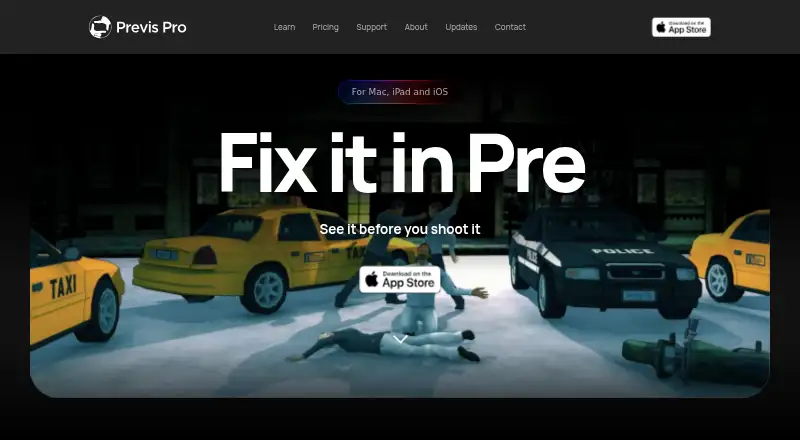
What Previs Pro is
Previs Pro is a 3D previsualisation tool for filmmakers planning virtual sets, character positions, camera angles, and editorial timelines. Its simulation follows real-world optics rather than treating a scene as a flat drawing. It imports screenplay files from Final Draft, Fountain, Open Screenplay Format, Fade In, and Celtx. Export options include PDF, JPEG, PNG, MP4, and NLE; the NLE export is a Final Cut Pro 7 XML project compatible with Adobe Premiere Pro and DaVinci Resolve. The free plan permits one animatic per project and watermarks exports. Paid options include Annual at $9.99 a year, billed $119.99/year; Monthly at $39.99 a month; and Lifetime at $359.99, paid once. These plans include unlimited projects, scenes, shots, and animatics, with AI generation by use. Previs Pro is Apple-only, with no Windows or Android version or roadmap. One purchase works on up to five personal devices using the same Apple ID. Imported screenplays stay locally in the .previs project file rather than being sent to Previs Pro servers by importing them.
Good
- 3D simulation follows real-world optics.
- Imports files from five listed screenplay formats.
- NLE export is compatible with Premiere Pro and DaVinci Resolve.
- One purchase works on up to five personal Apple devices.
Watch out
- Free plan allows one animatic per project.
- Free exports are watermarked.
- There is no Windows or Android version.
- AI generation is by use on paid plans.
Who it suits
Previs Pro suits filmmakers who want to plan scenes, camera positions, and timelines in a 3D environment. It is intended for users on iOS or macOS who work with screenplay files or NLE exports.
Verdict
Previs Pro combines 3D scene planning with screenplay import and editing-workflow exports. Its Apple-only availability and free-plan limits are important considerations.
Plans and prices
From Previs Pro's own pricing page, checked 14 Oct 2026.
| Plan | Price | What it gives you |
|---|---|---|
| Free | Free | watermarked exports · one animatic per project · up to 20 images per project · no team sharing |
| Starter credit pack | $4.99, paid once | 100 AI credits · one-time in-app purchase |
| Standard credit pack | $14.99, paid once | 400 AI credits · one-time in-app purchase |
| Monthly | $39.99 a month | full access · unlimited animatics · unwatermarked exports · AI uses credits · monthly |
| Pro credit pack | $39.99, paid once | 1,200 AI credits · one-time in-app purchase |
| Annual | $119.99 a year | full access · unlimited animatics · unwatermarked exports · AI uses credits · $119.99/year |
| Lifetime | $359.99, paid once | permanent access · unlimited animatics · unwatermarked exports · AI uses credits · one-time purchase |
The facts
Each one read from Previs Pro's own pages, with the date it was checked.
What it does
- 3D camera simulation
- Its 3D workflow uses camera sensor sizes and focal lengths so framing follows real-world optics.checked 14 Oct 2026
- 3D simulation
- The software is a 3D simulation that obeys real-world optics rather than a 2D drawing canvas.checked 1 Oct 2026
- AI generation
- AI tools generate or enhance images and video, create dialogue, music and sound effects, and generate 3D props and characters.checked 14 Oct 2026
- AI models
- AI generation uses third-party models including FLUX.2 Turbo, Seedream 4.5, Veo 3.1 Fast, ElevenLabs and Tripo3D.checked 1 Oct 2026
- AI providers
- Documented providers include fal.ai models, ElevenLabs, Kokoro, and Tripo3D, with generation charged through credits.checked 14 Oct 2026
- AI training
- Previs Pro states that user prompts, scripts, scenes and images are not used to train its own models.checked 1 Oct 2026
- AI training policy
- The wiki says user prompts, scripts, scenes, and images are not used to train Previs Pro’s own models.checked 14 Oct 2026
- Animatics
- Animatics can keyframe camera, character, prop, and lighting movement with multiple keyframes and precise durations.checked 14 Oct 2026
- API and SDK
- The public documentation describes project files and browser review functionality but does not list a public API, SDK, or self-hosting package.checked 14 Oct 2026
- AR workflow
- AR mode places virtual characters and props into real locations for scouting and on-location blocking.checked 14 Oct 2026
- Created content
- Ghostwheel makes no copyright or trademark claims to output files customers export as images or movies.checked 1 Oct 2026
- Data collection
- Ghostwheel says it collects the minimal amount of data possible and does not sell, trade or rent users’ personal identification information.checked 1 Oct 2026
- Documentation
- The published wiki covers getting started, scripts, boards, timeline, AI, exports, sharing, troubleshooting, privacy, and system requirements, with a separate support knowledge base and release history.checked 14 Oct 2026
- Editorial timeline
- The timeline supports shot ordering, timing, transitions, playback, and four audio lanes for dialogue, music, sound effects, and voiceover.checked 14 Oct 2026
- Hardware requirement
- The wiki identifies 4 GB RAM as the minimum and recommends 6 GB or more for comfortable use.checked 1 Oct 2026
- Independent review
- No Film School described the camera field-of-view preview and Apple AR location overlay as especially useful for communicating lens choices and scouting.checked 14 Oct 2026
- Licence
- Previs Pro is proprietary software licensed through Apple’s App Store under a Ghostwheel LLC EULA; users may not copy, reverse engineer, or redistribute it.checked 14 Oct 2026
- LiDAR importing
- The product advertises importing LiDAR scans to create location backdrops.checked 14 Oct 2026
- Limit: animation history
- No Film School’s review criticized the early version for lacking basic camera and character animation, requiring multiple boards to show movement.checked 14 Oct 2026
- Limit: model posing
- No Film School noted that the earlier character models used preset poses rather than fully posable armatures, which could frustrate advanced users.checked 14 Oct 2026
- Limit: pricing
- An App Store reviewer said the earlier roughly $200 price was difficult to justify even while awarding five stars.checked 14 Oct 2026
Where it runs
- Device sharing
- One purchase works on up to five personal devices using the same Apple ID.checked 1 Oct 2026
The company
- Maker legal name
- The App Store identifies the provider and copyright holder as Ghostwheel LLC.checked 14 Oct 2026
- Maker location
- Ghostwheel’s privacy policy gives a Brooklyn, New York mailing address.checked 14 Oct 2026
The full review of Previs Pro
Overview
Previs Pro gives filmmakers a way to block scenes, test camera angles and shape an animatic before production. It suits Apple-based writers and crews who want screenplay-to-previs planning in one workflow; its strongest case is the 3D-to-editing handoff, while the free plan and Apple-only reach set clear boundaries.
Its 3D simulation follows real-world optics rather than treating a scene as a flat canvas. That makes it useful for judging framing and camera placement in space, not merely arranging storyboard panels. Scene layouts and shot annotations help keep planning details attached to the work, and team collaboration makes it more suitable for production workflows than a solo sketchpad.
Screenplay import accepts Final Draft, Fountain, Open Screenplay Format, Fade In and Celtx files. That can reduce setup when a script already exists. NLE export produces a Final Cut Pro 7 XML project compatible with Adobe Premiere Pro and DaVinci Resolve, a practical bridge into editing rather than a replacement for an editor. Other export formats include PDF, JPEG, PNG, MP4, 2D and 3D.
AI generation uses third-party models, including FLUX.2 Turbo, Seedream 4.5, Veo 3.1 Fast, ElevenLabs and Tripo3D. Previs Pro says prompts, scripts, scenes and images are not used to train its own models. Imported screenplays stay in the local .previs project file and are not sent to Previs Pro servers through importing. Ghostwheel says it collects minimal personal data and does not sell, trade or rent users’ personal identification information. It makes no copyright or trademark claims to exported images or movies.
Key features
- Optics-based 3D planning: Virtual sets, characters and camera angles can be arranged in a simulated space, a better fit for blocking and shot exploration than a purely 2D planning canvas.
- Script-led setup: Imports from five screenplay formats can carry an existing script into the previs workflow.
- Production handoff: NLE export creates Final Cut Pro 7 XML compatible with Premiere Pro and DaVinci Resolve; PDF, image, video, 2D and 3D exports cover other sharing needs.
- Collaboration and annotation: Team collaboration, scene layouts and shot annotations support coordinated planning, though the free plan’s export watermark and animatic cap may constrain sharing.
Pricing
Previs Pro is freemium, with a free plan and paid subscriptions or a one-time purchase. The paid tiers list unlimited projects, scenes, shots and animatics, AI generation by use, and 2D, 3D, MP4 and NLE exports.
| Plan | Price | What it includes |
|---|---|---|
| Free | free | One animatic per project; watermarked exports. |
| Annual | $9.99 a year (billed $119.99/year) | Unlimited projects, scenes, shots and animatics; AI generation by use; 2D, 3D, MP4 and NLE exports. |
| Monthly | $39.99 a month (billed $39.99/month) | Same listed unlimited projects, scenes, shots and animatics, AI generation by use, and export formats as Annual. |
| Lifetime | $359.99, paid once (billed $359.99 one time) | Same listed features as the subscriptions, plus lifetime access. |
The free tier is a useful way to try scene planning, but one animatic per project and watermarked exports make it a poor fit for recurring client or production delivery. Annual is the lower-cost subscription choice for ongoing work; Monthly offers the same listed features at a substantially higher yearly run rate, so it makes sense mainly when a short commitment matters. Lifetime trades a larger upfront payment for access without recurring subscription billing. AI generation is charged by use on paid plans, so unlimited project capacity does not mean unlimited AI generation.
A free trial is offered. One purchase works on up to five personal devices using the same Apple ID, which is helpful for an individual switching among Apple devices but is not a multi-seat licensing promise.
Platforms
Previs Pro supports iOS and macOS and has no Windows or Android version or roadmap. That excludes mixed-device teams and filmmakers who need to work on those platforms. The wiki sets 4 GB RAM as the minimum and recommends 6 GB or more for comfortable use. For purchase or export issues, the maker directs users to email [email protected] with Apple receipt details.
Who it's for
Choose Previs Pro if you work on Apple devices, want to translate a screenplay into 3D scene planning, and need animatic or NLE exports for a production workflow. It is less suitable if you need Windows or Android support, depend on unwatermarked free exports, or want a flat storyboard tool without the 3D workflow.
Pros and cons
- Pro: Real-world-optics 3D simulation makes camera and blocking decisions more contextual than a flat drawing canvas.
- Pro: Imports from five screenplay formats and exports compatible NLE XML, linking script-based planning to established editing applications.
- Pro: Imported screenplay files remain in the local project rather than being sent to Previs Pro servers by the import process.
- Con: No Windows or Android version rules out users and teams tied to those platforms.
- Con: The free plan allows only one animatic per project and watermarks exports, limiting its usefulness for polished delivery.
- Con: Paid AI generation is by use, so the plan’s unlimited project and animatic allowances do not remove that variable cost.
Alternatives
Storyboard Software is the broader category to browse if you want to compare storyboard-focused tools.
StoryTribe is worth considering if cross-platform access, including Windows and Android, matters more than Previs Pro’s Apple-only focus; its free plan allows unlimited projects but caps projects at 10 shots and watermarks downloads and exports.
Shot Designer is another option for shot planning across Android, iOS, macOS and Windows. Its free plan is limited to one saved current scene and omits file management, export and sync or team sharing.
Mari is a Linux and Windows alternative for readers seeking a different kind of creative software; its non-commercial free plan limits exports to 4K and 16-bit per channel and disables Python scripting.
Boords is a web-based alternative with a free single-user plan that includes unlimited storyboards and scripts, which may suit solo storyboard work better than 3D previs.
Krock.io is a web and desktop option to consider if you need a review-oriented workspace; its free plan allows one user, one workspace, two projects and 2 GB storage.
Storyboarder is a free, open-source alternative for readers who prefer software available on Linux, macOS and Windows.
AIM Previz is a browser-based option if web access matters; its free plan provides 50 credits a month and includes a seven-day Pro trial with 150 credits.
Cineboard is another web-based option for readers who want to compare a different production-planning tool.
Verdict
Previs Pro is a strong fit for Apple-based filmmakers who want screenplay import, optics-aware 3D blocking and a route into Premiere Pro or DaVinci Resolve. The free tier is enough to explore the workflow, but the paid plans are the practical choice for unwatermarked, repeatable exports. Look elsewhere if Windows or Android support is essential.
Alternatives to Previs Pro
- 1

Krock.io
Free planWebAPIExtensionmacOS7.8From $10 a month - 2
Studiovity
AndroidiOSWebAPI7.8 - 3

Boords
Free planWebAPI7.5Free plan - 4

AIM Previz
Free planWebAPIExtensionSelf-hosted7.3From $29 a month - 5
Shot Designer
Free planAndroidiOSmacOSWindows7.2Free plan - 6

StoryTribe
Free planAndroidiOSWebmacOS7.2Free plan