StitchConsole
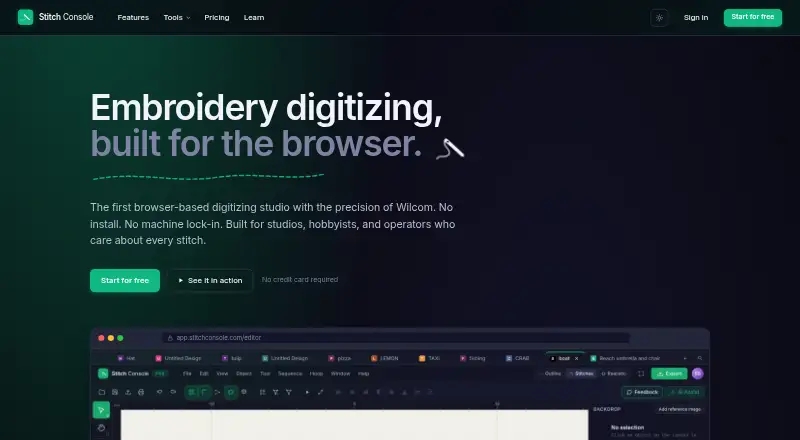
StitchConsole is a browser-based studio for creating and editing embroidery designs, with digitizing tools and image conversion.
What StitchConsole is
StitchConsole is a browser-based studio for creating and editing embroidery designs, with digitizing tools and image conversion. Its free plan includes run, satin and fill stitch tools, editable pen and Bezier paths, underlay, pull compensation, density controls and automatic splitting on objects. The converter turns images into editable stitch objects; the first ten conversions are free, and images are read in the browser rather than leaving it. It opens around thirty embroidery machine formats and exports DST, PES, JEF, EXP, VP3, PEC, XXX, U01, TBF and PMV. The site lists formats associated with Tajima, Brother, Janome, Pfaff, Melco, Singer and other machines. Before exporting, users can inspect stitch simulation, measurements, colour lists and stitch counts. The free plan allows unlimited designs, but syncs ten at a time and includes ten image conversions. Pro costs $19 a month and adds lettering, appliqué, motif fill and run, program split, unlimited auto-digitizing, AI Assist, optimisers, bulk export and unlimited cloud storage. It runs in a browser on Windows, macOS, Linux and ChromeOS without an installer or plugin. Auto-digitizing is better suited to flat artwork than gradients or photographs.
Good
- Free plan includes run, satin and fill tools.
- First ten image conversions are free.
- Images are processed in the browser.
- Preview stitch simulation, measurements and counts.
- Runs on Windows, macOS, Linux and ChromeOS.
Watch out
- Free cloud sync is limited to ten designs at a time.
- Free plan includes ten image conversions.
- Gradients and photographs do not convert well.
- Large resizing may require redigitizing.
Who it suits
StitchConsole suits embroiderers who want to digitize or edit designs in a browser and check stitch details before export. It is also suited to users working with flat artwork such as logos, badges and clip art.
Verdict
StitchConsole combines browser-based digitizing, conversion and stitch previews with a free tier for trying core tools. Pro expands the toolset and cloud library for $19 a month.
Plans and prices
From StitchConsole's own pricing page, checked 3 Oct 2026.
| Plan | Price | What it gives you |
|---|---|---|
| Free | Free | Unlimited designs · ten designs synced at a time · ten image conversions · ten export formats |
| Pro | $19 a month | Adds lettering, appliqué, motif fill and run, program split, unlimited auto-digitize, AI Assist, stitch order and colour sequence optimisers, bulk export, and an unlimited cloud library · a month |
| Studio | Priced on request | Priced per team · priced per team |
The facts
Each one read from StitchConsole's own pages, with the date it was checked.
What it does
- Cloud storage limit
- The free plan includes cloud sync with ten designs synced at a time.checked 3 Oct 2026
- Conversion limitation
- The site advises redigitizing a converted stitch design if it needs resizing by more than about ten percent.checked 3 Oct 2026
- Digitizing tools
- The free plan includes run, satin and fill stitch tools, editable pen and Bezier paths, underlay, pull compensation, density controls, and auto-split on objects.checked 3 Oct 2026
- File formats
- The converter opens around thirty embroidery machine formats and exports DST, PES, JEF, EXP, VP3, PEC, XXX, U01, TBF and PMV.checked 3 Oct 2026
- Image conversion
- It converts images into editable fill, satin and run-stitch objects, and the first ten conversions are free.checked 3 Oct 2026
- Local image processing
- The image conversion page says images are read in the browser and never leave it.checked 3 Oct 2026
- No installation
- StitchConsole runs in a browser on Windows, macOS, Linux and ChromeOS without an installer or plugin.checked 3 Oct 2026
- Preview and simulation
- The converter lets users inspect stitch simulation, measurements, colour lists and stitch counts before export.checked 3 Oct 2026
- Pro features
- Pro adds lettering, appliqué, motif fill and run, program split, unlimited auto-digitize, AI Assist, optimisers, bulk export and an unlimited cloud library.checked 3 Oct 2026
- Purpose
- StitchConsole is a browser-based embroidery digitizing studio for creating and editing embroidery designs.checked 3 Oct 2026
- Supported artwork
- Auto-digitize works best with flat artwork such as logos, badges and clip art; gradients and photographs do not convert well.checked 3 Oct 2026
Where it runs
- Machine compatibility
- The site lists formats associated with Tajima, Brother, Janome, Pfaff, Melco, Singer and other embroidery machines.checked 3 Oct 2026
The full review of StitchConsole
Overview
StitchConsole is a browser-based studio for digitizing, editing and converting embroidery designs. It is best suited to makers who want core stitch tools and machine-file conversion without installing desktop software. The free tier is a useful starting point, while recurring conversion or advanced design work makes Pro the more practical option.
Key features
Free includes run, satin and fill stitch tools, editable pen and Bezier paths, underlay, pull compensation, density controls and automatic object splitting. That gives users meaningful control over stitch construction without a paid commitment; lettering, appliqué and motif work, however, require Pro.
Image conversion turns artwork into editable fill, satin and run-stitch objects, with the first ten conversions free. Auto-digitizing is best for flat artwork such as logos, badges and clip art; gradients and photographs are poor candidates. Images are read in the browser and never leave it, a useful safeguard for artwork users prefer to keep local. Converted stitch designs should be redigitized when resizing by more than about ten percent, so conversion is not a dependable shortcut for substantial scaling.
The converter opens around thirty embroidery-machine formats and exports DST, PES, JEF, EXP, VP3, PEC, XXX, U01, TBF and PMV, covering formats associated with Tajima, Brother, Janome, Pfaff, Melco, Singer and others. Stitch simulation, measurements, colour lists and stitch counts are visible before export. That preview makes it easier to review a file before sending it to a machine, though it does not remove the need to check converted work carefully.
Pricing
Free: free. It includes unlimited designs, ten designs synced at a time, ten image conversions and ten export formats. This suits occasional users learning the tools or working on a small number of designs. The conversion and sync caps are the main constraints: a larger active library or regular image conversion will quickly make the free tier less convenient.
Pro: $19 a month, billed a month. It adds lettering, appliqué, motif fill and run, program split, unlimited auto-digitize, AI Assist, stitch-order and colour-sequence optimisers, bulk export and an unlimited cloud library. This is the stronger fit for regular digitizing and users who need the expanded tools or library; its monthly price is difficult to justify for occasional edits that fit within Free.
Studio: custom pricing, priced per team. It is the team-oriented option, while Free and Pro are presented as individual plan tiers.
Platforms
StitchConsole runs in a browser on Windows, macOS, Linux and ChromeOS, with no installer or plugin. That broad desktop coverage is convenient for users moving between supported systems, but the listed platform support does not include mobile devices.
Who it's for
Choose StitchConsole if you need browser-based embroidery digitizing, conversion and pre-export stitch previews, particularly for flat artwork and common machine formats. It is less suitable for photograph-heavy conversion, significant resizing of converted designs, or users who need advanced tools but do not want a monthly plan.
Pros and cons
- Pros: A substantial free editing toolkit lets users create and refine stitch objects before paying.
- Pros: Browser-based operation across Windows, macOS, Linux and ChromeOS avoids an installer or plugin.
- Pros: Local image processing keeps source images in the browser rather than sending them away for conversion.
- Pros: Simulation, measurements, colours and stitch counts provide useful checks before export.
- Cons: Free conversion is capped at ten images, and cloud sync covers only ten designs at a time.
- Cons: Gradients and photographs do not digitize well, and resizing converted designs by more than about ten percent calls for redigitizing.
- Cons: Lettering, appliqué, motif tools and other Pro additions require a $19 a month subscription.
Alternatives
For other options, browse Embroidery Design Software.
Boldbobbin is another freemium option, with support for iOS as well as desktop platforms. mySewnet Embroidery offers a free Basic plan with 100MB of Vault storage and standard embroidery, quilting and craft-cutting tools, and is available on Android and iOS as well as desktop. TurtleStitch is a free, open-source web platform for users who want an open-source alternative. Ink/Stitch is also free and open-source, but runs as an Inkscape extension on desktop platforms.
Embird, DRAWings PRO XII, Embrilliance StitchArtist and Hatch Embroidery are paid alternatives for users comparing dedicated desktop embroidery software.
Verdict
StitchConsole is a strong fit for desktop users who want browser-based digitizing, broad machine-format support and useful previews, with enough free tools to start without a subscription. Its main reason to choose Pro is the expanded design toolkit and unlimited cloud library; look elsewhere if you need reliable photo conversion, major resizing without redigitizing, or advanced capabilities without a monthly fee.
Getting started
- Open https://www.stitchconsole.com/ in a supported browser
- Create or edit a design with the available stitch and path tools
- Import artwork for conversion into editable stitch objects
- Review the stitch simulation, measurements, colour list, and stitch count
- Export to a supported machine format such as DST, PES, JEF, EXP, VP3, PEC, XXX, U01, TBF, or PMV
- Choose the free plan or subscribe to Pro for additional tools
Limits worth knowing
The free plan syncs up to ten designs at a time and includes ten image conversions. Pro costs $19 a month and removes the cloud-library limit while adding advanced features.
Questions
Is StitchConsole free?
Yes. The Free plan costs 0.00 USD and includes unlimited designs, ten synced designs at a time, ten image conversions, and ten export formats.
What does Pro cost?
Pro costs $19 a month, billed monthly.
Which platforms does it support?
It runs in a browser on Windows, macOS, Linux, and ChromeOS, with no installer or plugin.
Which embroidery formats can it export?
Exports include DST, PES, JEF, EXP, VP3, PEC, XXX, U01, TBF, and PMV.
Does it support auto-digitizing?
Yes. Pro adds unlimited auto-digitize, and the tool works best with flat artwork such as logos, badges, and clip art.
What does Pro add?
Pro adds lettering, appliqué, motif fill and run, program split, AI Assist, stitch-order and colour-sequence optimisers, bulk export, and an unlimited cloud library.
Alternatives to StitchConsole
- 1
Boldbobbin
Free planiOSWebLinuxmacOS8.0From $21 a month - 2

mySewnet Embroidery
Free planAndroidiOSWebmacOS8.0Free plan - 3
Ink/Stitch
Free planOpen sourceWebExtensionLinuxmacOS7.5Free plan - 4
PEmbroider
Free planOpen sourceAPImacOSWindows7.1Free plan - 5

Embird
macOSWindows6.9$15 one-time - 6

Brother PE-DESIGN 11
Windows6.7$1,450 one-time