Step
Step is a free Linux desktop application for exploring physical systems through interactive simulations.
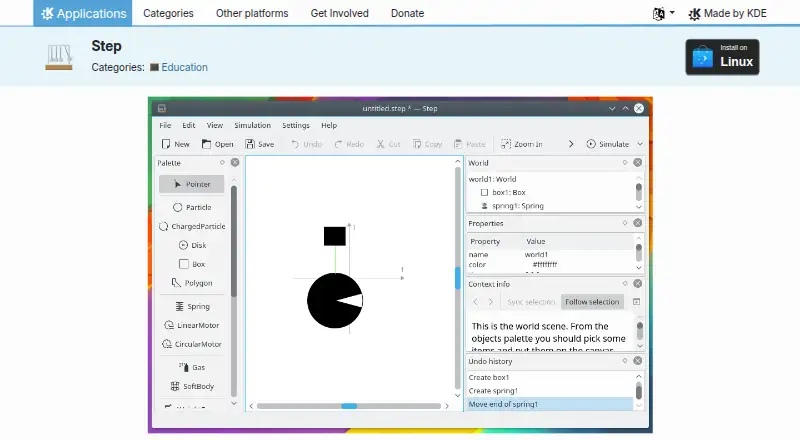
What Step is
Step is a free Linux desktop application for exploring physical systems through interactive simulations. It supports two-dimensional classical mechanics, molecular dynamics, sound waves, and deformable bodies. Experiments can include particles, damped springs, gravitational and Coulomb forces, rigid bodies, and collision handling. Users can change body and force properties during a running simulation. Graph, meter, and tracer tools display results, while a controller can adjust properties using custom keyboard shortcuts. Step also calculates unit conversions, expressions, error propagation, and solver error estimates. Its explicit and implicit solvers reach 8th order and can use adaptive timesteps, though most solvers require GSL. Expression calculations such as unit conversion require libqalculate. Learning materials include tutorials, sample experiments, object context details, and an integrated Wikipedia browser; more experiments are available through KNewStuff. Step is GPL-2.0+ licensed, and its StepCore simulation library can be used separately in code or other software. The listed release is Step 26.08.2, released 2026-10-08.
Good
- Simulates four types of physical systems.
- Properties can be edited during a simulation.
- Includes graph, meter, and tracer visualization tools.
- Tutorials and example experiments are included.
Watch out
- Available for Linux only.
- Most solvers require GSL.
- Unit conversion expressions require libqalculate.
Who it suits
Step suits Linux users learning or exploring physical systems through editable simulations. Its tutorials, examples, and calculation tools may also help users building classroom or self-guided experiments.
Verdict
Step offers a broad set of physical simulation types and tools at no cost. Check its solver and calculation dependencies against the features you plan to use.
Plans and prices
From Step's own pricing page, checked 11 Oct 2026.
| Plan | Price | What it gives you |
|---|---|---|
| Step | Free | GPL-2.0+ · Linux |
The facts
Each one read from Step's own pages, with the date it was checked.
What it does
- 3D visuals
- Nochecked 20 Sep 2026
- Additional experiments
- More example experiments can be downloaded with KNewStuff.checked 11 Oct 2026
- Authoring tools
- Yeschecked 20 Sep 2026
- Calculations
- Step can calculate unit conversions, expressions, error propagation, and solver error estimates.checked 11 Oct 2026
- Delivery mode
- desktopchecked 20 Sep 2026
- Dependency
- Expression calculations such as unit conversion require libqalculate.checked 11 Oct 2026
- Experiment editing
- Users can change body and force properties, including while a simulation is running.checked 11 Oct 2026
- Forces and objects
- Supported elements include particles, damped springs, gravitational and Coulomb forces, rigid bodies, and collision handling.checked 11 Oct 2026
- Latest listed release
- The page lists Step 26.08.2, released 2026-10-08.checked 11 Oct 2026
- Learning resources
- The application includes tutorials, example experiments, object context information, and an integrated Wikipedia browser.checked 11 Oct 2026
- Lesson library
- Yeschecked 20 Sep 2026
- Library
- StepCore is the underlying physical simulation library and can be used without Step in code or other software requiring simulation functionality.checked 11 Oct 2026
- License
- Step is listed under the GPL-2.0+ license.checked 11 Oct 2026
- Purpose
- Step is an interactive physical simulator for exploring the physical world through simulations.checked 11 Oct 2026
- Simulation types
- It supports two-dimensional classical mechanics, molecular dynamics, sound waves, and deformable bodies.checked 11 Oct 2026
- Solver options
- It offers explicit and implicit solvers up to 8th order, with or without adaptive timesteps; most solvers require GSL.checked 11 Oct 2026
- Support
- Help is available through the Step Handbook, KDE forum, the kde-edu mailing list, and the #kde-edu Libera.chat channel.checked 11 Oct 2026
- Visualization and controls
- Graph, meter, and tracer tools visualize results, and a controller tool can adjust properties during simulation using custom keyboard shortcuts.checked 11 Oct 2026
Money
- Free plan
- Yeschecked 20 Sep 2026
Alternatives to Step
- 1

SimFlow
Free planWebLinuxmacOSWindows8.2From €8,000 a year - 2

COMSOL Multiphysics
WebAPILinuxmacOS7.7 - 3
FeenoX
Free planWebAPILinuxSelf-hosted7.5Free plan - 4
myPhysicsLab
Free planWebLinuxmacOSSelf-hosted7.5Free plan - 5

OpenFOAM
Free planLinuxmacOSSelf-hostedWindows7.3Free plan - 6
MPTRAC
Free planWebLinuxSelf-hosted7.2Free plan