myPhysicsLab
myPhysicsLab is a free, open-source collection of interactive physics simulations and JavaScript tools for building animated models.
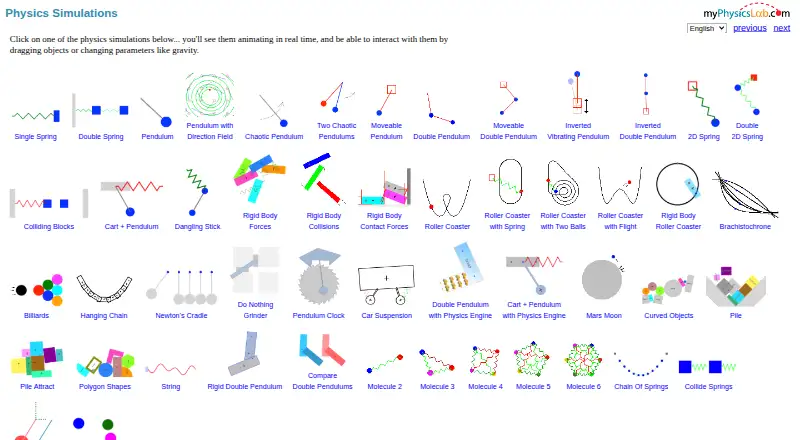
What myPhysicsLab is
myPhysicsLab is a free, open-source collection of interactive physics simulations and JavaScript tools for building animated models. Users can drag objects or change parameters such as gravity while simulations run, with examples covering pendulums, springs, collisions, roller coasters, billiards, and molecular models. The site lists around 50 simulations, and many pages explain the mathematics behind them. Models can be customized with EasyScript or JavaScript using a browser and text editor; a share URL can reproduce a setup using embedded EasyScript. Numeric simulation data is available through VarsHistory, JavaScript, or collision-data scripts. Downloadable versions support offline viewing. The software is licensed under Apache 2.0, and its source code is available on GitHub. The simulations do not specify measurement units, so users need to keep values consistent within each model. Building from source requires TypeScript, esbuild, Perl, and GNU Make. The maker is based in Seattle, Washington, and the project began in 2001.
Good
- Interactive models respond to dragging and parameter changes.
- Around 50 simulations cover varied physics examples.
- Many pages explain the underlying mathematics.
- Custom models can use EasyScript or JavaScript.
- Downloadable versions can be used offline.
Watch out
- Simulation units are unspecified and must stay consistent.
- Building from source requires four listed tools.
- No third-party integrations are listed.
- No support plan is listed.
Who it suits
It suits learners and educators exploring physics concepts, as well as developers who want to customize interactive simulations. Users can also download versions for offline viewing.
Verdict
myPhysicsLab combines interactive examples with explanations and options for customizing or sharing models. Its dimensionless units require care, but downloadable versions support offline use.
Plans and prices
From myPhysicsLab's own pricing page, checked 3 Oct 2026.
| Plan | Price | What it gives you |
|---|---|---|
| Free and open source | Free | Browser simulations · source code under Apache 2.0 · downloadable versions for offline use |
The facts
Each one read from myPhysicsLab's own pages, with the date it was checked.
What it does
- 3D visuals
- Nochecked 20 Sep 2026
- Audience
- The simulations include explanations of their underlying mathematics and the site describes the project as an online science museum effort.checked 2 Oct 2026
- Authoring tools
- Yeschecked 20 Sep 2026
- Build requirements
- Building from source requires TypeScript, esbuild, Perl, and GNU Make.checked 2 Oct 2026
- Customization
- Users can customize simulations with EasyScript or JavaScript, using a browser and text editor.checked 3 Oct 2026
- Data access
- The site documents ways to obtain numeric simulation data using VarsHistory, JavaScript, and collision data tools.checked 3 Oct 2026
- Data export
- Yeschecked 20 Sep 2026
- Delivery mode
- hybridchecked 20 Sep 2026
- Education
- Most simulation pages show how the mathematics is derived, and the author says he began the site with a vision of an online science museum.checked 3 Oct 2026
- Integrations
- The maker documents sharing simulation URLs by email and customizing simulations with JavaScript; it does not list third-party integrations on the pages reviewed.checked 3 Oct 2026
- Interactive simulations
- The site offers simulations that animate in real time and let users drag objects or change parameters such as gravity.checked 2 Oct 2026
- Lesson library
- Yeschecked 20 Sep 2026
- License
- The software is open source under the Apache 2.0 License, and its source code is available on GitHub.checked 3 Oct 2026
- Measurement limits
- Simulation units are dimensionless and must be used consistently within each simulation.checked 2 Oct 2026
- Offline access
- Yeschecked 20 Sep 2026
- Offline use
- Downloadable versions are available for showing simulations offline when not connected to the internet.checked 3 Oct 2026
- Purpose
- myPhysicsLab provides interactive, real-time animated physics simulations that users can change by dragging objects and adjusting parameters.checked 3 Oct 2026
- Security and compliance
- The maker's home page and linked documentation reviewed describe the open source license and source repository but make no security or compliance claims.checked 3 Oct 2026
- Sharing
- A simulation's share button creates a URL containing EasyScript that reproduces the configured conditions.checked 3 Oct 2026
- Simulation library
- The site lists around 50 simulations, including pendulums, springs, collisions, roller coasters, and rigid-body examples.checked 3 Oct 2026
The company
- Founded
- 2001checked 28 Sep 2026
- Headquarters
- Seattle, Washington, USAchecked 28 Sep 2026
- Maker
- The author says he is a self-employed software engineer living in Seattle, Washington, and that he started developing the site in 2001.checked 3 Oct 2026
Money
- Free plan
- Yeschecked 20 Sep 2026
The full review of myPhysicsLab
myPhysicsLab is a free collection of browser-based physics simulations alongside JavaScript tools for making and modifying them. It is best suited to learners, educators, and developers who want to explore mechanics through interactive models and their underlying mathematics. Its strongest appeal is the combination of explanations, adaptable examples, and open-source access; the main caveat is that users must interpret dimensionless units consistently.
Overview
Launched in 2001 as an online science museum project, myPhysicsLab pairs real-time animations with explanations of how many of its models work mathematically. Users can drag objects and alter parameters such as gravity, making abstract mechanics more approachable than a static illustration. But the simulations do not prescribe measurement units: anyone comparing values or explaining results must establish a consistent interpretation within each model.
Key features
- Broad set of examples: Around 50 simulations cover pendulums, springs, collisions, roller coasters, billiards, molecular models, and rigid-body motion. The range gives students and instructors useful material across mechanics topics, though it is a library of interactive examples rather than a general-purpose physics package.
- Customization and sharing: EasyScript or JavaScript lets users modify models in a browser with a text editor. The share button encodes an EasyScript setup in a URL, so a learner can pass along a particular configuration without asking the next person to recreate it manually.
- Access to numeric data: VarsHistory, JavaScript, and collision-data scripts provide ways to retrieve simulation values. That makes the examples more useful for investigation and coding than visual exploration alone, though interpreting the results still depends on users keeping their chosen units consistent.
- Offline and open-source use: Downloadable versions support offline demonstrations, and the Apache 2.0 source is available on GitHub. Building from source requires TypeScript, esbuild, Perl, and GNU Make, a meaningful hurdle for users who want to work on the code rather than simply run the simulations.
Pricing
myPhysicsLab is free and open source: the Free and open source plan costs nothing and includes browser simulations, Apache 2.0 source code, and downloadable versions for offline use. There is no paid tier or free trial to weigh against that plan. It suits students, teachers, and developers looking for a no-cost model library, but teams seeking a priced support or service package should look elsewhere.
Platforms
The hybrid delivery model combines web access with downloadable, offline versions. The platform list includes Linux, macOS, and Windows, as well as self-hosted use. That mix helps educators who need to present simulations without an internet connection, while source builds call for a development toolchain rather than just an installed app.
Who it's for
Choose myPhysicsLab for classroom demonstrations, self-guided study, or small programming projects where interactive mechanics examples and readable mathematical explanations matter more than formal units. Its authoring tools and data access also make it relevant to developers adapting models. It is a less natural fit for users who need simulations with fixed measurement conventions or a broader, general-purpose physics workflow.
Pros and cons
- Pro: Explanations accompany most simulations, helping learners connect an animation to the mathematics behind it.
- Pro: EasyScript, JavaScript, URL sharing, and numeric data access support customization, collaboration, and analysis without a paid plan.
- Pro: Downloadable versions and Apache 2.0 licensing support offline demonstrations and open-source reuse.
- Con: Dimensionless units require users to define and apply their own consistent interpretation, which can complicate comparisons or teaching examples that depend on standard measurements.
- Con: Building from source requires several developer tools, so modifying the underlying software is less accessible than using the browser simulations.
Alternatives
For more tools in this category, browse Physics Simulation Software.
- SimFlow is worth considering for Linux, macOS, Windows, or web users who want a freemium option with a free plan and trial; myPhysicsLab instead offers its full stated plan at no cost and includes downloadable simulations.
- COMSOL Multiphysics may suit users prepared to pursue a paid commercial or academic license with custom pricing and a free trial; myPhysicsLab is the simpler choice when free, open-source examples are enough.
- OpenSim is another free, open-source option for Linux, macOS, and Windows, with an API; its download requires a SimTK account. Choose between them based on the platform and workflow you need.
- SimScale offers a web-based community plan for testing and learning, with selected analysis types, 10 unrestricted simulations, and up to 3,000 core hours. It may fit users whose work suits those limits; myPhysicsLab is free of those stated simulation and core-hour caps.
- Ansys Fluent is a paid alternative with a Try Fluent Today option.
- Open Source Physics is a free alternative available on web, Windows, macOS, Linux, iOS, and Android.
- OpenFOAM is a free option for Windows, macOS, and Linux.
- Xcos is free, open-source software distributed with Scilab for Windows, macOS, and Linux.
Verdict
myPhysicsLab is a strong choice for learners, teachers, and developers who want free, adaptable mechanics simulations with mathematical explanations and offline access. Its main advantage is that users can explore, customize, and share models without paying; look elsewhere if dimensionless values are unsuitable for your work or you need a different kind of physics workflow.