StemForge
StemForge is a free, open-source audio workstation that runs locally in a browser and connects workflows for stem separation, MIDI extraction, audio generati…
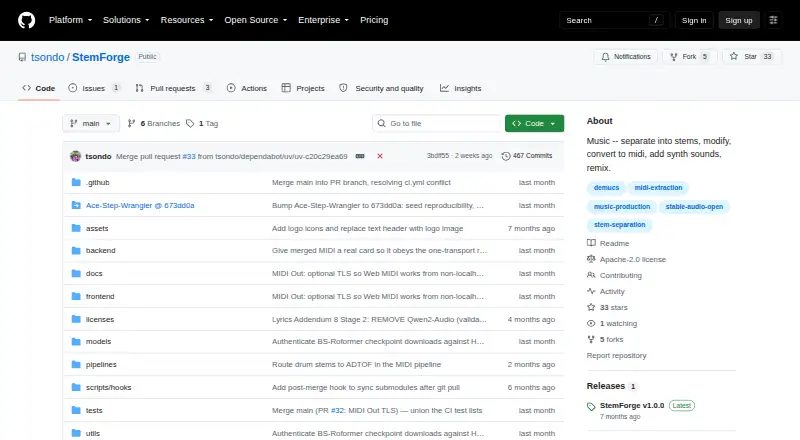
What StemForge is
StemForge is a free, open-source audio workstation that runs locally in a browser and connects workflows for stem separation, MIDI extraction, audio generation, composition, mixing, and export. Demucs and BS-Roformer separate audio into vocal, drum, bass, other, guitar, and piano stems; spectral analysis helps recommend an engine and model. It extracts MIDI from instrument stems with BasicPitch and from vocal melodies with faster-whisper and pitch tracking. Web MIDI can send MIDI to hardware synths. The Synth tab uses Stable Audio Open for text-conditioned audio generation up to 600 seconds, with optional audio or MIDI conditioning. Compose uses AceStep for song generation and RVC for voice conversion, while Mix combines stems, MIDI-rendered tracks, synth outputs, and composed songs. Exports include WAV, FLAC, MP3, and OGG, separately or as a ZIP archive. The project says audio stays on the user's computer and that internet is not needed after initial model downloads. Setup requires Python 3.12, FFmpeg, and FluidSynth with a GM soundfont. Models download on first use; AceStep requires about 20 GB, and Stable Audio Open requires license acceptance and authentication. NVIDIA acceleration requires driver 580 or newer; CPU-only operation is significantly slower. MIDI Out requires Chrome or Edge in a secure browser context.
Good
- Runs locally in a browser
- Connects separation, MIDI, composition, and mixing
- Exports WAV, FLAC, MP3, and OGG
- Audio remains on the user's computer
- No internet needed after initial model downloads
Watch out
- Setup requires Python 3.12, FFmpeg, and FluidSynth
- CPU-only operation is significantly slower
- AceStep models require about 20 GB
- MIDI Out requires Chrome or Edge
Who it suits
StemForge suits people who want local tools for separating audio, extracting MIDI, generating or composing audio, and mixing exports. Users should be prepared to install its required software and download large models.
Verdict
StemForge connects a wide set of audio workflows while keeping processing local after model downloads. Its setup requirements, model downloads, and slower CPU-only operation are important considerations.
Plans and prices
From StemForge's own pricing page, checked 15 Oct 2026.
| Plan | Price | What it gives you |
|---|---|---|
| Local StemForge | Free | self-hosted · no subscription · no per-track fees · model downloads required |
| StemForge | Free | Open-source; runs locally on your hardware · No subscriptions or per-track fees |
The facts
Each one read from StemForge's own pages, with the date it was checked.
What it does
- AMD support
- Linux AMD GPUs use a separate ROCm 7.1 project variant, but the project describes end-to-end AMD hardware support as untested.checked 15 Oct 2026
- Audio generation
- Stable Audio Open is used for text-conditioned stereo generation with optional stem, MIDI, and mix conditioning and project support up to 600 seconds through chunking.checked 15 Oct 2026
- Basic Pitch integration
- Spotify describes Basic Pitch as an audio-to-MIDI converter with pitch-bend detection and publishes it under Apache-2.0.checked 15 Oct 2026
- Documentation
- The repository links an INSTRUCTIONS.md guide, requirements, installation steps, launcher flags, model-cache guidance, and a third-party notices file.checked 15 Oct 2026
- Export formats
- Export supports WAV, FLAC, MP3, and OGG, including ZIP downloads.checked 15 Oct 2026
- Hugging Face gate
- The Synth tab requires accepting Stable Audio Open's license and logging in locally with a read token before model access.checked 15 Oct 2026
- Install
- Installation uses a recursive Git clone, uv sync, and uv run python run.py, then serves the interface at localhost port 8765.checked 15 Oct 2026
- Integrations
- The documented workflow connects Separate, MIDI, Synth, Compose, Mix, and Export tabs so outputs can flow between pipelines; MIDI Out connects to hardware synths via the browser's Web MIDI API.checked 4 Oct 2026
- Licence
- The repository identifies StemForge itself as Apache License 2.0 and permits commercial use, modification, and distribution.checked 15 Oct 2026
- Limit: Demucs artifacts
- Demucs documentation reports substantial bleeding and artifacts for the piano source in its experimental six-source model.checked 15 Oct 2026
- Limit: Demucs maintenance
- The Demucs repository is archived and says its original maintainer no longer actively maintains it beyond important fixes.checked 15 Oct 2026
- Limit: licence inconsistency
- The v1.0.0 release page instead describes that release as personal and non-commercial under PolyForm Noncommercial 1.0.0, creating a material licence discrepancy.checked 15 Oct 2026
- Limit: Stable Audio language and style
- The model card says performance is weaker outside English, varies across musical styles and cultures, and is generally better for sound effects and field recordings than music.checked 15 Oct 2026
- Limit: Stable Audio vocals
- Stability's model card says Stable Audio Open is not able to generate realistic vocals.checked 15 Oct 2026
- Limit: third-party rights
- The project warns that its Apache licence does not cover third-party model weights and lists some weights as non-commercial, unknown-licence, or requiring separate review.checked 15 Oct 2026
- Local processing
- The project says audio remains on the user's computer and that internet access is unnecessary after model downloads.checked 15 Oct 2026
- MIDI
- StemForge extracts MIDI from instrument stems with BasicPitch and vocal melodies with faster-whisper and pitch tracking, and can send MIDI to hardware synths through Web MIDI.checked 4 Oct 2026
- MIDI extraction
- Instrument MIDI uses Basic Pitch, while vocal MIDI uses faster-whisper with pitch tracking; FluidSynth provides browser previews.checked 15 Oct 2026
- MIDI Out
- Extracted MIDI can be sent to software or hardware synthesizers through Web MIDI, with program changes and a panic control; Chrome or Edge is required by the project.checked 15 Oct 2026
- Mixing
- Mix combines audio stems, MIDI renders, synth outputs, and composed songs with per-track instruments and volume, then renders FLAC.checked 15 Oct 2026
- Mixing and export
- The Mix tab combines audio stems, MIDI-rendered tracks, synth outputs, and composed songs; exports support WAV, FLAC, MP3, and OGG, individually or as a ZIP archive.checked 4 Oct 2026
Where it runs
- macOS support
- Apple Silicon Macs use MPS acceleration, while Intel Macs operate CPU-only.checked 15 Oct 2026
- MIDI browser support
- MIDI Out requires Chrome or Edge and a secure browser context; the project documents HTTPS or localhost as supported secure origins.checked 4 Oct 2026
The company
- Maker identity
- The repository owner identifies as Todd (tsondo) and lists Germany as the location.checked 15 Oct 2026
The full review of StemForge
StemForge is a local, browser-based audio workstation for separating tracks, extracting MIDI, generating audio, and composing songs. It is best suited to technically confident musicians and audio enthusiasts with capable hardware who want several workflows in one place. Its breadth and local processing are strong draws, but setup and model requirements rule it out as a casual, low-maintenance option.
Overview
StemForge connects separate, MIDI, synth, compose, mix, and export workflows, letting users move material between stages and combine stems, MIDI-rendered tracks, synth outputs, and composed songs. That integration suits projects that need more than one kind of audio tool; it is less compelling if the goal is simply to split a song or make a quick remix.
The project says audio stays on the user's computer, and an internet connection is unnecessary after the initial model downloads. That makes local processing attractive to users who want to keep their audio on their own hardware. The privacy benefit comes with a practical cost: models must be downloaded, and some are substantial.
Key features
Stem separation and MIDI
Demucs and BS-Roformer can separate vocals, drums, bass, other, guitar, and piano. StemForge recommends engines and models using spectral analysis, which gives users a way to choose a suitable separation path without making them pick entirely blind. It also makes the tool relevant to arrangements that need individual instrumental parts, not only vocal removal.
BasicPitch extracts MIDI from instrument stems; vocal melodies use faster-whisper and pitch tracking. MIDI can also be sent to hardware synthesizers through Web MIDI. That range supports workflows from turning parts into editable notes to controlling external gear, though MIDI Out requires Chrome or Edge and a secure browser context such as HTTPS or localhost.
Generation, composition, and export
The Synth tab uses Stable Audio Open to generate text-conditioned audio up to 600 seconds, with optional audio or MIDI conditioning. Compose uses AceStep for song generation and RVC for voice conversion, with 14 built-in voices and a HuggingFace model browser. These tools give StemForge reach beyond separation, but their model requirements make it a heavier commitment than a focused online generator.
Mix brings stems, MIDI-rendered tracks, synth outputs, and composed songs together. Finished work can be exported as WAV, FLAC, MP3, or OGG, either track by track or in a ZIP archive. This is a useful endpoint for a multi-stage workflow rather than a collection of isolated experiments.
Pricing
StemForge is free and open source under Apache 2.0, with no subscriptions or per-track fees. The free plan runs locally on the user's hardware, so there is no paid tier to unlock; in exchange, users supply the computer, software prerequisites, and storage for models.
Model terms are not uniform: the project notes that Stable Audio Open is subject to Stability AI's Community License, and one six-stem BS-Roformer model has no specified license. Users should account for those separate model terms rather than treating the application's Apache 2.0 license as covering every model.
Platforms
StemForge supports Linux, macOS, and Windows, and runs locally through a browser. Setup requires Python 3.12, FFmpeg, and FluidSynth with a GM soundfont. NVIDIA GPU acceleration requires driver 580 or newer; CPU-only operation is significantly slower, so users without a compatible GPU should expect a less responsive workflow.
Models download lazily when first used. AceStep models for Compose require about 20 GB, while Stable Audio Open requires HuggingFace license acceptance and authentication. These requirements make available disk space and willingness to manage downloads part of the platform choice, not an afterthought.
Who it's for
StemForge is a strong fit for producers, musicians, and audio tinkerers who want separation, MIDI extraction, generation, composition, and mixing connected in a local workflow. It is especially suited to people comfortable installing dependencies and managing large models, and to those who value keeping audio on their own computer.
It is a poor match for users who want a lightweight web service, need reliable CPU-speed processing, or prefer not to handle local setup and model licensing. Hardware synth users should also check their browser and secure-origin requirements before relying on MIDI Out.
Pros and cons
- Pros: A connected workflow spans separation, MIDI, generation, composition, mixing, and export, reducing the need to move between specialized tools.
- Pros: Audio processing stays local after downloads, and the software has no subscription or per-track fees.
- Pros: Separation covers six stem categories, while export supports WAV, FLAC, MP3, and OGG.
- Cons: Python, FFmpeg, FluidSynth, and a GM soundfont add setup work before the workflow is ready.
- Cons: CPU-only processing is significantly slower, and AceStep's Compose models need about 20 GB.
- Cons: Some model terms are separate from the application's Apache 2.0 license, including one six-stem BS-Roformer model with no specified license.
Alternatives
For a broader comparison, browse AI Music Remixing Tools.
Choose Fadr instead if a freemium service with web and mobile platforms is a better fit: its free Basic plan includes vocals, melodies, drums, and bass, plus MP3 downloads, MIDI detection, and Remix Maker.
AceStep AI Music Remixer is another option for users who prefer a web-based freemium tool, with a free allowance of 10 credits a day and generations up to 120 seconds.
AetherWave Music Studio, MeloLab AI Remix, MusicWave.ai, AI Remix Music Generator, Mubert AI Music Remixer, and RiffGen Remixer AI are also alternatives to consider.
Verdict
Choose StemForge if you want a free, locally run workstation that links stem separation, MIDI, generation, composition, mixing, and export—and are prepared to manage its technical setup and models. Its main advantage is that range in a single local workflow; look elsewhere if you need a simple service, modest hardware demands, or fewer model and licensing considerations.
Getting started
- Open the StemForge GitHub project page.
- Install Python 3.12, FFmpeg, and FluidSynth with a GM soundfont.
- Use NVIDIA driver 580 or newer for NVIDIA GPU acceleration, or run CPU-only with slower processing.
- Start StemForge locally in a browser.
- Allow models to download when first used; accept the HuggingFace license and authenticate for Stable Audio Open.
Limits worth knowing
CPU-only operation is significantly slower. AceStep models require about 20 GB, and Stable Audio Open requires HuggingFace license acceptance and authentication. MIDI Out requires Chrome or Edge in a secure context, such as HTTPS or localhost.
Questions
How much does StemForge cost?
StemForge is free: free, with no subscriptions or per-track fees.
Does StemForge work offline?
The project says audio stays on the user's computer and no internet connection is needed after initial model downloads.
Which platforms does it support?
The listed platforms are Linux, macOS, self-hosted, web, and Windows.
What formats can it export?
It exports WAV, FLAC, MP3, and OGG, individually or as a ZIP archive.
What does setup require?
The documented setup requires Python 3.12, FFmpeg, and FluidSynth with a GM soundfont.
Is the project open source?
StemForge is licensed under Apache 2.0. The project notes that upstream models have separate license terms.
Alternatives to StemForge
- 1

AceStep AI Music Remixer
Free planOpen sourceWebAPILinuxmacOS8.3From $9 a month - 2

Loudly
Free planAndroidiOSWebAPI8.3From $96 a year - 3

Fadr
Free planAndroidiOSWebAPI8.1From $100 a year - 4

AI Remix Music Generator
Free planAndroidiOSWeb7.9Free plan - 5
Mubert AI Music Remixer
Free planAndroidiOSWebAPI7.9From $9.98 a month - 6

MeloLab AI Remix
Free planiOSWebAPI7.7From $12.42 a month