
MusicWave.ai
MusicWave.ai is a web-based song generator and stem-splitting tool.
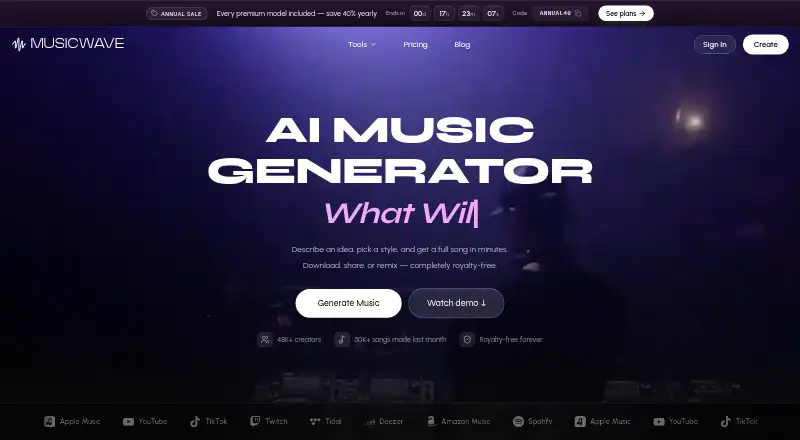
What MusicWave.ai is
MusicWave.ai is a web-based song generator and stem-splitting tool. Users describe an idea to generate a song with lyrics, melody, and arrangement; Starter supports tracks up to 8 minutes. Stem Splitter separates vocals, drums, bass, and instruments into aligned stems. Users can upload common formats such as MP3 and WAV, and export audio in either format. The free plan gives 10 signup credits, enough for up to 2 song generations, but access is streaming-only, has no downloads, and is for personal use. Starter costs $5.99 a month and is also for personal use. Paid plans provide commercial rights to created songs, and Pro lists a commercial license. Annual plans offer 40% off with code ANNUAL40; unused monthly installments remain until annual renewal, while unused subscription credits pause for 90 days after a subscription ends. The page lists Spotify, Apple Music, YouTube, TikTok, Twitch, Tidal, Deezer, and Amazon Music as destinations. Multi-seat, classroom, and studio pricing is available by contacting MusicWave.
Good
- Free signup includes 10 credits
- Generates songs with lyrics, melody, and arrangement
- Stem Splitter separates four instrument groups
- Exports MP3 and WAV audio
Watch out
- Free access does not include downloads
- Free plan is limited to personal use
- Starter is also personal-use only
Who it suits
MusicWave.ai suits people who want to generate songs from ideas or separate existing audio into stems in a web browser. Creators needing downloads or commercial rights should review the paid-plan terms.
Verdict
MusicWave.ai combines song generation with stem separation and MP3 or WAV export. The free tier is limited to streaming and personal use, while commercial rights are tied to paid plans.
Plans and prices
From MusicWave.ai's own pricing page, checked 28 Sep 2026.
| Plan | Price | What it gives you |
|---|---|---|
| Free | Free | 10 credits on signup; streaming only and personal use only · 10 credits · 2 song generations · No credit card required |
| Starter | $5.99 a month | Personal use only; cancel anytime · 1,000 credits per month · ~200 songs · 8 minutes · Cancel anytime |
| Pro | $14.99 a month | Includes commercial license; cancel anytime · 3,000 credits per month · ~600 songs · Cancel anytime |
| Creator | $29.99 a month | Includes priority email support; cancel anytime · 7,500 credits per month · ~1,500 songs · Cancel anytime |
The facts
Each one read from MusicWave.ai's own pages, with the date it was checked.
What it does
- Annual discount
- Annual plans offer 40% off with code ANNUAL40.checked 28 Sep 2026
- Audio formats
- Users can upload common audio formats such as MP3 and WAV.checked 28 Sep 2026
- Audio upload
- Yeschecked 22 Sep 2026
- Commercial rights
- Paid plans provide commercial rights to created songs; Pro lists a commercial license.checked 28 Sep 2026
- Commercial use
- Yeschecked 22 Sep 2026
- Credit pause
- Unused subscription credits pause for 90 days after subscription ends.checked 28 Sep 2026
- Credit rollover
- On annual plans, unused monthly installments remain available until annual renewal.checked 28 Sep 2026
- Maximum track length
- 8checked 22 Sep 2026
- Paid from
- 6.49checked 22 Sep 2026
- Song generation
- Users describe an idea and generate a full song with lyrics, melody, and arrangement.checked 28 Sep 2026
- Stem export
- Yeschecked 22 Sep 2026
- Stem splitter
- Stem Splitter isolates vocals, drums, bass, and instruments into aligned stems.checked 28 Sep 2026
- Support levels
- Creator includes priority email support; the page also lists support and troubleshooting resources.checked 28 Sep 2026
- Track length
- Starter supports full-length songs up to 8 minutes.checked 28 Sep 2026
- Vocal generation
- Yeschecked 22 Sep 2026
The company
- Company identity
- The footer identifies the company as MusicWave, Inc., copyright 2026.checked 28 Sep 2026
Money
- Free plan
- Yeschecked 22 Sep 2026
- Free tier credits
- The free plan gives 10 credits on signup, enough for up to 2 song generations.checked 28 Sep 2026
- Free tier limits
- Free users have streaming-only access, no downloads, and personal use only.checked 28 Sep 2026
- Free tier models
- Free access includes v4.5-all, MiniMax, and MusicGen.checked 28 Sep 2026
- Team plans
- Multi-seat, classroom, and studio pricing is available by contacting MusicWave.checked 28 Sep 2026
Where it runs
- Platform destinations
- The page lists Spotify, Apple Music, YouTube, TikTok, Twitch, Tidal, Deezer, and Amazon Music.checked 28 Sep 2026
- Supported platforms
- webchecked 22 Sep 2026
The full review of MusicWave.ai
MusicWave.ai is a web app for generating complete songs and separating uploaded audio into stems. It is best for creators who want both jobs in one workflow; its free tier is a limited preview rather than a practical option for downloading or commercial projects.
Overview
Describe an idea and MusicWave.ai builds a song with lyrics, melody, and arrangement. It also handles existing recordings through stem separation, making it a useful two-in-one option for creators who alternate between drafting music and working with recorded audio. If you need only generation or only stem extraction, a more focused tool may suit you better.
Key features
Song generation and stem separation
MusicWave.ai can generate tracks up to eight minutes, enough room for a full-length song rather than just a short sketch. Its Stem Splitter isolates vocals, drums, bass, and instruments into aligned stems. Uploads accept common formats including MP3 and WAV, and exports are available as MP3 or WAV. Those formats cover familiar uses, but the export selection is narrow.
Models and destinations
Free access includes v4.5-all, MiniMax, and MusicGen, so users can try more than one generation model without paying. The service lists Spotify, Apple Music, YouTube, TikTok, Twitch, Tidal, Deezer, and Amazon Music as destinations. Paid plans provide commercial rights to created songs; Pro specifically includes a commercial license.
Pricing
MusicWave.ai is freemium, with monthly plans that can be canceled at any time. The free plan costs nothing, requires no credit card, and provides 10 signup credits—enough for up to two song generations. It is limited to streaming and personal use, with no downloads, so it works for evaluation rather than finished deliverables.
- Free: 10 credits at signup, up to two generations, streaming-only access, and personal use only. Choose it to explore the service; the lack of downloads and commercial rights rules it out for publishing or client work.
- Starter: $5.99 a month for 1,000 credits (about 200 songs), personal use only, and tracks up to eight minutes. It is the lowest-cost paid plan for regular personal creation, but it does not provide commercial rights.
- Pro: $14.99 a month for 3,000 credits (about 600 songs) and a commercial license. This is the natural fit for creators who need rights to use generated songs commercially.
- Creator: $29.99 a month for 7,500 credits (about 1,500 songs) and priority email support. It suits high-volume users who also value prioritized email help; the extra credits and support are the stated advantages over Pro.
Annual plans offer 40% off with code ANNUAL40. Unused monthly installments on annual plans remain available until annual renewal, while unused subscription credits pause for 90 days after a subscription ends. Multi-seat, classroom, and studio plans use custom pricing through MusicWave.
Platforms
MusicWave.ai runs on the web. That suits browser-based work, but it is not a choice for someone seeking a native mobile app.
Who it's for
MusicWave.ai is strongest for independent creators who want to generate full songs, separate parts from uploaded recordings, and export in standard MP3 or WAV. The free plan is useful for trying generation, Starter serves personal projects, and Pro is the better fit when commercial rights matter. It is less suitable for mobile-first users, people who need more export formats, or anyone who expects free downloads.
Pros and cons
- Pro: Song generation and aligned four-part stem separation sit in one web app, reducing the need to switch tools for those tasks.
- Pro: Eight-minute tracks support complete songs, and MP3 and WAV cover common upload and export workflows.
- Pro: Annual credit rollover and a 90-day post-cancellation pause give subscribers flexibility around unused credits.
- Con: The free tier offers no downloads and limits use to personal projects, so it cannot serve as a no-cost publishing workflow.
- Con: Starter remains personal-use only; commercial rights begin with paid plans, with Pro explicitly including a commercial license.
- Con: Web is the only supported platform, and export choices stop at MP3 and WAV.
Alternatives
For another broad set of music-generation options, browse AI Music Generators; for audio transformation rather than song creation, see AI Music Remixing Tools.
- Suno is worth considering if Android or iOS access matters more than MusicWave.ai's web-only setup; it also offers a free plan and a paid Pro plan at $8 a month.
- Eleven Music is another web-based freemium option, with a free plan and a $6 a month Starter tier.
- SongUp AI may suit someone who prefers a free-forever offer with three instant songs, or a Pro plan at $9.99 a month.
- Treblo is an alternative if mobile apps or a broader set of download formats are priorities; it supports web, iOS, and Android, with its free plan offering downloads in OGG, MP3, WAV, and FLAC.
- Wubble may appeal to users prioritizing generation minutes over a large download allowance: its free plan offers unlimited generation minutes but only three downloads total.
- Udio is another free option, with iOS and web access, 10 daily credits, and up to three 130-second songs per day on its free plan.
- Melody Genie offers web and Android access, with a free plan providing 14 shared credits per month and three full AI songs.
- Mubert is an alternative to consider for mobile access; it supports web, iOS, and Android.
- Meditation apps is a separate category for readers looking for meditation software.
Verdict
Choose MusicWave.ai if you want song generation and stem separation together, especially when eight-minute tracks and MP3 or WAV exports fit your workflow. The main reason to look elsewhere is its limited free tier: downloads and commercial use require paid access, while the only stated platform is web.
Alternatives to MusicWave.ai
- 1
Lacuna
Free planiOSWebAPIExtension8.2From $9.50 a month - 2

ImagineArt
Free planAPI7.1Free plan - 3
Neume
AndroidiOSWebAPI7.1From $3.99 a month - 4
Kleep
Free planWeb6.9Free plan - 5

MusiCraft Stem Splitter
Free planWeb6.9From $89.88 a year - 6
GoCrazyAI
Web6.5From $25 a month