
AceStep AI Music Remixer
AceStep AI Music Remixer turns a prompt and selected settings into a song arrangement with drums, bass, harmonies and vocals.
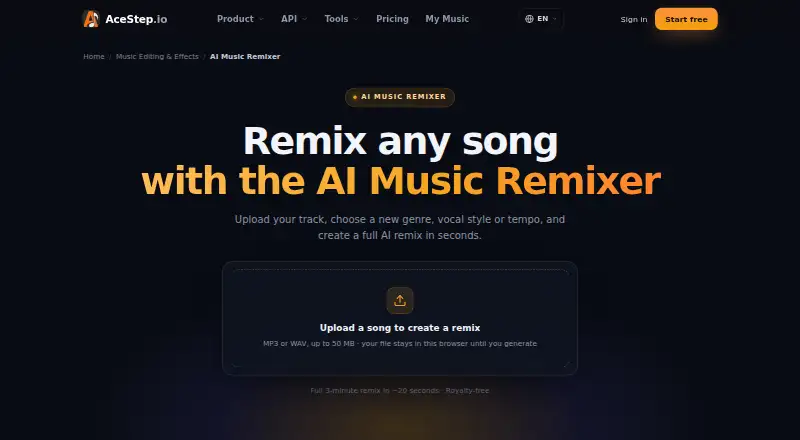
What AceStep AI Music Remixer is
AceStep AI Music Remixer turns a prompt and selected settings into a song arrangement with drums, bass, harmonies and vocals. Set a genre, key, BPM and energy level, then choose male, female or duet vocals. The remixer can organize a track into sections such as an intro, build, drop, breakdown, climax and outro. It accepts MP3 and WAV uploads up to 50 MB; the page says the file stays in the browser until generation. It offers MP3 and WAV downloads and describes its stereo mix as royalty-free. Lyrics and vocals are supported in English, Spanish, Japanese, Korean and Chinese. The page says a 2–3 minute remix typically renders in roughly 20 seconds, depending on duration and quality settings. Stem upload, mashup mode and stem export are listed as coming soon.
Good
- Choose genre, key, BPM and energy.
- Select male, female or duet vocals.
- Downloads are available as MP3 or WAV.
- Supports five listed lyric and vocal languages.
Watch out
- Free plan is limited to personal projects.
- Stem upload, mashup mode and stem export are coming soon.
- Uploads are limited to 50 MB.
Who it suits
It suits DJs, producers, creators and remix fans who want to make genre-based arrangements, as well as podcasters, indie artists and brands. Users planning monetized or client work should note that the free plan is limited to personal projects.
Verdict
AceStep offers prompt-based remixing with controls for style, vocals and arrangement structure. Free use is personal only; paid plans start at $9/mo, while the listed Studio plan includes client and agency work.
Plans and prices
From AceStep AI Music Remixer's own pricing page, checked 14 Oct 2026.
| Plan | Price | What it gives you |
|---|---|---|
| Free | Free | 10 credits/day · generations up to 120 seconds · personal use only |
| 50 Credits | $7, paid once | 50 credits · credits never expire · One-time payment |
| Credit pack | $7, paid once | 50 credits · advertised as about 10 more songs · no subscription · one-time payment |
| Creator | $9 a month | 100 credits/month · about 40 standard song versions · up to 4 minutes · social monetization · 2 concurrent generations · monthly |
| Pro / Artist | $19 a month | 300 credits/month · about 120 standard song versions · DSP distribution rights · batch up to 5 · 4 concurrent generations · monthly |
| Studio | $49 a month | 900 credits/month · about 360 standard song versions · client and agency work · 3 team seats · dedicated support and API · 8 concurrent generations · monthly |
The facts
Each one read from AceStep AI Music Remixer's own pages, with the date it was checked.
What it does
- API access restriction
- API-key creation and live calls require an active Studio subscription priced at $49 per month on the API page.checked 14 Oct 2026
- API capabilities
- The API page lists endpoints for generation, extension, section replacement, adding stems, cover creation and lyric generation.checked 14 Oct 2026
- Arrangement
- It can generate a remix structure with an intro, build, drop, breakdown, climax and outro.checked 3 Oct 2026
- Commercial use
- The remixer FAQ says generated remixes are original and royalty-free for personal and commercial projects, including ads, videos and releases.checked 3 Oct 2026
- Content restrictions
- The acceptable-use policy prohibits copyright infringement, deceptive deepfakes, hate speech, explicit sexual content and graphic violence.checked 14 Oct 2026
- Developer documentation
- The repository provides guides for Gradio, Python, REST API, CLI, installation, GPU compatibility, troubleshooting, benchmarking and LoRA training.checked 14 Oct 2026
- Exports
- The remixer page lists MP3 and WAV downloads and describes the stereo mix as royalty-free.checked 3 Oct 2026
- Flow editing
- Studio can retake verses, swap hooks and extend outros without regenerating the entire song.checked 14 Oct 2026
- Generation speed
- The product advertises a full three-minute remix in about 20 seconds.checked 14 Oct 2026
- Genre and language coverage
- The service claims more than 15 genres and vocals in at least 10 languages, including English, Spanish, Japanese and Chinese.checked 14 Oct 2026
- Independent paper date
- The ACE-Step 1.5 technical paper was submitted to arXiv on January 31, 2026 and revised on February 6, 2026.checked 14 Oct 2026
- Independent research result
- The ACE-Step 1.5 arXiv paper reports generation under two seconds on an A100, under ten seconds on an RTX 3090, operation below 4 GB VRAM and LoRA personalization from a few songs.checked 14 Oct 2026
- Input-rights limitation
- Terms place responsibility on users to have rights or permissions for uploaded audio, lyrics, prompts and other source materials.checked 14 Oct 2026
- Integrations and destinations
- Paid plans list distribution destinations including Spotify, Apple Music, YouTube Music and SoundCloud; the site also advertises TikTok and other social publishing use.checked 14 Oct 2026
- Integrations and distribution
- The pricing page lists Spotify, Apple Music, YouTube Music and SoundCloud distribution rights with Pro / Artist, and client project uses with Studio.checked 3 Oct 2026
- Intended users
- The page names DJs, producers, content creators, TikTok and Reels editors, podcasters, indie artists, brands and remix fans.checked 3 Oct 2026
- Languages
- The model supports lyrics and vocals in English, Spanish, Japanese, Korean and Chinese, with more languages planned.checked 3 Oct 2026
- Limitations
- Stem upload, mashup mode and stem export are listed as coming soon.checked 3 Oct 2026
- Limit: audio artifacts
- The same independent reviewer reported noticeable vocal artifacts and weaker compositional moments in personal tests compared with leading proprietary tools.checked 14 Oct 2026
- Limit: cloud concurrency
- A July 8, 2026 podcast report said its tests saw four concurrent requests succeed, half of eight succeed and all sixteen fail with HTTP 504 errors.checked 14 Oct 2026
- Limit: fine-grained control
- The reviewer said musicians and prosumers still need much more precise hands-on control over generation.checked 14 Oct 2026
- Local model limits
- The repository says 2B models need roughly 4.7 GB for weights, while XL models need at least 12 GB VRAM with offload or 20 GB without it.checked 14 Oct 2026
Where it runs
- Browser multitrack editor
- Studio layers generated songs, user uploads and separated stems on a timeline with trimming, clip movement, volume, panning and stereo export.checked 14 Oct 2026
Money
- Free use limit
- The pricing page limits free generations to personal projects and excludes monetization, client work, DSP distribution and Content ID registration.checked 3 Oct 2026
The full review of AceStep AI Music Remixer
Overview
AceStep AI Music Remixer turns an uploaded track and musical choices into a newly arranged song. It best suits creators who want to shape a remix by genre, tempo and vocal style without constructing the arrangement themselves. Its strongest case is a guided, section-aware workflow; its main drawback is that commercial permissions depend on the plan.
Key features
Users can set genre, key, BPM and energy, then choose male, female or duet vocals. The generated arrangement can include an intro, build, drop, breakdown, climax and outro, giving editors a way to request a sense of progression rather than only a genre change. It generates drums, bass, harmonies and vocals, but does not offer stem uploads, mashup mode or stem exports yet, so it is not the right fit for detailed stem-level production or combining tracks.
Uploads may be MP3 or WAV files up to 50 MB. The remixer says the file stays in the browser until generation, a useful privacy boundary for the upload step. It says a typical 2–3 minute remix renders in roughly 20 seconds, with duration and quality settings affecting the time. Downloads are MP3 and WAV; the stereo mix is described as royalty-free. Lyrics and vocals are supported in English, Spanish, Japanese, Korean and Chinese.
The FAQ describes generated remixes as original and royalty-free for personal and commercial projects, including ads, videos and releases. That broad permission does not override the free plan’s narrower terms: free generations are limited to personal projects and exclude monetization, client work, distribution to digital service providers and Content ID registration.
Pricing
The Free plan costs nothing and provides 10 credits per day, supports tracks up to 120 seconds and is personal-use only. It is a useful way to explore the workflow, but the short duration and rights restrictions make it unsuitable for monetized or client work.
The 50 Credits plan is $7, paid once, a one-time payment for 50 credits that never expire. It avoids a monthly commitment, but the plan details do not include the longer duration, monetization or distribution rights offered by the monthly tiers.
Creator costs $9 a month, billed $9 / month; the page also shows $12. It includes 100 credits, tracks up to 4 minutes, social monetization and two concurrent generations. This is the practical entry point for creators earning from social content, though it does not include the stated DSP distribution rights.
Pro / Artist costs $19 a month, billed $19 / month; the page also shows $24. Its 300 credits, four-minute limit, WAV export, four concurrent generations, priority support and DSP distribution rights make it a better fit for artists preparing releases. Studio costs $49 a month, billed $49 / month; the page also shows $62. It raises the allowance to 900 credits and eight concurrent generations, and adds client and agency work, three team seats, dedicated support and API access. That is the tier for collaborative commercial work; the added capacity and seats matter more than the personal creator workflow.
Platforms
AceStep is available on web and through an API. The listed workflow accepts browser uploads and offers MP3 and WAV downloads.
Who it's for
The product names DJs, producers, content creators, TikTok and Reels editors, podcasters, indie artists, brands and remix fans as intended users. Its controls and section-based arrangement are especially relevant to creators who need a shaped backing track quickly. Those distributing releases should consider Pro / Artist, while agencies and client-facing teams need Studio. Free use is confined to personal projects, and the absence of mashups and stem handling rules it out for workflows built around combining or editing separate parts.
Pros and cons
- Pros: Genre, key, BPM, energy and vocal choices give meaningful direction over the result.
- Pros: A multi-section arrangement can provide deliberate pacing for edits and releases.
- Pros: The free tier refreshes to 10 credits daily, and the one-time 50-credit option has no expiry.
- Cons: Free generations cannot be monetized, used for client work, distributed to DSPs or registered with Content ID.
- Cons: No stem upload, mashup mode or stem export limits production flexibility.
- Cons: Creator, Pro / Artist and Studio cap tracks at four minutes, and Creator lacks the stated DSP rights.
Alternatives
AI Music Remixing Tools is the broader category directory for comparing options. Choose Fadr if you want a remix tool with vocal, melody, drum and bass separation, MIDI detection and apps beyond the web; its free Basic tier includes MP3 downloads and Remix Maker. StemForge is the alternative for people who want open-source software running locally on their own hardware, with no subscription or per-track fees.
AetherWave Music Studio is another freemium web and API option. MeloLab AI Remix is a web alternative with a free tier limited to eight lifetime credits and personal use. MusicWave.ai offers a web free tier with 10 credits for two generations, streaming-only output and personal use. AI Remix Music Generator has a web free tier with 10 sign-up credits and one job at a time, at two credits per remix. RiffGen Remixer AI offers five free generations per month on the web. Loudly is a web alternative with a 30-second free-track limit and paid tiers for downloads and commercial licensing.
Verdict
AceStep is a strong fit for creators who want to steer a full, sectioned remix with practical musical controls and can choose a plan that matches their rights needs. Its clearest reason to choose it is the combination of arrangement structure, vocal options and several commercial-use tiers. Look elsewhere if you need mashups, stem-level control or a free path to monetized and client work.
Getting started
- Open the AceStep AI Music Remixer website or use its API.
- Choose the Free plan or select a paid option.
- Upload an MP3 or WAV file up to 50 MB.
- Set genre, key, BPM and energy, then choose a vocal type.
- Generate the arrangement and download it as MP3 or WAV.
Limits worth knowing
The Free plan provides 10 credits per day, supports tracks up to 120 seconds and permits personal use only. It excludes monetization, client work, DSP distribution and Content ID registration.
Questions
Is there a free plan?
Yes. Free provides 10 credits per day, tracks up to 120 seconds and personal use only.
What do the paid plans cost?
The 50 Credits option costs $7.00 USD as a one-time payment. Monthly plans are Creator at $9.00 USD, Pro / Artist at $19.00 USD and Studio at $49.00 USD.
Which platforms are supported?
The listed platforms are web and API.
Can I use generated remixes commercially?
The FAQ describes generated remixes as royalty-free for personal and commercial projects. The Free plan is restricted to personal projects; paid plans list social monetization, DSP distribution rights or client and agency work, depending on plan.
Which plan includes distribution rights?
Pro / Artist lists DSP distribution rights, including Spotify, Apple Music, YouTube Music and SoundCloud. Studio lists client project uses.
Who makes AceStep?
The About page describes ACE-Step’s mission as making AI music creation accessible and gives [email protected] for questions or collaboration.
Alternatives to AceStep AI Music Remixer
- 1

Loudly
Free planAndroidiOSWebAPI8.3From $96 a year - 2

Soundverse AI Beat Maker
Free planAndroidiOSWebAPI8.2Free plan - 3

Suno
Free planAndroidiOS8.0From $8 a month - 4

AIVA
Free planWebLinuxmacOSWindows7.7From €11 a month - 5

Ecrett Music
Free planAndroidiOSWeb7.7From $4.99 a year - 6

Topview AI
AndroidiOSWebAPI7.5