
Steam Community
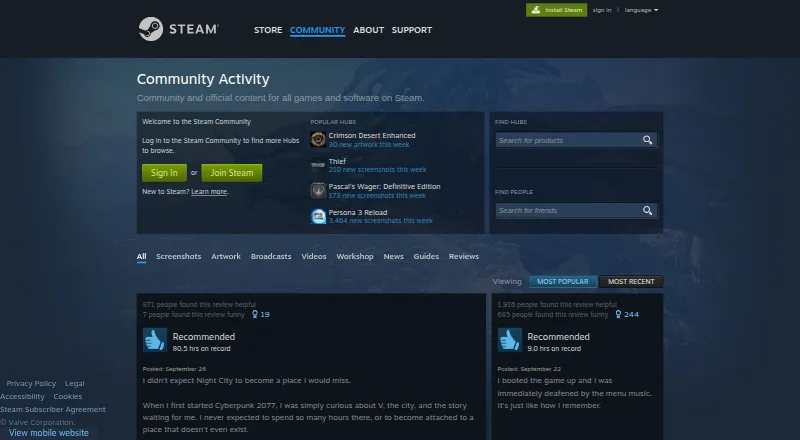
Steam Community is the social area for Steam users to share entertainment and ideas and connect with other players.
What Steam Community is
Steam Community is the social area for Steam users to share entertainment and ideas and connect with other players. Game hubs bring discussions, uploaded material, and game updates together. Users can browse screenshots, artwork, broadcasts, videos, Workshop items, news, guides, and reviews, as well as achievements and custom recommendations. Steam Chat supports text and voice conversations with friends or groups and can include videos, Tweets, and GIFs. Steam Broadcast lets users stream gameplay to friends or the community. Workshop offers player-created mods and cosmetics for nearly 1,000 supported games. The Steam mobile app for iOS and Android provides access to Community, Discussions, Market, Workshop, broadcasts, friends, groups, screenshots, and inventory. Steam Community is free, but viewing more Hubs requires a Steam account. The client supports 28 languages and counting. Accounts are personal and generally cannot be sold or transferred; users under 13 may not subscribe, and local laws may set a higher account-creation age.
Good
- Game hubs gather discussions, content, and updates.
- Includes screenshots, guides, news, and reviews.
- Chat supports text, voice, videos, Tweets, and GIFs.
- Mobile app provides access to community features.
- Client supports 28 languages and counting.
Watch out
- Accessing more Hubs requires a Steam account.
- Users under 13 may not subscribe.
- Accounts generally cannot be sold or transferred.
Who it suits
Steam Community suits players who want to discuss games, share creations, follow updates, or connect with friends. Its mobile app offers access to community features and related Steam areas on iOS and Android.
Verdict
Steam Community brings player discussions and shared game content together, with mobile access to many community areas. It is free, but access to more Hubs requires a Steam account and age limits apply.
Plans and prices
From Steam Community's own pricing page, checked 30 Sep 2026.
| Plan | Price | What it gives you |
|---|---|---|
| Steam Community | Free | Community features require a Steam account to access more Hubs |
The facts
Each one read from Steam Community's own pages, with the date it was checked.
What it does
- Audience
- Steam is not intended for children under 13, and users under 13 may not become subscribers.checked 29 Sep 2026
- Broadcasting
- Steam Broadcast lets users stream gameplay live and share it with friends or the community.checked 30 Sep 2026
- Chat
- Steam Chat supports text and voice conversations with friends or groups, plus videos, GIFs, and other media.checked 30 Sep 2026
- Community content
- The Community page features game hubs and content categories including screenshots, artwork, broadcasts, videos, Workshop items, news, guides, and reviews.checked 29 Sep 2026
- Community features
- Steam users can browse screenshots, artwork, broadcasts, videos, Workshop content, news, guides, and reviews.checked 30 Sep 2026
- Eligibility
- Valve sets the minimum age to create a Steam User Account at 13, with parental consent required where local laws set a higher age of consent.checked 30 Sep 2026
- Game hubs
- Game Hubs bring together discussions, uploaded content, and updates for a game.checked 30 Sep 2026
- Integrations
- Valve says Steam accounts can be linked to third-party accounts with user consent, and Steamworks API makes some account information available to games and partners.checked 30 Sep 2026
- Languages
- Steam's client supports 28 languages and counting.checked 29 Sep 2026
- Mobile
- The Steam mobile app is available on iOS and Android.checked 29 Sep 2026
- Mobile access
- Steam says its mobile app provides access to Community, Discussions, Market, Workshop, broadcasts, friends, groups, screenshots, and inventory.checked 30 Sep 2026
- More features
- Steam lists achievements, reviews, and custom recommendations among its features.checked 29 Sep 2026
- Notable limit
- Steam accounts are personal and may not be sold or transferred, subject to exceptions expressly permitted by Valve.checked 29 Sep 2026
- Privacy
- Valve says it does not sell personal data and provides a Privacy Dashboard for users to access, rectify, or delete personal data.checked 30 Sep 2026
- Privacy compliance
- Valve's privacy policy says it complies with applicable privacy laws including CCPA, GDPR, and UK GDPR, and participates in the EU-U.S., UK, and Swiss-U.S. Data Privacy Frameworks.checked 29 Sep 2026
- Privacy safeguards
- Valve lists data minimization, pseudonymization, industry-standard encryption, and need-to-know data access among its safeguards.checked 29 Sep 2026
- Purpose
- Steam Community provides community and official content for games and software on Steam.checked 30 Sep 2026
- Security
- Valve lists pseudonymization, industry-standard encryption, data minimization, and need-to-know access among its data protection measures.checked 30 Sep 2026
- Support
- Steam Support guides users through self-service steps or lets them send a help request to the support team.checked 30 Sep 2026
- Workshop
- Steam Workshop lets users create, discover, and download player-created mods and cosmetics for nearly 1,000 supported games.checked 30 Sep 2026
The company
- Founded
- 1996checked 23 Sep 2026
- Headquarters
- Bellevue, Washington, United Stateschecked 23 Sep 2026
- Steam account
- Valve says creating a Steam User Account requires an email address, country of residence, username, and password, and does not require a real name.checked 30 Sep 2026
Where it runs
- Platforms
- Steam says its mobile app is available for iOS and Android, and its desktop client supports Windows, Mac, and Linux titles.checked 30 Sep 2026
The full review of Steam Community
Overview
Steam Community is the social layer around Steam games, for players who want to follow game discussions, share creations, and keep in touch with friends in one place. Its strength is the breadth of activity organized around game hubs; that focus makes it a natural choice for Steam players, but a less direct fit for people seeking a standalone community service.
Steam Community is free, with more Hubs available through a Steam account. Account creation requires an email address, country of residence, username, and password, but not a real name. Steam accounts are personal and cannot be sold or transferred except where Valve expressly permits it. Steam is not intended for children under 13, and local laws may require parental consent at a higher age.
Key features
Game hubs and shared content
Each game hub brings together discussions, player uploads, and updates. Across the Community, players can browse screenshots, artwork, broadcasts, videos, Workshop items, news, guides, and reviews. That range makes the service useful for keeping up with a particular game and finding community-created material without moving between separate destinations.
Chat and broadcasting
Steam Chat supports text and voice conversations with friends or groups, and messages can include videos, Tweets, and GIFs. Steam Broadcast lets players stream gameplay to friends or the wider community. These tools suit people who want to share and talk with their Steam connections; they are less compelling for anyone looking for a general-purpose chat service.
Workshop and discovery
Steam Workshop lets players create, find, and download mods and cosmetics for nearly 1,000 supported games. Achievements, reviews, and custom recommendations add ways to follow and discover games. Workshop's appeal depends on whether the games a player cares about support it, but for those titles it gives community-made additions a clear home.
Mobile access and privacy
The iOS and Android app provides access to Community, Discussions, Market, Workshop, broadcasts, friends, groups, screenshots, and inventory. That makes Steam's social and shared-content features reachable on mobile as well as on web, Windows, macOS, and Linux. Valve says it does not sell personal data, provides a Privacy Dashboard for access, correction, or deletion, and uses safeguards including encryption, pseudonymization, data minimization, and need-to-know access.
Pricing
Steam Community is free. The Steam Community plan costs nothing; there is no free trial because the service is already free. The free plan provides the community features, though accessing more Hubs requires a Steam account. There are no paid Community tiers described here, so the main trade-off is account access rather than a choice between feature bundles.
Platforms
Steam Community is available on Android, iOS, Linux, macOS, web, and Windows. The mobile app covers community areas as well as friends, groups, broadcasts, and inventory. Steam's client supports 28 languages and counting.
Who it's for
Steam Community is best for players who already use Steam and want game-specific conversation, shared creations, chat, and broadcasts connected to their games. It also suits players looking for mods and cosmetics in Workshop-supported titles. Anyone under 13 is ineligible for a Steam account, and players who want community access without creating an account may find the account requirement a drawback.
Pros and cons
Pros
- Game hubs combine discussion, updates, and uploads. Players can follow a game's activity and community content together.
- Broad content and communication tools. Screenshots, guides, reviews, Workshop items, chat, and broadcasts support different kinds of participation.
- Mobile access spans many community areas. The iOS and Android app reaches discussions, Workshop, broadcasts, friends, groups, and more.
- Free access. Community features have no subscription price.
Cons
- More Hubs require a Steam account. The service is less convenient for people who do not want a Steam account.
- Workshop support varies by game. Its mod and cosmetic library is useful only for supported titles.
- Age eligibility excludes children under 13. Local consent rules may set a higher threshold.
Alternatives
Browse the Gaming Community Platforms directory to compare options by category.
- Ascended is an alternative with a free plan for up to 3 communities or groups, plus 720p streaming and uploads; choose it if managing a small number of communities is the priority.
- The100.io offers a free Basic plan with core functionality; consider it when those core features suit your needs.
- Z League is free to download with in-app purchases available; it may suit readers who prefer that model.
- GameTree provides free core LFG features, while personality matching and Steam sync require an account; choose it when finding teammates is the main goal.
- Game Jolt is a free alternative available on Android, iOS, Linux, web, and Windows.
- Speedrun.com offers free core community features; consider it as another community option.
- Enjin Wallet is a free Android and iOS wallet, with network and possible third-party service fees.
- NexGild has a free web plan for one game and up to 30 members, with event scheduling, RSVPs, and 100 MB of media storage; choose it for organizing a smaller game group.
Verdict
Steam Community is the right choice for Steam players who want game hubs, shared content, Workshop creations, and friend connections tied to the games they follow. Its free access and range of community formats make it a practical home for that activity. Look elsewhere if you need a community service independent of Steam or cannot meet its account age requirements.
Getting started
- Visit the Steam Community website
- Create a Steam User Account with an email address, country of residence, username, and password
- Sign in to access more Hubs
- Use the Steam mobile app on iOS or Android for mobile community access
Limits worth knowing
Steam Community is free, but accessing more Hubs requires a Steam account. Users under 13 may not subscribe, and local laws may set a higher age of consent for account creation.
Questions
Is Steam Community free?
Yes. It has a free plan, though access to more Hubs requires a Steam account.
Which platforms are supported?
Steam Community lists Android, iOS, Linux, macOS, web, and Windows. The Steam mobile app is available on iOS and Android.
What information is needed to create an account?
Valve says account creation requires an email address, country of residence, username, and password, but not a real name.
Can I sell or transfer my Steam account?
Accounts are personal and may not be sold or transferred, except where Valve expressly permits it.
Does Steam Community have Workshop content?
Yes. Steam Workshop provides player-created mods and cosmetics for nearly 1,000 supported games.
Who makes Steam Community?
Steam Community, founded in 1996, is headquartered in Bellevue, Washington, United States.
Alternatives to Steam Community
- 1

GameTree
Free planAndroidiOSWebmacOS8.0From $9.99 a month - 2
Ascended
Free planAndroidiOSWebWindows7.4From $4.99 a month - 3

The100.io
Free planAndroidiOSWeb7.2Free plan - 4
Z League
Free planAndroidiOSWeb7.1Free plan - 5

Toornament
Free planWebAPI6.8€19 one-time - 6
TrueAchievements
Free planWeb6.8From $39.99 a year