Ascended
Ascended is a gaming social platform built around voice, communities, clips, parties, progression and live game activity.
What Ascended is
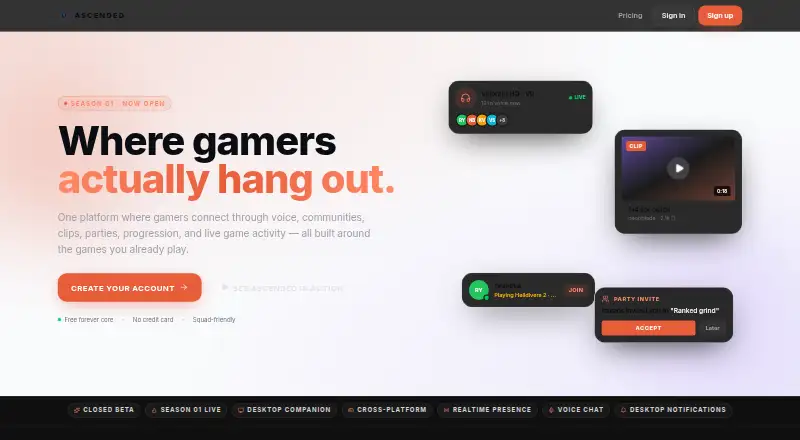
Ascended is a gaming social platform built around voice, communities, clips, parties, progression and live game activity. Its feed brings together clips, photos, LFG listings and posts, and users can join persistent communities with channels and events. Voice rooms and parties can carry across games; users can also livestream to friends with chat, reactions and party watch. A Windows desktop companion advertises automatic game detection, screenshots, an in-game overlay and a 30-second instant replay buffer. Captured clips stay on the PC unless users choose to share them to the cloud. The free plan allows up to three communities or groups and 720p streaming and uploads; Ascended Plus costs $4.99 per month and allows up to 10 communities or groups with bigger upload limits. Ascended lists a Windows desktop app and browser-based home-screen installation for iPhone, iPad and Android. Its privacy policy is labeled a private-beta placeholder, and some moderation tools remain placeholders. During beta, deleting an account requires a manual support request.
Good
- Voice rooms and parties carry across games
- Feed includes clips, photos, LFG and posts
- Desktop app includes a 30-second replay buffer
- Clips remain on the PC unless shared
Watch out
- macOS and Linux are listed as coming soon
- Privacy policy is a private-beta placeholder
- Some moderation tools are still placeholders
- Beta account deletion requires manual support request
Who it suits
Ascended is presented for gamers, squads, creators and communities looking to connect through voice, posts, clips and shared activity. The desktop companion may suit Windows users who want local clip and screenshot capture alongside the social features.
Verdict
Ascended combines gaming communities and social features with a Windows desktop capture companion. Readers should note that its privacy policy and some moderation tools are still placeholders during beta.
Plans and prices
From Ascended's own pricing page, checked 2 Oct 2026.
| Plan | Price | What it gives you |
|---|---|---|
| Free | Free | Create up to 3 communities/groups · 720p streaming and uploads · $0 forever |
| Ascended Plus | $4.99 a month | Up to 10 communities/groups · Bigger upload limits · $4.99/mo |
| Squad Plan | $14.99 a month | Includes 5 squad members · Up to 25 communities/groups · $14.99/mo |
| Founder | $300, paid once | Lifetime Ascended Plus · Lifetime Founder badge and profile effects · $300 one-time |
The facts
Each one read from Ascended's own pages, with the date it was checked.
What it does
- Account controls
- Users can edit their profile, delete their account, and export their data in Settings; during beta, account deletion requires a manual support request.checked 2 Oct 2026
- Audience
- The maker presents Ascended as built for gamers, squads, creators, and communities.checked 2 Oct 2026
- Capture and storage
- The desktop companion captures clips and screenshots, and clips remain on the PC unless users choose to share them to the cloud.checked 2 Oct 2026
- Communities
- Communities are persistent gaming hubs with channels, events, supporters, and culture.checked 2 Oct 2026
- Desktop availability
- The download page lists a Windows desktop app, version 2.0.7 at 95 MB; it also gives iPhone and iPad Safari and Android Chrome home-screen installation instructions.checked 2 Oct 2026
- Desktop features
- The desktop app advertises automatic game detection, a 30-second instant replay buffer, screenshots, and an in-game overlay.checked 2 Oct 2026
- Desktop operating systems
- The homepage lists Windows 10 / 11 support and says macOS and Linux are coming soon.checked 2 Oct 2026
- Livestreaming
- Users can livestream to friends with built-in chat, reactions, and party watch.checked 2 Oct 2026
- Moderation
- The safety page lists reporting, slow mode, timeout, kick and ban tools, DM controls, and channel permissions, and says some tools are still placeholders during beta.checked 2 Oct 2026
- Privacy
- The privacy page says Ascended collects account details, profile preferences, posted content, and basic device and usage analytics; it says it does not sell data or run third-party ad networks.checked 2 Oct 2026
- Privacy policy status
- The privacy page labels its policy a placeholder for the private beta, not legal advice or a final policy.checked 2 Oct 2026
- Product
- Ascended describes itself as a gaming social platform for connecting through voice, communities, clips, parties, progression, and live game activity.checked 2 Oct 2026
- Social feed
- The social feed includes clips, photos, LFG, and posts, ranked by who users care about.checked 2 Oct 2026
- Voice and parties
- Users can drop into voice rooms and parties that carry across games.checked 2 Oct 2026
The full review of Ascended
Overview
Ascended is a gaming social platform with communities, voice, game activity and a Windows capture companion. It suits squads and creators who want to organize play and share clips in one place. Its broad social toolkit is compelling, though the beta-stage privacy and moderation caveats deserve attention.
Key features
The feed brings clips, photos, looking-for-group posts and updates together, ranked around people users care about. That makes it useful for squads that want to keep up with one another and find players without relying on a separate static group directory.
Voice rooms and parties carry across games, while persistent communities provide channels, events, supporters and their own culture. Together, these features make Ascended better suited to groups building an ongoing home than to players who only need a quick teammate match.
The Windows desktop companion advertises automatic game detection, an in-game overlay, screenshots and a 30-second instant replay buffer. Captures stay on the PC unless users choose to share clips to the cloud, a useful default for players who want control over uploads. Livestreaming to friends adds chat, reactions and party watch.
Safety tools include reporting, slow mode, timeout, kick and ban controls, DM settings and channel permissions, but some remain placeholders during beta. The privacy page says the service collects account details, profile preferences, posted content and basic device and usage analytics; it also says Ascended does not sell data or use third-party ad networks. Users can edit profiles, delete accounts and export data in Settings, although deletion currently requires a manual support request. This is a meaningful limitation for anyone who needs mature, self-serve account controls.
Pricing
The Free plan costs $0 forever and allows up to three communities or groups, with 720p streaming and uploads. It is a sensible starting point for an individual or small group, but the community cap and 720p ceiling constrain larger or more ambitious use.
Ascended Plus costs $4.99/mo and raises the cap to 10 communities or groups while providing bigger upload limits. It fits creators or organizers who have outgrown the free caps; the plan does not state a higher streaming resolution.
The Squad Plan costs $14.99/mo, includes five squad members and permits up to 25 communities or groups. It is aimed at a defined team that wants shared capacity, rather than a solo user who can make do with Plus.
Founder costs $300 one-time and includes lifetime Ascended Plus, a lifetime Founder badge and profile effects. It suits committed users who value the status additions and expect to keep using the service long term, but its upfront cost is substantially higher than a monthly plan.
Platforms
Ascended is available on Android, iOS, web and Windows. The desktop app is listed for Windows 10 and 11; macOS and Linux support is coming soon. Mobile installation instructions use Safari on iPhone and iPad and Chrome on Android to add Ascended to the home screen.
Who it's for
Ascended is best for gamers, squads, creators and communities that want persistent group spaces alongside cross-game voice, events, teammate finding and shared clips. It is less suitable for users who require finalized privacy terms, fully settled moderation controls, or a native desktop app on macOS or Linux today.
Pros and cons
- Pro: Cross-game parties, persistent communities and LFG posts combine group coordination with ongoing social activity.
- Pro: The 30-second replay, screenshots and in-game overlay give Windows players capture tools, with clips kept local unless shared.
- Pro: The free plan supports up to three communities and 720p streaming and uploads, allowing a small group to get started without paying.
- Con: The privacy policy is explicitly a private-beta placeholder, so it is not a finalized policy.
- Con: Some moderation tools are placeholders, and account deletion requires contacting support manually.
- Con: Desktop support is currently Windows-only, limiting the capture companion for macOS and Linux users.
Alternatives
Gaming Community Platforms is a useful category overview for readers comparing community-focused options.
- Steam Community is a free alternative across Android, iOS, Linux, macOS, web and Windows; its community features require a Steam account to access more Hubs.
- The100.io offers a free Basic plan with core functionality and is an alternative to consider for a more focused group-finding option.
- GameTree keeps core LFG features free, with personality matching and Steam sync requiring an account; choose it when teammate finding is the priority.
- Game Jolt is a free alternative available on Android, iOS, Linux, web and Windows.
- WildStack offers free matchmaking, groups, chat and voice on the web, making it an option for browser-based group play.
- Backloggd offers free unlimited game logging, lists, reviews and journal tracking, plus 14 days of recent activity; choose it for tracking a gaming backlog rather than organizing live play.
- Challengermode is a free alternative with Android, iOS, API and web availability; its Developers plan has custom pricing.
- GamerLink is a free alternative for Android and iOS.
Verdict
Choose Ascended if your squad or creator community wants cross-game voice, persistent spaces and a Windows capture companion in one service. Its free tier makes a low-commitment start possible, but anyone who needs finalized privacy terms, dependable self-serve deletion or broader desktop support should look elsewhere for now.
Getting started
- Open the Ascended website.
- Choose Android, iOS, web, or Windows access.
- For iPhone or iPad, follow the Safari home-screen installation instructions; for Android, follow the Chrome instructions.
- For desktop capture features, download the Windows app.
- Choose the Free plan or a paid plan based on community limits and plan features.
Limits worth knowing
The Free plan permits up to three communities or groups and 720p streaming and uploads. Ascended Plus raises the community limit to 10 and offers bigger upload limits; Squad Plan allows up to 25 communities or groups and includes five squad members.
Questions
Is Ascended free?
Yes. The Free plan is $0 forever and allows up to three communities or groups, plus 720p streaming and uploads.
What do paid plans cost?
Ascended Plus is $4.99 per month, Squad Plan is $14.99 per month, and Founder costs $300 one-time.
Which platforms does Ascended support?
Ascended lists Android, iOS, web, and Windows. Its download page gives Safari home-screen instructions for iPhone and iPad and Chrome instructions for Android; the homepage lists Windows 10 and 11 support.
What does the desktop app do?
The Windows app advertises automatic game detection, a 30-second instant replay buffer, screenshots, and an in-game overlay. Clips remain on the PC unless users choose to share them to the cloud.
What account and privacy controls are available?
Users can edit their profile, delete their account, and export data in Settings. During beta, deletion requires a manual support request; the privacy page labels its policy a placeholder for the private beta.
Alternatives to Ascended
- 1

GameTree
Free planAndroidiOSWebmacOS8.0From $9.99 a month - 2

Steam Community
Free planAndroidiOSWebLinux7.3Free plan - 3

The100.io
Free planAndroidiOSWeb7.2Free plan - 4
Z League
Free planAndroidiOSWeb7.1Free plan - 5

Toornament
Free planWebAPI6.8€19 one-time - 6
TrueAchievements
Free planWeb6.8From $39.99 a year