Specmatic
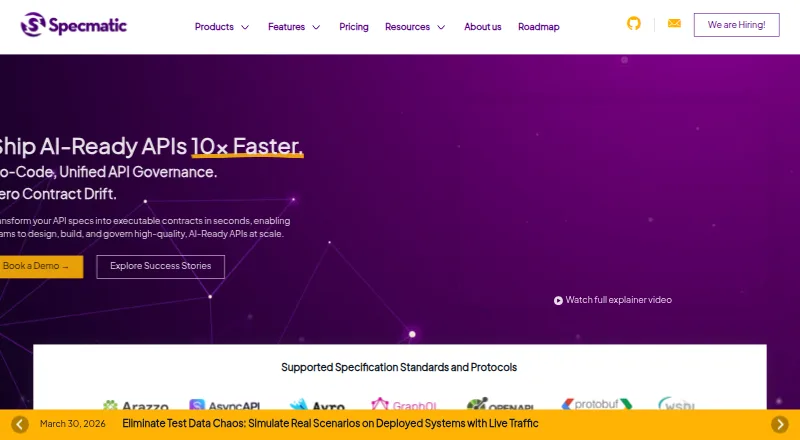
Specmatic turns API specifications into executable contracts used to design, build, and govern APIs.
What Specmatic is
Specmatic turns API specifications into executable contracts used to design, build, and govern APIs. Its suite includes Genie, which generates specifications from plain English; Studio for visual API workflows and contract testing; and Insights for governance and analytics. Listed specification formats include OpenAPI, AsyncAPI, Avro, GraphQL SDL, Protobuf, WSDL, and Arazzo. Protocol support spans HTTP/REST, Kafka, gRPC, GraphQL, Google Pub/Sub, JMS, MQTT, RabbitMQ, SOAP, WebSocket, and MCP. The free Open Source plan includes contract and resilience testing, service virtualization, backward compatibility checks, a proxy server, and a specification coverage report. Enterprise adds Studio, Insights with SaaS or on-premise deployment, and further protocol and workflow capabilities. Specmatic supports Linux, macOS, Windows, and self-hosted environments, with installation options including shell and PowerShell scripts, npm, and pip. Enterprise pricing and included consultation hours vary by seat band.
Good
- Free Open Source plan includes contract testing.
- Supports listed API formats including OpenAPI and AsyncAPI.
- Includes service virtualization and backward compatibility testing.
- Runs on Linux, macOS, Windows, and self-hosted environments.
Watch out
- Advanced Studio and Insights features require Enterprise.
- Enterprise consultation hours vary by seat band.
- Daily CI/CD threshold excess can temporarily block local runs.
Who it suits
Specmatic suits teams that need executable API contracts and testing across listed formats and protocols. The free plan may fit teams seeking the listed core contract-testing features; Enterprise adds governance tools and dedicated email support.
Verdict
Specmatic combines API contract creation, testing, and governance, with a free plan covering several core testing functions. Teams considering Enterprise should check the seat band, protocol needs, and CI/CD limits that apply to their plan.
Plans and prices
From Specmatic's own pricing page, checked 29 Sep 2026.
| Plan | Price | What it gives you |
|---|---|---|
| Open Source (Free) | Free | OpenAPI (REST), WSDL (SOAP), MCP · contract testing · API resilience testing · intelligent service virtualization · backward compatibility testing · proxy server · spec coverage report · standard open source support |
| Enterprise Tier — Next 1,000 Seats | $20 a month | 1,001–2,000 seats · 5,000 CI/CD runs per day · 32 consultation hours included · Billed Annually; page lists $20 per user/month |
| Enterprise Tier — Next 500 Seats | $30 a month | 501–1,000 seats · 2,000 CI/CD runs per day · 16 consultation hours included · Billed Annually; page lists $30 per user/month |
| Enterprise Tier — Next 250 Seats | $40 a month | 251–500 seats · 1,000 CI/CD runs per day · 8 consultation hours included · Billed Annually; page lists $40 per user/month |
| Enterprise Tier — 251–500 Seats | $40 a month | 2,000 CI/CD runs per day · 16 consultation hours included · Billed Annually; page lists $40 per user/month |
| Enterprise Tier — First 250 Seats | $50 a month | Minimum 50 seats · 500 CI/CD runs per day · 4 consultation hours included · Billed Annually; page lists $50 per user/month |
| Enterprise Tier — More than 2,000 Seats | $120 a year | Unlimited CI/CD runs per day · 40 consultation hours included · $120.00 per user per year (= $10.00 per user/month, billed annually) |
| Enterprise Tier — 2,000+ Seats | $120 a year | Unlimited CI/CD runs per day · 80 consultation hours included · $120.00 per user per year (= $10.00 per user/month, billed annually) |
The facts
Each one read from Specmatic's own pages, with the date it was checked.
What it does
- CI/CD licensing
- Enterprise CI/CD agents authenticate through service accounts and do not consume seats; if the daily run threshold is exceeded, CI/CD runs are not blocked, but local runs are temporarily blocked for the rest of that day.checked 29 Sep 2026
- Deployment
- Specmatic Insights is offered as SaaS or on-premise in the Enterprise plan.checked 29 Sep 2026
- Downloads
- The documentation provides Open Source installation methods including shell and PowerShell scripts, npm, and pip, and lists Windows, Linux, and macOS installation options for Enterprise.checked 29 Sep 2026
- Enterprise features
- The Enterprise plan adds Studio, Insights offered as SaaS or on-premise, advanced OpenAPI features, and support for protocols including Kafka, JMS/AMQP, Google Pub/Sub, gRPC, GraphQL, Avro, Redis stubbing, JDBC stubbing, and Arazzo workflow testing.checked 29 Sep 2026
- Products
- Its product suite includes Genie for generating API specifications from plain English, Studio for visual API workflows and contract testing, and Insights for API governance and analytics.checked 29 Sep 2026
- Protocols
- The site lists protocols including HTTP/REST, Kafka, gRPC, GraphQL, Google Pub/Sub, JMS, MQTT, RabbitMQ, SOAP, WebSocket, and MCP.checked 29 Sep 2026
- Purpose
- Specmatic transforms API specifications into executable contracts for designing, building, and governing APIs.checked 29 Sep 2026
- Specifications
- The site lists support for OpenAPI, AsyncAPI, Avro, GraphQL SDL, Protobuf, WSDL, and Arazzo specifications.checked 29 Sep 2026
- Support
- The Open Source plan includes standard open source support, while Enterprise includes dedicated email support with a 24-hour turnaround time.checked 29 Sep 2026
- Testing features
- The Open Source plan includes contract testing, API resilience testing, intelligent service virtualization, backward compatibility testing, a proxy server, and a spec coverage report.checked 29 Sep 2026
The company
- Company history
- Specmatic’s roadmap says it began in 2019.checked 29 Sep 2026
- Company leadership
- The About Us page identifies Naresh Jain as Founder and CEO and Joel Rosario as Co-founder and CTO.checked 29 Sep 2026
The full review of Specmatic
Specmatic is an API contract testing and governance platform built around executable API specifications. It is best suited to teams that want testing tied to API definitions, particularly those working across multiple protocols. The free tier offers a substantial testing toolkit; Enterprise is the route to visual workflows, analytics and broader protocol coverage.
Overview
Specmatic turns API specifications into contracts teams can use in designing, building and governing APIs. Its supported formats include OpenAPI, AsyncAPI, Avro, GraphQL SDL, Protobuf, WSDL and Arazzo, with protocols spanning HTTP/REST, Kafka, gRPC, GraphQL, Google Pub/Sub, JMS, MQTT, RabbitMQ, SOAP, WebSocket and MCP. That breadth matters for organizations whose APIs extend beyond REST, although not all of that protocol coverage is included in the free plan.
The suite includes Genie for generating specifications from plain English, Studio for visual API workflows and contract testing, and Insights for governance and analytics. Enterprise adds Studio and Insights, with Insights offered as SaaS or on-premise. The free plan is therefore more compelling as a testing toolkit than as a complete visual governance environment.
Key features
The Open Source plan bundles contract testing with API resilience testing, intelligent service virtualization, backward compatibility testing, a proxy server and a specification coverage report. That combination gives teams several ways to check API behavior and simulate services without moving to a paid tier. Its format coverage is narrower at this level: the plan names OpenAPI (REST), WSDL (SOAP) and MCP.
Enterprise expands the toolkit with advanced OpenAPI features and protocol support that includes Kafka, JMS/AMQP, Google Pub/Sub, gRPC, GraphQL, Avro, Redis stubbing, JDBC stubbing and Arazzo workflow testing. Database testing and test data management are also supported. This is a stronger fit for teams that need those integrations, but the value depends on using capabilities the free plan does not include.
Enterprise CI/CD agents authenticate through service accounts and do not use seats. Daily run thresholds vary by seat band; exceeding one does not stop CI/CD runs, but temporarily blocks local runs for the rest of that day. That distinction gives teams room to keep automated pipelines moving, while making the cap operationally important for developers who also run tests locally.
Installation options include shell and PowerShell scripts, npm and pip for Open Source, with Windows, Linux and macOS options for Enterprise. Specmatic supports Java, Kotlin, JavaScript/Node.js, Python, C# and Go, and can be deployed in both hosted and self-hosted contexts.
Pricing
The Open Source plan is free and includes the listed core testing features and standard open source support. It is the sensible starting point for individuals and teams whose specifications fit OpenAPI (REST), WSDL (SOAP) or MCP and who do not need Enterprise products or broader protocol support.
Enterprise is billed annually, with prices varying by seat band. The published bands are $50 per user/month for the first 250 seats, with a 50-seat minimum; $40 per user/month for the next 250 seats; $30 per user/month for the next 500 seats; and $20 per user/month for the next 1,000 seats. The corresponding listed daily CI/CD limits are 500, 1,000, 2,000 and 5,000 runs, respectively. The 251–500-seat and next-250-seat entries both show $40 per user/month, 2,000 daily runs and 16 consultation hours, so buyers should confirm which band applies to their seat count.
For organizations above 2,000 seats, two entries show $120.00 per user per year, equivalent to $10.00 per user/month billed annually, and unlimited daily CI/CD runs. One includes 40 consultation hours and the other 80, so confirm the applicable offer when evaluating this tier. Enterprise includes dedicated email support with a 24-hour turnaround time; consultation-hour allowances vary by listed band, from 4 at the first 250 seats to 80 in one of the 2,000+ entries. The published annual price is a meaningful commitment for teams that only need occasional testing, while the free tier avoids that cost at the expense of Enterprise features and coverage.
Platforms
Specmatic supports Linux, macOS, Windows and self-hosted deployment. The mix of installation methods and operating-system options gives teams several ways to fit it into their development environment, while Insights can be delivered as SaaS or on-premise under Enterprise.
Who it's for
Specmatic makes the most sense for teams that treat API definitions as part of their development and testing workflow, especially when they need contract checks, service virtualization or compatibility testing. The free plan is a practical starting point for teams within its named specification coverage. Organizations needing Studio, Insights, wider protocol support or dedicated support should consider Enterprise and weigh its seat minimums and daily CI/CD thresholds against their usage.
Pros and cons
- Pro: The free plan combines contract, resilience and backward compatibility testing with service virtualization and coverage reporting, giving teams a broad testing set without a subscription.
- Pro: Broad specification and protocol support, with Enterprise extensions for messaging, database stubbing and Arazzo workflows, suits more varied API environments.
- Pro: Enterprise CI/CD agents do not consume seats, and exceeding daily run thresholds does not block pipeline runs.
- Con: Free-plan specification coverage is limited to OpenAPI (REST), WSDL (SOAP) and MCP, a substantial narrowing from the broader support associated with Specmatic overall.
- Con: Enterprise starts at a 50-seat minimum in the first band, which may be excessive for a small team seeking its visual and governance features.
- Con: Exceeding the daily CI/CD threshold blocks local runs for the rest of that day, even though CI/CD runs continue.
Alternatives
Choose Microcks if a 100% open-source, community-driven CNCF Incubating project better fits your approach. Consider oasdiff for its open-source engine, CLI and GitHub Action when that toolset is the priority. Pact offers open-source tooling for readers comparing free contract-testing options.
Karate is worth considering if you want a free MIT-licensed framework that combines REST, GraphQL and SOAP API testing with browser and desktop UI automation and Gatling performance testing. Choose Pact Broker if its free Starter option, with unlimited users, two integrations and bi-directional contract testing, is a closer fit. Confluent Cloud is an alternative for teams looking at a free, managed Kafka service with autoscaling resources and more than 80 managed connectors. Schemathesis generates tests from OpenAPI and GraphQL schemas, while GraphQL Hive offers a free Hobby plan with 1M operations per month and seven-day usage-data retention.
For broader category comparisons, see Contract Testing Tools and Integration Testing Tools.
Verdict
Specmatic is a strong choice for API teams that want contract testing, virtualization and compatibility checks anchored to specifications, with a capable free starting point. Choose it when those testing tools cover your formats and protocols, or when Enterprise’s visual, governance and broader integration features justify its annual seat-based pricing. Look elsewhere if the free plan’s narrower coverage is a mismatch, or if Enterprise’s seat bands and local-run consequence of exceeding CI/CD thresholds do not suit your team.
Alternatives to Specmatic
- 1

Karate
Free planOpen sourceAPIExtensionLinuxmacOS8.2From $100 a year - 2

PactFlow
Free planWebAPILinuxSelf-hosted7.6From $115.42 a month - 3

Pact
Free planAPILinuxmacOSSelf-hosted7.5From $115.42 a month - 4

Microcks
Free planWebAPIExtensionLinux7.2Free plan - 5
oasdiff
Free planWebAPILinuxmacOS7.2From $100 a month - 6

Confluent Cloud
Free planWebAPILinux7.1From $385 a month