SmarTTY
SmarTTY is a free Windows SSH client combining tabbed remote sessions, SCP transfer, and in-place remote file editing.
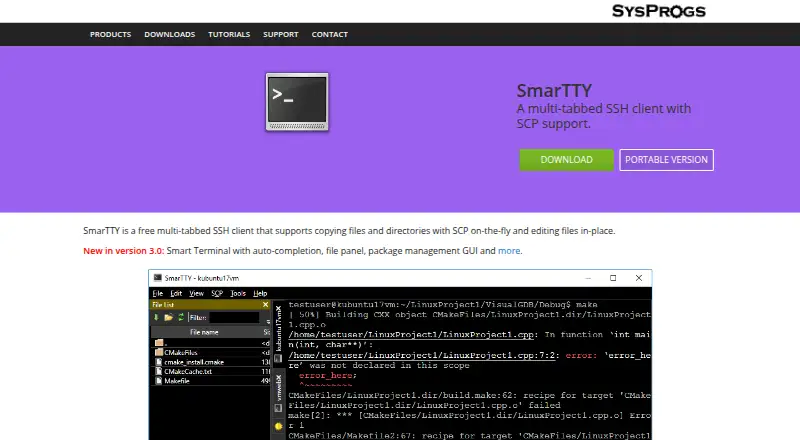
What SmarTTY is
SmarTTY is a free Windows SSH client combining tabbed remote sessions, SCP transfer, and in-place remote file editing. It supports multiple tabs within one SSH connection when the server provides sub-sessions. Smart Terminal mode adds completion for files, folders, and recent commands, a file-navigation panel, clickable file-and-line links, and graphical interfaces for APT and YUM package managers. Transfers can handle single files, recursive directories, or directories sent as on-the-fly TAR archives. Remote files open in editor tabs; SmarTTY converts CRLF line endings to LF and can invoke sudo when saving protected files. Its hex terminal communicates over COM ports or TCP, displays ASCII, HEX, or both, and saves logs. Public-key authentication stores the private key in a Windows key container without storing the Unix password. XMing and VcXsrv support graphical applications. A portable ZIP version can run as an EXE. The listed plan costs nothing.
Good
- Free SSH and SCP client
- Multiple tabs in one connection
- Remote editing with sudo saves
- Recursive and TAR directory transfers
- Built-in serial and TCP hex terminal
Watch out
- Windows only
- Multiple tabs require server sub-sessions
- Portable version requires manual ZIP unpacking
Who it suits
SmarTTY suits Windows users connecting to SSH servers, transferring files, and editing remote Linux files. It also supports embedded-device work over serial or TCP connections.
Verdict
SmarTTY brings SSH, SCP, remote editing, and terminal utilities into one free Windows application. Its serial, X11, and package-manager tools extend it beyond basic shell access.
Plans and prices
From SmarTTY's own pricing page, checked 10 Oct 2026.
| Plan | Price | What it gives you |
|---|---|---|
| SmarTTY | Free | Free multi-tabbed SSH client |
The facts
Each one read from SmarTTY's own pages, with the date it was checked.
What it does
- Authentication
- It can configure public-key authentication for selected remote computers; the private key is stored in a Windows key container and the Unix password is not stored.checked 10 Oct 2026
- File transfer
- It supports single-file SCP transfers, recursive directory transfers, and directory transfers using on-the-fly TAR.checked 10 Oct 2026
- Intended users
- The maker describes SmarTTY as a client for connecting to SSH servers and exchanging files, with features for remote Linux work and embedded-device serial or TCP communication.checked 10 Oct 2026
- License terms
- The download page permits redistribution and use in binary form under stated conditions and provides an as-is warranty disclaimer.checked 10 Oct 2026
- Portable version
- A portable version is available as a ZIP archive that users unpack and run as an EXE; its listed requirements are Windows 10, 8.1, 8, 7, and 2008.checked 10 Oct 2026
- Purpose
- SmarTTY is a free multi-tabbed SSH client with SCP file transfer and in-place remote file editing.checked 10 Oct 2026
- Remote editing
- It can open remote files in an editor tab, convert CRLF to LF automatically, and invoke sudo when saving protected files.checked 10 Oct 2026
- Serial and TCP
- Its built-in hex terminal can communicate over COM ports or TCP and display ASCII, HEX, or both while saving logs.checked 10 Oct 2026
- Smart terminal
- Smart Terminal mode provides completion for files, folders and recent commands, a file navigation panel, clickable file-and-line links, and APT and YUM package manager GUIs.checked 10 Oct 2026
- SSH sessions
- It lets users open multiple tabs within one SSH connection, using server-supported sub-sessions.checked 10 Oct 2026
- X11
- It includes XMing and VcXsrv X servers that can be configured and started when a graphical application is launched in the terminal.checked 10 Oct 2026
The company
- Headquarters
- Vancouver, British Columbia, Canadachecked 28 Sep 2026
Where it runs
- Platforms
- The download page lists Microsoft Windows 11, 10, 8.1, 8, 7, and 2008 as system requirements.checked 10 Oct 2026