Sidebar Diagnostics
Sidebar Diagnostics is a Windows desktop sidebar for keeping hardware readings visible while you work.
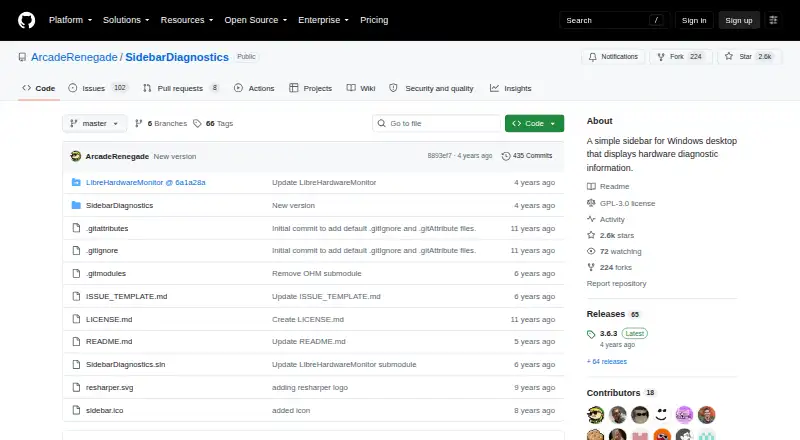
What Sidebar Diagnostics is
Sidebar Diagnostics is a Windows desktop sidebar for keeping hardware readings visible while you work. It monitors CPU, RAM, GPU, network activity, and logical drives, and can graph those metrics. The sidebar can also display a clock and provide alerts and hotkeys; it supports monitors with different DPI settings and offers extensive customization. Hardware information is supplied by Libre Hardware Monitor. It supports Windows 7, Windows 8, Windows 8.1, and Windows 10. The project is available free, with a listed price of no cost. Releases include an installer and a standalone ZIP, though the ZIP version does not update automatically. The application must be run as administrator. Remote monitoring is not supported. The GitHub project is licensed under GPL-3.0, provides an issue template for problem reports, and its author invites donations while stating that the software will remain free on GitHub.
Good
- Tracks CPU, RAM, GPU, network, and logical drives.
- Graphs metrics and can show a clock.
- Supports alerts, hotkeys, and different DPI settings.
- Installer and standalone ZIP are available.
- Free under GPL-3.0.
Watch out
- Requires administrator privileges.
- Standalone ZIP does not auto-update.
- Remote monitoring is unavailable.
- Supports Windows 7 through Windows 10 only.
Who it suits
It suits Windows users who want hardware metrics, graphs, and alerts in a customizable desktop sidebar. It is not intended for remote monitoring.
Verdict
Sidebar Diagnostics brings a range of hardware readings and display options into a Windows sidebar at no cost. Consider the administrator requirement and lack of remote monitoring before choosing it.
Plans and prices
From Sidebar Diagnostics's own pricing page, checked 9 Oct 2026.
| Plan | Price | What it gives you |
|---|---|---|
| Free | Free | Windows desktop app · requires administrator privileges |
The facts
Each one read from Sidebar Diagnostics's own pages, with the date it was checked.
What it does
- Customization
- The project says the sidebar supports extensive customization.checked 9 Oct 2026
- Data library
- The project says its hardware data is provided by Libre Hardware Monitor.checked 9 Oct 2026
- Display features
- It can graph metrics, show a clock, and support alerts, hotkeys, and monitors with different DPI settings.checked 9 Oct 2026
- Donation
- The author says the software will always be free on GitHub and invites donations.checked 9 Oct 2026
- Installation
- The releases page provides an installer and a standalone ZIP; the standalone build does not auto-update.checked 9 Oct 2026
- License
- The repository identifies the software as GNU General Public License (GPL-3.0).checked 9 Oct 2026
- Metrics
- It monitors CPU, RAM, GPU, network, and logical drives.checked 9 Oct 2026
- Purpose
- Sidebar Diagnostics is a Windows desktop sidebar that displays hardware diagnostic information.checked 9 Oct 2026
- Remote monitoring
- Nochecked 24 Sep 2026
- Support
- The repository provides an issue template for reporting issues.checked 9 Oct 2026
- System requirement
- The README says the application must be run as administrator.checked 9 Oct 2026
Money
- Free plan
- Yeschecked 24 Sep 2026
Where it runs
- Supported platforms
- Windows 7,Windows 8,Windows 8.1,Windows 10checked 24 Sep 2026
- Supported Windows versions
- The README lists Windows 10, Windows 8.1, Windows 8, and Windows 7 as supported operating systems.checked 9 Oct 2026
Alternatives to Sidebar Diagnostics
- 1
Mango Mirror
Free planAndroidiOSWebLinux7.4From $5.99 a month - 2

Desktop Widgets
APILinuxmacOSWindows7.0From $12.99 a year - 3

Nexus
Free planAndroidiOSWebLinux6.9Free plan - 4
SAWAS Dashboard
Free planAndroidiOSWebWindows6.7Free plan - 5
Duckboard
Free planmacOSWindows6.5$29 one-time - 6
Monitor Flows
Free planAPIWindows6.5From $3 a month