SAWAS Dashboard
SAWAS Dashboard is a free Windows desktop widget that stays visible behind regular windows.
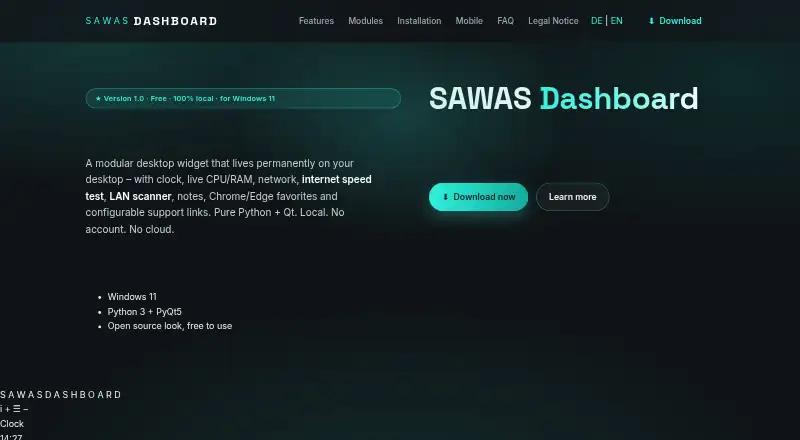
What SAWAS Dashboard is
SAWAS Dashboard is a free Windows desktop widget that stays visible behind regular windows. Its modules combine a clock, CPU and RAM readings, network rates, notes, browser favorites, and support links. System and network history is saved locally in SQLite every 15 seconds and can be viewed in day, week, or month charts. Favorites can read bookmarks from Chrome and Microsoft Edge profiles, with search and pinning features. The network scanner finds local devices using ping, ARP, and reverse DNS, and can run every 30 minutes while the PC is idle. An internet speed test reports ping, download, and upload, and can also run on that idle schedule using speedtest-cli. Users can add Python modules by placing a file in the modules folder and reloading modules. The maker says there is no telemetry, cloud service, or sign-in, and dashboard data stays on the PC. One credential detail to note: network device usernames, passwords, and notes are stored in plain text in network_devices.json. The dashboard can back up settings, notes, counters, support links, and known network devices to ZIP.
Good
- Displays live CPU, RAM, and network readings.
- Stores history locally with day, week, and month charts.
- Reads Chrome and Edge bookmarks.
- Can scan local-network devices while the PC is idle.
- Free for private and commercial use.
Watch out
- Network device credentials and notes are stored as plain text.
- Requires Windows 11 and Python 3.10 or newer.
- Does not include a cloud service or sign-in.
Who it suits
SAWAS Dashboard may suit Windows users who want system and network readings, notes, and browser favorites visible on their desktop. It also supports users who want to add Python modules or keep dashboard data on their PC.
Verdict
SAWAS Dashboard brings monitoring, notes, and browser favorites into a configurable Windows widget. Its local-data approach may appeal to some users, but plain-text storage of network credentials deserves particular attention.
Plans and prices
From SAWAS Dashboard's own pricing page, checked 9 Oct 2026.
| Plan | Price | What it gives you |
|---|---|---|
| Free | Free | Free for private and commercial use · no ads · no subscription |
The facts
Each one read from SAWAS Dashboard's own pages, with the date it was checked.
What it does
- Backup
- The dashboard can back up settings, notes, counters, support links and known network devices to ZIP and creates a .bak file before overwriting data during restore.checked 9 Oct 2026
- Credential storage
- Network device usernames, passwords and notes are stored in plain text in network_devices.json in the dashboard folder.checked 9 Oct 2026
- Custom modules
- Users can add their own Python modules by placing a module file in the modules folder and reloading modules in the dashboard.checked 9 Oct 2026
- History
- CPU, RAM and network history is saved locally in SQLite every 15 seconds and can be viewed as day, week or month charts.checked 9 Oct 2026
- Intended users
- The maker describes the software as free for private and commercial use and provides a source-code ZIP for users who want to modify it or add modules.checked 9 Oct 2026
- LAN tools
- The network scanner finds devices on the local network using ping, ARP and reverse DNS, and can scan automatically every 30 minutes while the PC is idle.checked 9 Oct 2026
- Privacy
- The maker says there is no telemetry, cloud service or sign-in and that dashboard data stays on the PC.checked 9 Oct 2026
- Purpose
- SAWAS Dashboard is a modular desktop widget that stays visible behind normal windows and combines clock, system, network, notes, favorites and support link modules.checked 9 Oct 2026
- Requirements
- The FAQ lists Windows 11, Python 3.10 or newer, PyQt5 and psutil, and says the installation uses less than 100 MB of disk space.checked 9 Oct 2026
- Speed test
- An internet speed test reports ping, download and upload and can run automatically every 30 minutes while the PC is idle; it uses speedtest-cli.checked 9 Oct 2026
- Support
- For startup troubleshooting, the maker directs users to run start_debug.bat and email the resulting output.checked 9 Oct 2026
- System monitoring
- The system module displays live CPU and RAM usage, and the network module shows real-time download and upload rates.checked 9 Oct 2026
Where it runs
- Browser support
- The favorites modules read bookmarks from Chrome and Microsoft Edge profiles and provide search and pinning features.checked 9 Oct 2026
- Platforms
- The desktop program is for Windows 11; a free mobile web version runs in a phone browser, while native iOS and Android apps are under development.checked 9 Oct 2026
The company
- Headquarters
- Gaschurn, Austriachecked 28 Sep 2026
- Maker and location
- The legal notice identifies Holger Sahler in Gaschurn, Austria, as the website's named individual.checked 9 Oct 2026
The full review of SAWAS Dashboard
SAWAS Dashboard is a Windows desktop widget for people who want system monitoring, notes, browser favorites, and local-network tools in one place. Its main appeal is a broad set of practical modules with no subscription; the Python-based setup and plain-text network credentials are important trade-offs.
Overview
Rather than a conventional app window, SAWAS sits behind normal windows and brings together a clock, CPU and RAM readings, network rates, notes, browser favorites, and support links. Custom layouts let users arrange those modules to suit their desktop. That combination makes it a useful fit for Windows users who want at-a-glance utilities without a cloud account, but it is less suitable for anyone seeking a service that syncs across devices or a more secure place to store network passwords.
Key features
Live monitoring and history
CPU and RAM usage and network transfer rates update in real time. The dashboard also saves this history locally in SQLite every 15 seconds, with day, week, and month charts. Those charts add value for users who want to review patterns instead of seeing only current readings, while the local storage keeps the data tied to the PC.
Favorites and network tools
Favorites modules read bookmarks from Chrome and Microsoft Edge profiles and offer search and pinning. The LAN scanner finds devices using ping, ARP, and reverse DNS, and can scan every 30 minutes while the computer is idle. A speed test reports ping, download, and upload using speedtest-cli, with the same option for automatic idle-time runs. These tools make SAWAS more than a monitoring widget, though their appeal is strongest for users who want utilities on the same Windows desktop.
Customization, privacy, and setup
Users can add Python modules by placing a module file in the modules folder and reloading modules in the dashboard. The maker says there is no telemetry, cloud service, or sign-in, and that dashboard data stays on the PC. Backups can include settings, notes, counters, support links, and known network devices; restoring data creates a .bak file before overwriting it.
The FAQ calls for Windows 11, Python 3.10 or newer, PyQt5, and psutil, and says installation uses less than 100 MB of disk space. That setup is reasonable for users already comfortable with Python, but it is a higher hurdle than an ordinary install for others. More significantly, usernames, passwords, and notes for network devices are saved in plain text in network_devices.json in the dashboard folder. Anyone using those fields should protect access to that folder.
Pricing
SAWAS Dashboard is free for private and commercial use: the Free plan costs nothing and has no ads or subscription. It is the straightforward choice for individual users and organizations that want the listed desktop features without recurring charges. There is no paid tier to unlock additional capabilities, but the free offer is Windows-only and the Python requirements still apply.
Platforms
The dashboard is supported on Windows. Its listed requirements specify Windows 11, Python 3.10 or newer, PyQt5, and psutil; the maker says it uses less than 100 MB of disk space. For startup problems, the maker directs users to run start_debug.bat and email the resulting output.
Who it's for
SAWAS is best for Windows users who want a configurable desktop panel combining live system readings, usage history, notes, browser bookmarks, and LAN utilities. Python users may also value the option to add their own modules, and the software is free for both private and commercial use. It is a poor choice for anyone who needs support across operating systems, cloud access, or secure credential storage within the network-device feature.
Pros and cons
- Pro: Live CPU, RAM, and network readings come with locally saved history and day, week, and month charts.
- Pro: Chrome and Edge favorites, notes, a LAN scanner, and an internet speed test bring several desktop utilities into one widget.
- Pro: The free plan has no ads or subscription and covers private and commercial use.
- Pro: Custom Python modules and ZIP backups give technically confident users room to extend and preserve their setup.
- Con: Setup requires Windows 11 and several Python components, which may deter users looking for a simple standalone installer.
- Con: Network-device usernames, passwords, and notes are stored in plain text in a local JSON file.
- Con: Windows is the only supported platform, limiting its usefulness for mixed-device households or teams.
Alternatives
For a broader comparison, browse Desktop Widget Software. Consider these alternatives if their platform support or widget model better matches your needs:
- Mango Mirror is worth considering if you want desktop widgets across Android, iOS, Linux, web, and Windows, with a free plan covering two screen licenses and clock, news, weather, background images, quotes, custom layouts, and pages. Its free trial and Pro plan also suit users open to a freemium option.
- Nexus is a free alternative with support for Android, iOS, Linux, macOS, web, and Windows, making it a better platform match for users who need wider coverage.
- Duckboard may suit macOS and Windows users who want a dashboard builder: its free plan allows one dashboard and up to three widgets, while a $29, paid once Extended upgrade provides unlimited widgets on one dashboard.
- GKrellM is a free option for users who prefer software released under the GNU General Public License and need Linux, macOS, or Windows support.
- GadgetPack (formerly 8GadgetPack) is another Windows option; its 23MB download requires administrative rights.
- Monitor Flows may fit users seeking a widget library across Windows and API, with a free plan offering 15 core widgets, three pages, and five themes without a time limit or credit card requirement.
- Themia is a Windows alternative whose free plan includes 10 widgets, two screens, every widget type, and full customization.
- WidgetSpark is another Windows choice, with a free set of widgets for desktop, taskbar, and SparkBar use and no account requirement.
Verdict
Choose SAWAS Dashboard if you want a free, configurable Windows widget that combines live monitoring and history with notes, browser favorites, and local-network tools. Its local-data approach and ability to accept custom Python modules strengthen that case. Look elsewhere if you need another operating system, a less demanding setup, or secure storage for network credentials.
Getting started
- Open the SAWAS website
- Download the available source-code ZIP
- Use Windows 11 with Python 3.10 or newer, PyQt5 and psutil
- Install the dashboard using the supplied files
- Place optional Python modules in the modules folder
- Reload modules in the dashboard
Limits worth knowing
The free plan is free for private and commercial use, with no ads or subscription. Network-device usernames, passwords and notes are kept in plain text in network_devices.json.
Questions
Is SAWAS Dashboard free?
Yes. The Free plan costs nothing, is available for private and commercial use, and has no ads or subscription.
Which operating system does it require?
The FAQ lists Windows 11, Python 3.10 or newer, PyQt5 and psutil.
Does it use cloud services or sign-in?
The maker says there is no telemetry, cloud service or sign-in, and dashboard data stays on the PC.
Can I add my own modules?
Yes. Place a Python module file in the modules folder and reload modules in the dashboard.
What browser favorites are supported?
The favorites modules read bookmarks from Chrome and Microsoft Edge profiles, with search and pinning.
How are network credentials stored?
Network device usernames, passwords and notes are stored as plain text in network_devices.json.
Alternatives to SAWAS Dashboard
- 1
Mango Mirror
Free planAndroidiOSWebLinux7.4From $5.99 a month - 2

Desktop Widgets
APILinuxmacOSWindows7.0From $12.99 a year - 3

Nexus
Free planAndroidiOSWebLinux6.9Free plan - 4
Duckboard
Free planmacOSWindows6.5$29 one-time - 5
Monitor Flows
Free planAPIWindows6.5From $3 a month - 6
WidgetSpark
Free planWindows6.5From $19.99 a year