Mango Mirror
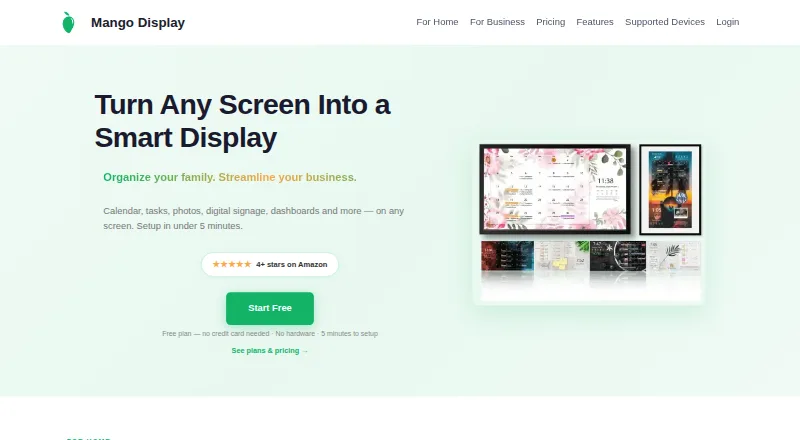
Mango Mirror turns screens into customizable displays for calendars, weather, photos, news, tasks, menus, and business dashboards.
What Mango Mirror is
Mango Mirror turns screens into customizable displays for calendars, weather, photos, news, tasks, menus, and business dashboards. A drag-and-drop editor lets users arrange widgets, make multiple pages, and schedule content changes by time. Displays can be controlled in a browser on a phone, laptop, or tablet, with changes appearing on screen within seconds. The free plan includes two screen licenses, custom layouts and pages, clock, news, weather, background images, and quotes. Pro supports calendar feeds from Google, Outlook, Apple iCal, Cozi, and ICS, plus task and photo services. Business adds office files, PDFs, video, website embeds, and browser snapshots; Enterprise adds Power BI, linked displays, Microsoft 365 group calendars, Teams shared calendars, and advanced snapshots. Supported screens include Samsung and LG TVs, Android/Google TV, Fire TV, tablets, Echo Show, Windows PCs, browsers, and Raspberry Pi. Pro is $5.99 a month, Business is $19.99 a month, and Enterprise is $49 a month; each includes three screens. Business includes priority live chat support and a 99.9% uptime SLA.
Good
- Free plan includes two screen licenses.
- Widgets can be arranged with drag and drop.
- Content can be scheduled by time.
- Browser controls work from phones, laptops, and tablets.
- Business includes priority live chat and a 99.9% uptime SLA.
Watch out
- Pro includes three screens; extra screens cost $2.99 a month.
- Business includes three screens; extra screens cost $5.99 a month.
- Enterprise includes three screens; extra screens cost 19 USD per month.
- Other displayed data is not encrypted while stored in the database.
Who it suits
It suits households or home offices wanting a shared display, small and medium businesses needing office content, or organizations with more specialized display needs. The plan features distinguish those audiences.
Verdict
Mango Mirror offers customizable display layouts with different content integrations across its plans. Review screen allowances and the stated stored-data encryption limits when deciding whether it fits.
Plans and prices
From Mango Mirror's own pricing page, checked 29 Sep 2026.
| Plan | Price | What it gives you |
|---|---|---|
| Free | Free | 2 screen licenses · clock, news, weather, background images, quotes, custom layouts and pages |
| Pro | $5.99 a month | 3 screens included · additional screens $2.99/mo · 250 MB storage · $5.99 per month or $59.99 per year |
| Business | $19.99 a month | 3 screens included · additional screens $5.99/mo · 1 GB storage · one browser snapshot widget per display, 4-hour refresh · $19.99 per month or $199 per year |
| Enterprise | $49 a month | 3 screens included · additional screens $19/mo · 50 hours of monthly browser snapshot refresh time · $49 per month or $499 per year |
The facts
Each one read from Mango Mirror's own pages, with the date it was checked.
What it does
- Audience
- The maker describes Pro as suited to home or home office, Business for small and medium businesses, and Enterprise for organizations with unique needs.checked 29 Sep 2026
- Business content
- Business adds Google Docs, Sheets and Slides, Microsoft Office files, PDFs, video, website embeds and browser snapshots.checked 29 Sep 2026
- Business SLA and support
- The Business plan includes priority live chat support and a 99.9% uptime SLA.checked 29 Sep 2026
- Calendar integrations
- Pro supports Google, Outlook, Apple iCal, Cozi and ICS feeds, with multiple sources combinable in one view.checked 29 Sep 2026
- Data handling
- The privacy policy says data is encrypted in transit and backups are encrypted, while names and email addresses are encrypted in the database using AWS Key Management Service; other displayed data is not encrypted while stored in the database.checked 29 Sep 2026
- Enterprise features
- Enterprise adds Power BI, linked displays, Microsoft 365 group calendars, Microsoft Teams shared calendars and advanced browser snapshots.checked 29 Sep 2026
- Layouts
- Users can arrange widgets with a drag-and-drop editor, create multiple pages and schedule content to change by time.checked 29 Sep 2026
- Privacy
- The maker says it does not share or sell user data and that products operate in the United States on AWS.checked 29 Sep 2026
- Product
- Mango Display turns screens into live customizable displays for calendars, weather, photos, news, tasks, menus and business dashboards.checked 29 Sep 2026
- Security attestation
- Mango Display says it maintains a SOC 2 Type I security attestation.checked 29 Sep 2026
- Support contact
- The maker offers live chat and lists [email protected] and +1 (289) 678-1622 as contact methods.checked 29 Sep 2026
- Supported screens
- The maker lists Samsung, LG, Android/Google TV, Fire TV, iPad, Android/Fire tablets, Echo Show, Windows PC, web browsers and Raspberry Pi.checked 29 Sep 2026
Where it runs
- Browser control
- Displays can be managed from app.mangodisplay.com in a browser on a phone, laptop or tablet, with changes appearing on screen within seconds.checked 29 Sep 2026
- Tasks and photos
- Pro supports Google Tasks, Microsoft To Do, Todoist, Apple Photos, Google Photos and Unsplash.checked 29 Sep 2026
The full review of Mango Mirror
Overview
Mango Mirror turns compatible screens into customizable displays for home, office and business information. It suits people who want calendars, photos, weather or operational content visible on a shared screen rather than confined to individual apps. Its range of display options is a strength, but the useful integrations and screen capacity depend on the plan.
Key features
Layouts and display control
A drag-and-drop editor lets users arrange widgets, build multiple pages and schedule content to change over time. That makes Mango Mirror more useful than a fixed information board when a display needs different content at different times of day. Listed widget categories include health, fitness, nutrition, sleep, weather, photos, calendars, reminders, notes, news, quotes and background photos.
Displays can be managed from app.mangodisplay.com using a phone, laptop or tablet, with changes appearing on screen within seconds. That browser-based control is practical for updating a display remotely without managing it at the screen itself. Supported screens include Samsung and LG displays, Android/Google TV and Fire TV, tablets, Echo Show, Windows PCs, web browsers and Raspberry Pi.
Integrations and business content
Pro connects Google, Outlook, Apple iCal and Cozi calendars, plus ICS feeds, and can combine multiple sources in one view. It also supports Google Tasks, Microsoft To Do and Todoist, along with Apple Photos, Google Photos and Unsplash. This is the most relevant tier for households or home offices that need more than the Free plan's basic clock, news, weather, background images and quotes.
Business adds Google Docs, Sheets and Slides, Microsoft Office files, PDFs, video, website embeds and browser snapshots. It includes one browser snapshot widget per display, refreshed every four hours, as well as priority live chat support and a 99.9% uptime SLA. Enterprise adds Power BI, linked displays, Microsoft 365 group calendars, Microsoft Teams shared calendars and advanced browser snapshots, with 50 hours of monthly browser snapshot refresh time. Those additions target organizations with more involved display and collaboration needs, rather than casual home use.
Security and privacy
Mango Display says it maintains a SOC 2 Type I security attestation, does not share or sell user data, and operates its products in the United States on AWS. Its privacy policy says data is encrypted in transit and backups are encrypted; names and email addresses are encrypted in the database using AWS Key Management Service. Other displayed data is not encrypted while stored in the database, a material consideration for businesses showing sensitive content.
Pricing
Mango Mirror is freemium, with a free plan and a free trial. Each paid plan includes three screens, while the Free plan allows two screen licenses. Screen additions and storage or snapshot allowances vary enough that buyers should compare them against their intended number of displays and content.
- Free: free. It includes two screen licenses, a clock, news, weather, background images, quotes, custom layouts and pages. It is a sensible starting point for a basic display, but it does not include the listed Pro integrations.
- Pro: $5.99 a month, billed $5.99 per month or $59.99 per year. Three screens are included; additional screens cost $2.99/mo, and storage is 250 MB. Its calendar, task and photo integrations make it the home or home-office choice, though the extra-screen charge matters for larger setups.
- Business: $19.99 a month, billed $19.99 per month or $199 per year. Three screens are included; additional screens cost $5.99/mo. It includes 1 GB storage and one browser snapshot widget per display with a four-hour refresh. The SLA and priority live chat are relevant for business displays, but the snapshot allowance is limited to one widget per display.
- Enterprise: $49 a month, billed $49 per month or $499 per year. Three screens are included; additional screens cost $19/mo. It includes 50 hours of monthly browser snapshot refresh time and the Enterprise integrations. The higher per-screen cost is best justified by linked displays, advanced snapshots and organization-wide calendars; organizations with unique needs can request custom pricing.
Mango Display offers live chat, [email protected] and +1 (289) 678-1622 as support channels.
Platforms
Mango Mirror supports Android, iOS, Linux, web and Windows. The maker also identifies compatible display hardware and environments including Samsung, LG, Android/Google TV, Fire TV, iPad, Android/Fire tablets, Echo Show, Windows PC, web browsers and Raspberry Pi. This breadth suits mixed-device households and organizations, although it does not include macOS as a named platform.
Who it's for
Choose Mango Mirror if you want one configurable display for calendars, weather, photos or business content, especially when browser-based updates and scheduled pages matter. Free fits a basic two-screen setup; Pro is the strongest fit for a home or home office relying on multiple calendar, task or photo services. Business is aimed at small and medium businesses that need office files, snapshots and a stated uptime SLA. Enterprise is for organizations that need linked displays, Power BI or shared Microsoft calendars. It is a weaker fit if stored-data encryption for all displayed content is essential, or if you want desktop-widget software specifically for macOS.
Pros and cons
- Pro: Multiple calendar sources can appear in one view, reducing the need to choose a single calendar service for a shared screen.
- Pro: Browser control and scheduled pages support remote updates and time-based display changes.
- Pro: The free plan covers two screens and several basic content types, making it possible to start without a paid subscription.
- Con: Paid plans include only three screens, and additional screen fees rise from $2.99/mo on Pro to $19/mo on Enterprise.
- Con: The Business snapshot widget refreshes only every four hours, limiting its fit for content that needs frequent updates.
- Con: Other displayed data is not encrypted at rest in the database, which may rule it out for sensitive dashboards.
Alternatives
For a broader comparison, see Desktop Widget Software.
- Nexus is a free alternative with a free plan and support for Android, iOS, Linux, macOS, web and Windows.
- Conky is a free option for Linux, macOS and self-hosted setups.
- Duckboard suits macOS or Windows users who want a free dashboard capped at one dashboard and three widgets, or a one-time $29.00 USD upgrade for unlimited widgets.
- GadgetPack (formerly 8GadgetPack) is a free Windows-only option; its 23MB download requires administrative rights.
- Themia is a Windows alternative with a free tier of 10 widgets and two screens, or a one-time $19.00 USD Pro plan for unlimited widgets and screens on up to five devices.
- WidgetSpark is a Windows choice with a free widget set and no account requirement, or a $1.99 USD monthly Pro plan.
- Übersicht is a free, open-source option for macOS.
- GKrellM is a free alternative for Windows, macOS and Linux.
Verdict
Mango Mirror is a strong choice for homes and businesses that want a shared screen combining multiple information sources, with browser control and plans scaled to more demanding integrations. Its key advantage is the range from basic free displays to business and enterprise content; its main cautions are rising per-screen costs and the lack of at-rest database encryption for most displayed data. Choose it when the integrations and display workflow fit, and look elsewhere if those security or cost limits outweigh them.
Getting started
- Open https://mangodisplay.com/ to access Mango Mirror.
- Choose the Free plan or a paid plan based on the screen licenses and features needed.
- Use a supported Android, iOS, Linux, web or Windows platform.
- Set up a supported screen, such as a TV, tablet, Windows PC, browser or Raspberry Pi.
- Manage the display at app.mangodisplay.com from a phone, laptop or tablet.
- Arrange widgets, add pages and schedule content changes.
Limits worth knowing
The Free plan includes two screen licenses and basic display items such as clock, news, weather, background images and quotes. Pro costs $5.99 a month and includes three screens and 250 MB storage; Business costs $19.99 a month and includes three screens, 1 GB storage and one browser snapshot widget per display with a four-hour refresh. Enterprise costs $49 a month and includes three screens and 50 hours of monthly browser snapshot refresh time.
Questions
Is Mango Mirror free?
Yes. The Free plan is free and includes two screen licenses, custom layouts and pages, clock, news, weather, background images and quotes.
What do the paid plans cost?
Pro is $5.99 a month, Business is $19.99 a month and Enterprise is $49 a month. Each includes three screens; the plans also have annual billing options.
Which platforms and screens does it support?
The software supports Android, iOS, Linux, web and Windows. Supported screens include Samsung and LG, Android/Google TV, Fire TV, iPad, Android and Fire tablets, Echo Show, Windows PC, web browsers and Raspberry Pi.
Which calendar services can I connect?
Pro supports Google, Outlook, Apple iCal, Cozi and ICS feeds, and multiple sources can appear in one view. Enterprise adds Microsoft 365 group calendars and Microsoft Teams shared calendars.
What does Business add?
Business supports Google Docs, Sheets and Slides, Microsoft Office files, PDFs, video, website embeds and browser snapshots. It includes priority live chat support and a 99.9% uptime SLA.
Who makes Mango Mirror, and how does it handle data?
The website is mangodisplay.com, and Mango Display describes Pro for home or home office, Business for small and medium businesses, and Enterprise for organizations with unique needs. It says products operate in the United States on AWS, it does not share or sell user data, and its SOC 2 Type I attestation accompanies stated encryption practices; other displayed data is not encrypted while stored in the database.
Alternatives to Mango Mirror
- 1
Desktop Widgets
APILinuxmacOSWindows7.0From $12.99 a year - 2

Nexus
Free planAndroidiOSWebLinux6.9Free plan - 3
SAWAS Dashboard
Free planAndroidiOSWebWindows6.7Free plan - 4
Duckboard
Free planmacOSWindows6.5$29 one-time - 5
Monitor Flows
Free planAPIWindows6.5From $3 a month - 6
WidgetSpark
Free planWindows6.5From $19.99 a year