
Secure ShellFish
Secure ShellFish is an SSH and SFTP client with a native terminal for iPhone, iPad, and Mac.
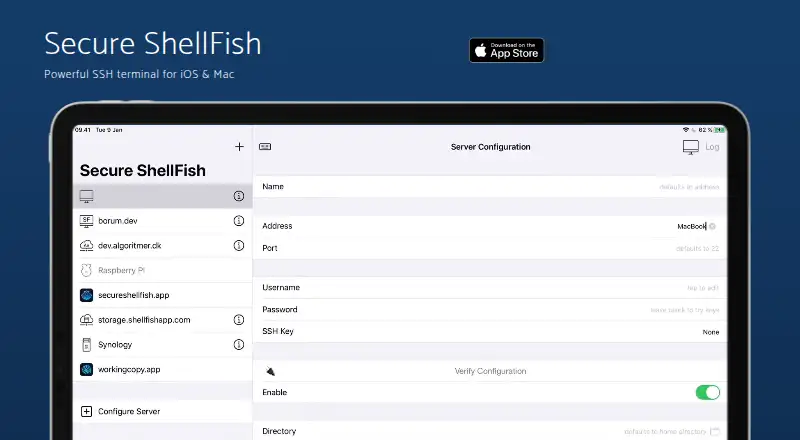
What Secure ShellFish is
Secure ShellFish is an SSH and SFTP client with a native terminal for iPhone, iPad, and Mac. It connects servers to the iOS Files app and Mac Finder, where users can browse and edit files in place and change permissions. The terminal supports native rendering, file-aware drag-and-drop, OSC 52 clipboard sync, and inline link detection. Authentication options include passwords, public keys, and two-factor authentication, with ED25519, ECDSA, or RSA keys, YubiKeys, Secure Enclave keys, and short-lived SSH certificates. Server configurations sync through iCloud Keychain, while snippets sync through iCloud. Shortcuts can upload or download files, list directories, run commands, back up data, or start a terminal. The app can launch Linux virtual machines on DigitalOcean droplets or Hetzner Cloud and remove them when no longer needed. Pro features include offline folders with syncing, video streaming from Files without downloading first, and tmux session controls. The Free plan costs nothing.
Good
- Supports SSH and SFTP.
- Connects servers to Files and Finder.
- Offers password, key, and two-factor authentication.
- Shortcuts can run commands and transfer files.
- Server configurations sync through iCloud Keychain.
Watch out
- Some Pro features require an unlock.
- Offline folders and video streaming are Pro features.
Who it suits
It suits iPhone, iPad, and Mac users who need SSH or SFTP access, terminal tools, and server file management.
Verdict
Secure ShellFish combines terminal access with server file browsing and editing across Apple devices.
Plans and prices
From Secure ShellFish's own pricing page, checked 7 Oct 2026.
| Plan | Price | What it gives you |
|---|---|---|
| Free | Free | Free to try; some Pro features require an unlock |
| Monthly | — | Pro features; price not stated on the page · Pay monthly if you prefer |
| Pro Unlock | — | Lifetime access to Pro features across iPhone, iPad and Mac · One purchase unlocks every pro feature across iPhone, iPad and Mac for life |
The facts
Each one read from Secure ShellFish's own pages, with the date it was checked.
What it does
- Authentication
- It supports password, public-key and two-factor authentication, and can use ED25519, ECDSA or RSA keys, YubiKeys, Secure Enclave keys and short-lived SSH certificates.checked 7 Oct 2026
- Automation
- Shortcuts actions include upload, download, listing directories, running commands, backup and starting a terminal.checked 7 Oct 2026
- Cloud integrations
- The app can launch Linux virtual machines on DigitalOcean droplets or Hetzner Cloud and destroy them when no longer needed.checked 7 Oct 2026
- Files access
- It connects SSH and SFTP servers to the iOS Files app and Mac Finder, where users can browse, edit files in place and change permissions.checked 7 Oct 2026
- Media playback
- Pro users can stream videos from the Files app without downloading them first.checked 7 Oct 2026
- Offline files
- Pro Unlock enables offline folders with foreground and background syncing, resumable partial downloads and failure notifications.checked 7 Oct 2026
- Product
- Secure ShellFish is an SSH and SFTP client with a native terminal for iPhone, iPad and Mac.checked 7 Oct 2026
- Support
- The maker invites questions and feature suggestions by email and says Anders will do his best to assist.checked 7 Oct 2026
- Sync
- Server configurations sync between devices through iCloud Keychain, and snippets sync through iCloud.checked 7 Oct 2026
- Terminal
- The terminal supports native rendering, file-aware drag-and-drop, OSC 52 clipboard sync and inline link detection.checked 7 Oct 2026
- Terminal multiplexing
- It supports tmux session thumbnails, attaching and detaching clients, sharing sessions by universal link and Handoff between Apple devices signed into the same iCloud account.checked 7 Oct 2026
- Widgets
- Home Screen, Lock Screen, StandBy and Apple Watch widgets can display server data provided through a shell command, with Live Activities for ongoing tasks.checked 7 Oct 2026