Secure Folder: Incogni Vault
Secure Folder: Incogni Vault is an iPhone app for placing photos, videos, files, and notes in a PIN- or biometric-locked vault.
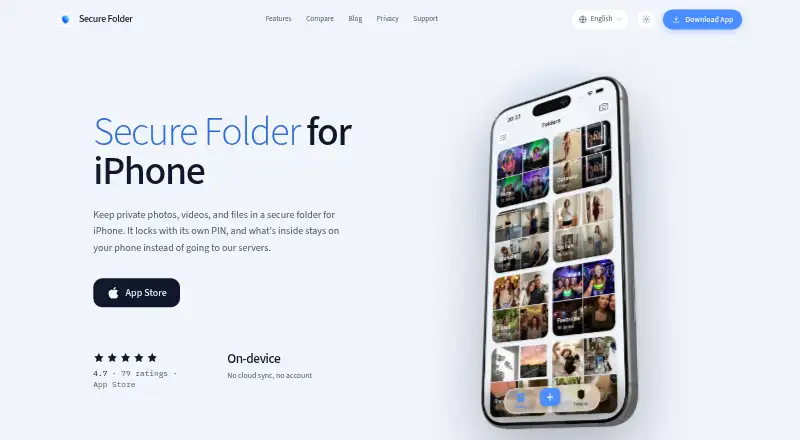
What Secure Folder: Incogni Vault is
Secure Folder: Incogni Vault is an iPhone app for placing photos, videos, files, and notes in a PIN- or biometric-locked vault. Content remains inside the app on the iPhone rather than being uploaded, and the vault works without an account, cloud sync, or network connection. A second PIN opens a separate decoy vault containing items you choose. Stealth mode offers nine alternate icons, including calculator, calendar, weather, and sudoku designs. Incogni Pro can silently photograph wrong PIN attempts with the front camera and log those images on the device. Face ID and Touch ID checks are handled by iOS, while the app says it does not see biometric data. The free plan has limited imports, PIN and biometric locking, and stealth icons. Imports copy photos, leaving originals in Photos until deleted. iOS 16.6 or later is required.
Good
- On-device vault storage without cloud sync
- Decoy vault opened by a second PIN
- Nine alternate stealth icons
- PIN and biometric locking on free plan
- Works without a network connection
Watch out
- Free plan limits imports
- Forgotten PINs cannot be reset server-side
- Original photos remain in Photos after importing
- Anonymous usage events go to Firebase Analytics
Who it suits
It suits iPhone users who want offline, on-device storage for private media, files, or notes. It also fits users wanting a decoy vault or disguised app icon.
Verdict
Secure Folder: Incogni Vault focuses on private iPhone storage that stays on the device, with decoy and disguise options. Check the import behavior and PIN recovery limitation before relying on it for sensitive content.
Plans and prices
From Secure Folder: Incogni Vault's own pricing page, checked 8 Oct 2026.
| Plan | Price | What it gives you |
|---|---|---|
| Free | Free | limited imports · PIN and biometric lock · stealth icons |
| Incogni Pro | Priced on request | unlimited imports · intruder alerts · widgets · Available as a subscription or a one-time lifetime purchase; price not stated on the page |
The facts
Each one read from Secure Folder: Incogni Vault's own pages, with the date it was checked.
What it does
- Analytics
- The app sends anonymous usage events to Firebase Analytics and says those events do not include vault content or PINs.checked 8 Oct 2026
- Biometrics
- Face ID and Touch ID checks are handled by iOS, and the app says it does not see biometric data.checked 8 Oct 2026
- Decoy vault
- A second PIN opens a separate decoy vault containing content chosen by the user.checked 8 Oct 2026
- Import behavior
- Importing copies a photo into the vault, so the original remains in Photos until the user deletes it.checked 8 Oct 2026
- Independence
- The maker says the app is not affiliated with Surfshark's Incogni service or Samsung Secure Folder.checked 8 Oct 2026
- Intruder alerts
- With Incogni Pro, wrong PIN attempts can trigger a silent front-camera photo that is logged on the device.checked 8 Oct 2026
- No account or sync
- The app has no account system or cloud sync, and its vault works without a network connection.checked 8 Oct 2026
- PIN recovery limit
- The developer says it cannot reset a forgotten PIN server-side because vault data is stored only on the device.checked 8 Oct 2026
- Purpose
- Secure Folder: Incogni Vault is an iPhone app for hiding photos, videos, files, and notes in a PIN- or biometric-locked vault.checked 8 Oct 2026
- Stealth mode
- The app can use one of nine alternate icons, including calculator, calendar, weather, and sudoku disguises.checked 8 Oct 2026
- Support
- Support requests and feedback can be sent by email to [email protected].checked 8 Oct 2026
The company
- Headquarters
- Istanbul, Turkeychecked 28 Sep 2026
- Maker
- The app is made by indie developer Mehmet Ali Kısacık, based in Istanbul, Turkey.checked 8 Oct 2026
Where it runs
- On-device storage
- Vault content is stored in the app on the iPhone and is not uploaded to a server.checked 8 Oct 2026
- Platform requirement
- The homepage lists iOS 16.6 or later as a requirement.checked 8 Oct 2026
Alternatives to Secure Folder: Incogni Vault
- 1
Hide it Pro
Free planAndroidiOSExtensionmacOS7.9From $9.99 a month - 2

Weave Vault
Free planAndroidiOSmacOS7.8From $9.99 a year - 3

Keepsafe Photo Vault
Free planAndroidiOS7.6From $23.99 a year - 4

NullVault
Free planAndroidiOS7.6From $19.99 a year - 5
Obscura Photo Vault
Free planiOS7.3From $29.99 a year - 6

LockMyPix
Free planAndroidiOS6.8$29.99 one-time