Screenflick
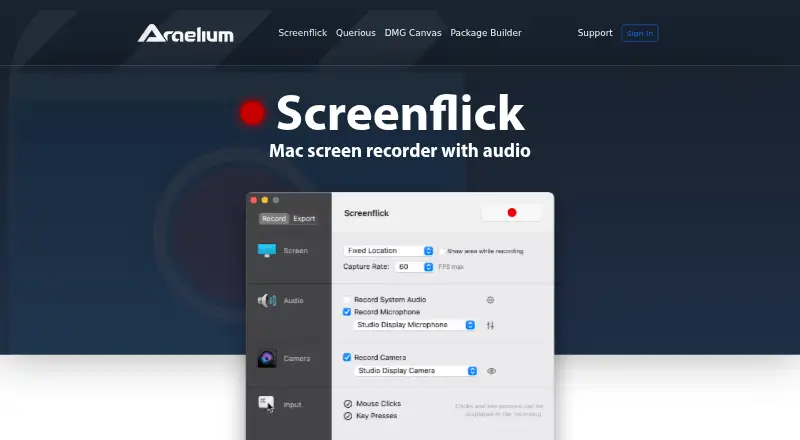
The facts below are what the maker publishes about Screenflick, checked and dated. Our editors have not written about it yet.
Plans and prices
From Screenflick's own pricing page, checked 22 Sep 2026.
| Plan | Price | What it gives you |
|---|---|---|
| Full License | $35 a month | Screenflick 3 license · Free updates for version 3 · No subscription or expiration · One-time payment; no monthly or annual subscriptions |
| Upgrade from Version 2 | $20 a month | Upgrade to Screenflick 3 · Recent purchases from January 1, 2021 or later may qualify for a free upgrade |
| Screenflick 3 Full License | $35, paid once | Version 3 and free updates to it · macOS 11 or later · one user on primary and secondary computers · One-time payment; no subscription or expiration |
The facts
Each one read from Screenflick's own pages, with the date it was checked.
What it does
- Audience
- The maker describes Screenflick as built for Mac creators and names teachers, students, developers, YouTubers, and other professionals among its users.checked 11 Oct 2026
- Automation
- Screenflick integrates with Shortcuts and Automator to start, stop, schedule, and export recordings as part of workflows.checked 11 Oct 2026
- Capture resolution
- The maker says Screenflick can record from a thumbnail-sized area up to 5K resolution at 60 fps, or higher on ProMotion displays.checked 11 Oct 2026
- Compatibility
- The product page lists macOS 11 or later and says the app is optimized for Intel and Apple Silicon Macs.checked 11 Oct 2026
- Editing
- Screen, audio, camera, keystrokes, and mouse clicks are recorded on separate tracks for non-destructive changes after recording.checked 11 Oct 2026
- Export formats
- It exports QuickTime MOV, MPEG-4 MP4, WebM, and animated GIF, with codecs including H.264, HEVC, VP8/VP9, and ProRes.checked 11 Oct 2026
- iPhone features
- On supported macOS versions, Screenflick can use an iPhone or iPad camera and can be controlled remotely with the Screenflick Remote iPhone app.checked 11 Oct 2026
- Maximum video quality
- 4kchecked 22 Sep 2026
- Microphone recording
- Yeschecked 22 Sep 2026
- Privacy
- The FAQ says Screenflick records only when started, saves video locally on the Mac, does not upload recordings, and does not collect personal data.checked 11 Oct 2026
- Product
- Screenflick is a Mac screen recorder that captures screen video, system audio, microphone audio, and webcam footage at up to 60 fps.checked 11 Oct 2026
- Recording limits
- The FAQ says Screenflick cannot record multiple screens at once or DRM-protected video played through Apple's underlying video player.checked 11 Oct 2026
- Sensitive text
- The product page says passwords and other secure text entry are not captured in keystroke recordings.checked 11 Oct 2026
- Support
- The maker says purchase includes free support, with email contact, documentation, and troubleshooting information.checked 11 Oct 2026
- System audio
- Yeschecked 22 Sep 2026
- Webcam recording
- Yeschecked 22 Sep 2026
Money
- Free plan
- Nochecked 22 Sep 2026
- Trial
- The unlimited free trial lets users explore all features and record as much as they want, but exported videos have a small watermark until a license is purchased.checked 11 Oct 2026
Where it runs
- Supported platforms
- macOS,iOSchecked 22 Sep 2026
Alternatives to Screenflick
- 1
Cap
Free planOpen sourceWebAPIExtensionLinux9.0From $29 a year - 2

Loom
Free planAndroidiOSWebmacOS8.9From $18 a month - 3

Vmaker
Free planiOSWebExtensionmacOS8.9From $18 a month - 4

ScreenPal
Free planAndroidiOSWebmacOS8.8From $4 a month - 5

Claap
Free planAndroidiOSWebAPI8.8From €32 a month - 6

Screencastify
Free planWebExtensionLinuxmacOS8.7From $7 a month