ScanCode Toolkit
ScanCode Toolkit is a free software tool for examining codebases for code origin, copyrights, licenses, vulnerabilities, packages, and dependencies.
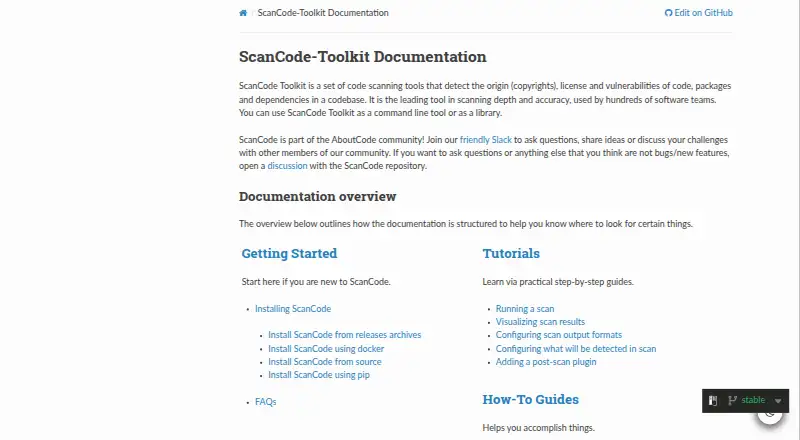
What ScanCode Toolkit is
ScanCode Toolkit is a free software tool for examining codebases for code origin, copyrights, licenses, vulnerabilities, packages, and dependencies. It can run from the command line or be used as a library in an application. For license detection, it checks extracted file text against an index of license texts and matching rules. It can unpack archives recursively and extract text from binary files when needed, and it recognizes many package manifests, lockfiles, and package datafiles. Scan results can be saved as JSON, YAML, JSON Lines, HTML, SPDX, Debian copyright, or CycloneDX; CSV is deprecated. JSON results can be used with ScanCode Workbench and applications that accept ScanCode result data. Plugins extend processing stages, and external plugins can add license data. Installation options include release archives, Docker, source, pip, and Fedora's repository. The documentation lists Linux, macOS, and Windows as tested platforms, with 64-bit operating system and Python requirements. The project points users to community Slack and GitHub discussions for help. Scan output is provided as-is, without warranties, and is not legal advice.
Good
- Scans for code origin, licenses, vulnerabilities, and dependencies.
- Runs from the command line or as an application library.
- Reads archives recursively and can extract binary-file text.
- Exports to JSON, SPDX, HTML, and other formats.
- Free software with plugin extension options.
Watch out
- CSV output is deprecated.
- Documentation specifies 64-bit operating systems and Python requirements.
- Scan output is not legal advice and carries no warranty.
Who it suits
It suits developers and organizations that need to inspect codebases for licensing, provenance, vulnerabilities, and dependency details. Its command-line and library options support both direct scanning and use within applications.
Verdict
ScanCode Toolkit offers a broad set of codebase scanning and reporting functions in a free package. Check its documented platform requirements and treat results as technical information, not legal advice.
Plans and prices
From ScanCode Toolkit's own pricing page, checked 2 Oct 2026.
| Plan | Price | What it gives you |
|---|---|---|
| ScanCode Toolkit | Free | Free software code scanning tool |
The facts
Each one read from ScanCode Toolkit's own pages, with the date it was checked.
What it does
- Archive scanning
- The scanning process extracts files recursively from archives and extracts text from binary files when needed.checked 2 Oct 2026
- Extensibility
- Plugins can extend ScanCode at different stages, and users can add license data through external plugins.checked 2 Oct 2026
- Installation
- Installation options include release archives, Docker, source, pip, and Fedora’s repository.checked 2 Oct 2026
- Integration
- JSON scan results can be consumed by ScanCode Workbench and other applications that accept ScanCode result data.checked 2 Oct 2026
- Legal limitation
- The scan output says ScanCode is provided as-is without warranties and that its content should not be used as legal advice.checked 2 Oct 2026
- License detection
- License detection searches an index of license texts and rules for matches in extracted file text.checked 2 Oct 2026
- Output formats
- Scan results can be written as JSON, YAML, JSON Lines, HTML, SPDX, Debian copyright, or CycloneDX; CSV is marked deprecated.checked 2 Oct 2026
- Package support
- It supports a wide variety of package manifests, lockfiles and package datafiles containing package and dependency information.checked 2 Oct 2026
- Purpose
- ScanCode Toolkit scans codebases to detect code origin, copyrights, licenses, vulnerabilities, packages and dependencies.checked 2 Oct 2026
- Support
- The project directs users to its community Slack and GitHub discussions for questions and challenges.checked 2 Oct 2026
- Use modes
- It can be used as a command-line tool or as a library in an application.checked 2 Oct 2026
The company
- Founded
- 2003checked 28 Sep 2026
- Headquarters
- Los Altos, California, United Stateschecked 28 Sep 2026
- Maker history
- nexB says it was founded in 2003 by Michael J. Herzog, Philippe Ombrédanne and François Granade.checked 2 Oct 2026
Where it runs
- Platform requirements
- The documentation lists Linux, macOS and Windows as tested platforms and specifies 64-bit operating systems and Python requirements.checked 2 Oct 2026
The full review of ScanCode Toolkit
Overview
ScanCode Toolkit is a free code-scanning tool that identifies origin, copyrights, licenses, vulnerabilities, packages and dependencies in codebases. It suits teams and developers who need technical license and dependency data they can inspect or feed into other tools. Its breadth of scan and report options is a strength; its output is not legal advice, and using it well calls for comfort with technical workflows.
Key features
ScanCode can run from the command line or serve as a library inside an application, making it useful both for direct scans and for software workflows that need scanning built in. It extracts files recursively from archives and can extract text from binary files when needed, broadening the material a scan can examine.
License detection compares extracted file text against an index of license texts and rules. The toolkit also supports many package manifests, lockfiles and package datafiles, so it can surface package and dependency information alongside license findings. That range is valuable for codebase review, though the results remain technical findings rather than legal conclusions.
Reports can be written in JSON, YAML, JSON Lines, HTML, SPDX, Debian copyright or CycloneDX. JSON results can be consumed by ScanCode Workbench and other applications that accept ScanCode result data. CSV is deprecated, so it is a poor choice for a workflow that depends on that format.
Plugins can extend different scanning stages, and external plugins can add license data. Installation options include release archives, Docker, source, pip and Fedora’s repository. The project points users to community Slack and GitHub discussions for questions and challenges; that is a community support route rather than a stated commercial support service.
Pricing
ScanCode Toolkit costs nothing. The free plan is the toolkit itself, described as a free software code-scanning tool, with on-premise deployment and advisory policy enforcement. Attribution reports are supported, and the listed source scan methods are multiple. There is no paid tier or seat or scan quota to weigh in the stated plan, making it a fit for readers seeking a no-cost scanning tool rather than a packaged paid service.
Platforms
ScanCode supports Linux, macOS and Windows, with API and self-hosted options also listed. Its documentation identifies Linux, macOS and Windows as tested platforms and sets 64-bit operating system and Python requirements, so compatibility depends on meeting those prerequisites. Multiple installation routes offer flexibility, but this is a toolkit to install and operate rather than a web-only service.
Who it's for
Choose ScanCode if you need broad codebase scanning, machine-readable reports, or an embeddable library, and can work with a technical toolchain. It is less suitable as a standalone legal compliance decision-maker: its own output disclaims warranties and says not to use the content as legal advice.
Pros and cons
- Pros: Scans licenses, copyrights, origin, vulnerabilities, packages and dependencies, giving technical teams several useful kinds of codebase information in one toolkit.
- Pros: Command-line and library use, plugin extension, and several report formats make it adaptable to different technical workflows.
- Pros: The free plan and on-premise deployment suit users who want a no-cost tool they can run in their own environment.
- Cons: Platform use comes with 64-bit operating system and Python requirements, so it is not a zero-setup option for every reader.
- Cons: CSV is deprecated, and scan output is explicitly not legal advice; teams needing CSV-dependent processes or authoritative legal guidance should look elsewhere or supplement the results.
Alternatives
Browse open-source license compliance software for more options in this category.
FOSSology is another free open-source license compliance toolkit, with Linux, macOS, Windows, web and self-hosted support; consider it if web access is important alongside local use. OHRisk is a free CLI option for Linux, macOS and Windows. Apache Flink CDC is a free option for Linux and Windows, including self-hosted use. licscan is a free standalone CLI at $0 per scan under Apache 2.0, which may suit a reader wanting that stated per-scan model. SBOM Workbench is a free option for Linux, macOS and Windows; SCANOSS says its distributed software is open source and the Workbench has a public GitHub repository. SourceTrust offers a free option for eligible public GitHub repositories subject to fair use and attribution, plus a $29 a month project plan; consider it if a web-based service is preferred. DeepFilterNet is free and open source under MIT or Apache-2.0 for Linux, macOS and Windows. Double Open Compliance has free and Pro tiers and supports API, self-hosted and web use.
Verdict
ScanCode Toolkit is a strong fit for technical users who want broad, free codebase scanning with flexible reports and local deployment. Its main reason to choose it is the combination of scan coverage, extensibility and output options at no cost. Look elsewhere if you need a turnkey web service, or treat its findings as a starting point rather than legal advice.
Alternatives to ScanCode Toolkit
- 1
DeepFilterNet
Free planOpen sourceAPILinuxmacOSSelf-hosted7.6Free plan - 2

FOSSology
Free planOpen sourceWebAPILinuxmacOS7.5Free plan - 3
ScanCode.io
Free planWebAPILinuxmacOS7.0Free plan - 4
SourceTrust
Free planWeb6.7From $299 a year - 5
FOSSA
Free planWebAPILinuxSelf-hosted6.4Free plan - 6
DejaCode
WebAPILinuxSelf-hosted6.3From $500 a month