ScamDrill
ScamDrill trains families and organizations to recognize scams through simulated messages and follow-up lessons.
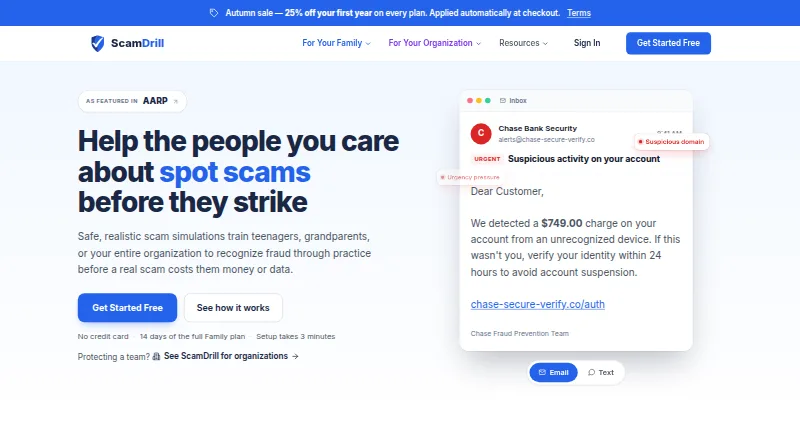
What ScamDrill is
ScamDrill trains families and organizations to recognize scams through simulated messages and follow-up lessons. Family exercises use email and SMS, while organization simulations also cover QR code scams. Exercises adapt to learner performance and raise difficulty as skills improve; a dashboard tracks progress, scam types caught, and areas needing more practice. Family members can forward suspicious emails or texts for AI analysis, included with the Family plan. Organizations can sync rosters with Okta, Azure AD, and Google Workspace, while Enterprise adds a REST API and webhooks. ScamDrill says data is encrypted in transit and at rest, with tenant isolation at the database level and passkey-based two-factor authentication. It also says simulated landing pages do not capture, transmit, or store what learners type. The company says it does not sell personal data or share learner data with advertisers or data brokers. SOC 2 is listed as planned; paid organization plans include audit report exports for frameworks including SOC 2, ISO 27001, and HIPAA. Plans range from a free tier to paid family and organization options.
Good
- Family drills cover email and SMS.
- Organization simulations include QR code scams.
- Exercises adapt to learner performance.
- Family plan includes AI message checking.
- Roster sync supports Okta, Azure AD, and Google Workspace.
Watch out
- Free tier allows one email drill monthly.
- Free tier is limited to one learner.
- SOC 2 is listed as planned.
- AI message checking is included with Family, not the free tier.
Who it suits
ScamDrill suits families training teenagers or older adults, and organizations training employee teams. Its simulations and progress tracking are designed for ongoing scam-awareness practice.
Verdict
ScamDrill offers distinct family and organization training, with adaptive exercises and progress tracking. Check the plan-specific limits and renewal terms before subscribing.
Plans and prices
From ScamDrill's own pricing page, checked 14 Oct 2026.
| Plan | Price | What it gives you |
|---|---|---|
| Free | Free | 1 learner · 1 basic email drill/month · beginner difficulty · progress dashboard · real-time alerts · $0/mo |
| AI Analysis add-on | $2.99 a month | AI-powered scam checking for Free accounts · $2.99/mo |
| Family | $9 a month | 4 learners · extra learners $2/mo · email and SMS tips · full library · AI checking · reports · priority support · $9/mo; 25% first-year sale shown as $6.75/mo |
| AI Analysis add-on | $29.99 a year | AI-powered scam checking for Free accounts · $29.99/yr |
| Family | $84 a year | 4 learners · extra learners $19/yr · email and SMS tips · full library · AI checking · reports · priority support · $84/yr; 25% first-year sale shown as $63 |
| Starter | $449 a year | 2–25 seats · email simulations · Autopilot · adaptive training · compliance reports · helpdesk support · $449/yr standard; $336.75 first year shown |
| Team | $1,499 a year | Up to 100 seats · Team features · extra seats $1.25/mo in 100-seat blocks · $1,499/yr standard; $1,124.25 first year shown |
| Business | $5,999 a year | Up to 500 seats · AI detection · campaigns · departments · SSO/SCIM add-on $2,500/yr · $5,999/yr standard; $4,499.25 first year shown |
| Enterprise | $19,999 a year | Up to 2,500 seats · white-label branding · LMS API · priority support · SSO/SCIM add-on $2,500/yr · $19,999/yr standard; $14,999.25 first year shown |
The facts
Each one read from ScamDrill's own pages, with the date it was checked.
What it does
- Adaptive difficulty
- Simulation difficulty is tuned to each learner's performance and age group.checked 14 Oct 2026
- Adaptive training
- Simulations adapt to each learner’s performance and difficulty progresses as skills improve.checked 29 Sep 2026
- AI checking
- Users can forward suspicious emails to [email protected] for AI-assisted risk analysis, red flags and recommended action.checked 14 Oct 2026
- API and webhooks
- Enterprise includes a REST API and webhooks for learners, campaign activity, reports, threats and remediation lifecycle events.checked 14 Oct 2026
- Channels
- Family training includes email and SMS simulations, and organization simulations also cover QR code scams.checked 29 Sep 2026
- Closed-loop remediation
- Remediation events cover assignment, completion and resolution, with webhook events for each stage.checked 14 Oct 2026
- Compliance
- SOC 2 is listed as planned on the Trust Center; paid organization plans include audit reports exportable for frameworks including SOC 2, ISO 27001, and HIPAA.checked 29 Sep 2026
- Compliance status
- ScamDrill says platform controls and privacy documentation are in production, while SOC 2 is planned rather than completed.checked 14 Oct 2026
- Data retention
- Forwarded scam checks retain only verdict metadata for 13 months, and security audit logs are retained for one year.checked 14 Oct 2026
- Google Play privacy disclosure
- The Google Play listing says no data is shared with third parties, data is encrypted in transit and deletion requests are supported.checked 14 Oct 2026
- Independent domain fact
- Scam Detector reports the domain was registered on April 4, 2026 and was not detected on blacklist engines.checked 14 Oct 2026
- Independent launch
- Indie Hackers records the family product launch on June 2, 2026, with the founder describing it as a household version of corporate phishing training.checked 14 Oct 2026
- Independent praise: family use
- StrictSeal described email and text drills, feedback after clicks and a progress view as useful for protecting relatives.checked 14 Oct 2026
- Independent praise: practice model
- StrictSeal praised the use of realistic harmless scams, immediate explanations and progressively harder drills to build habits.checked 14 Oct 2026
- Independent revenue claim
- The Indie Hackers listing displays revenue of $10K per month.checked 14 Oct 2026
- Independent trust score
- Scam Detector assigned scamdrill.com a 30.3 out of 100 score and labeled it medium risk.checked 14 Oct 2026
- Integrations
- Directory synchronization supports Okta, Azure AD/Entra ID and Google Workspace; SAML/OIDC SSO and SCIM are available as an add-on.checked 14 Oct 2026
- Intended users
- The product describes family training for teenagers and older adults, as well as organization training for employee teams.checked 29 Sep 2026
- License
- ScamDrill's terms state that simulation templates, lessons and branded materials are its exclusive property, indicating proprietary software rather than open source.checked 14 Oct 2026
Where it runs
- Android listing
- Google Play lists ScamDrill: Scam Checker under developer Gasbuggy Media, with a first release updated August 26, 2026.checked 14 Oct 2026
- Apple App Store listing
- The iPhone app is free with in-app purchases, 65.2 MB, English-language and marked for ages 4 and up.checked 14 Oct 2026
- Limit: Android availability inconsistency
- The Google Play listing presents an Android ScamDrill checker, while ScamDrill's app page says an Android app is not yet available.checked 14 Oct 2026
The company
- Company founder
- ScamDrill identifies Justin Fernandez as founder and says he has more than 15 years of US national-security experience.checked 14 Oct 2026
- Company legal name and headquarters
- Google Play identifies the developer as Scam Drill LLC at 1209 Mountain Road Pl NE Ste N, Albuquerque, New Mexico 87110-7825, United States.checked 14 Oct 2026
The full review of ScamDrill
Overview
ScamDrill is a scam-recognition training service for households and employee teams. It suits families who want practice across email and text, and organizations looking for adaptive exercises with progress tracking. Its strongest distinction is that it pairs simulations with follow-up learning and, on Family, AI checks of suspicious messages; the trade-off is that meaningful organization use carries substantial annual plan costs.
Key features
Family exercises cover email and SMS, while organization simulations add QR-code scams. Exercises adapt to each learner’s results and become more difficult as skills improve, making this a better fit than a fixed sequence for groups with differing experience. A dashboard tracks progress, scam types caught, and areas that need practice, giving administrators a way to see where further training may help.
Families can forward suspicious emails or texts for AI analysis; message checking is included with Family and sold as a $2.99 a month add-on for Free users. Organization rosters can sync with Okta, Azure AD, and Google Workspace. Enterprise adds a REST API and webhooks. The product also includes phishing simulations, interactive awareness content, automated campaigns, and risk scoring, though the listed plan details do not assign every one of those capabilities to a particular tier.
ScamDrill says data is encrypted in transit and at rest, uses database-level tenant isolation, and supports passkey-based two-factor authentication. Its security FAQ says simulated landing pages do not capture, transmit, or store what learners type. The company says it does not sell personal data or share learner data with advertisers or data brokers. SOC 2 is planned; paid organization plans include audit report exports for frameworks including SOC 2, ISO 27001, and HIPAA. Those exports may help with audit preparation, but planned SOC 2 should not be mistaken for current certification.
Pricing
The Free plan costs nothing and includes one email drill per month, one learner, beginner difficulty, a progress dashboard, and real-time alerts. It is a useful low-commitment introduction, but one monthly drill and one learner sharply limit it as ongoing household or team training.
The AI Analysis add-on costs $2.99 a month on Free. Family costs $5.25 a year, billed annually at $63 and renewing at the standard $84/yr. It supports four learners and adds email and SMS drills, the full scam library, iPhone and Android apps, AI message checking, and priority support. For a household, this is the clearest fit; its renewal price is higher than the stated first-year annual billing.
Organization plans use annual pricing. Starter is $336.75 a year for 2–25 seats, with email simulations, Autopilot, adaptive training, compliance reports, and helpdesk support; it renews at the standard rate after year one ($449 shown). Team is $1,124.25 a year for up to 100 seats, adds additional seats in blocks of 100, and renews at the standard rate after year one ($1,499 shown). Both fit teams seeking core simulations and reporting, but Starter's 25-seat ceiling and Team's block-based expansion matter as headcount grows.
Business is $4,499.25 a year for up to 500 seats, with Team features plus AI scam detection, campaign scheduling, and departments; SSO/SCIM is a $2,500/yr add-on. It renews at the standard rate after year one ($5,999 shown). Enterprise is $14,999.25 a year for up to 2,500 seats, adds white-label branding, an LMS API, and priority support, and also charges $2,500/yr for the SSO/SCIM add-on; it renews at the standard rate after year one ($19,999 shown). These tiers suit larger organizations that need the specified scale or capabilities, but the renewal step and add-on cost should be part of the budget decision. A free trial is available.
Platforms
ScamDrill is available on Android, iOS, web, and API. Family includes iPhone and Android apps; Enterprise lists an LMS API, while organization roster sync supports Okta, Azure AD, and Google Workspace.
Who it's for
Choose ScamDrill for a household training teenagers and older adults together, especially if AI message checking and four learner seats matter. For organizations, it is most compelling when adaptive simulations, roster syncing, reporting, or the larger-tier features match a defined training program. It is less suitable for an individual seeking frequent practice on a free plan, or a small organization unwilling to commit to the annual organization tiers.
Pros and cons
- Pros: Adaptive difficulty and a progress dashboard make training more responsive and show which scam types need attention.
- Pros: Family combines four learners, email and SMS drills, and AI message checking, covering household use more broadly than the Free cap.
- Pros: Organization roster sync and paid-plan audit exports can support administration and compliance workflows.
- Cons: Free is restricted to one learner, one monthly email drill, and beginner difficulty, so it offers limited continuing practice.
- Cons: Organization pricing rises considerably across tiers, with stated post-year-one renewal rates and a separate SSO/SCIM fee on Business and Enterprise.
- Cons: SOC 2 is planned rather than an achieved status, which may not satisfy organizations requiring current certification.
Alternatives
For another freemium option, Wizer offers free basic annual security awareness training, basic user management, limited reporting, and automatic learner reminders; choose it when those basics are the priority. Brightside AI has free courses and a vishing option priced from €1/ m. per seat, making it worth considering when voice-focused simulation is the deciding factor. CyberHoot offers a $125 a month Autopilot plan with white-label functionality, multi-tenancy, automated training, interactive phishing training, and videos; consider it when those capabilities are central.
Proofpoint Email DLP and Encryption, Boxphish, Mimecast Data Leak Prevention, OpenText Core Email Message Privacy, and Hoxhunt are other options to compare. Browse the Cybersecurity Training Platforms list for more choices.
Verdict
ScamDrill is a strong fit for families who want shared, adaptive scam practice and AI message checking, and for organizations whose training needs justify its paid tiers. Its adaptive exercises, progress view, and family coverage are persuasive reasons to choose it. Look elsewhere if you need sustained free training, a lower-cost organization plan, or current SOC 2 certification.
Getting started
- Visit https://scamdrill.com/.
- Choose the Free plan or review the paid family and organization plans.
- Use the web, Android, or iOS platform.
- Begin with email drills on the Free plan, or choose Family for email and SMS drills.
- For organization roster sync, connect Okta, Azure AD, or Google Workspace.
Limits worth knowing
The Free plan includes 1 learner, 1 email drill per month, and Beginner difficulty. The Family plan is listed at $6.75 a month and renews at the standard $9/mo; it covers 4 learners.
Questions
Does ScamDrill have a free plan?
Yes. The Free plan is free and includes one learner, one email drill per month, Beginner difficulty, a progress dashboard, and real-time alerts.
Is AI message checking included?
Family includes AI-powered message checking for suspicious emails or texts. It is also available as a $2.99 a month add-on on the Free plan.
What platforms does ScamDrill support?
Its listed platforms are Android, iOS, web, and API.
What does the Family plan cost?
Family is listed at $6.75 a month, billed monthly at $6.75, and renews at the standard $9/mo.
Which organization integrations are supported?
Organization roster sync supports Okta, Azure AD, and Google Workspace. Enterprise includes a REST API and webhooks.
What security and privacy practices does ScamDrill describe?
ScamDrill says data is encrypted in transit and at rest, with database-level tenant isolation and passkey-based two-factor authentication. The company also says it does not sell personal data or share learner data with advertisers or data brokers.
Alternatives to ScamDrill
- 1
Wizer
Free planAndroidiOSWebAPI8.0Free plan - 2
PhishingBox
AndroidiOSWebAPI7.5 - 3
Brightside AI
Free planWebAPIExtension7.3From €0.50 a month - 4
PhishSkill
WebExtension6.7 - 5
Boxphish
AndroidiOSWeb6.5From £5 a year - 6

Keepnet Labs
WebAPISelf-hosted6.4From $1.80 a month