
Saku Overclock
Saku Overclock is a free, open-source Windows utility for tuning AMD Ryzen laptops.
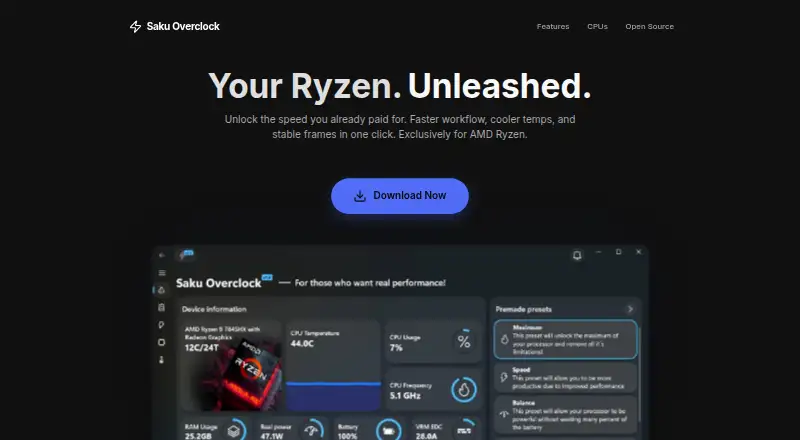
What Saku Overclock is
Saku Overclock is a free, open-source Windows utility for tuning AMD Ryzen laptops. Users can create and adjust presets, then switch configurations for different workloads. Its dashboard tracks CPU, GPU, RAM, battery, and thermal data in real time. Temperature tools include fan control and custom cooling curves, and integration with RivaTuner Statistics Server can display selected system metrics in a game overlay. The project lists AMD Ryzen generations 1000–9000+ and AMD A-Series models such as Bristol Ridge and Stoney Ridge. It supports Windows 10 and Windows 11, but not Intel Core processors; the project says it is built exclusively for AMD architecture. The tuning interface limits values to ranges described as safe and offers hardware-based suggestions. However, the project warns that incorrect AMD SMU commands can permanently damage a processor and recommends standard overclocking options unless users have extensive experience. The software is distributed under GPL-v3.0, with questions and suggestions directed to its Discord community or email contact.
Good
- Free and open-source under GPL-v3.0.
- Presets can be switched for different workloads.
- Monitors CPU, GPU, RAM, battery, and thermal data.
- Includes fan control and custom cooling curves.
- Supports Windows 10 and Windows 11.
Watch out
- Intel Core processors are not supported.
- Incorrect AMD SMU commands can permanently damage a processor.
Who it suits
Saku Overclock suits enthusiasts who want to tune AMD Ryzen laptop hardware and switch settings for different workloads. It is not for Intel Core systems, and advanced users should heed the project's caution about AMD SMU commands.
Verdict
Saku Overclock offers AMD Ryzen laptop tuning, live monitoring, and cooling controls at no cost. Its hardware scope is limited to AMD, and the project's warning about potentially damaging SMU commands is important for users to consider.
Plans and prices
From Saku Overclock's own pricing page, checked 30 Sep 2026.
| Plan | Price | What it gives you |
|---|---|---|
| Free | Free | No paywalls · no premium tiers · AMD Ryzen only · forever |
The facts
Each one read from Saku Overclock's own pages, with the date it was checked.
What it does
- Advanced-use caution
- The project warns that incorrect AMD SMU commands can permanently damage a processor and recommends standard overclocking options unless users have extensive experience.checked 30 Sep 2026
- Hardware limits
- The maker’s site says Intel Core processors are not supported and the product is engineered exclusively for AMD architecture.checked 30 Sep 2026
- Intended users
- The project describes the software as designed for enthusiasts who want more performance from AMD Ryzen laptop hardware.checked 30 Sep 2026
- Live monitoring
- Its dashboard monitors CPU, GPU, RAM, battery, and thermal data in real time.checked 30 Sep 2026
- Open source
- The project repository identifies Saku Overclock as free and open-source software distributed under GPL-v3.0.checked 30 Sep 2026
- Overlay integration
- The app integrates with RivaTuner Statistics Server to show selected system metrics in a game overlay.checked 30 Sep 2026
- Preset tuning
- Users can create and edit presets, then switch configurations for different workloads.checked 30 Sep 2026
- Purpose
- Saku Overclock is an overclocking utility for AMD Ryzen laptops.checked 30 Sep 2026
- Safety controls
- The project says its tuning interface restricts values to safe ranges and offers hardware-based suggestions.checked 30 Sep 2026
- Support
- The project directs users to its Discord community and provides an email address for questions and suggestions.checked 30 Sep 2026
- Supported AMD families
- The site lists AMD Ryzen generations 1000–9000+ and AMD A-Series models including Bristol Ridge and Stoney Ridge.checked 30 Sep 2026
- Thermal controls
- The project describes temperature management, fan control, and custom cooling curves.checked 30 Sep 2026
Where it runs
- Windows support
- The site lists Windows 10 and Windows 11 compatibility.checked 30 Sep 2026
The full review of Saku Overclock
Overview
Saku Overclock is a free, open-source Windows utility for tuning AMD Ryzen laptops. It suits enthusiasts who want workload-specific performance settings and live system monitoring in one place. Its AMD-only scope and the risk attached to advanced SMU commands make it a poor fit for casual or Intel-based users.
The project supports Ryzen generations 1000–9000+ and AMD A-Series models, including Bristol Ridge and Stoney Ridge; Intel Core processors are not supported. The interface restricts tuning values to safe ranges and offers hardware-based suggestions, but the project warns that incorrect AMD SMU commands can permanently damage a processor. Users without extensive experience should stick to standard overclocking options.
Distributed under GPL-v3.0, the software is free to use. The project points users to its Discord community and provides an email address for questions and suggestions. For more choices, browse PC Overclocking Software.
Key features
Presets for changing workloads
Users can create and edit tuning presets, then switch configurations as their workload changes. That is useful for enthusiasts who want distinct settings for different tasks, rather than adjusting one configuration repeatedly.
Live monitoring and overlays
The dashboard tracks CPU, GPU, RAM, battery, and thermal data in real time. RivaTuner Statistics Server integration can display selected metrics in a game overlay, keeping performance information visible during play.
Thermal and tuning controls
Saku Overclock includes CPU tuning, motherboard controls, and automatic overclocking. Its temperature-management features include fan control and custom cooling curves, which give users ways to balance cooling and performance. The safety limits are helpful guardrails, not a reason to disregard the project’s SMU warning.
Pricing
Saku Overclock has one plan: Free at no cost, billed forever. It has no paywalls or premium tiers, so users do not give up a higher-feature plan by choosing the free version. There is no free trial because the software is free. Its principal limits are compatibility and risk: it is for AMD Ryzen hardware, and advanced tuning can cause permanent processor damage if misused.
Platforms
The software supports Windows 10 and Windows 11. Its hardware scope is AMD, covering the Ryzen generations and A-Series families described above; Intel Core systems are excluded. Choose another utility if you need cross-platform support or Intel compatibility.
Who it's for
Saku Overclock is best for technically confident AMD Ryzen laptop owners who want to tune performance by workload, monitor several system components, and adjust cooling. Its broad listed AMD family support makes it relevant across many Ryzen generations. It is not the sensible choice for users who want a low-risk, hands-off utility or whose laptop uses Intel hardware.
Pros and cons
Pros
- Free and open source: The GPL-v3.0 software has no paid tiers or paywall.
- Useful workload flexibility: Editable presets let enthusiasts switch between tuning configurations.
- Monitoring and cooling in one utility: Live CPU, GPU, RAM, battery, and thermal readings pair with fan controls and custom cooling curves.
- Guardrails for tuning: Restricted value ranges and hardware-based suggestions can help users avoid unsuitable settings.
Cons
- AMD-only: Intel Core users cannot use it, and it is designed for AMD architecture.
- Advanced commands carry real risk: The project warns that incorrect SMU commands can permanently damage a processor.
- Windows only: Users on Linux or other platforms need a different tool.
Alternatives
- Universal x86 Tuning Utility is another free Windows option; consider it if you want an alternative to Saku Overclock’s AMD-specific offering.
- OCCT has a free personal-use plan with core features and runs on Linux as well as Windows. Pick it if cross-platform availability matters; its Supporter plan is €4.50 a month.
- Quick CPU is a freemium Windows alternative. Consider it if you are comparing other free monitoring and tuning software.
- ASUS GPU Tweak III is a free Windows option; consider it as an alternative if you are evaluating other no-cost tuning software.
- HYDRA is a paid Windows alternative, with supporter memberships starting at $3 a month.
- G-Helper is free and designed for Asus laptops and handhelds; pick it if your device is in that category rather than an AMD Ryzen laptop generally.
- Hypertune is a paid Windows alternative with a free trial and a Monthly plan at $9.99 a month; consider it if you want to compare a subscription option.
- RyzenAdj is a free, LGPL-3.0 command-line tool for Linux and Windows. Choose it if you specifically want a command-line alternative or need Linux support.
Verdict
Choose Saku Overclock if you have an AMD Ryzen laptop, want free preset-based tuning with live monitoring and cooling controls, and are comfortable treating advanced settings cautiously. Its strongest case is the combination of those features without paywalls; its clearest reasons to look elsewhere are Intel or non-Windows hardware and the potential for permanent damage from incorrect SMU commands.
Alternatives to Saku Overclock
- 1
MemTest86
Free planLinuxmacOSSelf-hostedWindows7.5From $76 a year - 2
HCI MemTest
Free planLinuxWindows7.3$5 one-time - 3
CoreCtrl
Free planOpen sourceLinux7.1Free plan - 4
AIDA64
AndroidiOSWindows7.0€59.95 one-time - 5

ASUS GPU Tweak III
Free planWindows6.7Free plan - 6

OCCT
Free planLinuxWindows6.6Free plan