
G-Helper
G-Helper is a free, portable Windows control tool for tuning performance, fans, GPU, battery, and RGB on Asus laptops and handhelds.
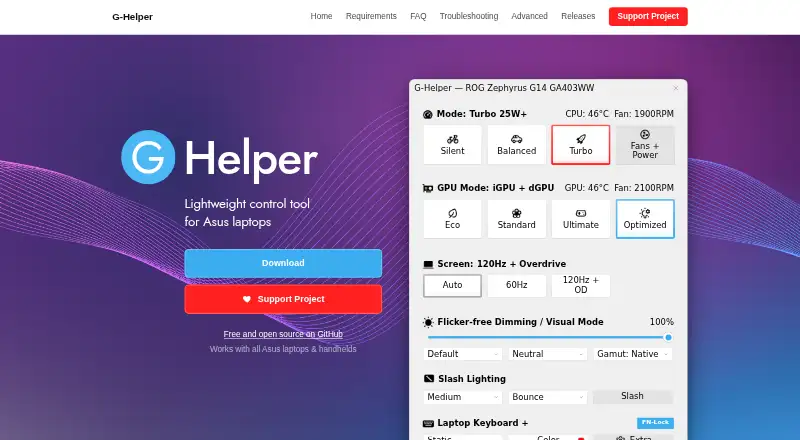
What G-Helper is
G-Helper is a free, portable Windows control tool for tuning performance, fans, GPU, battery, and RGB on Asus laptops and handhelds. It offers Silent, Balanced, and Turbo performance modes with built-in fan curves, plus Eco, Standard, Ultimate, and Optimized GPU modes. Dedicated GPU settings include core and memory clock offsets, GPU power, Dynamic Boost, and temperature limits. Automation can change performance mode, GPU mode, screen refresh rate, and keyboard-backlight timeout based on whether the device is on AC or battery power. An in-game overlay displays FPS, CPU and GPU temperatures, fan RPM, and power draw. The app also provides settings for selected Asus mice, keyboards, and headsets, including lighting, bindings, equalizers, and battery information. It checks the official Asus site for BIOS and driver updates for the specific model. G-Helper uses the Asus System Control Interface driver and operating modes stored in the laptop BIOS. It runs as a single executable without installation and requires .NET 10 Desktop Runtime and the Asus System Control Interface. The desktop application says it does not collect or transmit personal data or transfer information to other networked systems. Its code signing is provided free by SignPath.io with a certificate from the SignPath Foundation. Contributions are voluntary and can be made through Stripe, PayPal, GitHub Sponsors, or Buy Me a Coffee.
Good
- Free and runs without installation
- Offers three performance modes
- Automates settings based on AC or battery power
- Overlay shows FPS, temperatures, fan RPM, and power draw
- States it does not collect or transmit personal data
Watch out
- Requires .NET 10 Desktop Runtime
- Requires the Asus System Control Interface driver
- Designed for Asus laptops and handhelds
Who it suits
G-Helper may suit Asus laptop and handheld owners who want controls for performance, fans, GPU, battery, and RGB. It also supports settings for selected Asus peripherals.
Verdict
G-Helper brings multiple Asus device controls together in a free portable app, with automation and monitoring options. Check the required runtime and driver, and confirm your device and peripherals are within its stated scope.
Plans and prices
From G-Helper's own pricing page, checked 1 Oct 2026.
| Plan | Price | What it gives you |
|---|---|---|
| Free | Free | Asus laptops and handhelds · requires .NET 10 Desktop Runtime and Asus System Control Interface |
The facts
Each one read from G-Helper's own pages, with the date it was checked.
What it does
- Automation
- Automation can switch performance mode, GPU mode, screen refresh rate and keyboard-backlight timeout based on AC or battery power.checked 1 Oct 2026
- GPU modes
- It supports Eco, Standard, Ultimate and Optimized GPU modes.checked 1 Oct 2026
- GPU tuning
- Dedicated GPU settings include core and memory clock offsets, GPU power, Dynamic Boost and temperature limits.checked 1 Oct 2026
- Hardware interface
- G-Helper uses the Asus System Control Interface driver and selects operating modes stored in the laptop BIOS.checked 1 Oct 2026
- Installation limit
- It is a portable app that does not require installation and runs as a single executable.checked 1 Oct 2026
- Monitoring
- Its in-game overlay shows FPS, CPU and GPU temperatures, fan RPM and power draw.checked 1 Oct 2026
- Network behavior
- The program states that it will not transfer information to other networked systems.checked 1 Oct 2026
- Performance modes
- It provides Silent, Balanced and Turbo performance modes with built-in fan curves.checked 1 Oct 2026
- Peripheral support
- The app supports settings for selected Asus mice, keyboards and headsets, including lighting, bindings, equalizers and battery information.checked 1 Oct 2026
- Privacy
- The desktop application does not collect or transmit personal data.checked 1 Oct 2026
- Purpose
- G-Helper is a lightweight control tool for tuning performance, fans, GPU, battery and RGB on Asus laptops and handhelds.checked 1 Oct 2026
- Security
- Free code signing is provided by SignPath.io with a certificate from the SignPath Foundation.checked 1 Oct 2026
- Support model
- Contributions are voluntary and can be made through Stripe, PayPal, GitHub Sponsors or Buy Me a Coffee.checked 1 Oct 2026
- Updates
- The app checks for BIOS and driver updates from the official Asus website for the specific model.checked 1 Oct 2026
Alternatives to G-Helper
- 1
MemTest86
Free planLinuxmacOSSelf-hostedWindows7.5From $76 a year - 2
HCI MemTest
Free planLinuxWindows7.3$5 one-time - 3
CoreCtrl
Free planOpen sourceLinux7.1Free plan - 4
AIDA64
AndroidiOSWindows7.0€59.95 one-time - 5

ASUS GPU Tweak III
Free planWindows6.7Free plan - 6

OCCT
Free planLinuxWindows6.6Free plan