ROMSorter
ROMSorter detects and renames ROMs and other games, with tools for archive handling, duplicate sorting, and file checks.
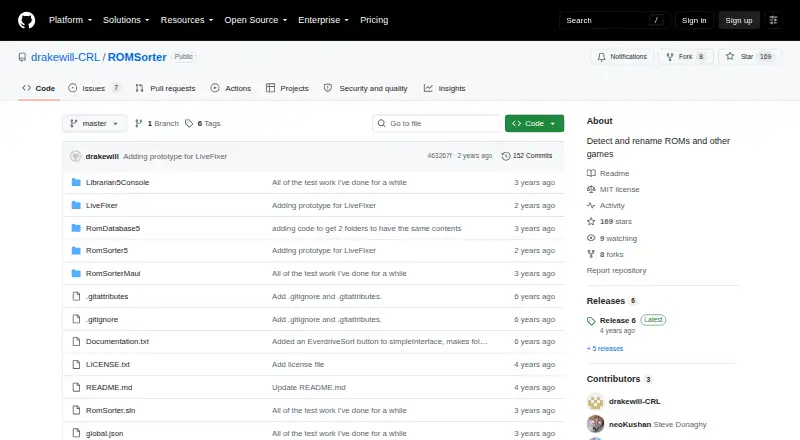
What ROMSorter is
ROMSorter detects and renames ROMs and other games, with tools for archive handling, duplicate sorting, and file checks. It can create zip files, convert supported archive formats by extracting and recompressing them, or unpack archives into a folder. Identical files can be moved into a subfolder named for the original file. A catalog records file names and hashes for later checks that files have not changed. The program can create DAT files for other ROM manager apps and rename single-file games using a supplied DAT. It also converts BIN/CUE or ISO files to CHD and can extract CHD back to BIN/CUE with chdman. Other functions include building one-game, one-ROM sets from Parent/Clone DAT files with region priorities, sorting Everdrive folders by starting letter, generating M3U playlists, and batch IPS/BPS patching. The current ROMSorter release is for Win-x64 only, while its Librarian command-line companion is available across platforms. Both require .NET 6. Linux and Mac Librarian users need an appropriate MAME chdman build for CHD commands. ROMSorter is free and MIT licensed, with no warranty.
Good
- Free and MIT licensed
- Catalogs filenames and hashes for later verification
- Can create one-game, one-ROM sets
- Supports M3U generation and batch patching
- Librarian companion is available across platforms
Watch out
- Current ROMSorter release is Win-x64 only
- Both apps require .NET 6
- Linux and Mac CHD commands need a MAME chdman build
- Software is provided without warranty
Who it suits
ROMSorter is for people organizing ROM and game files who need renaming, archive, duplicate, hash, or DAT tools. Windows users can use the current ROMSorter release; other platforms have the Librarian command-line companion.
Verdict
ROMSorter combines file organization with ROM-specific DAT, CHD, and playlist tools. Check the platform and .NET requirements, particularly if you need CHD commands outside Windows.
Plans and prices
From ROMSorter's own pricing page, checked 3 Oct 2026.
| Plan | Price | What it gives you |
|---|---|---|
| ROMSorter | Free | MIT-licensed software · current ROMSorter release is Win-x64 only |
The facts
Each one read from ROMSorter's own pages, with the date it was checked.
What it does
- 1G1R sorting
- It can build a one-game, one-ROM set from a Parent/Clone DAT and lets users prioritize regions.checked 3 Oct 2026
- Archive handling
- It can zip files, convert supported archive formats by extracting and zipping them, and extract archives in a folder.checked 3 Oct 2026
- Catalogs
- It saves file names and hashes to a catalog that can later be checked to confirm files have not changed.checked 3 Oct 2026
- CHD conversion
- It converts BIN/CUE or ISO files to CHD and extracts CHD files back to BIN/CUE using chdman.checked 3 Oct 2026
- DAT support
- It can create DAT files for use by other ROM manager apps and rename single-file games using a supplied DAT file.checked 3 Oct 2026
- Duplicate detection
- It identifies identical files and moves duplicates into a subfolder named for the original file.checked 3 Oct 2026
- Everdrive sorting
- Its Everdrive sort places games into folders by starting letter for devices with a low per-folder file limit.checked 3 Oct 2026
- License and warranty
- The software is MIT licensed and provided without warranty.checked 3 Oct 2026
- M3U playlists and patches
- Release 6 adds M3U playlist generation from CHD, BIN/CUE, and ISO disc formats, plus batch IPS/BPS patching.checked 3 Oct 2026
- Purpose
- ROMSorter detects and renames ROMs and other games.checked 3 Oct 2026
Where it runs
- Linux and macOS dependency
- Librarian users on Linux or Mac must provide an appropriate chdman build from MAME to use CHD commands.checked 3 Oct 2026
- Platforms and runtime
- The repository says ROMSorter currently releases for Win-x64 only, while its Librarian command-line companion is available for all platforms; the apps require .NET 6.checked 3 Oct 2026
The company
- Maker's stated focus
- The maker says the goal is a simple, easy ROM manager focused on speed rather than reproducing everything in ClrMamePro.checked 3 Oct 2026
The full review of ROMSorter
Overview
ROMSorter is a free ROM and game-file manager for people who want to rename, verify, and organize collections without a broader cataloging suite. Its strongest case is the combination of DAT-based sorting, archive handling, CHD conversion, and disc-playlist tools; the main caveat is that the current ROMSorter release is Windows x64 only.
Key features
ROMSorter can detect and rename ROMs and other games, but it does not scrape metadata. That makes it a practical choice for collection maintenance, not for building a richly described library.
Archive tools cover zipping files, converting supported archive formats by extracting and re-zipping them, and extracting archives into a folder. Duplicate detection moves identical files into a subfolder named after the original file, which can help separate redundant copies without deleting them. Catalogs store names and hashes so a later check can confirm files have not changed.
DAT support adds more specialized control: ROMSorter can create DAT files for other ROM managers and use a supplied DAT to rename single-file games. Its 1G1R sorting builds a one-game, one-ROM set from a Parent/Clone DAT and lets users prioritize regions. Everdrive sorting instead groups games by initial letter, a useful workaround for devices with a low file count limit per folder.
For disc collections, it can convert BIN/CUE or ISO files to CHD and extract CHD back to BIN/CUE with chdman. Release 6 also adds M3U playlists from CHD, BIN/CUE, and ISO formats, alongside batch IPS/BPS patching. These functions suit users managing disc images, though Linux and macOS Librarian users need to supply an appropriate MAME chdman build for CHD commands.
Pricing
ROMSorter is free: the ROMSorter plan costs nothing and the software is MIT-licensed. There is no free trial because no paid plan is involved. The free plan has no stated seat, quota, or renewal terms; its key practical limit is platform availability, with the current ROMSorter release restricted to Win-x64.
Platforms
The repository describes ROMSorter releases as Win-x64 only, despite broader platform labels. Its Librarian command-line companion is available for Windows, Linux, and macOS, and both apps require .NET 6. Linux and macOS users who need CHD commands must provide a suitable MAME chdman build. The software is supplied without warranty.
Who it's for
Choose ROMSorter if you maintain ROM or disc-image files and want file-level organization, hash checks, DAT workflows, 1G1R sets, or Everdrive-friendly folders. It is less suited to anyone seeking metadata scraping, a cross-platform graphical ROMSorter release, or a warranty-backed product. Its stated emphasis on speed and simplicity over matching all of ClrMamePro's capabilities makes it a focused utility rather than an attempt to cover every ROM-management workflow.
Pros and cons
- Pros: DAT renaming, 1G1R region priorities, and Everdrive letter folders address concrete collection and device-organization tasks.
- Pros: Hash catalogs and duplicate sorting help preserve and audit files without relying on metadata scraping.
- Pros: CHD conversion, M3U generation, and batch IPS/BPS patching add useful disc-image workflows.
- Cons: The current ROMSorter release is Win-x64 only, limiting the main app for Linux and macOS users.
- Cons: Linux and macOS Librarian users need an appropriate external chdman build for CHD commands.
- Cons: No metadata scraping means users wanting descriptive library records will need another tool or workflow.
Alternatives
ROM Management Software is the broader category directory for comparing tools. Consider these alternatives when their platform reach or stated focus better fits your setup:
- Igir is another free option for Linux, macOS, Windows, and self-hosted use, with no usage or collection-size limit stated.
- OxyROMon suits readers seeking free software across API, Linux, macOS, self-hosted, web, and Windows platforms, with no paid tiers or usage limits stated.
- RomM is a free, forever option spanning Android, iOS, web, Windows, Linux, API, and self-hosted platforms, with no paid features.
- verifydump is the more specific pick for a free command-line tool that verifies .chd and .rvz images against Redump Datfiles.
- RomForge is a free MIT-licensed desktop-app alternative for Linux, macOS, and Windows.
- ROMie is free to download and use on Linux, macOS, and Windows, with no paid plans stated.
- RomVault is worth considering if you want its Linux and Windows availability and a free plan, though its pricing model is freemium.
- ClrMamePro is a free alternative for Linux and Windows; ROMSorter may be preferable if its focused speed-first approach better matches your needs.
Verdict
ROMSorter is a strong fit for Windows users who want a free, focused way to rename and verify ROM collections while handling DAT-based sets and disc-image chores. Its specialized sorting and CHD tools make it more than a basic file organizer, but users who need metadata scraping or a native cross-platform ROMSorter release should look elsewhere.
Alternatives to ROMSorter
- 1

RomM
Free planOpen sourceAndroidiOSWebAPI8.5From $6.49 a month - 2
OxyROMon
Free planOpen sourceWebAPILinuxmacOS7.4Free plan - 3
WolvenKit
Free planOpen sourceLinuxSelf-hostedWindows7.3Free plan - 4

Igir
Free planLinuxmacOSSelf-hostedWindows6.6Free plan - 5
verifydump
Free planLinuxmacOSWindows6.6Free plan - 6
Gaseous
Free planWebLinuxSelf-hostedWindows6.3Free plan