
RiffToTab
RiffToTab converts MIDI files and recordings into playable guitar tab drafts for editing in a browser-based Guitar Pro style editor.
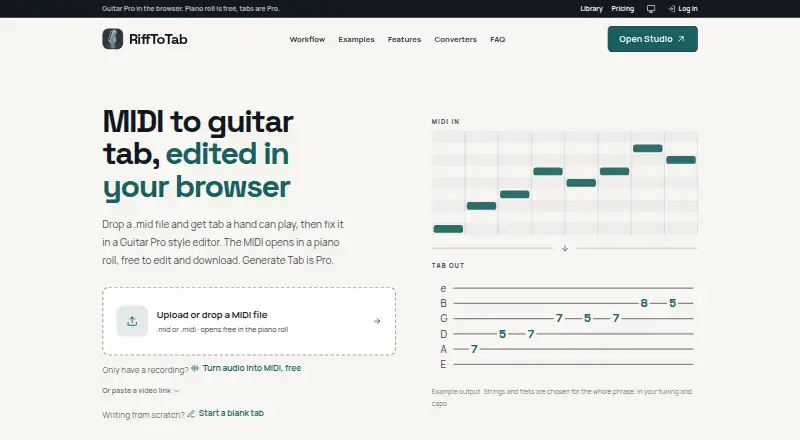
What RiffToTab is
RiffToTab converts MIDI files and recordings into playable guitar tab drafts for editing in a browser-based Guitar Pro style editor. Its converter assigns strings and frets to keep fingering within reach, and can preserve bends or simplify dense parts. The editor opens Guitar Pro, MusicXML, and alphaTex files, with tab and standard notation, multiple tracks, a fretboard view, playback, and common guitar articulations. Users can set tuning, capo positions from 1 to 12, and key changes up or down 12 semitones. Audio input can come from recordings, a microphone, or links from YouTube, TikTok, and Instagram. The service describes guitar and bass support from 4 to 7 strings; Pro also includes ukulele. Free exports include Guitar Pro, MIDI, text tab, and alphaTex, while Pro adds PDF and MusicXML. The Free plan costs nothing, requires no card, and includes three YouTube imports. Paid options include Monthly at $3.99 a month, Yearly at $39 a year, and Lifetime at $59, paid once. It runs in a browser without installation. Transcription quality depends on source material, settings, and user review; perfect results are not guaranteed.
Good
- Converts MIDI and recordings into playable tab drafts
- Editor supports tab and standard notation
- Free exports include Guitar Pro, MIDI, and alphaTex
- Runs in a browser with no installation
Watch out
- Perfect transcription or notation is not guaranteed
- Free plan includes only three YouTube imports
- PDF and MusicXML exports require Pro
Who it suits
RiffToTab suits guitarists and bassists who want editable tab drafts from MIDI or audio in a browser. Pro also includes ukulele support and additional export formats.
Verdict
RiffToTab pairs audio and MIDI conversion with an editor and several export formats. Source quality, settings, and review affect transcription results, so drafts may need correction.
Plans and prices
From RiffToTab's own pricing page, checked 8 Oct 2026.
| Plan | Price | What it gives you |
|---|---|---|
| Free | Free | Tab editor · audio to MIDI · opening and editing MIDI files · 3 YouTube imports · cloud save · Guitar Pro, MIDI and alphaTex export · No card. |
| Monthly | $3.99 a month | Unlimited tab generation · all Pro features · $3.99 first month, then $7.99 a month. Cancel anytime. |
| Yearly | $39 a year | Unlimited tab generation · all Pro features · $39 a year. Billed once a year. Cancel anytime. |
| Lifetime | $59, paid once | Future Pro features included · One payment. Nothing renews. |
The facts
Each one read from RiffToTab's own pages, with the date it was checked.
What it does
- Accuracy limitation
- The terms say output quality depends on the source material, settings and user review, and do not guarantee perfect transcription or notation.checked 8 Oct 2026
- Audio and video inputs
- The site accepts recordings and microphone input, and says it can fetch audio from YouTube, TikTok or Instagram links when converting.checked 8 Oct 2026
- Content rights
- The terms say users retain ownership of uploaded or created content and grant RiffToTab a limited license to process it as needed to operate the product and provide requested features.checked 8 Oct 2026
- Editor
- The editor opens Guitar Pro, MusicXML and alphaTex files and supports notation, multiple tracks, a fretboard view, and common guitar articulations.checked 8 Oct 2026
- Exports
- Free exports include Guitar Pro, MIDI, text tab and alphaTex; Pro adds PDF and MusicXML export.checked 8 Oct 2026
- Fingering
- The converter chooses strings and frets across a phrase to keep the fingering within reach, and can preserve bends or simplify dense parts.checked 8 Oct 2026
- Instruments
- The site describes guitar and bass support from 4 to 7 strings, and Pro also includes ukulele.checked 8 Oct 2026
- Integrations
- The terms say sign-in may be offered through email and password, Google, GitHub or other providers.checked 8 Oct 2026
- No installation
- RiffToTab says it runs in the browser and requires nothing to install.checked 8 Oct 2026
- Privacy and sharing
- The terms say saved tabs are private by default and link sharing creates a private link that is not listed on the site or submitted to search engines.checked 8 Oct 2026
- Pro features
- Pro includes unlimited tab generation and YouTube imports, practice controls, and unlimited cloud storage for recordings.checked 8 Oct 2026
- Purpose
- RiffToTab converts MIDI files or recordings into playable guitar tab drafts that can be edited in a browser-based Guitar Pro style editor.checked 8 Oct 2026
- Tuning controls
- Users can set tuning, capo and key, with capo positions 1 to 12 and key changes up or down 12 semitones.checked 8 Oct 2026
Money
- Billing and refund
- Paid plans are offered through Polar, and the terms offer a full refund when requested within 7 days of a charge for a generated tab.checked 8 Oct 2026
Alternatives to RiffToTab
- 1

Guitar2Tabs
Free planAndroidiOSWebAPI8.1Free plan - 2

Cesure
Free planAndroidiOSWebAPI8.0From €39.99 a year - 3

Note2Tabs
Free planWeb7.4From $5.99 a month - 4

Guitar Tab Maker
Free planAndroidiOSWebLinux7.3Free plan - 5

TabMaker
Free planAndroidiOSWebmacOS7.3From $34.99 a year - 6

Soundslice
Free planAndroidiOSWeb7.2From $5 a month