
RECAP
RECAP is a set of tools for working with PACER, the system for accessing U.S.
What RECAP is
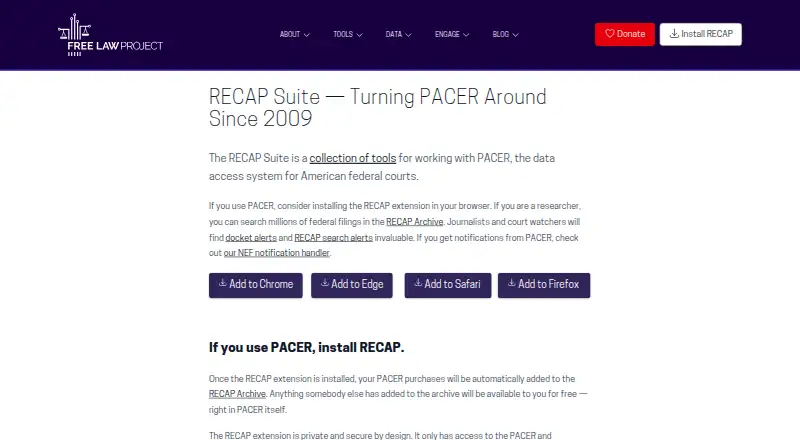
RECAP is a set of tools for working with PACER, the system for accessing U.S. federal court records. Its browser extension contributes purchased PACER documents to the RECAP Archive, where documents previously added by others are available free. The searchable archive holds tens of millions of documents, including scanned PDF pages. Users can follow cases for email notices about new filings and save searches to receive alerts when new matches appear. Attorneys can direct PACER notices to a personal CourtListener notification address so RECAP can process them and contribute cases and filings. The archive is also offered through an API and as bulk data for journalists, researchers, startups, and developers. Webhooks connect events on RECAP's website to actions in other systems; the maker also describes a PACER-to-Google-Drive connector demo. The extension says it does not access PACER credentials or transmit information to third parties, though it uploads federal records to CourtListener and sends CourtListener queries about requested records. RECAP is free; PACER may still charge for documents purchased. Paid access is listed from $10/user/mo.
Good
- Searches tens of millions of PACER documents
- Provides alerts for followed cases and saved searches
- Archive available through API and bulk data
- Extension does not access PACER credentials
Watch out
- PACER may charge for purchased documents
- No free trial is listed
- Coverage is limited to U.S. federal courts
Who it suits
RECAP is suited to people researching U.S. federal court records, including attorneys, journalists, and researchers. Developers and organizations can also use the archive's API or bulk data.
Verdict
RECAP can help users find and follow federal court filings, while contributing documents to a shared archive. Remember that PACER may charge for documents you buy through it.
Plans and prices
From RECAP's own pricing page, checked 2 Oct 2026.
| Plan | Price | What it gives you |
|---|---|---|
| RECAP | Free | The extension is free; PACER may still charge for documents you purchase. |
The facts
Each one read from RECAP's own pages, with the date it was checked.
What it does
- APIs and bulk data
- The RECAP Archive is available through an API or as bulk data for journalists, researchers, startups, and developers.checked 2 Oct 2026
- Archive
- The RECAP Archive contains tens of millions of PACER documents and is searchable, including scanned PDF pages.checked 2 Oct 2026
- Docket alerts
- Users can get email alerts when new filings appear in cases they follow, with additional alerts available when the extension is installed.checked 2 Oct 2026
- Integrations
- RECAP webhooks can connect events on its website to actions in other systems, and the maker describes a PACER-to-Google-Drive connector demo.checked 2 Oct 2026
- PACER document sharing
- The browser extension adds purchased PACER documents to the RECAP Archive, where documents already contributed by others can be accessed for free.checked 2 Oct 2026
- PACER notifications
- Attorneys can add their personal CourtListener notification address as a secondary PACER recipient so RECAP can process their notices and contribute cases and filings.checked 2 Oct 2026
- Permissions
- The FAQ says the extension accesses PACER websites and cannot see browsing on other websites.checked 2 Oct 2026
- Privacy
- The extension privacy policy says it does not access PACER credentials or transmit information to third parties, while explaining that it uploads federal records to CourtListener and sends CourtListener queries about requested records.checked 2 Oct 2026
- Purpose
- RECAP is a collection of tools for working with PACER, the data access system for American federal courts.checked 2 Oct 2026
- Restricted records
- The FAQ says RECAP detects some restricted-document warnings and does not upload those documents, and describes additional safeguards for ECF accounts and a process for addressing mistaken uploads.checked 2 Oct 2026
- Search alerts
- Search alerts notify users when new matches appear in PACER holdings for a saved search.checked 2 Oct 2026
- Support
- Users can report bugs through the bug tracker or by email.checked 2 Oct 2026
The company
- Founded
- 2009checked 28 Sep 2026
- Maker
- Free Law Project is a 501(c)(3) nonprofit that says it started in 2010 and uses technology, data, and advocacy to make the legal ecosystem more equitable and competitive.checked 2 Oct 2026
Where it runs
- Platforms
- The maker's suite overview links to extensions for Chrome, Edge, Safari, and Firefox; the App Store listing identifies RECAP Uploader for iPhone, iPad, and Mac.checked 2 Oct 2026
The full review of RECAP
RECAP is a set of tools for finding, following, and sharing U.S. federal court records through PACER and a public archive. It suits people whose work centers on federal filings, especially researchers, journalists, and attorneys. Its shared archive can spare users some repeat document purchases, but PACER may still charge for records they need.
Overview
RECAP pairs a browser extension with a searchable archive containing tens of millions of PACER documents. When the extension is used to buy a PACER document, it contributes that record to the archive, where others can access it for free. Search reaches scanned PDF pages as well as text, which helps when a filing is image-based or difficult to locate by title. The trade-off is that a record not already contributed may still require a PACER purchase.
The service focuses on U.S. federal courts rather than broad legal research across jurisdictions. Case-law and docket search, citation tools, and alerts make it useful for tracking court activity, but it is not a general-purpose source for statutes, regulations, or legal commentary.
Key features
Shared documents and search
RECAP turns individual PACER purchases into a shared resource: one user's contribution may let another reader retrieve the same filing without buying it again. Its archive's scale and scanned-page search are meaningful advantages for document-focused research, though coverage depends on records being contributed.
Case and search alerts
Email docket alerts follow new filings in cases a user tracks, while saved-search alerts flag new matches in PACER holdings. Installing the extension adds further alert options. These tools are well suited to ongoing federal litigation monitoring, but their jurisdiction remains limited to U.S. federal courts.
Contributions and integrations
Attorneys can add a personal CourtListener notification address as a secondary PACER recipient, allowing RECAP to process notices and contribute related cases and filings. Webhooks can connect RECAP site events to actions elsewhere; Free Law Project also describes a PACER-to-Google-Drive connector demo. Journalists, researchers, startups, and developers can access archive data through an API or bulk downloads.
Privacy and safeguards
The extension's privacy policy says it does not access PACER credentials or send information to third parties. It does upload federal records to CourtListener and query CourtListener for requested records, so users should understand that data flow before installing it. The extension accesses PACER websites rather than general browsing. RECAP says it identifies some restricted-document warnings and avoids uploading those records, with additional ECF safeguards and a process for mistaken uploads.
Pricing
The RECAP extension is free: the RECAP plan costs nothing. There is no free trial because the core extension is already free. PACER can still charge for documents a user buys, so the archive lowers costs only when the needed record has already been contributed.
Paid plans start at 10 /user/mo. That is a per-user starting price, but no specific paid-plan features or terms are established here, so readers should not assume it changes PACER fees or adds a particular capability. The free extension is the clearest fit for individual users who chiefly want archive access and basic contributions; teams considering a paid tier should confirm what it includes before budgeting.
Platforms
RECAP is available as an extension, on iOS, and on the web. The extension is central to PACER document contributions and additional alerts, while the web archive supports searching and browsing. iOS availability gives users another access point, though the core document-sharing workflow is tied to browser use.
Who it's for
RECAP is a strong fit for attorneys, journalists, researchers, and others who repeatedly need federal filings or monitor cases and PACER searches. Its shared archive can make recurring document research less expensive when prior users have contributed the records. It is a weaker choice for readers seeking state-law coverage, statutes and regulations, legal commentary, or a comprehensive cross-jurisdiction research platform.
Pros and cons
- Pros: A large, searchable archive can provide contributed PACER documents without a second purchase, including scans that ordinary text-only searches can miss.
- Pros: Case alerts, saved-search alerts, and attorney notice forwarding support ongoing federal docket monitoring.
- Pros: API and bulk-data access extend the archive's usefulness to research and software projects.
- Cons: The archive's federal focus excludes broader state-law and statutory research needs.
- Cons: Documents absent from the archive may still cost money through PACER.
- Cons: Contributing records entails uploading federal documents to CourtListener, a data flow users should weigh even with the stated credential and restricted-record safeguards.
Alternatives
Browse Legal Research Software for more options. Choose CourtListener when a web-based, open-source service with a free tier and stated alert quotas is a better fit. CanLII is the better match for free access to Canadian legal information, with Search+ requiring a free account and subject to daily limits.
Fastcase suits readers who want a broader mobile and desktop service: its Appellate plan costs $65 a month and covers 50-state and federal law, appellate cases, and nationwide statutes and regulations, with no contract. LegitQuest is an alternative for readers considering a freemium legal research service with a free trial. Midpage offers a trial and paid plans for readers seeking AI research tools. For paid web-based case tracking, consider Thomson Reuters Case Tracking; Bloomberg Law is another paid web option with sales-contact pricing. Manupatra AI Search is a paid option available on web, Windows, iOS, and Android.
Verdict
Choose RECAP if your work depends on U.S. federal filings and you value a shared archive that can make already-purchased PACER documents freely available to others. Its free extension, broad archive, and targeted alerts are compelling for document-led federal research. Look elsewhere if you need wide jurisdictional coverage or reliable access to documents that have not yet entered the archive, and remember that PACER purchases can still add cost.
Getting started
- Open the RECAP website or install the browser extension; RECAP is also available on iOS.
- Use the extension while working with PACER to add purchased documents to the RECAP Archive.
- Search the archive for contributed PACER documents, including scanned PDF pages.
- Follow cases for email alerts or save a search to receive alerts about new matches.
- If you are an attorney, add your personal CourtListener notification address as a secondary PACER recipient.
Limits worth knowing
The RECAP extension is free, but PACER may charge for documents you purchase. Paid access is listed from $10/user/mo.
Questions
Is RECAP free?
The extension is free. PACER may still charge for documents you purchase, and paid access is listed from $10/user/mo.
Which platforms does RECAP support?
RECAP is available as an extension, on iOS, and on the web.
What court records does RECAP cover?
Its coverage is U.S. federal courts. The searchable archive contains PACER documents, including scanned PDF pages.
Can I get alerts for court activity?
Yes. Users can get email alerts for new filings in followed cases and save searches for alerts about new matches in PACER holdings.
Can developers access RECAP data?
Yes. The archive is available through an API or as bulk data. RECAP webhooks can also connect website events to actions in other systems.
Does the extension access PACER credentials?
The extension privacy policy says it does not access PACER credentials or transmit information to third parties. It does upload federal records to CourtListener and send queries about requested records.
Alternatives to RECAP
- 1

Docket Alarm
Free planAndroidiOSWebAPI8.1Free plan - 2

Indian Kanoon
Free planAndroidWebAPI7.6From ₹500 a month - 3

HeinOnline
Free planAndroidiOSWeb7.5Free plan - 4
CanLII
Free planWebAPI7.2From C$100 a year - 5

Fastcase
AndroidiOSWebWindows7.0From $695 a year - 6
Manupatra AI Search
AndroidiOSWebWindows6.9From ₹5,000 a year