ReadSVP
ReadSVP is a free web speed-reading tool that displays PDF text one word at a time using RSVP pacing.
What ReadSVP is
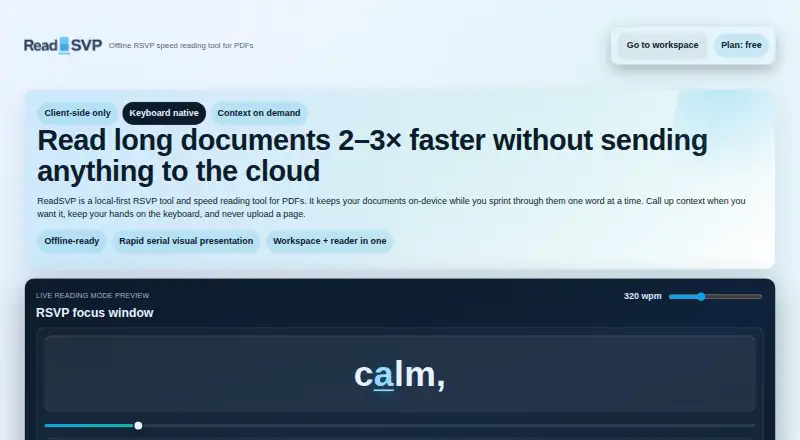
ReadSVP is a free web speed-reading tool that displays PDF text one word at a time using RSVP pacing. Its PDF-aware parser considers sentence boundaries, punctuation, and context. Readers can adjust words per minute and chunk size, with presets at 320, 520, and 820 wpm; the site describes segmentation and pacing as optimized for 300–900 wpm. ORP highlighting and steady pacing form the core reading method, while a context ribbon reveals surrounding text when needed. Keyboard controls include Space for the wait menu, arrow keys for movement and speed changes, and 1 or 2 for chunk size. The tool is local-first: PDFs, extracted text, and playback remain on the user’s machine. IndexedDB stores reading fingerprints, and checkpoints allow resuming or switching documents without losing pace. Clearing browser storage removes saved data. PDF is the stated import format.
Good
- Free PDF speed-reading tool
- Adjustable WPM and chunk size
- PDF-aware sentence and punctuation parsing
- Local playback and on-device storage
- Resume checkpoints across documents
Watch out
- PDF is the only stated import format
- Clearing browser storage removes saved data
- Designed around one-word-at-a-time RSVP reading
Who it suits
It suits readers who want browser-based RSVP practice with adjustable pacing and chunk sizes. It is particularly appropriate for people who prefer PDF reading with on-device storage.
Verdict
ReadSVP offers focused PDF speed reading with configurable pacing, keyboard controls, and local data handling. Choose it when PDF input and RSVP presentation match your reading workflow.
Plans and prices
From ReadSVP's own pricing page, checked 10 Oct 2026.
| Plan | Price | What it gives you |
|---|---|---|
| Free | Free | Plan: free · PDF speed reading |
The facts
Each one read from ReadSVP's own pages, with the date it was checked.
What it does
- Context
- A context ribbon is available when readers want surrounding text while reading at speed.checked 10 Oct 2026
- Import limit
- The site describes PDF import and does not state support for other document formats.checked 10 Oct 2026
- Keyboard shortcuts
- Space opens the wait menu, left and right arrows move backward or forward, up and down arrows adjust WPM, and 1 or 2 sets chunk size.checked 10 Oct 2026
- Local storage
- The site says storage uses IndexedDB, reading fingerprints stay on-device, and clearing browser storage wipes the saved data.checked 10 Oct 2026
- ORP highlighting
- The site says the RSVP reader is built around ORP highlighting and steady pacing.checked 10 Oct 2026
- PDF parsing
- PDF-aware parsing segments text while respecting sentences, punctuation, and context.checked 10 Oct 2026
- Privacy
- The site says PDFs, text extraction, and RSVP playback stay on the user's machine and are not uploaded to the cloud.checked 10 Oct 2026
- Progress resume
- Fingerprint-based checkpoints let readers resume where they left off and switch documents without losing pace.checked 10 Oct 2026
- Purpose
- ReadSVP is a local-first RSVP speed reading tool for PDFs that displays text one word at a time.checked 10 Oct 2026
- Reading controls
- Readers can adjust words per minute and chunk size, with presets at 320, 520, and 820 wpm.checked 10 Oct 2026
- Reading speed
- The site says its text segmentation and RSVP pacing are optimized for 300–900 words per minute.checked 10 Oct 2026
Alternatives to ReadSVP
- 1
Superead
Free planAndroidiOSWebmacOS8.0From $59.99 a year - 2
Ledor
Free planOpen sourceAndroidiOSWebLinux7.7Free plan - 3

LightSpeedRead
Free planiOSWebExtension7.5From $19 a year - 4

FastReadi
Free planiOS7.3From $3.33 a month - 5
Reading Trainer
Free planAndroidiOSWebWindows7.2Free plan - 6
SpeedyRead
Free planiOS7.2From $1.99 a month