pywinauto
pywinauto is a free Python library for automating graphical applications on Microsoft Windows.
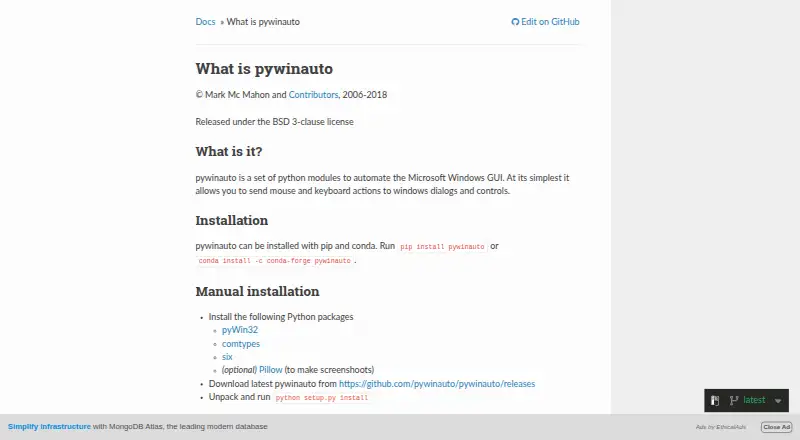
What pywinauto is
pywinauto is a free Python library for automating graphical applications on Microsoft Windows. Scripts can send mouse and keyboard actions to dialogs and controls, retrieve application text, start programs, or connect to programs already running. A Desktop object supports navigation across process boundaries. Two backends are provided: Win32 API and Microsoft UI Automation. Documented Win32 targets include MFC, VB6, VCL, simple WinForms, and legacy applications; UI Automation covers WinForms, WPF, Store apps, Qt5, and browsers. Installation is documented with pip or conda. Manual Windows setup lists pyWin32 and comtypes, while Pillow is optional for screenshots. The project uses the BSD 3-clause license. Linux mouse and keyboard emulation is described, but Linux accessibility support and Apple Accessibility API support are long-term plans. UI Automation cannot support custom properties and controls because of comtypes restrictions. Questions are directed to Stack Overflow and a mailing list.
Good
- Automates mouse and keyboard controls
- Supports Win32 and UI Automation backends
- Can connect to running applications
- Navigates across process boundaries
- Free BSD 3-clause library
Watch out
- Focused on Windows
- Linux accessibility support remains planned
- macOS accessibility support remains planned
- Custom UI properties and controls unsupported
Who it suits
pywinauto suits Python developers automating Windows desktop applications and controls. It is less suitable when Linux or macOS accessibility automation is required.
Verdict
pywinauto brings two Windows GUI automation backends and process-level controls to Python. Check its platform and UI Automation limitations against your target applications.
Plans and prices
From pywinauto's own pricing page, checked 7 Oct 2026.
| Plan | Price | What it gives you |
|---|---|---|
| pywinauto | Free | BSD 3-clause licensed Python library · Windows GUI automation |
The facts
Each one read from pywinauto's own pages, with the date it was checked.
What it does
- Actions and data
- The library can send mouse and keyboard actions to controls and can retrieve text data from applications.checked 7 Oct 2026
- Backends
- It supports the Win32 API backend and Microsoft UI Automation backend.checked 7 Oct 2026
- Cross-process access
- A Desktop object can be used to navigate across process boundaries.checked 7 Oct 2026
- Dependencies
- Manual Windows installation lists pyWin32 and comtypes; Pillow is optional for screenshots.checked 7 Oct 2026
- Installation
- The project documents installation with pip or conda.checked 7 Oct 2026
- License
- The repository states that pywinauto is distributed under the BSD 3-clause license.checked 7 Oct 2026
- Process control
- An Application object can start an application or connect to one that is already running.checked 7 Oct 2026
- Project history
- The repository says native Windows pywinauto was initially written by Mark Mc Mahon and continued by contributors.checked 7 Oct 2026
- Purpose
- pywinauto is a set of Python modules for automating the Microsoft Windows GUI, including mouse and keyboard actions on dialogs and controls.checked 7 Oct 2026
- Support
- The repository points users to Stack Overflow and a mailing list for questions, and welcomes feature requests and discussions through GitHub issues.checked 7 Oct 2026
- UI Automation limitation
- The docs state that custom properties and controls are unsupported because of comtypes Python library restrictions.checked 7 Oct 2026
The company
- Founded
- 2006checked 28 Sep 2026
Where it runs
- Linux limits
- The docs say Linux accessibility support is in the long-term plans; mouse and keyboard input emulation modules are described as working on Linux.checked 7 Oct 2026
- macOS limits
- The docs say Apple Accessibility API support is in the long-term plans.checked 7 Oct 2026
- Supported app types
- The docs list MFC, VB6, VCL, simple WinForms and legacy apps for Win32, and WinForms, WPF, Store apps, Qt5 and browsers for UI Automation.checked 7 Oct 2026
Alternatives to pywinauto
- 1

Cypress
Free planOpen sourceWebAPILinuxmacOS8.4From $67 a month - 2

Katalon Studio
Free planAndroidiOSWebAPI8.4From $1,000 a year - 3
testRigor
Free planAndroidiOSWebAPI8.3From $300 a month - 4
Keysight Eggplant Test
AndroidiOSWebAPI7.9$9,999 one-time - 5

Selenium
Free planOpen sourceWebAPIExtensionLinux7.8Free plan - 6
Leapwork
Free planAndroidiOSWebAPI7.7Free plan