PSPad
PSPad is a free Windows text and code editor from a maker based in the Czech Republic.
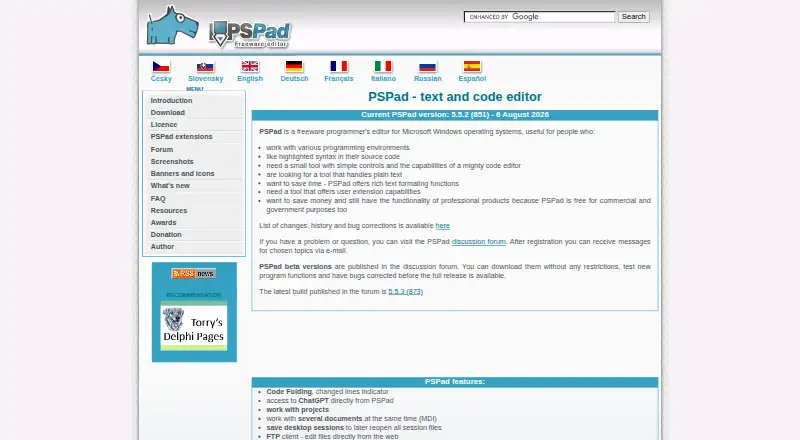
What PSPad is
PSPad is a free Windows text and code editor from a maker based in the Czech Republic. It is intended for people editing source code or plain text who want a small tool with simple controls. Syntax highlighting covers languages including HTML, PHP, XHTML, R, JavaScript, ASP, Perl, and C. Editing functions include code folding, multi-document work, sessions, macros, column editing, templates, search and replace across files, and a HEX editor. Web-oriented tools include an FTP client for text files, an internal browser, HTML preview, and HTML formatting. Users can call external programs and configure an external compiler with captured output, a log window, and a log parser. The feature list also includes direct ChatGPT access. Maker-supplied extensions include scripts, converters, and syntax definitions. Downloads provide 32-bit and experimental 64-bit installers plus portable ZIP packages. The FTP client handles text files only and has no binary transfer mode.
Good
- Free Windows editor
- Syntax highlighting for many languages
- Includes macros and column editing
- Portable ZIP packages available
- Supports extensions
Watch out
- Windows only
- FTP handles text files only
- No binary transfer mode
- 64-bit installer is experimental
Who it suits
PSPad suits Windows users editing code or plain text who want programming, web, and external-tool features in one editor. It also fits users who prefer portable packages or maker-provided extensions.
Verdict
PSPad combines source-code editing, web tools, macros, extensions, and external compiler support in a free Windows package. Its text-only FTP transfer and Windows focus define where it fits.
Plans and prices
From PSPad's own pricing page, checked 11 Oct 2026.
| Plan | Price | What it gives you |
|---|---|---|
| Freeware | Free | Free for any purpose, including commercial applications · Windows |
The facts
Each one read from PSPad's own pages, with the date it was checked.
What it does
- Author
- The author page names Jan Fiala and says he lives in the Czech Republic.checked 11 Oct 2026
- ChatGPT
- The feature list says users can access ChatGPT directly from PSPad.checked 11 Oct 2026
- Column editing
- Yeschecked 22 Sep 2026
- Distribution
- The download page offers 32-bit and experimental 64-bit installers, plus portable ZIP packages, and says PSPad can run without installation after unpacking.checked 11 Oct 2026
- Editing features
- Features include code folding, multi-document editing, sessions, macros, search and replace across files, templates and a HEX editor.checked 11 Oct 2026
- Extensions
- The maker provides user extensions such as scripts, user converters and syntax definitions.checked 11 Oct 2026
- Extension support
- Yeschecked 22 Sep 2026
- External tools
- Users can call external programs and configure an external compiler with output capture, a log window and log parser.checked 11 Oct 2026
- File transfer limit
- The FAQ says PSPad's FTP client handles text files only and has no binary transfer mode.checked 11 Oct 2026
- Intended users
- The author describes it as useful for people working in programming environments, editing source code or plain text, and seeking a small tool with simple controls.checked 11 Oct 2026
- Languages
- It supports syntax highlighting for many languages, including HTML, PHP, XHTML, R, JavaScript, ASP, Perl and C.checked 11 Oct 2026
- Product
- PSPad is a freeware text and code editor for Microsoft Windows.checked 11 Oct 2026
- Security
- The download page states that the installer and PSPad.exe are digitally signed with a Comodo code-signing certificate and that the installer contains no bundled software or malware.checked 11 Oct 2026
- Support
- Users with questions or problems can visit the PSPad discussion forum, and registered users can receive email messages about selected topics.checked 11 Oct 2026
- Web tools
- PSPad includes an FTP client for editing text files from the web, an internal web browser, HTML preview and HTML formatting tools.checked 11 Oct 2026
Money
- Free plan
- Yeschecked 22 Sep 2026
The company
- Headquarters
- Czech Republicchecked 28 Sep 2026
Where it runs
- Macro recording
- Yeschecked 22 Sep 2026
- Supported platforms
- Windowschecked 22 Sep 2026
Alternatives to PSPad
- 1

Calmly Writer
Free planAndroidWebLinuxmacOS8.6Free plan - 2

Zed
Free planLinuxmacOSWindows8.3From $10 a month - 3

Visual Studio Code
Free planWebLinuxmacOSWindows8.2Free plan - 4
Neovim
Free planAndroidAPILinuxmacOS8.1Free plan - 5
Geany
Free planOpen sourceLinuxmacOSWindows8.1Free plan - 6
GNU Emacs
Free planAndroidLinuxmacOSWindows8.0Free plan