Pop
Pop is a videoconferencing and screen-sharing service built around shared control of a computer.
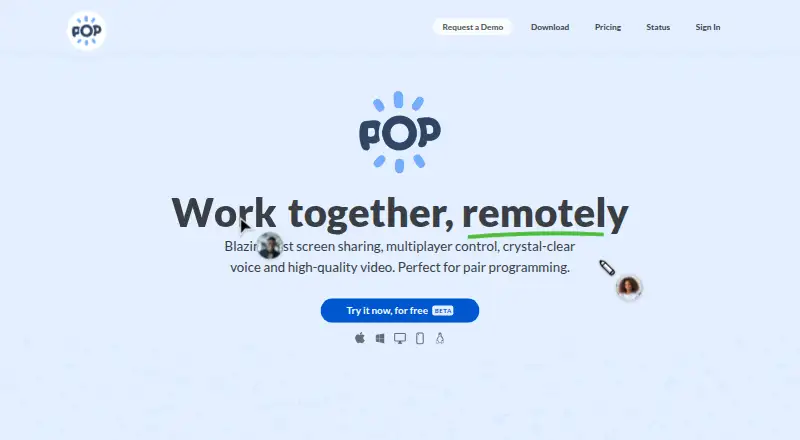
What Pop is
Pop is a videoconferencing and screen-sharing service built around shared control of a computer. Participants can use their own mouse and keyboard on the shared screen, and draw or highlight to communicate visual ideas. Voice and video accompany its low-latency screen sharing. People can join from a link before registering, using a laptop or smartphone; the site lists Chrome, Firefox, Safari, mobile browsers, and Mac, Windows, and Linux. Meetings can be started from Slack with a slash command or call button. Pop also supports connecting Google Calendar to manage scheduled meetings. Pop says meeting traffic is encrypted in transit and that it does not store or record meeting media. Its security information distinguishes calls: one-to-one sessions are end-to-end encrypted, while group calls with three or more participants use an SFU that decrypts and re-encrypts media. The Pro plan is listed at $0 while in beta, with unlimited meetings and no time limit. Starter is free; Enterprise is $25 per user per month and starts at 40 licenses for $12K/year.
Good
- Participants control shared screens with mouse and keyboard.
- Includes drawing and highlighting during screen sharing.
- People can join from a link before registering.
- Slack can start meetings from a conversation.
- Pop says it does not store or record meeting media.
Watch out
- Group calls use an SFU that decrypts and re-encrypts media.
- Enterprise starts at 40 licenses for $12K/year.
- Pro is listed at $0 while in beta.
Who it suits
Pop may suit collaborators who need to share and control a computer during a call, including pair programmers. Its browser joining options also suit people who want to enter from a link before registering.
Verdict
Pop combines calls with interactive screen sharing and remote control. Its call encryption differs between one-to-one and group sessions, so that distinction matters when evaluating it.
Plans and prices
From Pop's own pricing page, checked 30 Sep 2026.
| Plan | Price | What it gives you |
|---|---|---|
| Pro | Free | Create and join unlimited meetings · Host unlimited meetings · No time limit · Public support forum · While in BETA |
| Starter | Free | Join unlimited meetings · High quality screen sharing · Remote control · Draw / messaging |
| Enterprise | $25 a month | All Pro features · Single Sign-On SAML · Support via Slack or email · per user, per month; starting at 40 licenses for $12K/year |
The facts
Each one read from Pop's own pages, with the date it was checked.
Where it runs
- Browser support
- The site lists Chrome, Firefox, Safari and mobile browsers for joining, along with Mac, Windows and Linux.checked 30 Sep 2026
The company
- Company
- The privacy policy identifies the operator as Pop Technologies, Inc.checked 30 Sep 2026
What it does
- Drawing
- Pop supports drawing and highlighting to exchange visual ideas in real time.checked 30 Sep 2026
- Encryption
- Pop says meeting traffic is encrypted in transit, with SRTP and DTLS-SRTP for media and DTLS for real-time data channels.checked 30 Sep 2026
- Google Calendar
- The privacy policy says users can connect Google Calendar to manage scheduled Pop meetings, and Pop may view and edit calendar data for that purpose.checked 30 Sep 2026
- Group-call privacy
- The security page says one-to-one calls are end-to-end encrypted, while calls with three or more participants use an SFU that decrypts and re-encrypts media.checked 30 Sep 2026
- Hosting
- Pop says its service is hosted on Google Cloud Platform and Google Firebase.checked 30 Sep 2026
- Joining meetings
- People can join from a link before registering, using a laptop or smartphone.checked 30 Sep 2026
- Media storage
- Pop says it does not store or record meeting media as part of the service.checked 30 Sep 2026
- Pair programming
- Pop describes its multiplayer screen sharing as letting everyone control the shared screen with their own mouse and keyboard.checked 30 Sep 2026
- Product
- Pop is a videoconferencing and screen sharing service that lets users draw, click and type on one another’s computers.checked 30 Sep 2026
- Slack integration
- Pop says users can start a meeting from Slack with a slash command or the call button, and the meeting appears in the conversation.checked 30 Sep 2026
- Support
- The site lists [email protected] as a support contact; its pricing page includes a public support forum for Pro and Slack or email support for Enterprise.checked 30 Sep 2026
- Voice and video
- Pop offers voice and video alongside low-latency screen sharing.checked 30 Sep 2026
The full review of Pop
Pop is a video-calling service for people who need to work together directly on a shared computer. It suits pair programmers and teams guiding someone through a task; its strongest advantage is combining remote control and visual annotation with a call.
Overview
Pop combines voice and video with low-latency screen sharing, remote control, drawing and messaging. Participants can use their own mouse and keyboard on the shared screen, making Pop more useful for collaborative work than a call that only lets others watch. Guests can join from a link without registering, including from a smartphone, which makes it easier to bring someone into a short working session.
Pop says it does not store or record meeting media and encrypts traffic in transit. One-to-one calls are end-to-end encrypted; calls with three or more participants use an SFU that decrypts and re-encrypts media. Teams for whom end-to-end encryption across group calls is a requirement should look elsewhere. Pop is hosted on Google Cloud Platform and Google Firebase.
Key features
- Remote control: Pop lets participants click and type on another person’s computer, with each person using their own mouse and keyboard. That makes it a practical choice for pair programming and guided troubleshooting, but it requires comfort with others controlling a shared device.
- Drawing and highlighting: Participants can mark up the screen to explain visual ideas in real time. This adds a useful way to point out a change or problem without relying on verbal directions alone.
- Voice, video and messaging: These tools sit alongside screen sharing, so a working session can keep conversation and coordination together.
- Joining and integrations: Guests can join from a link before registering, using a laptop or smartphone. Users can start a meeting from Slack with a slash command or call button, with the meeting appearing in the conversation. Google Calendar can be connected to manage scheduled meetings; Pop may view and edit calendar data for that purpose.
Pricing
Pop has free plans and a paid Enterprise plan. Pro is free while in beta, with unlimited meeting creation and hosting, no time limit and access to a public support forum. It is the broadest free option for regular hosts, but its stated billing condition is tied to the beta.
Starter is free and includes unlimited meeting joining, high-quality screen sharing, remote control, drawing and messaging. It suits people who mainly join other users’ sessions; unlike Pro, its stated inclusions do not promise unlimited meeting hosting.
Enterprise is $25 a month, billed per user per month, starting at 40 licenses for $12K/year. It includes all Pro features, SAML single sign-on and Slack or email support. The 40-license minimum makes it a team-scale commitment rather than a small-team upgrade, but it adds centralized sign-in and a more direct support channel.
Platforms
Pop is available on Linux, macOS, the web and Windows. Meetings can also be joined through Chrome, Firefox, Safari and mobile browsers, using a laptop or smartphone.
Who it's for
Pop is best suited to pairs and teams who need to solve problems together on a computer, especially pair programmers, collaborators reviewing visual work and people providing remote guidance. It is less suitable for teams that require end-to-end encryption for calls with three or more participants, or for people who only need to present a screen without interactive control.
Pros and cons
- Pro: Remote control, drawing and messaging complement voice and video, supporting active collaboration rather than screen viewing alone.
- Pro: Guests can join from a link without registering, reducing friction for one-off collaborators.
- Pro: Pro offers unlimited hosting and no time limit at no charge while in beta.
- Con: Group calls with three or more participants are not end-to-end encrypted; the SFU decrypts and re-encrypts media.
- Con: Enterprise starts at 40 licenses, putting its $12K/year starting commitment out of reach for many small teams.
- Con: Pro’s free terms are stated as applying while in beta, so it is not the same commitment as a free plan described as lasting indefinitely.
Alternatives
For a broader directory of tools in this category, see Pair Programming Software. Choose Drovio if you want a free screen-sharing option with remote control and can work within its 30-minute daily remote-control limit and two-participant cap. Zed is the alternative to consider when a code editor with a free personal plan is a better fit than a videoconferencing tool. Saros may suit users seeking a completely open-source collaboration option with no paid plans. Visual Studio is another alternative. Coterm is a free macOS app with an optional self-hosted collaboration backend. Duckly may suit occasional sessions where two participants and no video calls are enough on its free plan. Remote Collab is an open-source SublimeText plugin for real-time work on the same project. Codeshare may suit browser-based code collaboration, with its free plan allowing 20 saved codeshares and unlimited collaborators.
Verdict
Choose Pop if your calls need shared control, screen annotation and conversation in one place, particularly for pair programming or remote guidance. The free Pro plan’s unlimited hosting and lack of time limits make it an appealing starting point while in beta. Look elsewhere if group-call end-to-end encryption is essential or your team needs a paid plan without Enterprise’s 40-license minimum.
Getting started
- Open https://pop.com/.
- Join a meeting from a link using a laptop or smartphone, without registering first.
- Use Chrome, Firefox, Safari or a mobile browser, or use Mac, Windows or Linux.
- For Slack meetings, start a call with the slash command or call button.
- Connect Google Calendar if you want to manage scheduled Pop meetings.
Limits worth knowing
Starter is free and includes joining unlimited meetings, high quality screen sharing, remote control, drawing and messaging. Pro is free while in beta and includes unlimited meetings and hosting with no time limit; Enterprise is $25 a month per user and starts at 40 licenses for $12K/year.
Questions
Is Pop free?
Yes. Starter is listed as free, and Pro is listed as free while in beta.
What does Enterprise cost?
Enterprise is $25 a month, billed per user per month, starting at 40 licenses for $12K/year.
Which platforms can I use to join?
Pop lists Linux, macOS, web and Windows. Joining options include Chrome, Firefox, Safari and mobile browsers, and people can join from a link on a laptop or smartphone.
Can I use Pop with Slack or Google Calendar?
A Slack slash command or call button can start a meeting that appears in the conversation. Google Calendar can be connected to manage scheduled Pop meetings.
How are meetings encrypted?
Pop says meeting traffic is encrypted in transit and one-to-one calls are end-to-end encrypted. Calls with three or more participants use an SFU that decrypts and re-encrypts media.
Does Pop record or store meeting media?
Pop says it does not store or record meeting media as part of the service.
Alternatives to Pop
- 1
Hopp
Free planOpen sourceWebmacOSSelf-hostedWindows7.9From $15 a month - 2
Drovio
Free planWebLinuxmacOSSelf-hosted7.7From $15 a month - 3
Visual Studio
Free planAPIWindows7.6Free plan - 4

Zed
Free planLinuxmacOSWindows7.6From $10 a month - 5

HackerRank
WebAPImacOSWindows7.4From $165 a month - 6

Coterm
Free planOpen sourceiOSAPImacOSSelf-hosted7.3Free plan