
Saros
Saros is an open-source IDE plugin for collaborative software development.
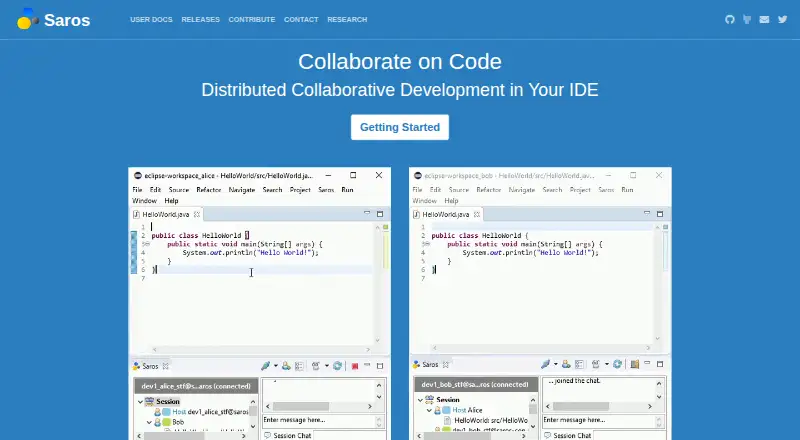
What Saros is
Saros is an open-source IDE plugin for collaborative software development. It synchronizes text-file edits so several participants with write access can work in shared files at the same time. Follow mode lets someone track another team member’s navigation and edits, while session awareness shows where others are working and what they have changed. Built-in instant messaging supports group and one-to-one chat; the documentation recommends using a separate voice or audio conferencing tool. Documented integrations are Eclipse and IntelliJ-platform IDEs, and sessions use an XMPP/Jabber account. Teams can host their own server to keep session communication within their network. The homepage describes sessions of up to five team members, but Saros/I release notes specify a two-participant limit. Saros/I also shares only one module, which must have exactly one content root, and does not include sub-modules. Collaboration needs higher bandwidth and lower latency than ordinary chatting, and public chat servers may be too slow for smooth use. Saros is free and open source, with no paid plans listed.
Good
- Concurrent editing for participants with write access
- Follow mode shows another member’s navigation and edits
- Includes group and one-to-one instant messaging
- Self-hosting can keep session communication within a network
Watch out
- Requires an XMPP/Jabber account for sessions
- No built-in voice audio or screen sharing
- Saros/I release notes limit sessions to two participants
- Saros/I sharing excludes sub-modules
Who it suits
Saros suits software teams using Eclipse or IntelliJ-platform IDEs who need to edit shared files together. Teams that need voice or audio communication should plan to use a separate tool.
Verdict
Saros offers shared editing, participant awareness, chat, and self-hosting at no charge. Check the participant and module limits for Saros/I, and consider network latency before choosing it for a team.
Plans and prices
From Saros's own pricing page, checked 2 Oct 2026.
| Plan | Price | What it gives you |
|---|---|---|
| Saros | Free | Completely open source; no paid plans or price listed |
The facts
Each one read from Saros's own pages, with the date it was checked.
What it does
- Awareness
- During a session, users can see where others are working and what they have changed.checked 2 Oct 2026
- Communication
- Saros provides instant messaging and supports multi-user or one-to-one chat; its documentation recommends using a separate VoIP or audio conferencing tool.checked 2 Oct 2026
- Concurrent writers
- Participants with write access can edit shared files at the same time.checked 2 Oct 2026
- Connection requirements
- Saros requires higher bandwidth and lower latency than normal chatting, and public chat servers may be too slow for smooth operation.checked 2 Oct 2026
- Follow mode
- Follow mode lets a participant observe another team member’s navigation and editing activity.checked 2 Oct 2026
- Integrations
- The documented IDE integrations are Eclipse and IntelliJ-platform IDEs, and sessions use an XMPP/Jabber account.checked 2 Oct 2026
- IntelliJ limitations
- Saros/I currently shares only one module, which must have exactly one content root, and does not include sub-modules when sharing.checked 2 Oct 2026
- Purpose
- Saros is an open-source IDE plugin for distributed collaborative software development.checked 2 Oct 2026
- Real-time editing
- It synchronizes collaborative text-file editing among participants.checked 2 Oct 2026
- Security and privacy
- The project recommends setting up an own XMPP server for company use or sessions with more than one peer; it does not state a security certification on the pages reviewed.checked 2 Oct 2026
- Self-hosting
- Users can host their own server and keep session communication within their network.checked 2 Oct 2026
- Session limit
- The homepage says a session can include up to five team members, while the Saros/I release notes limit that plugin to two participants.checked 2 Oct 2026
- Support
- The project directs users to its GitHub issue tracker to report bugs.checked 2 Oct 2026
Where it runs
- Platforms
- Saros is distributed as IDE plugins for Eclipse and IntelliJ-platform IDEs; the installation guide lists Eclipse 4.8 or newer and IntelliJ 2019.2.3 or newer.checked 2 Oct 2026
The full review of Saros
Saros is an open-source IDE plugin for distributed collaborative software development in Eclipse and IntelliJ-platform IDEs. It suits developers who want shared code editing and awareness inside a supported IDE, particularly teams comfortable operating their own collaboration server. Its focused workflow is compelling at no cost, but participant, network, and IntelliJ project limits should shape your decision.
Overview
Saros synchronizes text-file editing in real time, allowing several participants with write access to change shared files concurrently. Follow mode lets one participant observe another person’s navigation and editing, while session awareness shows where teammates are working and what they have changed. These features preserve context during pair or group programming better than a bare file-sharing exchange, provided everyone is using a compatible IDE.
Built-in instant messaging supports both one-to-one and multi-user conversations. Saros has no voice audio or screen sharing, and the project recommends a separate VoIP or audio-conferencing tool. Teams wanting coding, spoken discussion, and visual desktop sharing in one package should choose a broader collaboration product.
Key features
Shared editing and follow mode
Concurrent write access makes live pair programming and small-group changes possible in the same files. Follow mode is useful for teaching, reviewing, or guiding a teammate because a participant can track another person’s movement through the project. Awareness indicators add a practical view of who is working where, reducing duplicated navigation and helping collaborators coordinate changes.
IDE and session integration
The documented integrations are Eclipse and IntelliJ-platform IDEs, with sessions using an XMPP/Jabber account. That is a good fit for teams already standardized on those environments, but it excludes users whose primary editor is outside them. IntelliJ users should check project structure carefully: Saros/I currently shares only one module, that module must have exactly one content root, and sub-modules are not included.
Chat, hosting, and connectivity
Instant messaging handles quick coordination, while self-hosting lets an organization keep session communication within its own network. The project recommends setting up an own XMPP server for company use or sessions involving more than one peer. Saros needs higher bandwidth and lower latency than ordinary chatting, and a public chat server may be too slow for smooth collaboration. Bug reports go through the project’s GitHub issue tracker.
Pricing
| Plan | Price | What you get |
|---|---|---|
| Saros | free | Completely open source; no paid plans or price listed |
Saros is free and open source, with no free trial because there is no paid tier to trial. The absence of subscription fees suits individuals, open-source projects, and teams that can provide their own XMPP infrastructure. The trade-off is operational: you must account for the documented session cap of up to five team members, while Saros/I release notes limit that plugin to two participants. There is no paid upgrade that expands those constraints.
Platforms
Saros runs on Linux, macOS, and Windows, with a self-hosted option. Editor support covers Eclipse and IntelliJ IDEA or other IntelliJ-platform IDEs. Self-hosting is most relevant to organizations that need session traffic to remain on their network and are prepared to administer the required XMPP service.
Who it's for
Saros is strongest for small development groups doing pair programming, mentoring, or focused code reviews inside Eclipse or IntelliJ. It also suits privacy-conscious teams that prefer an internally hosted communication path. It is a poor fit for larger sessions, IntelliJ projects spread across multiple modules or content roots, or teams that require integrated voice and screen sharing.
Pros and cons
Pros
- Free and open source: there is no subscription cost or paid-plan gating.
- Concurrent IDE editing: participants with write access can work in shared files at the same time.
- Useful participant context: follow mode and awareness show teammates’ navigation, locations, and changes.
- Self-hosting: organizations can keep session communication within their own network.
Cons
- Small-session ceiling: the homepage allows up to five members, while Saros/I release notes limit that plugin to two.
- IntelliJ project restriction: only one module with exactly one content root is shared, excluding sub-modules.
- No voice or screen sharing: teams need a separate audio or conferencing tool.
- Latency-sensitive operation: low bandwidth or a slow public chat server can undermine smooth sessions.
Alternatives
Pair Programming Software is the broader category to compare when Saros’s IDE focus or session limits do not fit.
- Drovio is a better choice when unlimited screen sharing and calls matter; its free Basic plan permits two participants and limits remote control to 30 minutes per day.
- Pop fits teams wanting browser-based meetings, with a free beta plan offering unlimited hosted and joined meetings without a time limit.
- Zed is preferable when you want a standalone cross-platform code editor with a free Personal plan and 2,000 accepted edit predictions.
- Hopp suits organizations seeking self-hosting, with a free self-hosted plan and a separate paid cloud option.
- Visual Studio is the Windows-oriented alternative, including a Community edition for students, open-source, and individual developers.
- CodeInterview is aimed at interview workflows, with a free plan covering two interviews per month and unlimited users.
- Coterm offers a free GPL-3.0-or-later macOS app with an optional self-hosted collaboration backend.
- Duckly is suited to occasional sessions needing video, while its free plan allows two simultaneous participants and omits video calls.
Verdict
Choose Saros if your small team uses Eclipse or IntelliJ-platform IDEs and values open-source, self-hosted collaborative editing with participant awareness. Look elsewhere if you need larger sessions, unrestricted IntelliJ project sharing, built-in voice or screen sharing, or consistently low-latency collaboration without managing the supporting XMPP setup.
Alternatives to Saros
- 1

Hopp
Free planOpen sourceWebmacOSSelf-hostedWindows7.9From $15 a month - 2
Drovio
Free planWebLinuxmacOSSelf-hosted7.7From $15 a month - 3

Visual Studio
Free planAPIWindows7.6Free plan - 4

Zed
Free planLinuxmacOSWindows7.6From $10 a month - 5

HackerRank
WebAPImacOSWindows7.4From $165 a month - 6

Coterm
Free planOpen sourceiOSAPImacOSSelf-hosted7.3Free plan