Plumati
Plumati is an interactive ebook creator for authors, teachers, and publishers.
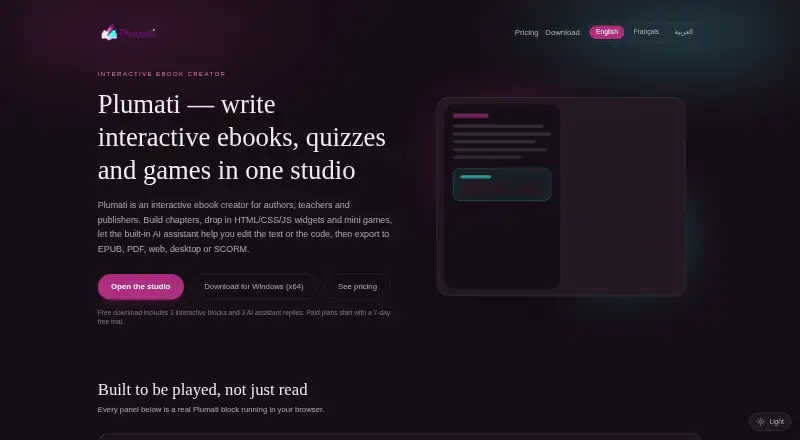
What Plumati is
Plumati is an interactive ebook creator for authors, teachers, and publishers. It lets users build chapters with HTML, CSS, JavaScript widgets, mini-games, and an AI assistant, then export projects as EPUB, PDF, responsive web apps, desktop or mobile builds, and SCORM packages. Quiz blocks support multiple choice, true/false, multi-select, ranking, and short-answer questions with instant scoring. Widget Studio includes live preview, asset uploads, and rollback to earlier widget versions. Books, chapters, and assets sync across devices through cloud saving, and exports can be password protected. Plumati imports EPUB, KEPUB, KPUB2, FB2, DOCX, Markdown, HTML, and TXT. SCORM 1.2, SCORM 2004, and xAPI exports are described as compatible with Moodle, Canvas, and Blackboard. The free plan includes 3 interactive blocks and 3 AI assistant replies. Starter costs $14.99 a month after a 7-day trial; higher plans offer more capacity and export options. PDF and Word exports omit interactive content.
Good
- Builds chapters with widgets, mini-games, and AI assistance
- Exports EPUB, PDF, web apps, desktop and mobile builds, and SCORM
- Offers several quiz formats with instant scoring
- Syncs books, chapters, and assets across devices
Watch out
- Free download includes 3 interactive blocks
- Free download includes 3 AI assistant replies
- PDF and Word exports remove interactive content
- Starter costs $14.99 a month after the trial
Who it suits
Plumati is suited to authors, teachers, and publishers creating interactive books, quizzes, or course materials. Its range of export formats may also suit teams distributing content across web, desktop, mobile, or learning platforms.
Verdict
Plumati combines interactive authoring, cloud sync, and a wide range of export options. Keep in mind that interactive elements are dropped from PDF and Word exports, and the free download is limited.
Plans and prices
From Plumati's own pricing page, checked 15 Oct 2026.
| Plan | Price | What it gives you |
|---|---|---|
| Free | Free | 20k AI tokens/month · 200 MB storage · 1 book · 1 author seat · EPUB and Web exports · Community support |
| Starter | $14.99 a month | 200k AI tokens/month · 2.0 GB storage · 5 books · 1 author seat · EPUB, PDF and Web exports · Last 10 versions · Email support · 1 week free trial — billed after 7 days |
| Author Pro | $31.99 a month | 2M AI tokens/month · 50 GB storage · Unlimited books · 1 author seat · EPUB, PDF, Web app, Desktop, Mobile and SCORM exports · Full version history · Priority support · 1 week free trial — billed after 7 days |
| Organization | $101.99 a month | 20M AI tokens/month · 1.0 TB storage · Unlimited books · 5 seats included · Extra seats $15/mo · Shared team library · Roles and permissions · SSO · LMS/SCORM · White-label export and analytics · 1 week free trial — billed after 7 days |
The facts
Each one read from Plumati's own pages, with the date it was checked.
What it does
- AI assistant
- The built-in assistant can rewrite text, outline chapters and generate interactive widgets or games.checked 15 Oct 2026
- AI data handling
- AI prompts and relevant content are sent to an AI model provider, while Plumati says it does not use that content to train models or sell it.checked 1 Oct 2026
- AI data retention promise
- Plumati says it does not use submitted AI content to train models or sell it.checked 15 Oct 2026
- AI processing
- AI prompts and relevant chapter or widget content are sent to an AI model provider.checked 15 Oct 2026
- API and SDKs
- The public editor describes built-in HTML/CSS/JavaScript editing and mobile packaging but does not publish a separate Plumati API or SDK.checked 15 Oct 2026
- Authoring
- Users can build chapters with HTML, CSS and JavaScript widgets, mini-games and an AI assistant.checked 1 Oct 2026
- Availability limitation
- The terms provide the service as-is without a guarantee of uninterrupted or error-free operation and advise users to keep backups.checked 15 Oct 2026
- Chapter authoring
- Books are organized into sections and chapters with a drag-and-drop outline and long-form editor.checked 15 Oct 2026
- Cloud sync
- Books, chapters and uploaded assets synchronize through cloud saving across devices.checked 15 Oct 2026
- Custom widgets
- Users can create HTML, CSS and JavaScript widgets with live preview.checked 15 Oct 2026
- Desktop export
- Electron packages run on Windows, macOS and Linux.checked 15 Oct 2026
- EPUB export
- Projects can be exported as EPUB 3 files, including password-locked EPUB packages.checked 15 Oct 2026
- Exports
- Projects can be exported to EPUB, PDF, responsive web apps, desktop builds, mobile builds and SCORM packages.checked 1 Oct 2026
- Flashcards
- Flashcard blocks let readers flip, shuffle and self-test within a book.checked 15 Oct 2026
- Hosting
- Exported interactive HTML can be hosted on any web server, GitHub Pages, Netlify or Vercel.checked 15 Oct 2026
- Import formats
- Plumati can import EPUB, KEPUB, KPUB2, FB2, DOCX, Markdown, HTML and TXT files.checked 1 Oct 2026
- Imports
- The editor imports EPUB, KEPUB, KPUB2, FB2, DOCX, Markdown, HTML and TXT files.checked 15 Oct 2026
- Interactive-content limit
- PDF and Word exports remove interactive content from the ebook.checked 1 Oct 2026
- LMS integrations
- SCORM 1.2 and SCORM 2004 exports are described as compatible with Moodle, Canvas and Blackboard.checked 15 Oct 2026
The company
- Content ownership
- Users retain rights to books, chapters, widgets and assets they create.checked 15 Oct 2026
- Headquarters
- Lebanonchecked 28 Sep 2026
Where it runs
- Desktop platforms
- Electron exports run on Windows, macOS and Linux.checked 1 Oct 2026
Money
- Free download
- The free download includes 3 interactive blocks and 3 AI assistant replies.checked 1 Oct 2026
- Free download limit
- The free download includes three interactive blocks and three AI assistant replies.checked 15 Oct 2026
The full review of Plumati
Overview
Plumati is an ebook authoring tool for people who want to build interactive books rather than simply format text. It suits authors, educators and publishers who need quizzes, custom widgets or learning-platform exports. Its broad export options are a strength, but interactive content does not survive PDF or Word export.
Key features
Interactive authoring
Chapters can combine HTML, CSS and JavaScript widgets, mini-games and AI assistance. Quiz blocks cover multiple choice, true/false, multi-select, ranking and short-answer questions, with instant scoring—a useful range for lessons and self-guided learning. Widget Studio adds live preview, asset uploads and rollback to earlier widget versions. The free download is tightly capped at three interactive blocks and three AI replies, so it is better for a small trial than substantial authoring.
Formats, sync and security
Import support spans EPUB, KEPUB, KPUB2, FB2, DOCX, Markdown, HTML and TXT. Projects can be exported as EPUB, PDF, responsive web apps, desktop and mobile builds, or SCORM packages. PDF and Word exports remove interactive content, so readers who need the quizzes or widgets must choose another output format. Optional password protection adds a measure of control over exported books.
Cloud saving syncs books, chapters and uploaded assets across devices. Desktop builds use Electron for Windows, macOS and Linux; mobile packages use Capacitor or Cordova for iOS and Android. SCORM 1.2, SCORM 2004 and xAPI exports are described as compatible with Moodle, Canvas and Blackboard. Security measures include encryption in transit and at rest, authentication, row-level database policies, hashed passwords and restricted administrative access. Prompts and relevant content go to an AI model provider; Plumati says it does not use that content to train models or sell it.
Pricing
The free plan costs nothing and includes 20k AI tokens/month, 200 MB storage, one book, one author seat, EPUB and Web exports, and community support. There is no free trial on this plan. The free download’s three-block and three-reply limits make it a constrained way to assess the interactive workflow.
Starter costs $14.99 a month, with a 1 week free trial and billing after 7 days. It raises the allowance to 200k AI tokens/month and 2.0 GB storage, allows five books, and adds PDF export, the last 10 versions and email support; it remains limited to one author seat and EPUB, PDF and Web exports.
Author Pro costs $31.99 a month, with a 1 week free trial and billing after 7 days. It offers 2M AI tokens/month, 50 GB storage, unlimited books, one author seat, all exports including SCORM, full version history, custom branding and priority support. This is the fit for solo creators who need learning-platform outputs or room to publish many books.
Organization costs $101.99 a month, with a 1 week free trial and billing after 7 days. It includes 20M AI tokens/month, 1.0 TB storage, unlimited books and five seats; extra seats cost $15/mo. Shared team library, roles and permissions, SSO, LMS/SCORM, white-label export and analytics, and dedicated support and onboarding make it the team option. The per-seat charge matters as a group grows.
Platforms
Plumati is available on Android, iOS, Linux, macOS, the web and Windows. Its exported desktop builds target Windows, macOS and Linux, while mobile app packages target iOS and Android.
Who it's for
Plumati makes most sense for authors and educators creating interactive material, especially when quizzes, custom widgets or LMS delivery are central. Authors producing conventional ebooks only may not need its interactive toolkit, while anyone whose final deliverable must preserve interactivity in PDF or Word should choose another format or tool.
Pros and cons
- Pros: Broad import and export support lets creators bring in existing material and publish to ebook, web, app and learning formats.
- Pros: Quiz variety, instant scoring and custom widgets suit instructional books better than a text-only workflow.
- Pros: Cloud sync and version rollback help keep projects and assets manageable across devices.
- Cons: PDF and Word exports strip interactive content, limiting their usefulness for books built around quizzes or widgets.
- Cons: The free download's three interactive blocks and three AI replies are too limited for a large project.
- Cons: Starter and Author Pro have one author seat; collaborative work requires Organization, which includes five seats and charges $15/mo for each extra seat.
Alternatives
For a straightforward free ebook editor, Sigil is completely free to download and use on Windows, macOS and Linux. Book Creator is worth considering for classroom-style creation: its free Starter plan allows one library with up to 40 books and unlimited students. AnyFlip offers a free plan with 30,000 daily opens, five uploads per day and 100G storage, though it includes a watermark; its Pro plan is $13.08 a month.
FlowPaper may suit a publisher looking for a free publishing option with cloud hosting, no traffic or file-size limits, and a 90-day publishing period. Bloom offers basic book features for small projects without outside support, with an enterprise option for custom branding and analytics. XMLmind Ebook Compiler is another free Windows, macOS and Linux option. Bookalope uses per-conversion pricing for its Basic plan and offers a free test version. Leanpub is oriented toward authors publishing books and courses: its Free Author plan allows three books and one course, with up to five previews or publishes per month.
Browse more options in eBook Creation Software.
Verdict
Choose Plumati if interactive authoring and flexible exports are central to your book, particularly for educational content headed to web, apps or an LMS. Its quiz tools, sync and SCORM support give it a clear role beyond basic ebook formatting. Look elsewhere if you need interactivity in PDF or Word, or if a one-seat paid plan cannot support your team.
Getting started
- Visit the Plumati website
- Choose the Free plan or a paid plan
- Download Plumati on a supported platform or use the web version
- Import a supported file or create chapters with widgets, mini-games or quizzes
- Export the project in a format included with your plan
Limits worth knowing
The Free plan includes 20k AI tokens per month, 200 MB storage, 1 book, 1 author seat, and EPUB and Web exports. Starter provides 200k AI tokens per month, 2.0 GB storage, 5 books and EPUB, PDF and Web exports; PDF and Word exports remove interactive content.
Questions
Is there a free plan?
Yes. Free costs nothing and includes 20k AI tokens per month, 200 MB storage, 1 book, 1 author seat, EPUB and Web exports, and community support.
How much does Starter cost?
Starter costs $14.99 a month, billed after a 7-day free trial.
What platforms does Plumati support?
Plumati is available on Android, iOS, Linux, macOS, web and Windows.
Can Plumati export SCORM packages?
SCORM exports are included in Author Pro and Organization. SCORM 1.2, SCORM 2004 and xAPI exports are described as compatible with Moodle, Canvas and Blackboard.
Which formats can Plumati import?
It can import EPUB, KEPUB, KPUB2, FB2, DOCX, Markdown, HTML and TXT files.
How does Plumati handle AI content?
AI prompts and relevant content are sent to an AI model provider. Plumati says it does not use that content to train models or sell it.
Alternatives to Plumati
- 1
AnyFlip
Free planAndroidiOSWebmacOS8.2From $13.08 a month - 2
FlowPaper
Free planAndroidiOSWebAPI8.2From $995 a year - 3
Book Creator
Free planAndroidiOSWebmacOS8.1From $150 a year - 4
ePubEditor
Free planAndroidiOSWeb7.9From €36 a year - 5
Vivliostyle
Free planOpen sourceWebAPILinuxmacOS7.5Free plan - 6

Bookalope
Open sourceAndroidiOSWebAPI7.4