AnyFlip
AnyFlip converts PDFs into page-flipping digital publications that can be shared online.
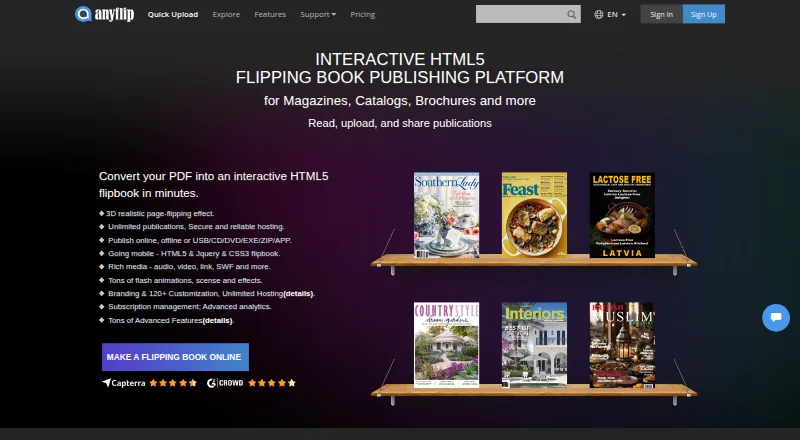
What AnyFlip is
AnyFlip converts PDFs into page-flipping digital publications that can be shared online. Its desktop Page Editor lets publishers add video, audio, images, slideshows, links, and other interactive content. Publications can be published online or locally in formats including HTML, ZIP, DVD/CD, EXE, and Mac APP. The desktop software can also publish flipbooks as WordPress plugins, Joomla modules, and Drupal extensions. Google Analytics tracking can report flipbook visits and reader activity. AnyFlip supports web, macOS, Windows, iOS, and Android. The free plan costs nothing and lists 30,000 daily opens, five uploads per day, 100G of storage, and a watermark. Pro costs $13.08 a month, Platinum costs $26.17 a month, and Enterprise costs $87.42 a month. A seven-day trial is listed. Paid users can publish locally or to FTP; Pro allows five local publications per month, while Platinum and Enterprise allow unlimited local publications. AnyFlip says flipbook data is stored through Amazon S3, and its privacy policy says collected data is transferred to the United States for processing.
Good
- PDFs become page-flipping online publications.
- Page Editor adds interactive media and links.
- Supports local publishing in several formats.
- Google Analytics tracking for reader activity.
- Seven-day trial listed.
Watch out
- Free plan adds a watermark.
- Free plan limits uploads to five per day.
- Free plan lists 30,000 daily opens.
- Collected data is transferred to the United States.
Who it suits
AnyFlip suits publishers who want to turn PDFs into interactive digital publications for online sharing. It also supports local publishing and integrations with WordPress, Joomla, and Drupal.
Verdict
AnyFlip offers PDF-based publishing with interactive content, multiple output formats, and reader tracking. Check the free-plan limits and the listed data-transfer practice when deciding whether it fits your publishing needs.
Plans and prices
From AnyFlip's own pricing page, checked 14 Oct 2026.
| Plan | Price | What it gives you |
|---|---|---|
| Free | Free | 30,000 daily opens · 5 uploads/day · 100G storage · AnyFlip watermark · 1 account · no premium editor · Free forever; users downgrade to this version after trial |
| Pro | $13.08 a month | 55,000 daily opens · 60 uploads/day · 500G storage · no watermark · 5 local publications/month · 1 account · $13.08/mo billed monthly; annual option shown as $157/yr |
| Platinum | $26.17 a month | 100,000 daily opens · 100 uploads/day · unlimited storage · unlimited local publications · 3 accounts · premium editor · $26.17/mo billed monthly; annual option shown as $314/yr |
| Enterprise | $87.42 a month | 500,000 daily opens · unlimited uploads · unlimited storage · unlimited local publications · 10 accounts · premium editor · $87.42/mo billed monthly; annual option shown as $1,049/yr |
The facts
Each one read from AnyFlip's own pages, with the date it was checked.
What it does
- Analytics
- Analytics reports include publication reads, homepage visitors, page views and link-click data.checked 14 Oct 2026
- Analytics integration
- AnyFlip supports Google Analytics tracking for flipbook visits and reader activity.checked 28 Sep 2026
- API and SDK
- The reviewed official documentation describes templates, plugins and export formats but does not document a public API or SDK.checked 14 Oct 2026
- Custom domains
- Publications can use a customized domain name; the pricing FAQ says custom-domain linking requires Platinum or Enterprise.checked 14 Oct 2026
- Google Analytics
- Flipbooks accept a Google Analytics ID so publishers can track publication and visitor statistics.checked 14 Oct 2026
- Hosting and storage
- AnyFlip says its cloud service uses Amazon S3 to store flipbook data.checked 28 Sep 2026
- Intended users
- AnyFlip describes its product as digital publishing software for creating and promoting publications from PDF files.checked 28 Sep 2026
- Interactive content
- Its desktop Page Editor can add videos, YouTube and Vimeo content, audio, images, slideshows, links and other interactive elements.checked 28 Sep 2026
- Licence
- AnyFlip is a proprietary hosted service governed by Wonder Idea terms; the documentation does not identify an open-source licence.checked 14 Oct 2026
- Limit: copyright controls
- A GetApp reviewer criticized the ease of uploading other people's content without apparent checking or due diligence.checked 14 Oct 2026
- Limit: editing workflow
- Reviewers report upload failures, difficulty editing published documents, glitches between desktop and web versions, and no autosave.checked 14 Oct 2026
- Limit: support and documentation
- Independent reviewers report unanswered emails, weak instructions, outdated help material and no phone support.checked 14 Oct 2026
- Limit: tutorials and media editing
- G2 reviewers report that video/link functions and custom-domain instructions can be difficult to find or understand.checked 14 Oct 2026
- Offline download
- Readers can download publications as PDF or ZIP files for offline use.checked 14 Oct 2026
- Online bookshelf
- AnyFlip provides an embeddable online bookshelf for presenting multiple flipbooks on a website.checked 14 Oct 2026
- Output formats
- Desktop publishing can produce HTML, ZIP, Windows EXE, Mac APP, FBR, mobile HTML5, CD, screen-saver and email outputs.checked 14 Oct 2026
Where it runs
- Apple app capabilities
- The iPad app lets users search, read, download and collect flipbooks, including offline reading.checked 14 Oct 2026
- Desktop platforms
- AnyFlip offers downloadable desktop versions for Windows and Mac; advanced page editing and media embedding require the desktop software.checked 14 Oct 2026
The company
- Company founded
- The FAQ states Wonder Idea Technology was established in 2007.checked 14 Oct 2026
- Company headquarters
- The company gives an address at Flat/Rm D3, 11/F, Luk Hop Industrial Building, No. 8 Luk Hop Street, San Po Kong, Kowloon, Hong Kong.checked 14 Oct 2026
- Company legal name
- Crunchbase lists the legal name as Wonder Idea Technology Limited.checked 14 Oct 2026
- Company ownership and funding
- Crunchbase describes Wonder Idea Technology as a private, for-profit company and does not show a disclosed founding year or usable funding total.checked 14 Oct 2026
- Headquarters
- Hong Kongchecked 23 Sep 2026
Money
- Free-plan limits
- The pricing page lists 30,000 daily opens, five uploads per day, 100G storage and a watermark for the free plan.checked 28 Sep 2026
The full review of AnyFlip
Overview
AnyFlip is digital publishing software for turning PDF files into page-flipping publications that can be shared online. It is aimed at people and organizations that want to create and promote material from PDFs, with tools for adding interactive content, publishing through different channels and tracking reader activity.
The desktop Page Editor supports videos, YouTube and Vimeo content, audio, images, slideshows, links and other interactive elements. Publications can be published online or locally in formats including HTML, ZIP, DVD/CD, EXE and Mac APP. The desktop software also supports publishing as a WordPress plugin, Joomla module or Drupal extension.
AnyFlip supports Google Analytics tracking for flipbook visits and reader activity. It says its cloud service uses Amazon S3 for flipbook data. Its privacy policy says collected data is transferred to the United States for processing, and lists AWS, Linode and Cloudflare among its cloud, database and storage providers. The policy also says EU users’ personal data is processed under GDPR, with service providers supporting functions such as analytics, payments and storage.
AnyFlip is listed for Android, iOS, macOS, web and Windows. The company is headquartered in Hong Kong.
Key features
- PDF conversion: Turn PDF files into page-flipping digital publications for online sharing.
- Interactive editing: Add video, audio, images, slideshows, links and other elements through the desktop Page Editor, including content from YouTube and Vimeo.
- Online and local publishing: Publish online or locally in formats such as HTML, ZIP, DVD/CD, EXE and Mac APP.
- Website integrations: Publish as a WordPress plugin, Joomla module or Drupal extension using the desktop software.
- Reader tracking: Google Analytics integration can track flipbook visits and reader activity.
- Embedding and branding: Website embedding and custom branding are supported.
- Support response times: AnyFlip says its support team responds within 12 hours on weekdays and 48 hours on weekends.
Pricing
AnyFlip has a free plan and paid plans billed monthly. The listed paid starting price is $13.08/mo, and a 7-day trial is available.
| Plan | Price | Listed limits |
|---|---|---|
| FREE | free | 30,000 daily opens, 5 uploads per day, 100G storage and a watermark |
| Pro | $13.08 a month, billed monthly | 55,000 daily opens, 60 uploads per day, 500G storage and 5 local publications per month |
| Platinum | $26.17 a month, billed monthly | 100,000 daily opens, 100 uploads per day, unlimited storage and unlimited local publications |
| ENTERPRISE | $87.42 a month, billed monthly | 500,000 daily opens, unlimited uploads per day, unlimited storage and unlimited local publications |
The pricing FAQ says paid users can publish locally or to FTP. Platinum publications can be managed by three accounts, while Enterprise publications can be managed by ten accounts.
On the free plan, a watermark is listed alongside the daily-open, upload and storage limits. The Pro plan allows five local publications each month; Platinum and Enterprise list unlimited local publications.
Platforms
AnyFlip is listed for Android, iOS, macOS, web and Windows. Its desktop software handles the Page Editor and local publishing, while online publications can be shared on the web. The service also supports mobile app use on iOS and Android.
Who it's for
AnyFlip may suit publishers, organizations and other users who want to turn PDF material into a shareable digital publication rather than distribute only the original file. The editing and publishing options may be useful when a publication needs embedded media, links, a website integration or local output. Its plans distinguish usage capacity through daily opens, upload limits and storage, with higher tiers also offering more or unlimited local publications and multi-account management.
Readers weighing the privacy details should note the stated transfer of collected data to the United States for processing, as well as the policy’s description of GDPR processing for EU users and its use of service providers for analytics, payments and storage.
Pros and cons
Pros
- Converts PDFs into online page-flipping publications.
- The desktop editor supports a range of media and interactive elements.
- Local publishing is available, with unlimited local publications listed on Platinum and Enterprise.
- Website integrations, Google Analytics tracking, embedding and custom branding are supported.
- A free plan and 7-day trial are listed.
Cons
- The free plan includes a watermark and limits uploads to five per day.
- Pro is limited to five local publications per month.
- Collected data is transferred to the United States for processing, according to the privacy policy.
Alternatives
Other options in the PDF Flipbook Software category include FlowPaper, FlipbookPDF.net, Heyzine, PubHTML5, FlipHTML5, Yumpu, pdfonweb and Simplebooklet. Readers considering adjacent formats can also browse Presentation Sharing Software and eBook Creation Software.
Verdict
AnyFlip brings PDF conversion, interactive editing and multiple publishing destinations together for digital publications. Its free tier provides a way to start, while the paid plans raise daily-open, upload and storage limits and expand local publishing capacity. The choice depends on whether its flipbook format and publishing options fit the material, and whether the applicable plan limits and stated data-processing practices meet the publisher’s needs.
Getting started
- Open the AnyFlip website.
- Choose the free plan or review the paid plans and seven-day trial.
- Use the desktop Page Editor to add interactive content to a PDF publication.
- Publish online, locally, or through a supported website integration.
Limits worth knowing
The free plan allows 30,000 daily opens, five uploads per day, and 100G of storage, and adds a watermark. Pro includes five local publications per month; Platinum and Enterprise include unlimited local publications.
Questions
Is AnyFlip free?
Yes. The FREE plan costs nothing and includes 30,000 daily opens, five uploads per day, 100G storage, and a watermark.
How much do the paid plans cost?
Pro costs $13.08 per month, Platinum costs $26.17 per month, and ENTERPRISE costs $87.42 per month. A seven-day trial is listed.
Which platforms does AnyFlip support?
AnyFlip is available on web, macOS, Windows, iOS, and Android.
Can AnyFlip publish flipbooks locally?
Yes. Desktop software can publish locally in formats including HTML, ZIP, DVD/CD, EXE, and Mac APP. Paid users can also publish to FTP.
Can multiple accounts manage publications?
The pricing FAQ says Platinum publications can be managed by three accounts and Enterprise publications by ten accounts.
Alternatives to AnyFlip
- 1
FlowPaper
Free planAndroidiOSWebAPI8.2From $995 a year - 2

Flipsnack
Free planAndroidiOSWebAPI8.1Free plan - 3
FlipbookPDF.net
Free planAndroidiOSWebmacOS8.0From $45.90 a year - 4
FlippingBook
AndroidiOSWebAPI7.8From $20 a month - 5

DCatalog
AndroidiOSWebAPI7.6From $299 a year - 6

Heyzine
Free planAndroidiOSWebAPI7.6Free plan