PubHTML5
PubHTML5 turns PDFs and other printed material into customized online and offline HTML5 publications.
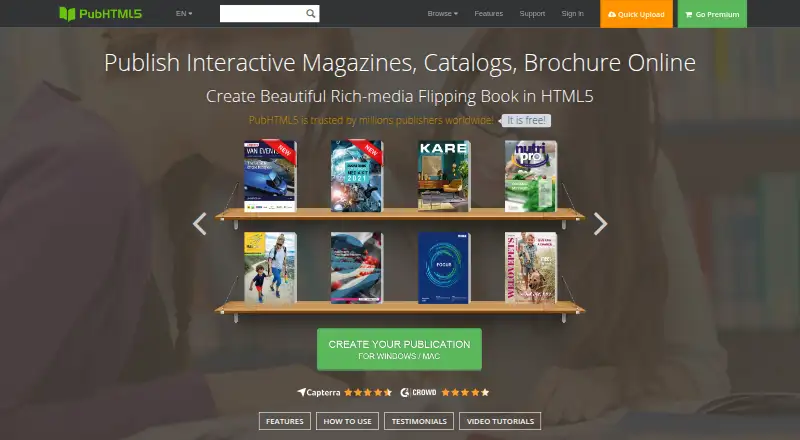
What PubHTML5 is
PubHTML5 turns PDFs and other printed material into customized online and offline HTML5 publications. It is intended for individuals and media businesses publishing magazines, catalogs, brochures, reports, ebooks, and other multi-page works. Publications can incorporate video, audio, links, animation, images, and slideshow popups. Templates and customization options cover logos, backgrounds, colors, buttons, and navigation. Readers can access publications through a URL or an embed code. Listed integrations include Google AdSense, Google Analytics, and a WordPress flipbook plugin. PubHTML5 Metrics reports page views, time on page, zoom patterns, and widget interactions. Pro security features include password protection, restricted access, remote authentication against a user's database, and controls that block support staff from viewing private content. The free plan includes ads and a watermark, allows five daily uploads, and caps books at 500 pages; advanced page editing to add video and audio is unavailable. Uploaded publications are stored on PubHTML5 servers using Amazon S3, while paid plans can publish locally or to FTP.
Good
- Adds video, audio, links, and animation to publications.
- Readers can access publications by URL or embed code.
- Metrics track page views and widget interactions.
- Offers custom branding and listed marketing integrations.
- Paid plans support local or FTP publishing.
Watch out
- Free plan displays ads and a watermark.
- Free plan allows five uploads per day.
- Free plan caps books at 500 pages.
- Free plan lacks advanced editing for adding video and audio.
Who it suits
PubHTML5 suits individuals and media businesses producing multi-page digital publications. Its embedding, branding, and reader analytics tools may suit publishers who share publications on websites.
Verdict
PubHTML5 combines publication conversion with multimedia, customization, embedding, and engagement reporting. The free plan has visible branding and upload and editing limits; paid plans start at $12.42 a month.
Plans and prices
From PubHTML5's own pricing page, checked 30 Sep 2026.
| Plan | Price | What it gives you |
|---|---|---|
| Free | Free | 1 user · 5 uploads per day · PDF to HTML5 conversion · ads in book · PubHTML5 watermark |
| Pro | $12.42 a month | 1 user · unlimited storage and daily uploads · no ads or watermark · custom logo/branding · 5 local publications per month · Billed monthly; billed at $180 $149 / yr |
| Platinum | $24.92 a month | 3 users · unlimited storage and daily uploads · image/PDF conversion · page and animation editors · custom book/bookcase domain · batch convert · unlimited local publications · Billed monthly; billed at $420 $299 / yr |
| Enterprise | $83.25 a month | 10 accounts · unlimited storage and uploads · image/PDF conversion · page and animation editors · custom book/bookcase domain · batch convert · command line API · unlimited local publications · Billed monthly; billed at $1188 $999 / yr |
The facts
Each one read from PubHTML5's own pages, with the date it was checked.
What it does
- Analytics
- PubHTML5 Metrics reports engagement measures including zoom patterns, page views, time on page, and widget interactions.checked 30 Sep 2026
- Audience
- The maker describes the product for individuals and media businesses publishing magazines, catalogs, brochures, reports, ebooks, and other multi-page material.checked 30 Sep 2026
- Customization
- The platform supports templates and customization of logos, backgrounds, colors, buttons, and navigation options.checked 30 Sep 2026
- Hosting and storage
- The pricing FAQ says uploaded publications are stored on PubHTML5 servers using Amazon S3, while paid plans can publish locally or to FTP.checked 30 Sep 2026
- Integrations
- The pricing page lists Google AdSense integration, Google Analytics tracking, and a WordPress flipbook plugin among its features.checked 30 Sep 2026
- Interactive content
- Publications can include video, audio, links, animation, images, and slideshow popups.checked 30 Sep 2026
- Notable limits
- The free plan has a watermark, ads, five daily uploads, and a 500-page-per-book limit; its FAQ says advanced page editing for adding video and audio is unavailable.checked 30 Sep 2026
- Privacy
- The privacy policy says PubHTML5 does not store payment card numbers or CVV on its servers and that passwords are encrypted before storage.checked 30 Sep 2026
- Product
- PubHTML5 converts PDFs and other printed material into customized online and offline HTML5 digital publications.checked 30 Sep 2026
- Security
- Its Pro security feature supports password protection, restricted publication access, remote authentication against a user's own database, and blocking support staff from viewing private content.checked 30 Sep 2026
- Sharing and embedding
- Readers can access publications by URL or through an embed code on websites and other online destinations.checked 30 Sep 2026
- Support
- The pricing FAQ says support, upgrades, and cloud hosting have no additional cost beyond the monthly or yearly plan.checked 30 Sep 2026
The company
- Company
- The privacy policy identifies PubHTML5 as an international technology company incorporated in Hong Kong and gives its headquarters address in Kowloon, Hong Kong.checked 30 Sep 2026
- Headquarters
- Hong Kongchecked 28 Sep 2026
Where it runs
- Platforms
- The maker offers desktop downloads for Windows and Mac and says its HTML5 publications work on iPhone, iPad, Android phones, and Android tablets.checked 30 Sep 2026
The full review of PubHTML5
Overview
PubHTML5 converts PDFs and other printed material into online and offline HTML5 publications. It is best suited to individuals and media businesses producing magazines, catalogs, brochures, reports, ebooks, and other multi-page material. Its strongest case is for publishers who want interactive, branded flipbooks and reader-engagement metrics; it is less compelling for anyone who needs advanced editing without moving to a paid plan.
Key features
Publications can combine video, audio, links, animation, images, and slideshow popups. Templates and controls for logos, backgrounds, colors, buttons, and navigation let publishers shape the reading experience around a brand. Readers can open publications by URL or through an embed code, making the format practical for both direct sharing and placement on a website.
Google AdSense, Google Analytics, and a WordPress flipbook plugin are among the integrations. PubHTML5 Metrics tracks page views, time on page, zoom patterns, and widget interactions. That added engagement detail is useful to publishers deciding whether readers are exploring the content, rather than merely opening it.
Pro security features include password protection, restricted publication access, authentication against a publisher's own database, and an option to block support staff from viewing private content. The privacy policy says payment card numbers and CVV are not stored on PubHTML5 servers and passwords are encrypted before storage. Cloud uploads use PubHTML5's servers with Amazon S3; paid plans also support local or FTP publishing.
Pricing
PubHTML5 is freemium. The Free plan costs nothing and supports one user, five uploads per day, and PDF-to-HTML5 conversion. Books carry ads and a PubHTML5 watermark, and each is capped at 500 pages. Advanced page editing for adding video and audio is unavailable, so this tier is best for occasional, non-branded publishing rather than finished commercial work.
Pro costs $12.42 a month, billed monthly, or $149 / yr (shown alongside a $180 annual figure). It is for a solo publisher who needs unlimited storage and daily uploads, ad- and watermark-free books, custom branding, and five local publications per month. The one-user seat limit and local-publication quota matter for teams or publishers who need frequent offline output.
Platinum costs $24.92 a month, billed monthly, or $299 / yr (shown alongside a $420 annual figure). It raises the allowance to three users and adds image/PDF conversion, page and animation editors, a custom book or bookcase domain, batch conversion, and unlimited local publications. This is the more suitable tier for a small publishing team that needs editing tools and higher local-output capacity.
Enterprise costs $83.25 a month, billed monthly, or $999 / yr (shown alongside a $1188 annual figure). It provides ten accounts and includes the Platinum editing, conversion, domain, and local-publication features, plus a command line API. It fits larger teams that need those capabilities across more accounts; the price is a substantial step up from Platinum.
Support, upgrades, and cloud hosting have no additional cost beyond the monthly or yearly plan. Paid plans can publish locally or to FTP, while cloud uploads are stored on PubHTML5 servers using Amazon S3.
Platforms
PubHTML5 supports Android, iOS, macOS, Windows, web, API, and self-hosted deployments. That breadth suits publishers working across desktop and mobile environments or needing an integration route, though the product's central role remains creating and distributing digital publications.
Who it's for
PubHTML5 is a good fit for individuals and media businesses turning print-oriented, multi-page material into shareable digital publications. Its branding controls, embedded media, and reader metrics serve publishers who want a more interactive and measurable format than a static PDF. The free tier can accommodate limited experimentation, but regular publishing without ads and watermarks, or editing pages with video and audio, calls for a paid plan.
Pros and cons
- Pros: Interactive media, templates and branding controls, URL and embed sharing, and engagement reporting combine the core publishing workflow with ways to distribute and assess a publication.
- Pros: Pro security includes several access controls, including authentication against a publisher's own database and blocking support staff from private content.
- Cons: The free plan's ads, watermark, five-upload daily cap, 500-page book limit, and lack of advanced video/audio page editing restrict its usefulness for regular or polished publishing.
- Cons: Pro allows only one user and five local publications per month; teams needing editors, more seats, or unlimited local output must pay for a higher tier.
Alternatives
For a wider shortlist, browse PDF Flipbook Software or Presentation Sharing Software.
- FlowPaper is worth comparing if its free tier's 90-day publishing window, single publisher workstation, cloud hosting, and lack of traffic or file-size limits better match your needs.
- Heyzine is an alternative if five free flipbooks with unlimited pages, 1GB storage, one account user, API access, and password protection suit your publishing needs.
- AnyFlip is another freemium option if its free allowance of 30,000 daily opens, five uploads per day, and 100G storage is a better fit, though its free plan carries a watermark.
- FlowVella is an alternative for public presentations, with a free allowance of four presentations and ten screens or slides per presentation.
- Calaméo offers a free Basic plan with basic features and statistics for readers who need a simpler starting point.
- Yumpu is worth considering if three free uploads, Google indexing, website integration, and social sharing cover your needs.
- FlipHTML5 is another freemium flipbook option, with a free plan allowing five flipbooks per day, one account, 20 GB storage, a 500-page upload limit, and one bookcase.
- Flipsnack is an alternative if its free allowance of five flipbooks, 15 pages each, 100 MB PDF upload, and 250 one-time AI credits suits your use.
Verdict
Choose PubHTML5 if you publish multi-page material and want interactive content, brand controls, embedded distribution, and engagement metrics in one platform. Its main appeal is the combination of publication conversion with richer presentation and reporting. Look elsewhere if you need advanced editing while staying free, or if the paid-plan seat and local-publication limits do not fit your publishing volume.
Alternatives to PubHTML5
- 1
AnyFlip
Free planAndroidiOSWebmacOS8.2From $13.08 a month - 2
FlowPaper
Free planAndroidiOSWebAPI8.2From $995 a year - 3

Flipsnack
Free planAndroidiOSWebAPI8.1Free plan - 4
FlippingBook
AndroidiOSWebAPI7.8From $20 a month - 5

SlideShare
Free planAndroidiOSWebAPI7.8Free plan - 6

Heyzine
Free planAndroidiOSWebAPI7.6Free plan