Penji
Penji is scheduling software for college tutoring centers that manage appointments, group sessions, and drop-in services.
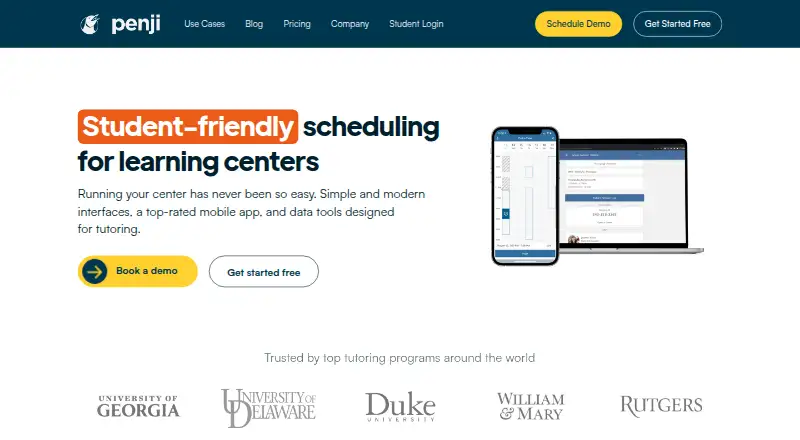
What Penji is
Penji is scheduling software for college tutoring centers that manage appointments, group sessions, and drop-in services. Students can book sessions themselves, attend online, in-person, or hybrid events, and check into configured drop-in locations using email, an ID, or a card swipe. They can also follow their queue position and estimated wait. Tutors can record attendance, while the system includes session usage caps, no-show handling, feedback logs, in-app chat, and video calling integration. Penji connects with Google and Outlook calendars and video providers such as Zoom. The tutoring product includes more than 20 interactive dashboards and a real-time report builder. It is available as a desktop web application and in mobile formats for Android and iOS. Penji says it complies with FERPA when customer data includes covered education records and meets WCAG 2.1 AA standards. Its free plan gives full platform access for up to five tutors or staff, but excludes SSO and IT integrations. Paid service is available by custom quote, based on active tutor count or annual student visits.
Good
- Students can self-book sessions.
- Drop-in students can see queue position and estimated wait.
- Supports online, in-person, and hybrid events.
- Includes more than 20 interactive dashboards.
- Free plan provides full access for up to five staff.
Watch out
- Free plan excludes SSO and IT integrations.
- Paid service requires a custom quote.
- Multi-center launches with integrations may need at least four weeks.
Who it suits
Penji suits college tutoring centers coordinating appointments, group classes, and drop-in queues. The free plan may fit a center with up to five tutors or staff that does not need SSO or IT integrations.
Verdict
Penji covers appointment scheduling and drop-in management alongside reporting and student check-in options. Its free plan has a clear staff limit and integration exclusions; larger or integrated deployments use custom pricing.
Plans and prices
From Penji's own pricing page, checked 8 Oct 2026.
| Plan | Price | What it gives you |
|---|---|---|
| Free Plan | Free | Full platform access · Up to 5 tutors or staff · No SSO or IT integrations · One free plan per institution |
| Custom quote | Priced on request | Price based on active tutor count or annual student visits · Custom quote; terms state annual billing unless otherwise specified in the contract. |
The facts
Each one read from Penji's own pages, with the date it was checked.
What it does
- Automations
- Features include session usage caps, in-app chat, video calling integration, feedback logs, and no-show handling.checked 8 Oct 2026
- Compliance
- Penji states that it complies with FERPA when customer data includes covered education records and meets WCAG 2.1 AA standards.checked 8 Oct 2026
- Drop-in check-in
- Students can check into configured drop-in locations by email, ID, or card swipe and follow their queue position and estimated wait.checked 8 Oct 2026
- Events
- Tutoring events can be online, in person, or hybrid, with attendance logging by tutors or student self check-in.checked 8 Oct 2026
- Integrations
- Penji states it integrates with Google and Outlook calendars and with video providers such as Zoom.checked 8 Oct 2026
- Intended users
- Penji says its software is designed for college tutoring centers and focuses on student-friendly, accessible, mobile-first services.checked 8 Oct 2026
- Privacy
- Penji says it does not sell student data and uses it to deliver its services to university partners and students.checked 8 Oct 2026
- Purpose
- Penji provides scheduling software for college tutoring centers, including appointments, groups, and drop-in services.checked 8 Oct 2026
- Reporting
- The tutoring product includes 20+ pre-built interactive dashboards and a real-time report builder.checked 8 Oct 2026
- Security
- Penji says it uses secure coding practices and providers such as AWS, and has a HECVAT available for review.checked 8 Oct 2026
- Setup
- Penji recommends at least four weeks for a multi-center launch with SSO and IT integrations; a single center without IT integrations can be set up within two days.checked 8 Oct 2026
- Support
- Penji describes in-house phone and email support, unlimited administrator trainings, and live troubleshooting.checked 8 Oct 2026
The company
- Headquarters
- Denver, Colorado, United Stateschecked 28 Sep 2026
Where it runs
- Platform access
- Penji is available as a desktop web application and in mobile formats.checked 8 Oct 2026
The full review of Penji
Penji is a scheduling and service-management platform built for college tutoring centers. It is strongest for campus programs coordinating appointments, group sessions and walk-in demand across staff. Its breadth is useful, but the five-staff free-plan ceiling and custom pricing for larger deployments are meaningful constraints.
Overview
Penji brings appointments, group classes and drop-in services into one system. Students can book sessions themselves, while centers can organize scheduled help alongside walk-in queues. That makes it a better fit for a tutoring program with coordinated staff and multiple service formats than for an individual tutor who only needs a booking calendar.
Students checking into configured drop-in locations can use email, ID or card swipe, then track their queue position and estimated wait. Events can run online, in person or in hybrid form, with attendance logged by tutors or through student self check-in. These options support a more complete campus visit workflow; a center handling only one-to-one appointments may have little need for the extra coordination.
Key features
Scheduling and session management
Self-booking, group classes and two-way calendar sync help keep student and tutor schedules aligned. Penji integrates with Google and Outlook calendars and video providers such as Zoom. Session usage caps, no-show handling, feedback logs and in-app chat cover tasks around the appointment, not just the booking. Video calling integration is part of the offering, though centers should confirm that their preferred provider fits their workflow.
Reporting and administration
More than 20 pre-built interactive dashboards and a real-time report builder give administrators several ways to examine tutoring activity. That reporting scope is valuable to centers that need ongoing operational visibility, while a small program with minimal reporting needs may not benefit enough to justify a broader system.
Penji describes in-house phone and email support, unlimited administrator trainings and live troubleshooting. It says it follows secure coding practices, uses providers such as AWS, does not sell student data, and complies with FERPA when customer data includes covered education records. It also states that it meets WCAG 2.1 AA standards and makes a HECVAT available for review—relevant considerations for university procurement and accessibility.
Pricing
Free Plan
The Free Plan costs nothing and includes full platform access for up to five tutors or staff. That is a useful way for a small center to access the broad feature set, but the staff cap limits its usefulness as a program grows. It also excludes SSO and IT integrations, and each institution can have only one free plan.
Custom quote
Paid deployments use custom pricing based on active tutor count or annual student visits, with annual billing unless the contract says otherwise. This can align cost with the scale of a center, but buyers need a quote to assess the budget, and the annual term is an important commitment to settle before choosing it.
Platforms
Penji is available on Android, iOS and the web, including desktop web access and mobile formats. That reach suits students and staff who need to access scheduling and check-in from different devices.
Who it's for
Penji is designed for college tutoring centers, particularly those managing both appointments and drop-in traffic, running group sessions, or tracking attendance and service activity. Setup expectations differ by deployment: a single center without IT integrations can be set up within two days, while a multi-center launch with SSO and IT integrations calls for at least four weeks. Institutions planning a complex rollout should account for that lead time.
Pros and cons
- Pros: Appointments, group classes and drop-in check-in cover more than a basic booking calendar.
- Pros: Queue position and estimated waits help students understand the status of a drop-in visit.
- Pros: More than 20 dashboards, a real-time report builder and attendance logging support center-level oversight.
- Cons: The free plan stops at five tutors or staff and excludes SSO and IT integrations.
- Cons: Custom pricing and annual billing make the cost of a larger deployment harder to assess before requesting a quote.
Alternatives
Tutoring Scheduling Software is the broader category guide for comparing options.
SchedulingKit is worth considering for a smaller team seeking a free forever plan; its free tier allows one team member, one event type and 50 bookings per month. Tutoressa is another freemium option for readers comparing tutoring software, while Tutorbase offers a free core plan with a 1% fee when invoicing through the system and no monthly subscription.
GetSetTime may suit a web-only booking workflow with a free tier of one seat and 50 bookings per month. Pynath Booking is a web and API option with a free plan capped at three active services and 10 attendees per slot. Twizzlo offers a web-based free plan with up to 150 bookings per month and unlimited employees, locations and customers, but no SMS.
TutorTab is a free web option where scheduling, reminders and invoicing are free, with payment fees when it collects payments. Classcard may suit buyers seeking a paid class-management alternative; its Starter plan is $99 a month with unlimited staff, students and classes.
Verdict
Penji is a strong fit for college tutoring centers that need one system for appointments, group sessions and drop-in management, with reporting and student check-in built into the workflow. Its main advantage is that operational breadth; look elsewhere if you need a simple individual booking tool, need SSO or IT integrations within a free plan, or require clear pricing before starting a purchase conversation.
Getting started
- Open the Penji tutoring website
- Choose the free plan or request a custom quote
- Configure tutors, staff, appointments, groups, and drop-in locations
- Connect Google or Outlook calendars and a video provider such as Zoom
- Make the service available through the web application and Android or iOS apps
- Allow up to two days for a single-center setup without IT integrations
Limits worth knowing
The free plan includes full platform access for up to five tutors or staff, excludes SSO and IT integrations, and is limited to one plan per institution. Custom plans are billed annually unless the contract states otherwise, with pricing based on active tutor count or annual student visits.
Questions
Is Penji free?
Yes. The Free Plan costs nothing and provides full platform access for up to five tutors or staff.
What does paid Penji pricing cost?
Paid service uses a custom quote. It is billed annually unless otherwise specified and is priced by active tutor count or annual student visits.
Which platforms does Penji support?
Penji is available as a desktop web application and in mobile formats for Android and iOS.
Does Penji offer calendar and video integrations?
Yes. It integrates with Google and Outlook calendars and video providers such as Zoom.
Who makes Penji and where is it based?
Penji is headquartered in Denver, Colorado, United States.
Does Penji support FERPA and accessibility requirements?
Penji states that it complies with FERPA when customer data includes covered education records and meets WCAG 2.1 AA standards.
Alternatives to Penji
- 1

SchedulingKit
Free planAndroidiOSWebAPI8.1From $10 a month - 2
Tutoressa
Free planAndroidiOSWebmacOS8.0From $24.99 a month - 3

Classcard
AndroidiOSWebAPI7.6From $99 a month - 4

LearnSuite
AndroidiOSWebAPI7.4$0.35 usage-based - 5
Pynath Booking
Free planWebAPI7.4From ₹9,999 a year - 6

Tutorbase
Free planAndroidiOSWebAPI7.4Free plan