GetSetTime
GetSetTime is web-based appointment scheduling software for businesses that take bookings.
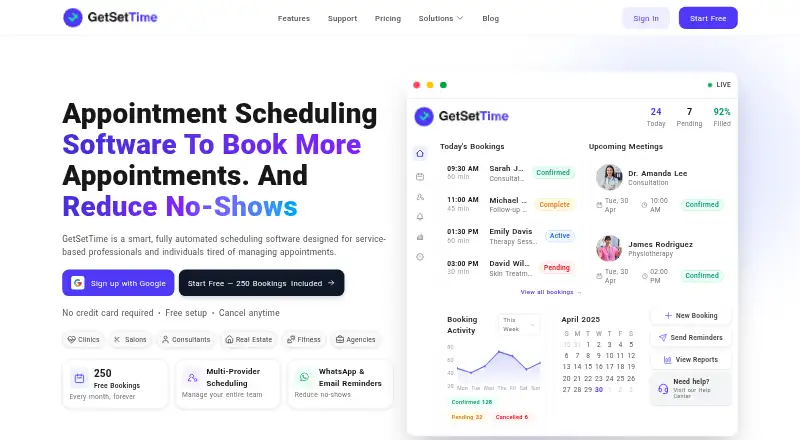
What GetSetTime is
GetSetTime is web-based appointment scheduling software for businesses that take bookings. Customers can use a public booking page to choose a service, provider, date, and time. Businesses can define availability rules, buffer times, and capacity, and provide rescheduling and cancellation flows. Automated confirmations, reminders, reschedule links, and follow-ups can be sent through WhatsApp and email. The product describes two-way Google Calendar synchronization and displays Zoom, Microsoft, Slack, Gmail, WhatsApp, Google Calendar, and Microsoft Teams as supported operational tools. Team features cover staff calendars, roles, working hours, leave days, rooms, resources, and service assignments. Analytics include booking volume, revenue trends, no-show and reminder delivery rates, staff utilization, and service demand. The cloud-based service can be managed from a device without installation. It is presented for appointment-based businesses such as clinics, salons, consultants, real estate, fitness, and agencies. A free plan is listed with 50 monthly bookings in the plan comparison; Starter lists 250, while Professional and Enterprise list unlimited bookings.
Good
- Public booking page for customer self-service
- Automated WhatsApp and email reminders
- Two-way Google Calendar synchronization
- Staff scheduling and resource management
- Booking and staff analytics
Watch out
- Free plan comparison lists 50 monthly bookings
- Starter plan comparison lists 250 monthly bookings
Who it suits
GetSetTime suits appointment-based businesses that need customer self-booking, staff scheduling, and booking analytics. The free plan comparison lists a limit of 50 bookings per month.
Verdict
GetSetTime combines online booking, team scheduling, reminders, and analytics in a web-based service. Compare plan booking limits and included features to choose a suitable tier.
Plans and prices
From GetSetTime's own pricing page, checked 4 Oct 2026.
| Plan | Price | What it gives you |
|---|---|---|
| Free | Free | 1 seat · 50 bookings/month in plan comparison · public booking page · email notifications · community support |
| Extra Seat | $799 a month | Additional provider seat; available on all plans · Monthly; +18% GST; prorated when added mid-cycle |
| Starter | $999 a month | 1 seat · 250 bookings/month · basic Google Calendar integration · email notifications · basic reporting · community support · Monthly; +18% GST |
| Professional | $1,499 a month | 2 seats · unlimited bookings · advanced calendar sync · WhatsApp and email reminders · custom branding · payment processing · staff management · advanced analytics · API access · priority support · Monthly; +18% GST; Professional and Enterprise annual billing saves 10% |
| Enterprise | $2,999 a month | 5 seats · unlimited bookings · multi-location support · advanced user roles · SSO · custom integrations · dedicated account manager · 24/7 phone support · SLA guarantee · Monthly; +18% GST; Professional and Enterprise annual billing saves 10% |
The facts
Each one read from GetSetTime's own pages, with the date it was checked.
What it does
- Analytics
- Its analytics include booking volume, revenue trends, no-show and reminder delivery rates, staff utilization, and service demand.checked 4 Oct 2026
- Automated reminders
- GetSetTime supports automated booking confirmations, reminders, reschedule links, and follow-ups through WhatsApp and email.checked 4 Oct 2026
- Booking
- Customers can book online through a public booking page with service, provider, date, and time selection.checked 4 Oct 2026
- Calendar integration
- The features page describes two-way Google Calendar updates and synchronization.checked 4 Oct 2026
- Intended customers
- The site presents GetSetTime for appointment-based businesses, including clinics, salons, consultants, real estate, fitness, and agencies.checked 4 Oct 2026
- Other integrations
- The homepage displays Zoom, Microsoft, Slack, Gmail, WhatsApp, Google Calendar, and Microsoft Teams logos as supported operational tools.checked 4 Oct 2026
- Product
- GetSetTime is cloud-based appointment scheduling software for appointment-based services and businesses.checked 4 Oct 2026
- Scheduling controls
- The online booking engine supports custom availability rules, buffer times, capacity, and reschedule and cancellation flows.checked 4 Oct 2026
- Support
- The contact page says the team usually replies within 24 hours, while the help center says chat replies typically arrive within two minutes and support is available 24/7 via chat.checked 4 Oct 2026
Money
- Plan limit
- The pricing comparison lists 50 monthly bookings for Free, 250 for Starter, and unlimited bookings for Professional and Enterprise; other pricing-page copy describes free bookings differently.checked 4 Oct 2026
- Security-related plan features
- Enterprise includes advanced user roles, SSO integration, and an SLA guarantee.checked 4 Oct 2026
Where it runs
- Platform availability
- The site describes GetSetTime as cloud-based and says it can be managed from anywhere on a device without installations.checked 4 Oct 2026
The company
- Team management
- The product supports managing staff calendars, roles, working hours, leave days, rooms, resources, and service assignments.checked 4 Oct 2026
The full review of GetSetTime
GetSetTime is a web-based appointment scheduler for businesses that book services with specific staff or resources. It is best suited to appointment-led teams, including clinics, salons, consultants, and tutors. Its strength is bringing booking, team calendars, reminders, and reporting together; its main trade-off is that useful capacity and features sit behind paid tiers.
Overview
Customers book through a public page by choosing a service, provider, date, and time. Businesses can set availability rules, buffer times, capacity, and rescheduling or cancellation flows, so the booking process can reflect operational constraints rather than simply offer open calendar slots. Recurring lessons and online payments are supported, extending its fit to tutors and other providers with repeat appointments.
Key features
Bookings, reminders, and calendars
Automated confirmations, reminders, reschedule links, and follow-ups can go through WhatsApp and email. That helps reduce manual appointment follow-up, particularly for teams managing frequent changes. Two-way Google Calendar synchronization can keep bookings aligned with staff calendars. The service also supports operational tools including Zoom, Microsoft, Slack, Gmail, WhatsApp, and Microsoft Teams.
Team operations and analytics
Staff calendars, roles, working hours, leave days, rooms, resources, and service assignments are managed alongside bookings. This breadth is useful when appointments depend on coordinating shared staff or spaces. Analytics cover booking volume, revenue trends, no-shows, reminder delivery, staff utilization, and service demand, giving managers a view of both appointment outcomes and workload.
Pricing
GetSetTime has a free plan and paid plans billed monthly, with +18% GST. Professional and Enterprise annual billing saves 10%. An added provider seat costs $799 a month, is prorated when added mid-cycle, and is available on all plans.
| Plan | Price | What it includes | Best fit |
|---|---|---|---|
| Free | free | 1 seat, 50 bookings/month, public booking page, email notifications, community support | Solo providers trying the booking workflow at low volume |
| Starter | $999 a month | 1 seat, 250 bookings/month, basic Google Calendar integration, email notifications, basic reporting, community support | Single-seat businesses that need more monthly capacity than Free |
| Professional | $1,499 a month | 2 seats, unlimited bookings, advanced calendar sync, WhatsApp and email reminders, custom branding, payment processing, staff management, advanced analytics, API access, priority support | Small teams needing higher capacity and fuller operating tools |
| Enterprise | $2,999 a month | 5 seats, unlimited bookings, multi-location support, advanced user roles, SSO, custom integrations, dedicated account manager, 24/7 phone support, SLA guarantee | Larger or multi-location operations with access-control and service commitments to consider |
Free's 50-booking monthly cap makes it a limited ongoing option, while Starter raises that ceiling to 250 but remains a one-seat plan with email notifications and basic reporting. Professional removes the booking cap and adds a second seat, richer reminders, payment processing, staff management, and advanced analytics; Enterprise adds three seats over Professional, multi-location support, SSO, custom integrations, and an SLA. The plan comparison gives Free 50 monthly bookings, while other pricing copy describes free bookings differently, so confirm the applicable cap before relying on it. A free trial is offered.
Platforms
GetSetTime is cloud-based and runs on the web. It can be managed from a device without installing software, which suits teams that need to access scheduling away from a fixed workstation.
Who it's for
Clinics, salons, consultants, real estate businesses, fitness providers, and agencies are among its intended customers. It also suits tutors who need student self-booking and recurring lessons. Teams sharing staff, rooms, or other resources are a stronger match than solo users with occasional appointments, particularly once booking volume exceeds the free or Starter allowance.
Pros and cons
- Pros: Customers can self-book against service, provider, and time choices, with rules for availability, capacity, buffers, and changes.
- Pros: WhatsApp and email reminders, two-way Google Calendar sync, and broad staff and resource scheduling support coordinated operations.
- Pros: Analytics span revenue, no-shows, reminder delivery, utilization, and demand, rather than stopping at booking counts.
- Cons: Free and Starter are capped at 50 and 250 monthly bookings respectively, and both are limited to one seat.
- Cons: Advanced reminders, payment processing, staff management, and unlimited bookings start at Professional, a notable jump in monthly cost from Starter.
Alternatives
Tutoring Scheduling Software is a category comparison for readers who want to evaluate tutoring schedulers more broadly. Choose SchedulingKit if Android or iOS access matters alongside web, or if a free plan with one team member, one event type, and 50 monthly bookings is sufficient. Tutoressa is another freemium option for readers comparing scheduling products across Android, iOS, and web. Consider Penji if a full-access free plan for up to five tutors or staff is the more relevant fit, while noting its free tier excludes SSO and IT integrations. Tutorbase may suit readers who prefer no monthly subscription and all features included, with a 1% fee when invoicing through the system. Pynath Booking offers a free web and API plan with up to three active services and 10 attendees per slot. Twizzlo is worth comparing if a free plan with up to 150 monthly bookings and online payments is a better match. TutorTab is a free web option for tutors, with payment fees applying when it collects payment. Classcard is a paid alternative with a free trial and plans for managing classes, students, and staff.
Verdict
GetSetTime is a strong fit for appointment-based businesses that need more than a booking link: it connects self-service scheduling with team and resource coordination, reminders, and useful operating analytics. Choose it when those workflows justify Professional's higher price and unlimited bookings; look elsewhere if you need inexpensive capacity beyond 250 bookings, multiple seats on an entry plan, or a more specialized alternative.
Alternatives to GetSetTime
- 1

SchedulingKit
Free planAndroidiOSWebAPI8.1From $10 a month - 2
Tutoressa
Free planAndroidiOSWebmacOS8.0From $24.99 a month - 3

Classcard
AndroidiOSWebAPI7.6From $99 a month - 4

LearnSuite
AndroidiOSWebAPI7.4$0.35 usage-based - 5
Pynath Booking
Free planWebAPI7.4From ₹9,999 a year - 6

Tutorbase
Free planAndroidiOSWebAPI7.4Free plan