
Pencil Spaces
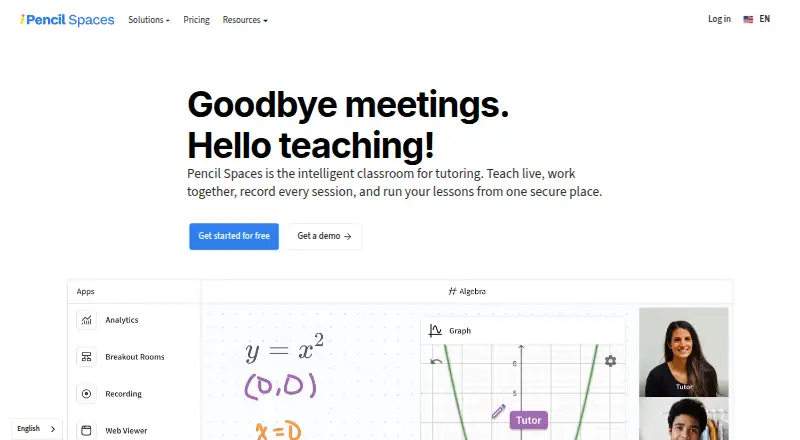
Pencil Spaces is a browser-based classroom for tutoring that brings live teaching, collaboration, recording, and lesson management into one space.
What Pencil Spaces is
Pencil Spaces is a browser-based classroom for tutoring that brings live teaching, collaboration, recording, and lesson management into one space. Classroom tools include video calling, persistent whiteboards, built-in resources, document annotation, and interactive web content. Teachers can set student views and permissions, use waiting rooms and breakout rooms, and receive private alerts if a student goes idle or switches tabs. Scheduling features include attendance tracking, automated scheduling, reminders, and engagement insights. Sessions can be recorded locally or in the cloud; cloud storage is listed as 90 days for Expert and 12 months for Master. Pencil Spaces runs in a browser without an install and lists Android, iOS, Linux, macOS, web, and Windows support, though some mobile features may be unavailable. Billing is in USD per session hour rather than per person, and charges start when a second person joins a Space. Integrations include Google Drive, OneDrive, Canvas, Zapier, Pipedream, and tutoring and education services.
Good
- Includes persistent whiteboards and video calling.
- Supports attendance tracking and breakout rooms.
- Offers local and cloud session recording.
- Runs in a browser without an install.
Watch out
- Some mobile features may be unavailable.
- Billing is per session hour, not per person.
- Charges begin when a second person joins a Space.
Who it suits
Pencil Spaces suits tutors and teaching teams that need a shared online classroom with scheduling, collaboration, and recording tools. Teams should consider its per-session-hour billing and the note that some mobile features may be unavailable.
Verdict
Pencil Spaces combines classroom, scheduling, and recording tools for tutoring in a browser-based service. Review its session-hour billing and mobile-feature caveat when deciding whether it suits your teaching setup.
Plans and prices
From Pencil Spaces's own pricing page, checked 8 Oct 2026.
| Plan | Price | What it gives you |
|---|---|---|
| Starter | Free | The Pro plan includes Starter; free-plan features and limits are not stated on the opened pricing page |
| Enterprise | $1,000 a month | For teams running thousands of session hours a month · Multi-year plans · Dedicated support team · Starting at $1,000/mo; custom pricing starting from $0.002 per participant minute |
The facts
Each one read from Pencil Spaces's own pages, with the date it was checked.
Money
- Billing detail
- The pricing page says prices are in USD, billing is per session hour rather than per person, and charges begin when a second person joins a Space.checked 8 Oct 2026
Where it runs
- Browser access
- Pencil Spaces runs in a browser without installs, and its help page lists desktop browsers and iOS and Android requirements; it notes that some mobile features may be unavailable.checked 8 Oct 2026
What it does
- Classroom tools
- Its virtual classroom includes persistent whiteboards, video calling, built-in resources, document annotation, and interactive web content.checked 8 Oct 2026
- Developer options
- The product page describes iframe embedding, API-based authentication, APIs, webhooks, and custom collaborative apps.checked 8 Oct 2026
- Integrations
- Listed integrations include Wise, Oases, Teachworks, YoCoach, Canvas, LTI 1.3, Google Drive, Bizstim, TutorCruncher, OneDrive, Zapier, and Pipedream.checked 8 Oct 2026
- Participant controls
- Teachers can control student views and permissions, use waiting rooms and breakout rooms, and receive private alerts when a student goes idle or switches tabs.checked 8 Oct 2026
- Product
- Pencil Spaces describes itself as an intelligent classroom for tutoring that brings live teaching, collaboration, session recording, and lesson management together.checked 8 Oct 2026
- Recording
- The product supports local and cloud session recording; its pricing page lists cloud recording with 90-day storage for Expert and 12 months for Master.checked 8 Oct 2026
- Scheduling
- Scheduling features include attendance tracking, automated scheduling, reminders, and engagement insights.checked 8 Oct 2026
- Security and compliance
- The product page describes COPPA, FERPA, GDPR, SOC 2, and HIPAA certification and says student video is never captured in privacy-aware recordings.checked 8 Oct 2026
- Support
- The pricing page advertises 24/7 support and states that replies are from real people, with an average support reply time under one minute.checked 8 Oct 2026
- Who it serves
- The pricing page describes Enterprise as intended for teams running thousands of session hours a month.checked 8 Oct 2026
The full review of Pencil Spaces
Pencil Spaces is a browser-based teaching workspace for tutors and teams that need more than video calls. Its classroom controls and scheduling tools are compelling for organized tutoring, but session-hour billing and mobile feature limits deserve close consideration.
Overview
Pencil Spaces brings live lessons, collaboration, and lesson management into one virtual classroom. Teachers can also schedule sessions, track attendance, and review engagement, making it a practical fit for tutoring operations that want classroom and administrative workflows together.
Students and teachers can join through a browser without installing software. The service supports desktop and mobile platforms, but some mobile features may be unavailable; teams that depend on phones or tablets should ensure their lesson routines work within that constraint.
Key features
Teaching and classroom control
The classroom combines persistent whiteboards, video calling, document annotation, built-in resources, and interactive web content. Teachers can set student views and permissions, use waiting rooms and breakout rooms, and receive private alerts when a student goes idle or switches tabs. These controls help structure participation and monitor lessons, but may be more than a tutor needs for straightforward one-to-one calls.
Scheduling and integrations
Automated scheduling, reminders, attendance tracking, and engagement insights extend Pencil Spaces beyond the live classroom. Integrations include tutoring services such as Wise, Oases, Teachworks, YoCoach, Bizstim, and TutorCruncher, alongside Canvas, LTI 1.3, Google Drive, OneDrive, Zapier, and Pipedream. This breadth is useful for teams already using those tools; the benefit is smaller if their workflows rely on other systems.
Recording, security, and extensibility
Sessions can be recorded locally or in the cloud. Expert includes cloud recording with 90-day storage, while Master extends that storage to 12 months. Pencil Spaces describes certifications for COPPA, FERPA, GDPR, SOC 2, and HIPAA, and says privacy-aware recordings never capture student video. For organizations with specific compliance needs, those claims make the platform worth evaluating against their own requirements.
Iframe embedding, API-based authentication, APIs, webhooks, and custom collaborative apps give teams developer options to connect or extend the classroom. These capabilities are most relevant to organizations integrating Pencil Spaces into a larger teaching setup, rather than tutors seeking a standalone call tool.
Pricing
Pencil Spaces is freemium, with a free plan and a 14-day trial. Paid pricing starts at $4/mo. Prices are in USD, and billing is per session hour rather than per person; charges begin when a second person joins a Space. That model ties cost to teaching time, so frequent or long sessions can matter more than the number of students alone.
- Starter: free. It is difficult to judge whether it can support a regular teaching workflow without knowing those caps.
- Expert and Master: Expert provides 90-day cloud recording storage, and Master provides 12 months.
- Enterprise: Starting at $1,000/mo, with custom pricing starting from $0.002 per participant minute. It is intended for teams running thousands of session hours a month and includes multi-year plans and a dedicated support team. This is aimed at large-scale operations, not independent tutors.
The pricing page also advertises 24/7 support, with replies from real people and an average response time under one minute. The published session-hour billing terms are especially important for teams comparing a free entry point with sustained, high-volume use.
Platforms
Pencil Spaces supports Android, iOS, Linux, macOS, web, and Windows, as well as an API. Browser access avoids installs, although some mobile features may be unavailable. That makes it a flexible option across desktop systems, with a caveat for mobile-first teaching.
Who it's for
Pencil Spaces is best suited to tutors and teaching teams that need guided online lessons, scheduling, attendance, and classroom controls in a connected service. Its integrations and developer options also suit organizations that want to connect lesson delivery with existing tutoring or learning systems. A solo tutor who only needs basic video calls may find its broader workflow unnecessary, while large operators can consider Enterprise's custom pricing and dedicated support.
Pros and cons
- Pro: Whiteboards, annotation, resources, and interactive web content support varied lesson activities within the classroom.
- Pro: Scheduling, reminders, attendance, and engagement insights bring administrative work alongside live teaching.
- Pro: Multiple student controls, including waiting rooms and breakout rooms, help teachers manage participation.
- Con: Session-hour billing begins when a second person joins, so recurring teaching time directly affects cost.
- Con: Some mobile features may be unavailable, which can complicate workflows built around phones or tablets.
Alternatives
For a broader comparison, browse Virtual Classroom Software.
- alfaview is another freemium option, with a free plan capped at one room/license and 50 participants per room.
- LearnCube offers a free classroom plan for unlimited one-to-one classes, with a materials library capped at 10 files.
- Lessonspace uses paid participant-minute pricing and includes unlimited concurrent sessions on its high-usage plan.
- TrainerCentral may suit course creators: its free plan supports up to three courses, 10 active learners, unlimited learner accounts, and 5GB of storage.
- BrainCert Virtual Classroom is another freemium virtual classroom option.
- Neukol has a free plan limited to one license, two lessons per month, 15 participants, and 1GB of storage.
- Classverse has a free plan with up to five enrollments per month and no video recording.
- Koala Go is another freemium option for tutoring.
Verdict
Choose Pencil Spaces if you want tutoring sessions, scheduling, attendance, and classroom controls in one browser-based workspace. Its main advantage is the range of tools around the lesson; its main drawbacks are session-hour billing and the mobile-feature caveat. Tutors who need only basic calls, or who teach mainly on mobile, should weigh simpler alternatives.
Alternatives to Pencil Spaces
- 1

alfaview
Free planAndroidiOSWebAPI8.1From €1 a month - 2

LearnCube
Free planAndroidiOSWebAPI8.0From $7 a month - 3

Lessonspace
Free planAndroidiOSWebAPI8.0From $9 a month - 4
BrainCert Virtual Classroom
Free planAndroidiOSWebAPI7.5From $49 a month - 5
Electa LMS
AndroidiOSWebAPI7.3 - 6

Classverse
Free planAndroidiOSWebAPI7.1From $15 a month