
PastePaw
PastePaw is a clipboard history app for macOS with a local MCP server that lets compatible agents search, read, and write clips.
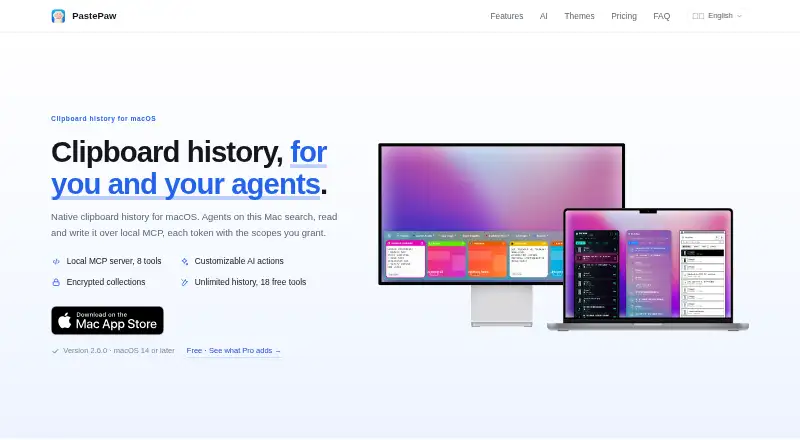
What PastePaw is
PastePaw is a clipboard history app for macOS with a local MCP server that lets compatible agents search, read, and write clips. Search checks each clip's first 300 characters and any note attached to it. The app includes 18 clip tools, including JSON, Base64, URL, YAML, XML, Markdown, HTML, JWT, QR, and OCR tools. Its macOS interface offers horizontal and vertical layouts, 20 themes, 29 looks, and light and dark modes. Clipboard history stays in a local SQLite database and is not uploaded, though anonymous usage statistics are sent by default and can be disabled. The main history database is not encrypted; secure collections are encrypted at rest, require Touch ID or a Mac password to unlock, and are not accessible to MCP clients. AI actions require your own API key and send selected clipboard content to the chosen provider when triggered. The macOS app requires macOS 14 or later. A separate free Windows app requires Windows 10 version 1709 or later and does not include the macOS app's MCP server, themes, or encrypted collections. Pro costs $2.99 a month, $19.99 a year, or 29.99 USD one-time.
Good
- Unlimited history on the free macOS plan
- Includes 18 clip tools
- Local clipboard database is not uploaded
- Secure collections are encrypted at rest
Watch out
- Main history database is not encrypted
- Anonymous usage statistics are on by default
- macOS app requires macOS 14 or later
- Windows app lacks MCP server and encrypted collections
Who it suits
PastePaw suits Mac users who want searchable clipboard history and MCP access for compatible agents. Windows users can choose its separate free app, with fewer listed features.
Verdict
PastePaw combines clipboard history with tools for transforming clips and local MCP access on macOS. Consider the unencrypted main database and the Windows app's feature differences when choosing a version.
Plans and prices
From PastePaw's own pricing page, checked 11 Oct 2026.
| Plan | Price | What it gives you |
|---|---|---|
| Free (macOS) | Free | Unlimited history · Search · All 18 clip tools · No account · No expiring trial |
| Pro (monthly) | $2.99 a month | Smart collections · Secure collections · Local MCP server · AI actions · All 29 theme looks · $2.99/ month |
| Pro (yearly) | $19.99 a year | Pro features · Use on every Mac signed in to the same Apple Account · $19.99 / year Save 44% |
| Pro (lifetime) | $29.99, paid once | Pro features · Use on every Mac signed in to the same Apple Account · $29.99 one-time lifetime |
The facts
Each one read from PastePaw's own pages, with the date it was checked.
What it does
- AI data handling
- When a user explicitly triggers an AI feature, the selected clipboard content is sent to their chosen AI provider for processing.checked 11 Oct 2026
- AI integrations
- The maker lists Claude Code, the ChatGPT desktop app, Gemini CLI, and Codex CLI as MCP clients, and AI actions require the user's own API key.checked 11 Oct 2026
- Clip tools
- It offers 18 clip tools, including JSON, Base64, URL, YAML, XML, Markdown, HTML, JWT, QR, and OCR tools.checked 11 Oct 2026
- Layouts and themes
- The macOS app has horizontal and vertical layouts, 20 themes, and 29 looks, with light and dark modes.checked 11 Oct 2026
- Privacy
- Clipboard history is stored in a local SQLite database and is not uploaded; anonymous usage statistics are sent by default and can be turned off in Settings.checked 11 Oct 2026
- Purpose
- PastePaw is a native macOS clipboard history app with a local MCP server that lets agents search, read, and write clipboard clips.checked 11 Oct 2026
- Search
- Search matches the first 300 characters of each clip and any note added to it.checked 11 Oct 2026
- Security
- Secure collections are encrypted at rest, unlock with Touch ID or the Mac password, and are not accessible to MCP clients.checked 11 Oct 2026
- Security limitation
- The support page says the main history database is not encrypted, and recommends Secure Collections for sensitive clips.checked 11 Oct 2026
- Support
- The maker says questions, bugs, and ideas are handled by the person who builds PastePaw, with email support and bug reports.checked 11 Oct 2026
The company
- Company details
- The site footer says © 2024–2026 PastePaw and “Made for macOS”; it does not state a headquarters or founding date.checked 11 Oct 2026
Where it runs
- macOS requirements
- The macOS app requires macOS 14 or later and runs natively on Intel and Apple Silicon Macs.checked 11 Oct 2026
- Sensitive apps
- Users can exclude apps from clipboard monitoring, and content copied from an ignored app is not recorded.checked 11 Oct 2026
- Windows version
- The separate Windows app is free and open source, requires Windows 10 version 1709 or later, and does not include the macOS app's MCP server, themes, or encrypted collections.checked 11 Oct 2026
Alternatives to PastePaw
- 1

Relic
Free planOpen sourceAndroidiOSWebAPI9.3From $5 a month - 2
Clipman
Free planOpen sourceAndroidiOSAPILinux9.2$1.99 one-time - 3

Pasteable
Free planAndroidiOSWebLinux8.3From $60 a year - 4

ClipboardFusion
Free planAndroidiOSWebExtension8.3$19 one-time - 5
OmniClip
Free planAndroidiOSWebExtension8.1Free plan - 6
Pastin
Free planiOSmacOS8.0From $29.99 a year