PaperSpan
PaperSpan is a reading service for collecting articles and returning to them across iPhone, iPad, Android, the web, Chrome, and Firefox.
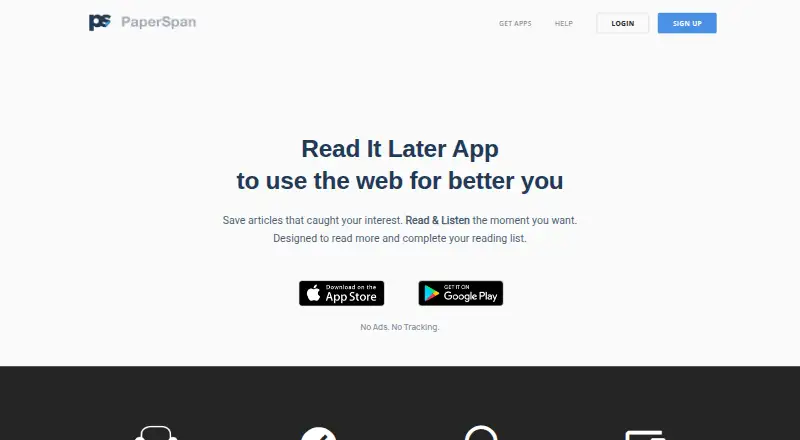
What PaperSpan is
PaperSpan is a reading service for collecting articles and returning to them across iPhone, iPad, Android, the web, Chrome, and Firefox. Its browser extensions and bookmarklet let readers save articles, while offline access supports reading, listening to, and managing saved items without a connection; changes sync afterward. Readers can mark useful passages and revisit those highlights. PaperSpan can also read articles aloud and send them to a Kindle device or app, including several articles arranged as a book. The service has a free plan on mobile and web. Premium adds full-text, author, notes, and other advanced search options, uninterrupted listening playlists, and reading insights such as read rate, peak reading time, categories, and popular sites. Premium costs $8.99 per year through an auto-renewing subscription; the price may vary by location. Renewal occurs unless canceled at least 24 hours before the period ends, and cancellation is unavailable during an active period. The website says PaperSpan has no ads or tracking.
Good
- Free plan available on mobile and web
- Offline reading, listening, and management
- Highlights can be reviewed later
- Can send articles to Kindle
- Browser extensions and bookmarklet save articles
Watch out
- Premium costs $8.99 per year
- Subscription renews automatically unless canceled in time
- Cannot cancel during the active period
Who it suits
PaperSpan suits readers who want to save articles across mobile, browser, and web, then read or listen offline. Premium may suit people who want advanced search, listening playlists, or reading insights.
Verdict
PaperSpan combines article saving, offline reading, highlighting, audio, and Kindle delivery across several platforms. Check the premium renewal and cancellation terms if you need its advanced search, playlists, or insights.
Plans and prices
From PaperSpan's own pricing page, checked 28 Sep 2026.
| Plan | Price | What it gives you |
|---|---|---|
| Free | Free | Free to download and use. · Save and read articles · Offline reading on mobile · Highlights · Send one article at a time to Kindle |
| Premium | — | Full-text search · Unlimited offline actions · Text-to-speech playlists · Send multiple articles to Kindle · Advanced statistics · auto-renewing subscription |
| PaperSpan Premium | $8.99 a year | Auto-renewing subscription; price may vary by location. · billed annually at $8.99 |
The facts
Each one read from PaperSpan's own pages, with the date it was checked.
Where it runs
- App developer
- The App Store lists Sravan Kumar as the developer and seller.checked 28 Sep 2026
- Browser extension
- Yeschecked 22 Sep 2026
- Browser extensions
- Browser extensions and a bookmarklet let users save articles directly.checked 28 Sep 2026
- Mobile apps
- Yeschecked 22 Sep 2026
- Supported platforms
- The service supports iPhone, iPad, Android, Web, Chrome, and Firefox.checked 28 Sep 2026
What it does
- Article highlighting
- Users can highlight important phrases and review them later.checked 28 Sep 2026
- Cancellation limit
- A subscription cannot be canceled during the active period.checked 28 Sep 2026
- Full-text search
- Yeschecked 22 Sep 2026
- Highlight export
- Yeschecked 22 Sep 2026
- Highlighting
- Yeschecked 22 Sep 2026
- Kindle integration
- Articles can be sent to a Kindle device or app, including multiple articles as a crafted book.checked 28 Sep 2026
- Offline access
- Yeschecked 22 Sep 2026
- Offline reading
- Articles can be read, listened to, and managed while offline, with automatic syncing afterward.checked 28 Sep 2026
- Premium playlist
- Premium provides uninterrupted article playlists for listening during activities.checked 28 Sep 2026
- Premium search
- Premium adds full-text, author, notes, and other advanced search options.checked 28 Sep 2026
- Pricing model
- Free to download and use, with an optional Premium subscription.checked 28 Sep 2026
- Privacy positioning
- The website says PaperSpan has no ads and no tracking.checked 28 Sep 2026
- Reading statistics
- Reading insights include read rate, peak reading time, categories, and popular sites.checked 28 Sep 2026
- Renewal condition
- Subscriptions renew automatically unless canceled at least 24 hours before the period ends.checked 28 Sep 2026
- Support contact
- Support is available through a contact form and [email protected].checked 28 Sep 2026
Money
- Free availability
- Available for free on iPhone, iPad, Android, and Web.checked 28 Sep 2026
- Free plan
- Yeschecked 22 Sep 2026
- Premium price
- Premium costs $8.99 per year through an auto-renewing subscription.checked 28 Sep 2026
The company
- Headquarters
- Bangaluru, Karnataka, Indiachecked 28 Sep 2026
The full review of PaperSpan
Overview
PaperSpan is a read-it-later app for collecting web articles and returning to them across mobile, browser, and web. It suits readers who want offline access, audio, and Kindle delivery in one service. Its free tier covers the essentials; Premium is aimed at people who need more powerful search and continuous listening.
Key features
Browser extensions and a bookmarklet let readers save articles from the web, then read, listen to, or manage them offline on mobile. Changes sync automatically once connectivity returns, a useful setup for commutes and other disconnected stretches. PaperSpan also supports highlighting and highlight export, so saved reading can serve as a reference rather than just a queue.
Text-to-speech provides a screen-free way to get through articles while walking, cooking, commuting, or working out. Premium’s uninterrupted playlists make that more practical for listeners who want a continuous queue; readers who only listen occasionally may not need the upgrade.
Kindle delivery works with a Kindle device or app. Free users can send one article at a time, while Premium can package multiple articles as a crafted book. Premium also expands search to full text, authors, notes, and other options, and adds reading insights such as read rate, peak reading time, categories, and popular sites.
The site says PaperSpan has no ads and no tracking. Support is available through a contact form and [email protected].
Pricing
PaperSpan is free to use on iPhone, iPad, Android, and the web. The Free plan includes article saving, mobile offline reading, highlights, and sending one article at a time to Kindle. It is a capable starting point for readers who want a personal reading queue without advanced discovery or batch Kindle delivery.
PaperSpan Premium costs $8.99 per year through an auto-renewing subscription. It adds full-text and advanced search, unlimited offline actions, text-to-speech playlists, multiple-article Kindle sends, and advanced statistics. The annual price makes it a modestly scoped paid tier, best suited to readers who will use several of those additions. The subscription renews automatically unless canceled at least 24 hours before the period ends, and it cannot be canceled during an active period.
Platforms
PaperSpan supports iPhone, iPad, Android, web, Chrome, and Firefox. Mobile apps and browser extensions cover saving and reading across devices; offline reading is supported on mobile, with syncing afterward.
Who it's for
Choose PaperSpan if you regularly save web articles and want to move between offline reading, listening, highlights, and Kindle. It is less compelling if you only need a basic reading queue, or if Premium’s annual auto-renewal and inability to cancel during an active period do not suit your subscription preferences.
Pros and cons
- Pro: Offline reading, listening, and management on mobile, followed by automatic syncing, suit reading away from a reliable connection.
- Pro: Highlights can be revisited and exported, making it easier to keep useful passages.
- Pro: Kindle delivery, text-to-speech, and browser capture give saved articles several routes beyond on-screen reading.
- Con: Free Kindle delivery is limited to one article at a time; multi-article books require Premium.
- Con: Advanced search, uninterrupted playlists, and reading insights are paid features, so the free tier is less suited to readers who depend on them.
- Con: Premium auto-renews and cannot be canceled mid-period, requiring attention to the cancellation deadline.
Alternatives
For a broader comparison, see Read-It-Later Apps.
- Omnivore is worth considering if you want a free option across Android, iOS, web, and other platforms; its cloud application was deprecated in November 2024, and the remaining free plan is self-hosted.
- Matter is an iOS and web alternative with an unlimited-library free plan; its Premium plan includes HD text-to-speech.
- Instapaper offers unlimited article, video, and page saves on its free plan, plus folders and API integration, for Android and iOS readers who prioritize a broad save queue.
- ReadNever is an option for readers seeking browser extensions and iOS access with unlimited free saves, highlights, and offline reading, subject to monthly limits on some features.
- Reminde offers a free plan with one slot and unlimited savings, making it an alternative for readers whose main need is a compact saving workflow.
- Burn 451 has a free plan with daily and library caps, so it may suit readers comfortable with fixed limits on saves and requests.
- Gistory combines unlimited article saves with 10 AI summaries per month on its free plan, for readers who want summaries in their reading workflow.
Verdict
PaperSpan is a strong choice for readers who want saved articles to work across offline reading, audio, highlighting, and Kindle rather than remain in a browser queue. Its best reason to choose Premium is the combination of deeper search, playlists, and multi-article Kindle delivery. Look elsewhere if a basic free save-and-read setup is enough or the subscription’s renewal and cancellation terms are a poor fit.
Alternatives to PaperSpan
- 1

wallabag
Free planOpen sourceAndroidiOSWebAPI8.5From €11 a year - 2
Gistory
Free planAndroidiOSWebExtension7.9From $7.99 a month - 3

Matter
Free planiOSWeb7.5Free plan - 4
Readspace
Free planAndroidiOSWebExtension7.5Free plan - 5

Burn 451
Free planiOSWebAPIExtension7.4From $48 a year - 6

Cubox
AndroidiOSExtensionmacOS7.4From $29 a year